November 4, 2026
Updated: November 4, 2026
The 2026 threat picture, core controls, the testing toolbox, OWASP ASVS 5.0 levels and a checklist.

Mohammed Khalil
Web application security is the practice of protecting websites, web apps and the APIs behind them from attacks that abuse their code, configuration, identity flows and third-party components. It combines secure design, controls built into the application and repeated testing.
The 2026 breach data shows why it matters: attackers still log in with stolen passwords or exploit unpatched web software. This guide covers the threat picture, the core controls, the testing toolbox, OWASP ASVS 5.0 levels and a checklist you can work through.
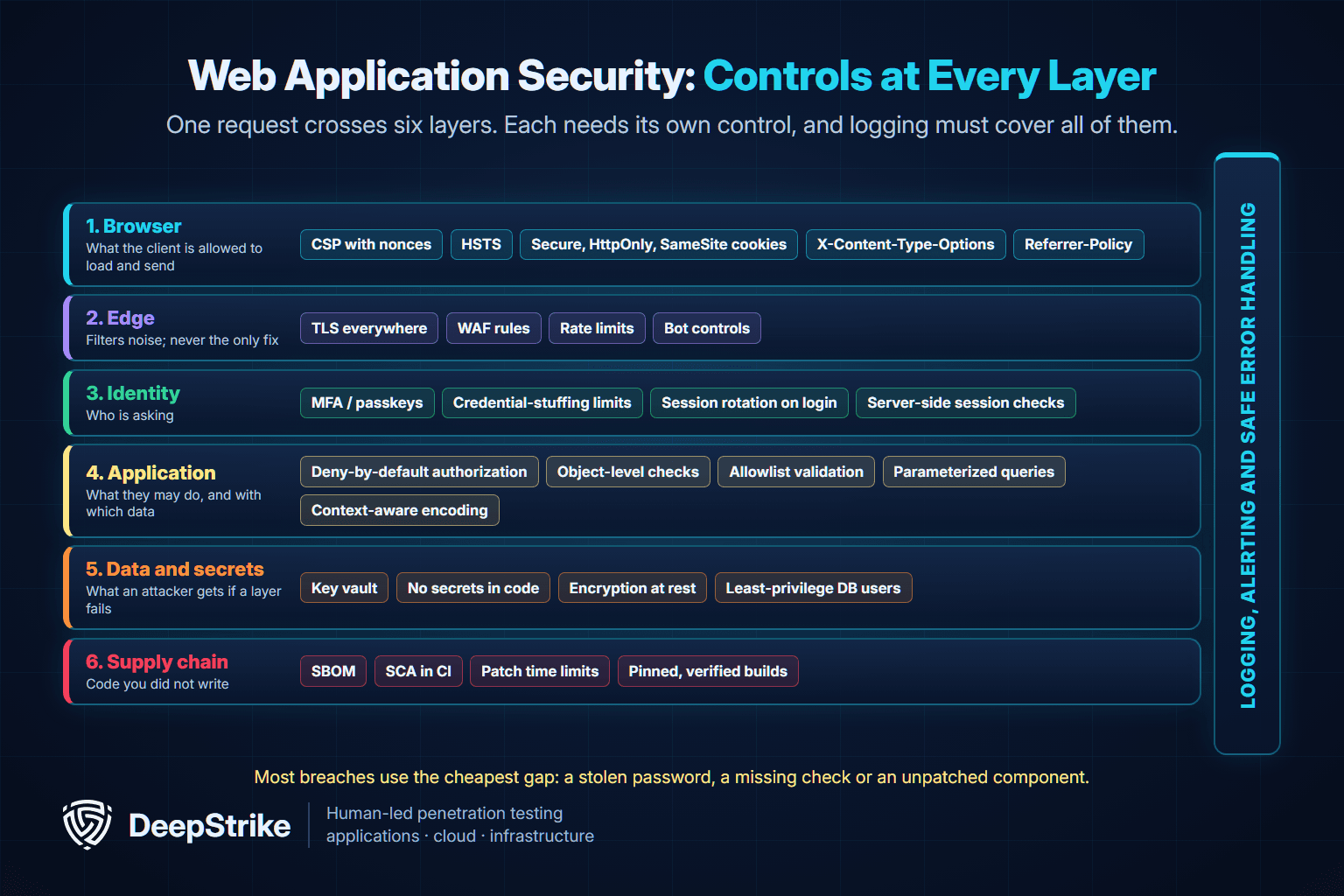
Web application security covers everything that decides whether a request to your application can do something it should not. That includes the browser (what scripts may run and where cookies go), the edge (TLS, rate limits, a web application firewall), identity (login, sessions, tokens), the application logic itself (authorization, input handling), the data and secrets it touches, and the open-source and third-party code it is built from.
Three points define the discipline in practice:
The terms overlap, and teams use them loosely. This is how they relate in practice:
| Term | Scope | Typical owner | Main reference |
|---|---|---|---|
| Application security | All software: web, mobile, desktop, embedded, internal services | AppSec or product security team | OWASP ASVS, NIST SSDF |
| Web application security | Browser-facing applications and the APIs they call over HTTP | AppSec with web engineering | OWASP Top 10, OWASP ASVS, OWASP WSTG |
| API security | Machine-to-machine and front-end APIs (REST, GraphQL, gRPC) | AppSec with platform or API teams | OWASP API Security Top 10 |
Modern web apps are mostly APIs with a browser on top, so in practice a web application security program must cover its APIs. Our API penetration testing guide explains the API-specific test areas.
The best public evidence on how web applications are actually breached is the Verizon 2026 Data Breach Investigations Report (DBIR). Its dataset covers October 2024 through November 2025 and includes 22,624 confirmed breaches. Two of its findings matter most for web teams.
The DBIR's Basic Web Application Attacks pattern covers attacks that go straight at a web application and then stop: log in with stolen credentials, or exploit a known flaw, and take the data. According to the Verizon 2026 Data Breach Investigations Report:
Verizon describes the pattern as closer to "oh, they left the door open" than to a sophisticated heist. That is useful framing: most of these breaches need no novel technique, only a missing control.
Across all breaches, the Verizon 2026 Data Breach Investigations Report found that exploitation of vulnerabilities is now the most common initial access vector, at 31%, while credential abuse fell to 13%. Patching is not keeping up: only 26% of critical vulnerabilities (those in CISA's Known Exploited Vulnerabilities catalog) were fully remediated in 2025, down from 38%, and the median time to full resolution rose to 43 days from 32. Breaches with third-party involvement reached 48% of the total.
More complex web exploitation, where attackers go on to deploy ransomware or move through the network, is counted in the DBIR's System Intrusion pattern rather than Basic Web Application Attacks. So the one-in-ten figure understates how often a web application is the entry point.
These publicly documented cases show the three most common root causes in web software: injection, unpatched internet-facing products and vulnerable components.
| CVE | Product | Root cause | Added to CISA KEV | Lesson |
|---|---|---|---|---|
| CVE-2023-34362 | Progress MOVEit Transfer | SQL injection in the web application allowed unauthenticated database access (CWE-89) | June 2, 2023; known ransomware use | Parameterized queries are not optional, even in mature commercial software |
| CVE-2025-61882 | Oracle E-Business Suite (BI Publisher Integration) | Unauthenticated network attacker over HTTP could take over Oracle Concurrent Processing | October 6, 2025; known ransomware use | Internet-facing business apps need emergency patch paths and exposure reviews |
| CVE-2025-55182 | React Server Components 19.0.0, 19.1.0, 19.1.1 and 19.2.0 | Unsafe deserialization of HTTP payloads to Server Function endpoints, pre-authentication RCE (CWE-502) | December 5, 2025; known ransomware use | A framework dependency can expose every app built on it; SCA and fast upgrades matter |
The details are in the NVD records for CVE-2023-34362, CVE-2025-61882 and CVE-2025-55182, and in the CISA Known Exploited Vulnerabilities catalog. The Verizon report notes that the group behind the 2023 MOVEit exploitation turned to the Oracle E-Business Suite zero-day in late summer 2025, compromising more than 100 organizations; we covered the Oracle CVE-2025-61882 patch when it was released.
The OWASP Top 10:2025 ranks the most critical web application risk categories: Broken Access Control, Security Misconfiguration, Software Supply Chain Failures, Cryptographic Failures, Injection, Insecure Design, Authentication Failures, Software or Data Integrity Failures, Security Logging and Alerting Failures, and Mishandling of Exceptional Conditions. Broken Access Control stays at number one; OWASP reports that 100% of the applications tested had some form of it.
Each category, with examples and how testers check it, is explained in our OWASP Top 10 2025 guide. The controls below map to those categories.
The controls that stop the attacks above fall into nine groups. Each subsection gives the control, why it matters and the ASVS 5.0 requirement you can use to verify it.
Stolen credentials are the top action in Basic Web Application Attacks, so authentication is where most teams get the biggest risk reduction for the least effort.
Broken access control is the most common web flaw class, and scanners struggle to find it because every exploiting request looks legitimate.
# Illustrative pattern: scope the lookup to the caller (lab example, not production code)
def get_invoice(session, invoice_id):
    invoice = db.invoices.find_one({
        "id": invoice_id,
        "tenant_id": session.tenant_id,   # from the server-side session
        "owner_id": session.user_id,
    })
    if invoice is None:
        raise NotFound()                  # same response whether it exists or not
return invoiceInjection flaws such as the MOVEit SQL injection come from mixing untrusted data with code or queries. Three habits remove most of them:
# Illustrative: a parameterized query keeps user input as data, not SQL
cursor.execute(
    "SELECT id, name FROM customers WHERE email = %s",
    (email_from_request,),
)
Two related risks deserve their own controls. When your server fetches URLs on a user's behalf, restrict destinations with an allowlist and block internal and cloud metadata addresses to prevent server-side request forgery (SSRF). And never deserialize untrusted data into objects; CVE-2025-55182 shows how a framework-level deserialization flaw becomes pre-authentication remote code execution.
Once a user logs in, the session token is as good as their password. ASVS 5.0 sets clear baselines:
Secure attribute and the __Host- or __Secure- name prefix. Add HttpOnly so scripts cannot read the token and SameSite to limit cross-site sending.Set-Cookie: __Host-session=<opaque-random-value>; Path=/; Secure; HttpOnly; SameSite=LaxThe __Host- prefix tells the browser to accept the cookie only if it is Secure, has Path=/ and has no Domain attribute, which stops subdomains from overwriting it. The MDN Set-Cookie reference documents each attribute.
SameSite narrows cross-site sending but is not a complete defense against forged requests; our guide to cross-site request forgery (CSRF) covers the token and origin checks that complete it.
Secrets were among the data compromised in 15% of Basic Web Application Attacks breaches in the Verizon 2026 Data Breach Investigations Report. Leaked API keys, database passwords and signing keys turn a small bug into full compromise.
The OWASP Secrets Management Cheat Sheet covers rotation and lifecycle in detail.
Most of a modern web application is code your team did not write. OWASP elevated this risk to A03:2025 Software Supply Chain Failures, noting that when tested it has the highest average incidence rate of any category, at 5.19%.
Our guide to supply chain attacks covers build-system and vendor compromise in more depth.
HTTP response headers tell the browser how to treat your content. They are cheap to deploy and limit the damage when another control fails. ASVS 5.0 section 3.4 sets the baseline:
| Header | What it does | ASVS 5.0 | Level |
|---|---|---|---|
| Strict-Transport-Security | Forces HTTPS; max-age of at least one year, and all subdomains from L2 | 3.4.1 | L1 |
| Access-Control-Allow-Origin (CORS) | Fixed value or an allowlist of trusted origins; no sensitive data with a wildcard | 3.4.2 | L1 |
| Content-Security-Policy | Limits which scripts and resources load; includes object-src 'none' and base-uri 'none', with an allowlist, nonces or hashes | 3.4.3 | L2 (per-response nonces or hashes at L3) |
| X-Content-Type-Options: nosniff | Stops MIME-type sniffing | 3.4.4 | L2 |
| Referrer-Policy | Prevents leaking paths and query data to third parties | 3.4.5 | L2 |
A nonce-based policy is the most practical way to meet the CSP requirement in a modern app:
Content-Security-Policy: default-src 'self'; script-src 'nonce-<random-per-response>' 'strict-dynamic'; object-src 'none'; base-uri 'none'; frame-ancestors 'self'
Strict-Transport-Security: max-age=31536000; includeSubDomains
X-Content-Type-Options: nosniff
Referrer-Policy: strict-origin-when-cross-origin
Roll out CSP in report-only mode first, fix what it reports, then enforce it. The OWASP Content Security Policy Cheat Sheet and the MDN CSP guide explain each directive. If you run payment pages, our PCI DSS 6.4.3 and 11.6.1 guide shows how script inventories and header monitoring are now required there.
You cannot respond to what you do not record, and logs nobody watches do not help. The 2025 OWASP list calls this category Security Logging and Alerting Failures (it was Security Logging and Monitoring Failures in 2021), which puts the emphasis on alerting.
A web application firewall (WAF) filters HTTP traffic against rules for known attack patterns; managed cloud WAFs and the open-source ModSecurity engine with the OWASP Core Rule Set are common examples. Rate limiting and bot management sit at the same layer.
These controls are valuable for blocking commodity attacks and buying time while you patch. They are not a substitute for fixing the application: a WAF cannot see that a valid-looking request reads another tenant's data, and it cannot repair broken session handling. Treat edge controls as a layer, and keep them out of your definition of "fixed."
| Control | Main attack it stops | ASVS 5.0 chapter | How to verify |
|---|---|---|---|
| MFA and strong password rules | Use of stolen credentials, brute force | V6 Authentication | Configuration review; login tests with breached passwords |
| Server-side, deny-by-default authorization | IDOR, privilege escalation | V8 Authorization | Multi-account, multi-role manual testing |
| Validation, parameterization, encoding | SQL injection, XSS, command injection | V1 Encoding and Sanitization; V2 Validation and Business Logic | SAST, DAST, manual review of sinks |
| Session rotation and cookie flags | Session fixation and hijacking | V7 Session Management; V3 Web Frontend Security | DAST and manual session tests |
| Secrets vault and scanning | Leaked keys and credentials | V13 Configuration | Secrets scanning across repo history |
| SBOM, SCA and patch deadlines | Known-vulnerable components | V15 Secure Coding and Architecture | SCA results against written deadlines |
| Security headers and CSP | XSS impact, clickjacking, downgrade | V3 Web Frontend Security | Automated header checks; CSP violation reports |
| Logging and alerting | Undetected attacks | V16 Security Logging and Error Handling | Simulated attack and alert review |
| WAF, rate limits, bot controls | Commodity scanning and stuffing | Outside ASVS scope (infrastructure) | Rule review; blocked-request metrics |
No single test proves an application is secure. Each method sees the application from a different angle, at a different point in the lifecycle, and each has blind spots. The practical answer is a layered mix: automated checks on every change, and human testing where logic and authorization matter.
| Method | What it is | When it runs | Best at | Main limitation |
|---|---|---|---|---|
| SAST | Static analysis of source code | Every commit or pull request | Injection sinks, unsafe functions, hard-coded secrets | False positives; cannot see runtime configuration or business rules |
| SCA | Inventory and vulnerability check of open-source dependencies | Every build | Known-vulnerable and outdated components | Says nothing about flaws in your own code |
| Secrets scanning | Pattern and entropy search for credentials | Pre-commit, CI, repo history | Committed keys, tokens and passwords | Misses secrets exposed at runtime or in logs |
| DAST | Automated testing of the running app over HTTP | Staging, on a schedule | Missing headers, reflected injection, TLS and configuration issues | Weak at multi-step flows and multi-role access control |
| IAST | Instrumentation inside the running app during tests | QA and integration tests | Confirms which code paths are actually reachable | Needs agent support for your stack; limited to exercised paths |
| Manual penetration test | Skilled testers attack the app with authorized scope | Before major releases and at least yearly | IDOR, business logic, chained exploits, authorization | Point-in-time; quality depends on the testers |
| Bug bounty | Outside researchers report issues for rewards | Continuous, in production | Novel issues found by many eyes | Coverage is uneven; needs mature triage and a clear scope |
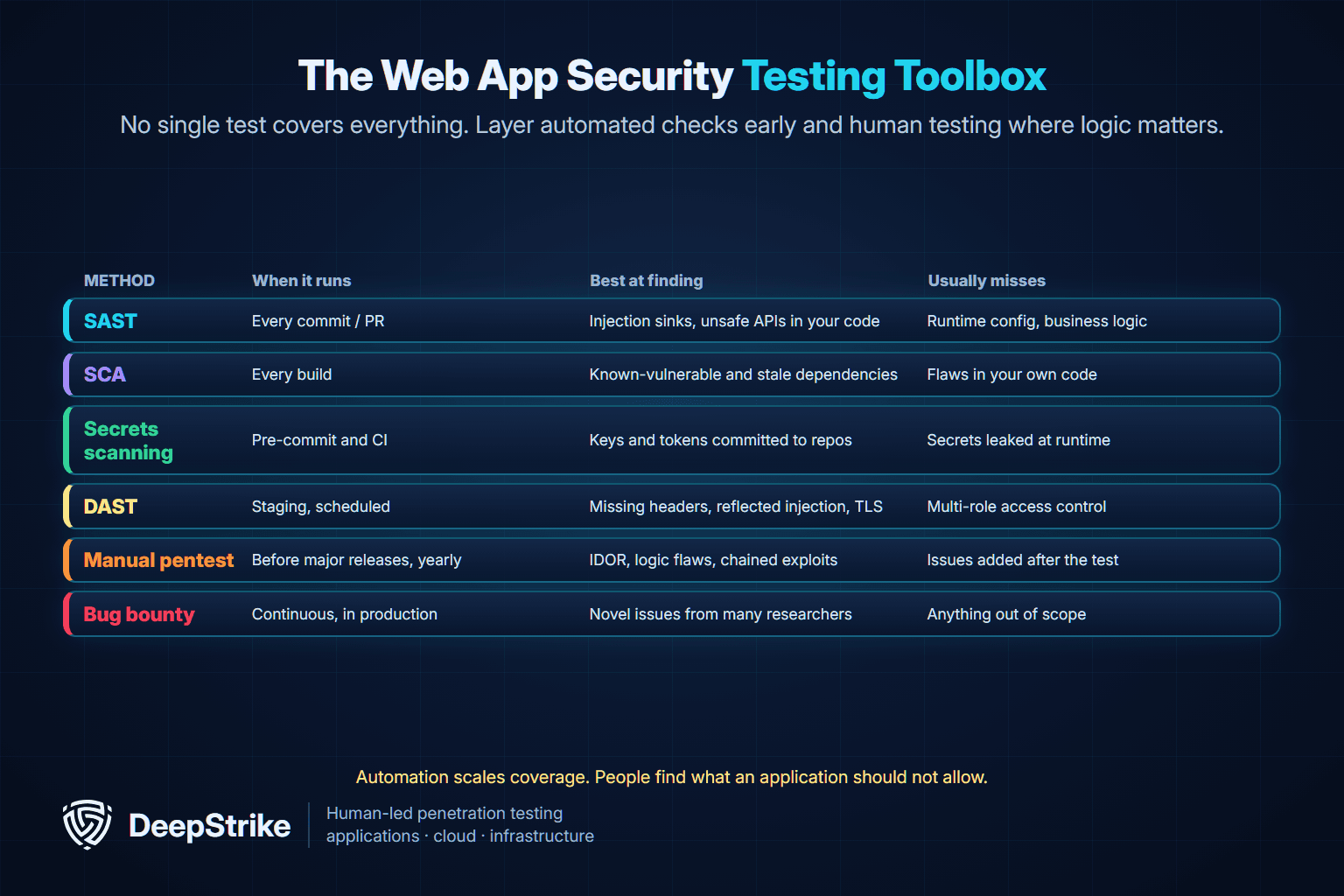
For a deeper comparison of the automated tools, including where RASP fits, see our guide to SAST vs DAST vs IAST vs RASP. For the human side, our comparison of penetration testing vs bug bounty explains when each fits, and manual vs automated penetration testing covers why tool-only "pentests" miss logic flaws.
This matrix is a planning aid, not a guarantee: results depend on configuration, scope and tester skill.
| Flaw | SAST | SCA | Secrets scan | DAST | Manual pentest | Bug bounty |
|---|---|---|---|---|---|---|
| SQL injection | Often | No | No | Often | Yes | Often |
| Reflected or stored XSS | Often | No | No | Often | Yes | Often |
| IDOR or broken object-level authorization | Rarely | No | No | Rarely | Yes | Sometimes |
| Business logic abuse (prices, limits, workflows) | No | No | No | Rarely | Yes | Sometimes |
| Vulnerable dependency (such as CVE-2025-55182) | Sometimes | Yes | No | Sometimes | Sometimes | Sometimes |
| Hard-coded API key | Sometimes | No | Yes | No | Sometimes | Sometimes |
| Missing security headers or weak CSP | No | No | No | Yes | Yes | Rarely |
| Session fixation or weak cookie flags | Sometimes | No | No | Often | Yes | Sometimes |
| SSRF to internal or cloud metadata services | Sometimes | No | No | Sometimes | Yes | Sometimes |
The pattern is clear: automation covers the "known pattern in a known place" flaws well, while authorization and logic flaws, the ones behind Broken Access Control, still need people who understand how the application is supposed to behave.
Whichever mix you choose, anchor testing to a published method so results are repeatable. The OWASP Web Security Testing Guide (WSTG) describes how to test each area, and the ASVS (next section) defines what passing looks like. A good test plan also starts from a threat model, so the riskiest flows get the most attention. For timing, our guide on how often to perform penetration testing covers release-driven and compliance-driven schedules.
The OWASP Top 10 is an awareness list. The OWASP Application Security Verification Standard (ASVS) is the opposite: a detailed list of testable security requirements you can design, build and verify against. It is the closest thing web application security has to a shared definition of "done."
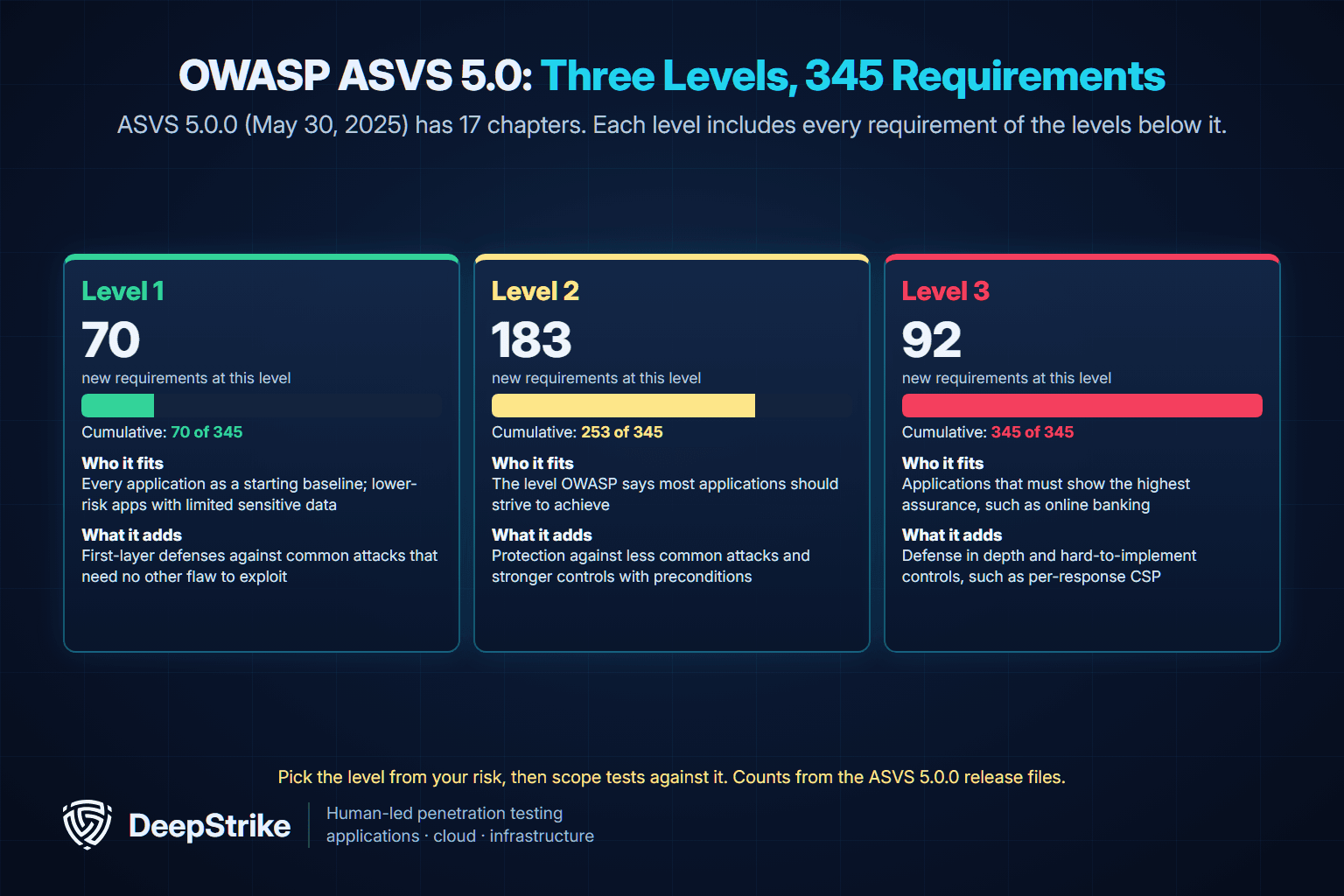
The current version is ASVS 5.0.0, released May 30, 2025, replacing 4.0.3 (October 2021). Version 5.0 has 345 requirements across 17 chapters, from V1 Encoding and Sanitization through V17 WebRTC, including dedicated chapters for self-contained tokens (V9), OAuth and OIDC (V10) and WebRTC (V17). Because identifiers can change between versions, OWASP recommends citing requirements with the version, such as v5.0.0-3.4.3.
Each level includes every requirement from the levels below it. Counts are from the 5.0.0 release files:
| Level | New requirements | Cumulative | What OWASP says it is for | Example fit |
|---|---|---|---|---|
| Level 1 | 70 | 70 of 345 (about 20%) | Minimum, first-layer defenses against common attacks that need no other flaw to exploit | Early-stage product with limited sensitive data; the starting point for everyone |
| Level 2 | 183 | 253 of 345 | The level most applications should strive to achieve; less common attacks and stronger protections | Most SaaS and business applications handling customer or personal data |
| Level 3 | 92 | 345 of 345 | The highest assurance; defense in depth and hard-to-implement controls | Applications whose users expect the strongest assurance; OWASP's own example is online banking |
Two changes matter if your team used the old standard:
The second point has a practical consequence: if you want a test to confirm an ASVS level, give testers documentation, code access or both. A pure black-box test cannot verify every Level 1 requirement.
The full standard and machine-readable requirement lists are in the OWASP ASVS GitHub repository.
If you are building a program from scratch, order the work by what the breach data says attackers use most. This sequence is DeepStrike's editorial recommendation, based on the Verizon 2026 Data Breach Investigations Report patterns and the ASVS levels above:
| Order | Focus | Why first | Done when |
|---|---|---|---|
| 1 | MFA for admins and sensitive roles; breached-password checks; login rate limits | Stolen credentials are the top action in Basic Web Application Attacks | No privileged account can log in with a password alone |
| 2 | Patch internet-facing software and dependencies against CISA KEV | Exploitation is now the top initial access vector at 31% | Written patch deadlines exist and are met |
| 3 | Move secrets into a vault; scan repos and history | Secrets appear in 15% of these breaches | Secret scanning runs in CI with zero open findings |
| 4 | Server-side authorization on every object and function | Broken Access Control is OWASP's number-one category | Two-user tests pass for every sensitive endpoint |
| 5 | Add SAST and SCA to CI; set headers and CSP in report-only mode | Catches common flaws on every change | Builds fail on critical findings; CSP enforced |
| 6 | Logging and alerts for authentication and authorization failures | Shortens detection time | Alerts fire in a simulated stuffing test |
| 7 | Authenticated manual penetration test against your chosen ASVS level | Finds logic and access control flaws automation misses | Findings fixed and re-tested |
Use this checklist as a working baseline. ASVS 5.0 requirement numbers are given where a single requirement maps cleanly.
Identity and sessions
Authorization
Input, output and data
Secrets and supply chain
Browser and transport
Detection and resilience
Testing and governance
It is the set of practices, controls and tests that stop people from using a website or web app in ways it was not meant to be used: logging in as someone else, reading data they should not see, running their own code or taking the service down. It covers code, configuration, identity, dependencies and the browser.
Web applications are directly reachable from the internet and hold the data attackers want. In the Verizon 2026 Data Breach Investigations Report, the Basic Web Application Attacks pattern alone accounted for 2,281 confirmed breaches, and exploitation of vulnerabilities was the most common initial access vector across all breaches, at 31%.
Using the OWASP Top 10:2025 order, the first five categories are Broken Access Control, Security Misconfiguration, Software Supply Chain Failures, Cryptographic Failures and Injection. Our OWASP Top 10 guide explains each one with examples.
Managed cloud WAFs and the open-source ModSecurity engine running the OWASP Core Rule Set are common examples. A WAF is not enough on its own: it filters known attack patterns but cannot understand your authorization rules or business logic, so flaws such as IDOR pass straight through.
SonarQube is a static analysis tool, so it belongs in the SAST category: it analyzes source code without running the application. DAST tools test the running application over HTTP. Most teams need both, plus SCA for dependencies.
ASVS 5.0 has three levels. Level 1 (70 requirements) covers first-layer defenses for every application, Level 2 (183 more, 253 in total) is the level OWASP says most applications should strive for, and Level 3 (92 more, all 345) is for applications that need the highest assurance.
The Top 10 is an awareness document that ranks the most critical risk categories. The ASVS is a verification standard with specific, testable requirements grouped into levels. Use the Top 10 to understand what goes wrong and the ASVS to define and test what "secure enough" means for your application.
Run SAST, SCA and secrets scanning on every change and DAST on a regular schedule. Add an authenticated manual penetration test before major releases and at least once a year, and re-test after fixing significant findings. Compliance frameworks and customer contracts may set stricter schedules.
Web application security comes down to a short list done well: strong authentication, server-side authorization on every object, safe handling of input and output, managed secrets, patched dependencies, sensible headers and logs that someone watches. Automated tools keep those controls from slipping on each release. Proving that they hold together, across roles, tenants and real business flows, still takes a human tester.
DeepStrike's web application penetration testing uses rigorous manual testing based on how your application is supposed to work, with security checks from multiple users' perspectives and only vulnerabilities validated through exploitation. You get a detailed report with fix recommendations, a technical presentation for your engineers, a shared Slack channel during the engagement and re-testing to confirm fixes hold. To scope a test for your application, contact DeepStrike.
Mohammed Khalil is a Cybersecurity Architect at DeepStrike, specializing in advanced penetration testing and offensive security operations. With certifications including CISSP, OSCP, and OSWE, he has led numerous red team engagements for Fortune 500 companies, focusing on cloud security, application vulnerabilities, and adversary emulation. His work involves dissecting complex attack chains and developing resilient defense strategies for clients in the finance, healthcare, and technology sectors.

Stay secure with DeepStrike penetration testing services. Reach out for a quote or customized technical proposal today
Contact Us
