November 4, 2026
Updated: November 4, 2026
Reflected, stored and DOM-based XSS with safe lab examples, dated CVEs, a tester's workflow and layered prevention with encoding, Trusted Types, CSP and HttpOnly cookies.

Mohammed Khalil
Cross-site scripting (XSS) is a web vulnerability that lets an attacker get their own JavaScript to run in another user's browser, inside a site that user trusts. It happens when an application places untrusted data into a page without encoding it for the context where it lands, so the browser parses that data as code. The three main types are reflected, stored and DOM-based XSS. Successful attacks can steal session tokens, act as the victim and take over accounts. Prevention relies on contextual output encoding, safe DOM APIs, Trusted Types, a strict Content Security Policy and HttpOnly cookies.
Cross-site scripting is an injection flaw on the client side. MITRE catalogs it as CWE-79, Improper Neutralization of Input During Web Page Generation. The attacker does not break into your server. Instead, they get the server or your own front-end code to deliver their script to a victim, and the victim's browser runs it with your site's identity.
That identity is what makes XSS serious. Browsers enforce the same-origin policy: script from one origin cannot read pages, cookies or storage that belong to another origin. Injected script sidesteps that rule because it runs inside your origin. To the browser, it is your code. It can read the page, call your APIs with the victim's session and change what the victim sees.
The name is historical. Early attacks loaded script from an attacker's site into a target site, which is where "cross-site" came from. Today the term covers any injection of script or active HTML into a page, whether the payload comes from a URL, a database record or a value in the browser itself.
Every XSS bug has the same root cause: the application mixes data and code without telling the browser which is which. A search page that writes the user's query straight into HTML, a comment system that stores raw markup and serves it back, or a script that copies part of the URL into innerHTML all hand the browser text that it will treat as markup. The fix is equally consistent: keep untrusted data as data at the point where it is written into the page.
The CISA and FBI Secure by Design Alert on eliminating cross-site scripting, published September 17, 2024, puts it plainly: XSS arises when manufacturers fail to properly validate, sanitize or escape inputs, and it is a preventable class of defect that has had effective solutions for more than twenty years.
Testers and developers describe XSS with two terms. A source is where attacker-controlled data enters: a query parameter, a form field, a stored comment, the URL fragment, a postMessage event or a value in web storage. A sink is the place where that data is written into the page or executed: server-side HTML generation, innerHTML, document.write, eval, an event-handler attribute or a javascript: URL.
An XSS attack follows four steps:
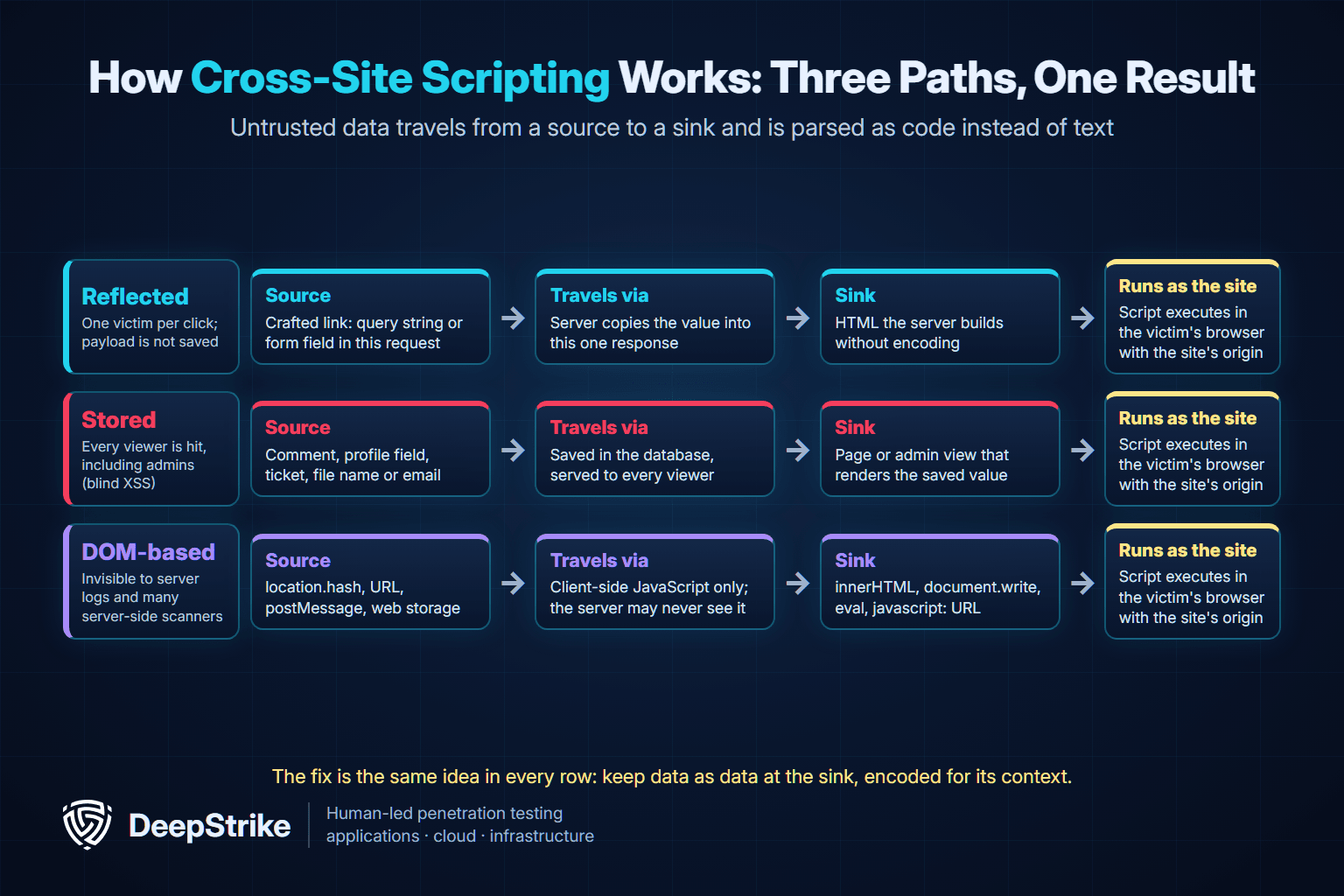
The three types differ only in how the value travels from source to sink. The outcome at the end is the same.
| Type | Where the payload lives | How the victim is reached | Does the server see the payload? | Typical root cause |
|---|---|---|---|---|
| Reflected XSS | In the current request only | Victim opens a crafted link or submits a crafted form | Yes, in the request | Server echoes a parameter into HTML without encoding |
| Stored XSS | In the database or other storage | Anyone who views the affected page or record | Yes, when it is saved and served | Saved user content rendered as raw HTML |
| DOM-based XSS | In the browser (URL, fragment, messages, storage) | Victim opens a crafted link or page state | Often no, for example with URL fragments | Client-side script writes data into a dangerous sink |
The examples below are deliberately vulnerable code for a lab you own. Each test input is a harmless canary that opens an alert box, which is enough to prove that the browser executed injected script. Never test applications you are not authorized to test.
Reflected XSS happens when the server takes a value from the current request and writes it into the response. The payload is not saved, so the attacker has to get each victim to send it, usually through a link in an email, chat message or ad.
A minimal vulnerable route in Node.js and Express:
// LAB ONLY: deliberately vulnerable search route
app.get('/search', (req, res) => {
  res.send(`<p>Results for ${req.query.q}</p>`); // raw string, no encoding
});
In your lab, first send a harmless marker such as /search?q=xsscanary<b>bold</b>. If the word "bold" renders in bold, the page is parsing your input as HTML. A canary such as /search?q=<img src=x onerror=alert(1)> then confirms script execution with an alert box.
The fix is to let the template engine encode the value for HTML:
// Fixed: the template engine HTML-encodes q, e.g. <p>Results for <%= q %></p> in EJS
app.get('/search', (req, res) => {
  res.render('search', { q: req.query.q });
});
The OWASP Web Security Testing Guide on reflected XSS describes the same approach in more depth.
Stored XSS, also called persistent XSS, happens when the application saves attacker input and later serves it to other users. It needs no crafted link: everyone who views the comment, profile, support ticket or message runs the script. That makes it the most dangerous type in most applications, especially when the stored value appears in an admin panel.
A vulnerable EJS template that prints comments with the unescaped output tag:
<!-- LAB ONLY: <%- %> writes the value as raw, unescaped HTML -->
<div class="comment"><%- comment.body %></div>
In the lab, post a comment containing <img src=x onerror=alert('stored-canary')> from a test account, then view the page as a second test user. If the alert appears for the second user, stored XSS is confirmed.
The fix is to use the escaping tag, <%= comment.body %>, so EJS HTML-encodes the value. Other engines have the same trap under different names, such as | safe in Jinja2 and Django. If users genuinely need formatting, store and render a limited markup language, or sanitize the HTML with a maintained allowlist sanitizer before it is rendered. Do not rely on a blocklist of tags.
Blind XSS is a stored XSS variant where the payload fires somewhere the attacker cannot see, such as an internal support dashboard or log viewer. It is often more severe than visible stored XSS because the victims are staff with elevated privileges.
DOM-based XSS lives entirely in client-side JavaScript. The page's own script reads a value from a source such as location.hash and writes it into a dangerous sink. When the source is the URL fragment (everything after #), the browser never sends the payload to the server, so server logs and server-side filters never see it.
A vulnerable greeting script:
// LAB ONLY: reads the URL fragment and writes it as HTML
const name = decodeURIComponent(location.hash.slice(1));
document.getElementById('greeting').innerHTML = 'Hello, ' + name;
In the lab, open page.html#<img src=x onerror=alert(1)>. The alert proves that the fragment reached innerHTML as markup.
The fix is to use a sink that treats data as text:
// Fixed: textContent creates a text node and never parses HTML
document.getElementById('greeting').textContent = 'Hello, ' + name;
The OWASP DOM based XSS Prevention Cheat Sheet recommends exactly this: choose the safe output method, such as textContent, rather than trying to encode correctly for innerHTML.
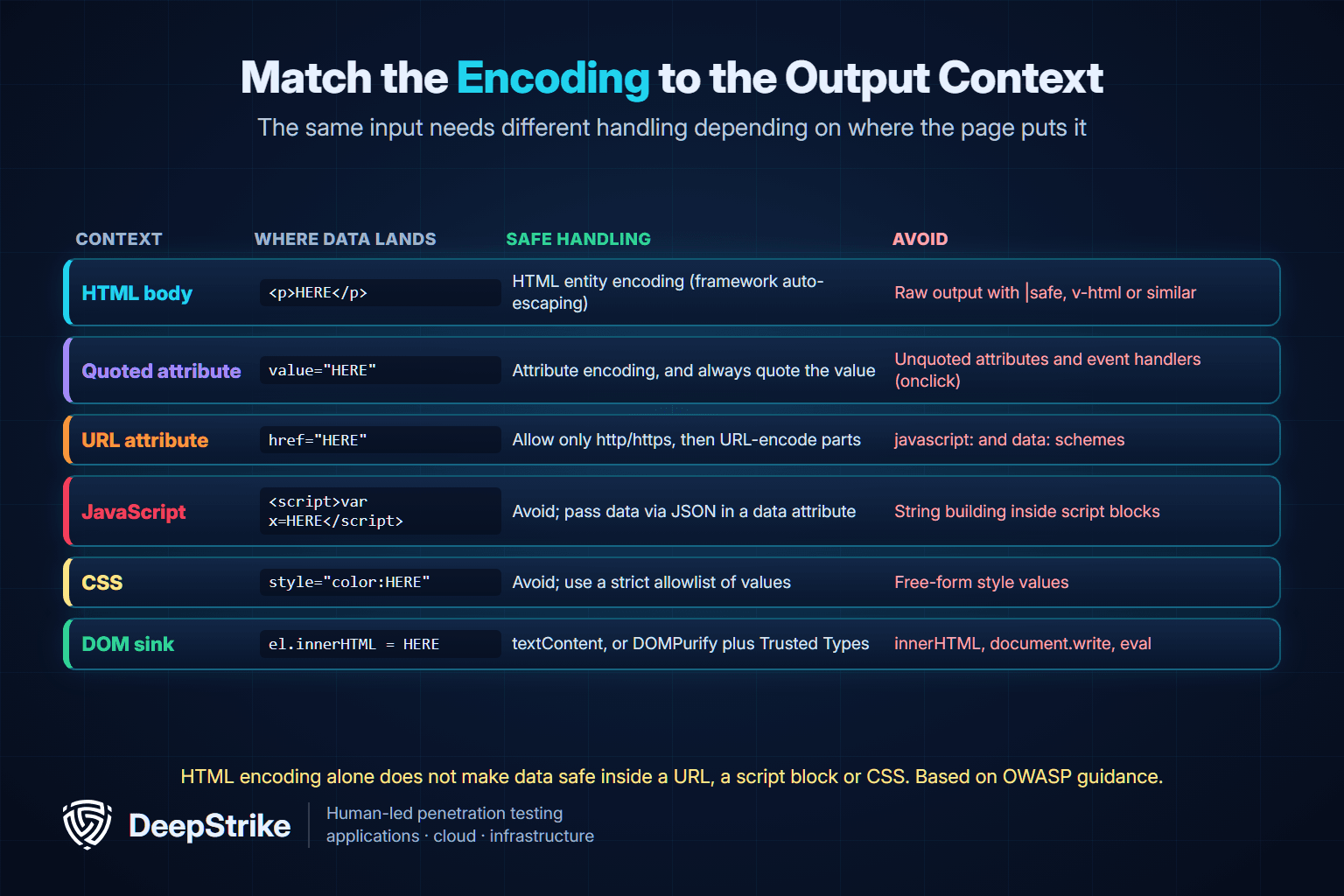
The single most important idea in XSS prevention is output context. The same input needs different handling depending on where the page puts it, and an encoding that is correct in one place is useless in another.
| Output context | Example of where data lands | Safe handling | What to avoid |
|---|---|---|---|
| HTML body | Text between tags | HTML entity encoding, usually framework auto-escaping | Raw output helpers that disable escaping |
| Quoted HTML attribute | value or title attribute | Attribute encoding and always quoting the value | Unquoted attributes and any event-handler attribute |
| URL attribute | href or src attribute | Allow only http and https schemes, then URL-encode components | javascript: and data: URLs built from input |
| JavaScript | Inside a script block or inline handler | Avoid; pass data as JSON in a data attribute and read it with code | Building script strings from input |
| CSS | Inside a style attribute or style block | Avoid; map input to a fixed allowlist of values | Free-form style values |
| DOM sink | innerHTML, outerHTML, insertAdjacentHTML, document.write | textContent, or a sanitizer plus Trusted Types when HTML is required | Passing raw strings to HTML sinks or eval |
This table follows the OWASP Cross Site Scripting Prevention Cheat Sheet, which also notes that no single technique solves XSS.
Attribute context is where many real bugs hide, because developers assume an ID or class name is harmless. DeepStrike's own disclosure CVE-2025-63725, published November 14, 2025, is a reflected XSS in SVX Portal 2.7A in which a query parameter was echoed into several HTML id attributes without encoding. A value containing a double quote could close the attribute and add an event handler. Our write-up of the SVX Portal reflected XSS shows the vulnerable code. The fix for that pattern is attribute encoding with quotes included (in PHP, htmlspecialchars($id, ENT_QUOTES, 'UTF-8')) plus an allowlist that accepts only the characters a valid ID needs.
Injected script can do anything the victim could do in that browser tab. The real impact depends on who the victim is and what the application allows. Typical outcomes include:
document.cookie and send it elsewhere, letting the attacker reuse the session. Tokens kept in localStorage or sessionStorage are always readable by script.Severity therefore ranges widely. A reflected XSS on a static marketing page with no session is a minor finding; a stored XSS in a support dashboard used by administrators can be critical.
Yes. XSS is still the most frequently reported web weakness, and attackers still exploit it.
The webmail pattern is worth noting. An email client renders attacker-supplied HTML by design, so a single sanitizer gap turns an incoming message into stored XSS that runs as soon as the victim opens it.
Our OWASP Top 10 2025 guide explains where XSS sits within A05 Injection and covers the other nine categories.
| Date | Case | Type | What happened | Primary source |
|---|---|---|---|---|
| October 4, 2005 | Samy worm on MySpace | Stored | Profile script sent the author a friend request and copied itself to each viewer's profile; over one million users ran it within 20 hours | Wikipedia article on the Samy worm |
| June 11, 2014 | TweetDeck | Stored | Tweets containing script ran in TweetDeck; a self-retweeting tweet spread rapidly and TweetDeck temporarily took its service down | NPR report quoting TweetDeck's own posts |
| June to August 2023 | Zimbra CVE-2023-37580 | Reflected | Exploited as a zero-day against government organizations; four separate campaigns stole email data, credentials and authentication tokens | Google Threat Analysis Group, November 16, 2023; CISA KEV |
| October 2023 | Roundcube CVE-2023-5631 | Stored | A crafted SVG inside an HTML email ran script when the message was viewed; added to CISA KEV on October 26, 2023 | NVD; CISA KEV; Google TAG |
| January 23, 2025 | jQuery CVE-2020-11023 | DOM-based | A 2020 library flaw added to CISA KEV in 2025, showing that old front-end dependencies keep XSS alive | NVD; CISA KEV |
| October 7, 2025 | Zimbra CVE-2025-27915 | Stored | Script hidden in calendar (ICS) content ran when an email was viewed and could set mail filters that redirect messages | NVD; CISA KEV |
| November 14, 2025 | SVX Portal CVE-2025-63725 | Reflected | Attribute-context XSS disclosed by DeepStrike researchers | CVE record and NVD |
| May 15, 2026 | Exchange CVE-2026-42897 | XSS in Outlook Web Access | Cross-site scripting in Outlook Web Access added to CISA KEV the day after Microsoft's advisory | Microsoft Security Response Center; CISA KEV |
Sources for the table: the Samy worm article, NPR's TweetDeck report, Google TAG on the Zimbra zero-day, NVD entries for CVE-2023-5631, CVE-2020-11023 and CVE-2025-27915, and Microsoft's advisory for CVE-2026-42897.
Three lessons stand out. First, the Zimbra case shows how fast attackers move: Google TAG reports that Zimbra pushed a hotfix to its public GitHub on July 5, 2023, and that another group began exploiting the bug on July 11, two weeks before the official patch on July 25. Second, XSS in a mail or collaboration client is a direct path to account data, not a cosmetic bug. Third, dependencies matter: an XSS in a widely used library such as jQuery affects every application that still ships the vulnerable version.
Good XSS testing is about following data, not spraying payloads. The workflow below is how a manual tester approaches it during an authorized test. It assumes test accounts, an agreed scope and, ideally, a staging environment.
dsk7q2canary) into each parameter, form field, header the application reflects, file name and stored field. Then search every response, rendered page and admin view for that marker.location, document.referrer, postMessage handlers, localStorage, window.name) and follow them to sinks (innerHTML, outerHTML, insertAdjacentHTML, document.write, eval, setTimeout with a string, jQuery .html(), and href or src assignments). Check framework escape hatches such as React's dangerouslySetInnerHTML, Angular's bypassSecurityTrust functions and Vue's v-html. The OWASP guide to testing for DOM-based XSS covers this step.For stored and blind XSS, agree in advance how payloads that may fire in staff-facing tools will be handled, and remove test data at the end of the engagement.
Scanners help with breadth, especially for reflected XSS, but they miss a lot. They struggle with multi-step flows, payloads that fire in a different part of the application, client-side routing and logic that only runs after user interaction. Manual review fills those gaps. Client-side filters are another common trap: input checks that run only in the browser can be bypassed by sending the request directly, as our article on client-side validation risks demonstrates with a stored XSS example.
A Content Security Policy is a response header that tells the browser which scripts may run. A well-built policy turns many confirmed injections into harmless text, which is why it belongs in every XSS defense. It is a second line of defense, not a fix.
The design that works is a strict CSP based on nonces or hashes, as described in Google's web.dev guide to strict CSP:
Content-Security-Policy: script-src 'nonce-{RANDOM}' 'strict-dynamic'; object-src 'none'; base-uri 'none'Each response gets a new random nonce, and only script tags that carry it can run. 'strict-dynamic' lets those trusted scripts load their own dependencies. object-src 'none' and base-uri 'none' close two common bypass routes. Because an attacker cannot guess the nonce, injected inline script is blocked.
What CSP does not do:
'unsafe-inline' cancels most of the benefit for script.Content-Security-Policy-Report-Only first, collect violation reports, and fix legitimate inline scripts before enforcing.On payment pages, CSP is also one of the mechanisms merchants use to control which scripts load in the browser; the PCI DSS payment page script guide explains where CSP meets those requirements and where it falls short. The MDN guide to Content Security Policy covers the full directive list.
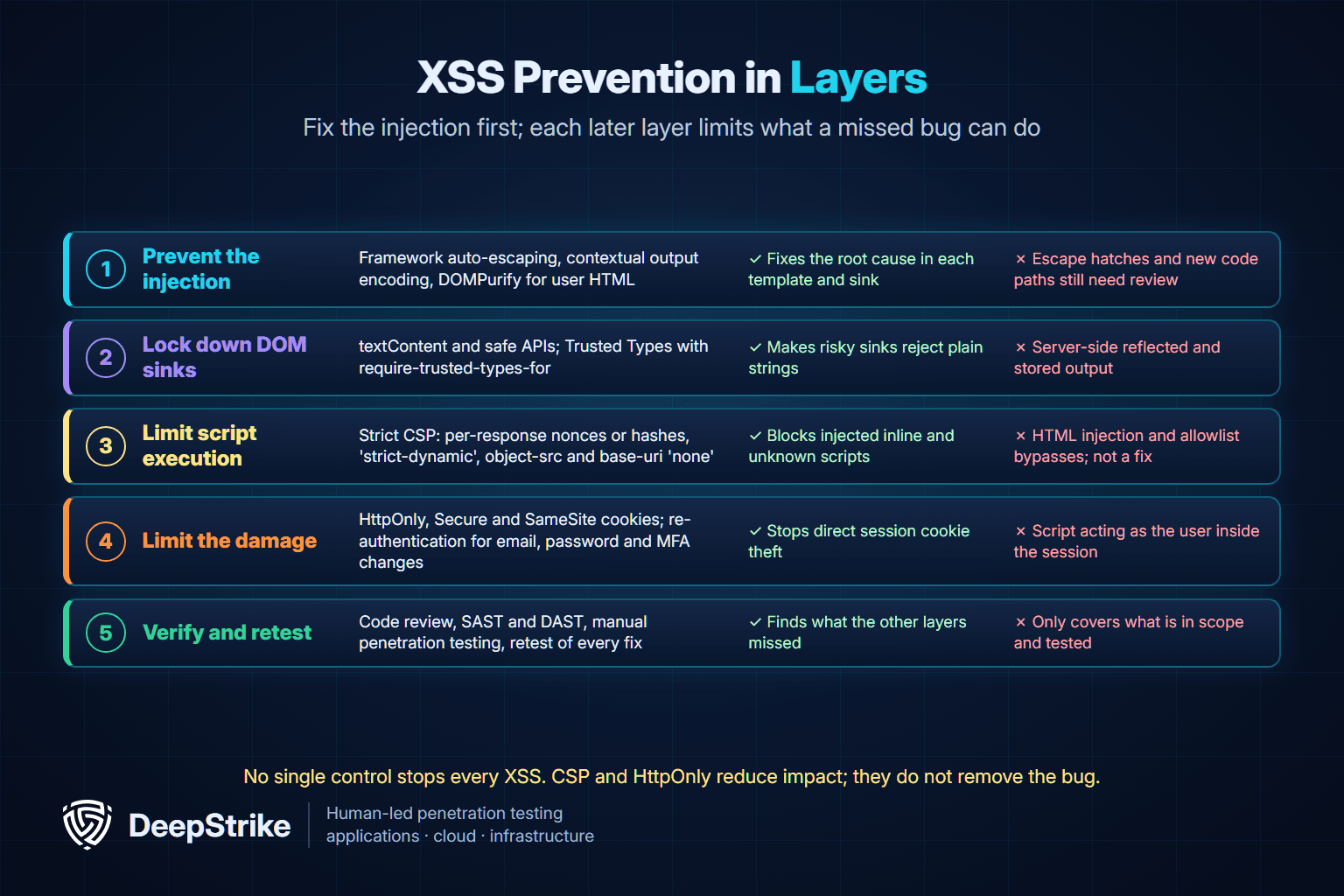
The CISA and FBI alert asks software makers to treat XSS as a class to eliminate, not a bug to patch one at a time. That means secure defaults in the framework, guardrails on dangerous APIs and testing that proves they work. Use these controls together.
dangerouslySetInnerHTML, bypassSecurityTrust functions, v-html, | safe and raw output helpers. Flag them in code review and lint rules. The OWASP cheat sheet notes that React 19 blocks javascript: URLs in src and href, but that this does not replace your own URL validation.textContent, setAttribute for non-URL attributes and DOM construction over HTML strings. Validate URLs before assigning them to href or src, allowing only http: and https:.'unsafe-inline' for script.HttpOnly, Secure and SameSite, keep long-lived tokens out of localStorage, and require re-authentication for email, password, MFA and payment changes. MDN's Set-Cookie reference notes that HttpOnly cookies are still sent with script-initiated requests, which is why HttpOnly limits theft but not misuse.A Trusted Types policy that routes HTML through DOMPurify, enforced by CSP:
// Policy defined once; every innerHTML assignment must use it
const htmlPolicy = trustedTypes.createPolicy('app-html', {
  createHTML: (input) => DOMPurify.sanitize(input),
});
element.innerHTML = htmlPolicy.createHTML(userSuppliedHtml);Content-Security-Policy: require-trusted-types-for 'script'; trusted-types app-html
Set-Cookie: session=<value>; Secure; HttpOnly; SameSite=Lax; Path=/| Control | What it stops | What it does not stop |
|---|---|---|
| Framework auto-escaping and contextual encoding | The injection itself in templates and server output | Escape hatches, wrong-context encoding and client-side sinks |
| HTML sanitizer such as DOMPurify | Script inside user-supplied rich text | Data placed in URL, script or CSS contexts; outdated versions |
| Safe DOM APIs and Trusted Types | DOM-based XSS through HTML and script sinks | Server-side reflected and stored XSS |
| Strict CSP with nonces | Execution of injected inline and unknown scripts | HTML injection, allowlist bypasses and the underlying bug |
| HttpOnly, Secure and SameSite cookies | Direct theft of the session cookie | Script acting as the user inside the session |
| Re-authentication for sensitive changes | Silent account takeover chains | Data visible on the compromised page |
| Code review, scanning and penetration testing | Bugs the other layers missed | Anything outside the tested scope |
These three are often confused because they all involve a browser or a template. The difference is where the attacker's input ends up.
| Vulnerability | Where attacker input executes | What it can do | Main fix |
|---|---|---|---|
| Cross-site scripting (XSS) | Victim's browser, as JavaScript in your origin | Read the page, act as the user, steal non-HttpOnly tokens | Contextual output encoding, safe sinks, strict CSP |
| Cross-site request forgery (CSRF) | Nowhere; the attacker's site makes the victim's browser send a request | Trigger one state-changing request without reading the response | Anti-CSRF tokens, SameSite cookies, origin checks |
| Server-side template injection (SSTI) | On the server, inside the template engine | Read server data and often run commands on the server | Never build templates from user input; sandboxed engines |
XSS defeats most CSRF protections, because script in your origin can read the token. Template injection can look like XSS at first, since a template expression that multiplies 7 by 7 may render as 49 in the page; our server-side template injection guide explains how to tell the two apart and why SSTI is usually far more severe.
For how cross-site request forgery works and how to prevent it, see our guide to cross-site request forgery.
XSS is one of the first things a web application tester checks, but finding it well takes context: knowing which pages admins view, which flows store data, how the front-end framework handles HTML and whether the CSP would hold. That is the gap between an automated alert and a confirmed, prioritized finding.
DeepStrike's web application penetration testing services combine automated discovery with manual testing from multiple user roles, validate each vulnerability before it is reported, and cover the OWASP Top 10, including injection and cross-site scripting. Each engagement includes a detailed report with fix recommendations, re-testing to confirm the fixes, an attestation letter and a technical presentation for your developers.
Cross-site scripting is a flaw that lets an attacker run their own JavaScript in another user's browser on a trusted site. A simple example is a search page that prints the search term without encoding it. If a link sets the term to an image tag with an onerror handler, the victim's browser runs that handler as part of the site.
Yes. CWE-79 ranks first in MITRE's 2025 CWE Top 25, OWASP's Top 10:2025 counts more than 30,000 XSS CVEs, and the CISA Known Exploited Vulnerabilities catalog lists 34 XSS flaws that attackers have used in the wild, by DeepStrike's count of catalog version 2026.11.03.
XSS is caused by an application writing untrusted data into a web page without encoding or sanitizing it for the context where it lands. The browser then treats part of that data as HTML or JavaScript instead of plain text.
Stored XSS is usually the most dangerous because it runs for every user who views the affected content, with no crafted link needed. Stored or blind XSS that fires in an admin view is often critical because the script runs with administrator privileges.
No. HttpOnly stops script from reading the session cookie, which blocks direct cookie theft. It does not stop the injected script from sending requests as the user, because the browser still attaches the cookie to those requests.
A strict, nonce-based CSP blocks most injected script from executing, so it greatly reduces the impact of XSS. It does not remove the underlying bug, does not stop HTML injection, and allowlist-based policies can often be bypassed.
Yes. Script running in the victim's session can change the account email or add an MFA method and then reset the password, or steal tokens kept in browser storage. Requiring re-authentication for those changes and using HttpOnly cookies makes takeover much harder.
XSS runs attacker script inside your site, so it can read pages and act freely as the user. CSRF only makes the victim's browser send a request from another site and cannot read the response. XSS can bypass CSRF defenses. The two are different flaws: CSRF alone does not execute script, but a forged request can plant a payload that a separate stored XSS bug later renders.
Start with the quick wins: search your codebase for escape hatches and dangerous DOM sinks, check that session cookies carry HttpOnly, Secure and SameSite, and deploy a nonce-based CSP in report-only mode to see what would break. Then have the application tested by people who follow data flows rather than run a payload list.
If you want an independent check of your application, contact DeepStrike to scope a web application penetration test.
Mohammed Khalil is a Cybersecurity Architect at DeepStrike, specializing in advanced penetration testing and offensive security operations. With certifications including CISSP, OSCP, and OSWE, he has led numerous red team engagements for Fortune 500 companies, focusing on cloud security, application vulnerabilities, and adversary emulation. His work involves dissecting complex attack chains and developing resilient defense strategies for clients in the finance, healthcare, and technology sectors.

Stay secure with DeepStrike penetration testing services. Reach out for a quote or customized technical proposal today
Contact Us
