November 3, 2026
Updated: November 4, 2026
Assumed-breach methodology, Active Directory attack paths, segmentation testing and a checklist for scoping and reading results.

Mohammed Khalil
Internal penetration testing is an authorized assessment that starts inside your network, usually from a standard user account or a laptop plugged into an office port, and measures how far an attacker could get after the first breach. Testers map Active Directory, look for weak credentials and misconfigured services, check whether network segments really block traffic, and chain findings into attack paths toward goals you agree in advance, such as domain admin rights or the payment environment. A good report shows which few fixes break the most paths, not just a long list of vulnerabilities.
An internal penetration test, often shortened to internal pentest, simulates an attacker who is already past your perimeter. That attacker might be malware running on an employee's laptop after a phishing email, a contractor with too much access, a stolen VPN account, or a device left behind in a meeting room. The test answers one question: once someone is inside, what can they reach, how fast, and would anyone notice?
Most internal tests focus on the corporate network and its identity layer. In a typical Windows estate that means Active Directory (AD) and the services that trust it: file shares, management interfaces, databases, backup systems, virtualization platforms and certificate services. Many tests also include hybrid identity links to Microsoft Entra ID when they are in scope.
An internal test is different from an external one, which starts from the internet and asks whether an attacker can get in at all. If you are still deciding which one you need, our guide to internal vs external penetration testing compares them side by side, and the external penetration testing guide covers the perimeter view in depth. This article stays inside the network.
Perimeter defenses fail often enough that "assume breach" has become a planning default rather than a pessimistic one. Two data points from Mandiant's M-Trends 2026 report, based on more than 500,000 hours of incident investigations in 2025, show why the inside view matters:
In other words, attackers often have days of quiet access, and access can change hands almost instantly. What decides the outcome is the internal environment: how flat the network is, how well credentials are protected, and whether unusual activity triggers an alert.
The weaknesses attackers use inside are also well documented. In a joint advisory, the NSA and CISA red and blue teams listed the ten most common misconfigurations they found during their assessments, including improper separation of user and administrator privilege, insufficient internal network monitoring, lack of network segmentation, insufficient access controls on network shares and services, and poor credential hygiene (CISA advisory AA23-278A). An internal penetration test checks which of these exist in your environment and whether they connect into a path to something that matters.
The starting position, sometimes called the threat start point, shapes everything else in an internal test. Choose it based on the scenario that worries you most.
| Starting position | What the tester receives | What it simulates | Best for |
|---|---|---|---|
| Unauthenticated network access | A network port, VPN profile or test device with no domain credentials | A rogue device, visitor or compromised IoT device | Testing name-resolution, relay and default-credential exposure before any login |
| Assumed breach, standard user | A normal domain user account on a managed workstation | A phished employee or stolen credentials | The most common choice; measures how far a typical user can escalate |
| Assumed breach, specific role | An account matching a real role, such as help desk, developer or contractor | Insider risk or a compromised third party | Testing role-based access and delegated rights |
| Hardened endpoint | A standard build with endpoint detection and response (EDR) active | An attacker who must work around real controls | Checking detection and response, not just exposure |
Assumed-breach testing with a standard user account is the most efficient option for most organizations. It skips the part of the test that phishing simulations already cover and spends the time on what happens next. If you want to know whether your detection team would catch the activity, say so in the rules of engagement; that changes how the testers pace their work and what they record.
Most providers follow a general framework such as NIST SP 800-115 and adapt it to the internal network. Our penetration testing methodology guide covers the general phases; the internal version usually runs like this.
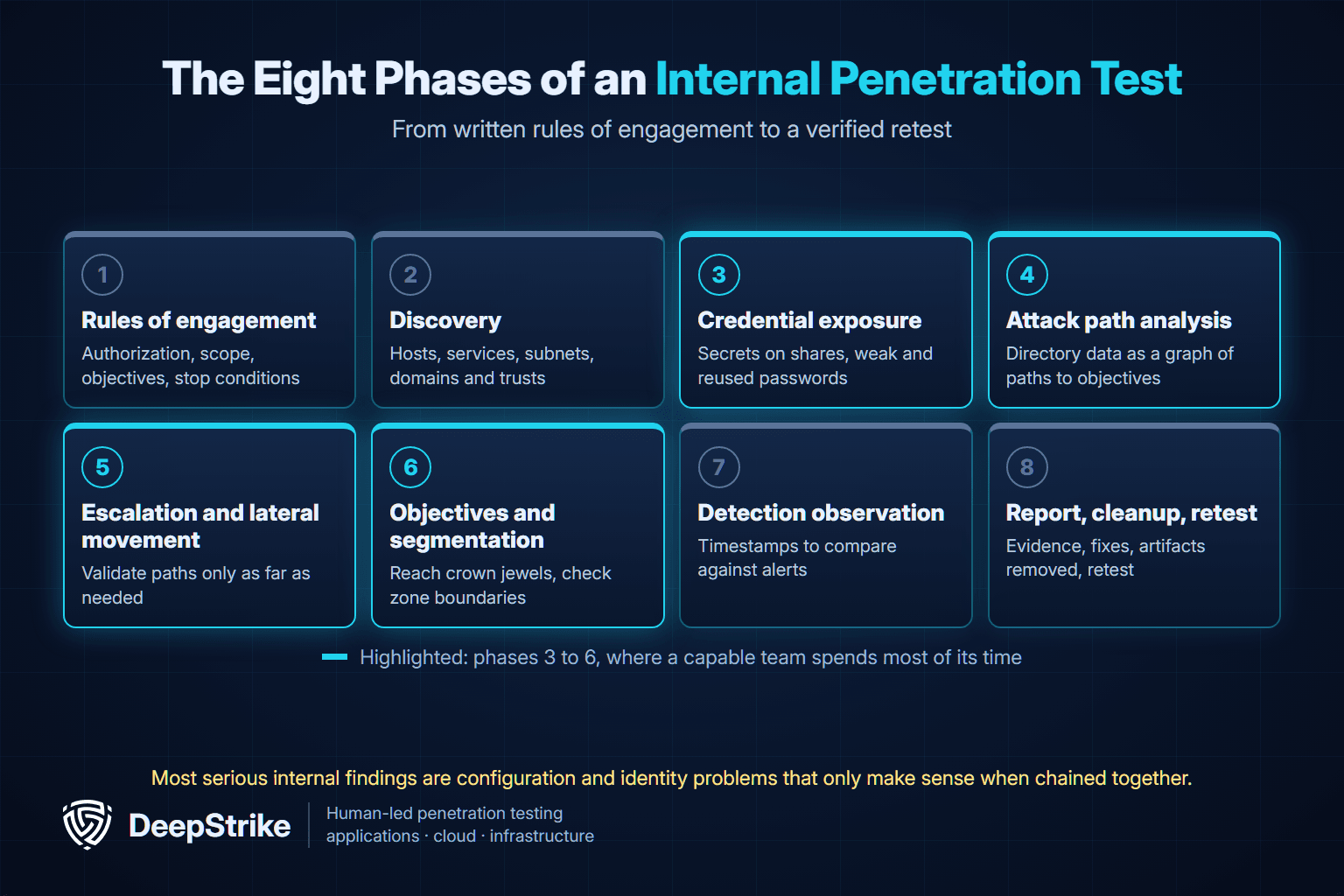
A capable team spends most of its time in steps 3 to 6. Automated vulnerability scanning is useful for coverage, but most serious internal findings are configuration and identity problems that only make sense when chained together.
The techniques below appear in many internal tests. They are described here at a conceptual level so you can understand findings and fixes; they are not instructions, and testing them requires written authorization.
For the attacker's side of these paths and how to detect them, see our guide to lateral movement.
In Active Directory, any authenticated user can request a Kerberos service ticket for an account that runs a service. Part of that ticket is encrypted with a key derived from the service account's password. MITRE ATT&CK describes how an attacker can take those tickets offline and try to crack the password, especially when older RC4 encryption is in use (T1558.003, Kerberoasting). A cracked service account password matters because service accounts are often over-privileged and their passwords rarely change.
What fixes it: long, randomly generated service account passwords, AES encryption instead of RC4 where possible, and least privilege for service accounts, including keeping them out of groups such as Domain Admins. Microsoft's group Managed Service Accounts let Windows manage service account passwords instead of administrators, which removes the weak-password problem for services that support them.
Active Directory Certificate Services (AD CS) issues certificates that can be used to log in. Security researchers at SpecterOps published a widely used catalog of AD CS abuse cases in 2021, labeled ESC1, ESC2 and so on, and Microsoft now flags several of them in its Defender for Identity certificate assessments. Two examples show the pattern:
MITRE tracks the broader behavior as T1649, Steal or Forge Authentication Certificates, and notes that certificate-based access can persist even after a password reset. What fixes it: restrict enrollment rights and template permissions, turn off requester-supplied subject names on authentication templates, require manager approval for sensitive templates, enforce HTTPS and Extended Protection on web enrollment or disable it if unused, and patch certificate servers.
When Windows cannot resolve a name through DNS, it may fall back to older broadcast protocols such as LLMNR and NBT-NS. An attacker on the same network segment can answer those broadcasts, receive authentication attempts, and either crack the captured hashes offline or relay them to another system (T1557.001). This is one of the few paths that can work with no credentials at all, which is why unauthenticated starting positions still find it.
What fixes it: disable LLMNR and NBT-NS where they are not needed, require SMB signing and other relay protections, and use segmentation and network monitoring to limit and detect the behavior.
If many workstations or servers share the same local administrator password, recovering it once can unlock all of them. Attackers can often reuse the password hash directly without cracking it, a technique called pass-the-hash (T1550.002); our explainer on what pass-the-hash is covers the mechanics and defenses. Microsoft's Windows LAPS rotates a unique local administrator password on each device and lists protection against pass-the-hash and lateral-traversal attacks as a core benefit.
Individual weaknesses often look minor. The risk comes from how they connect: a help desk group that can reset passwords for a group that has admin rights on a server where a domain admin is logged in. Tools such as BloodHound, an open-source project that uses graph theory to reveal hidden relationships in Active Directory and Azure environments, let testers and defenders see these chains as paths on a graph.
For defenders, the most useful output is not the full graph but the choke points: the small number of permissions, group memberships or sessions that many paths pass through. Removing one choke point can close dozens of paths at once. Ask your provider to report attack paths this way.
The example below is illustrative and simplified. It does not describe a DeepStrike client or a specific engagement. Each step below is a form of privilege escalation: moving from a standard account toward higher rights.
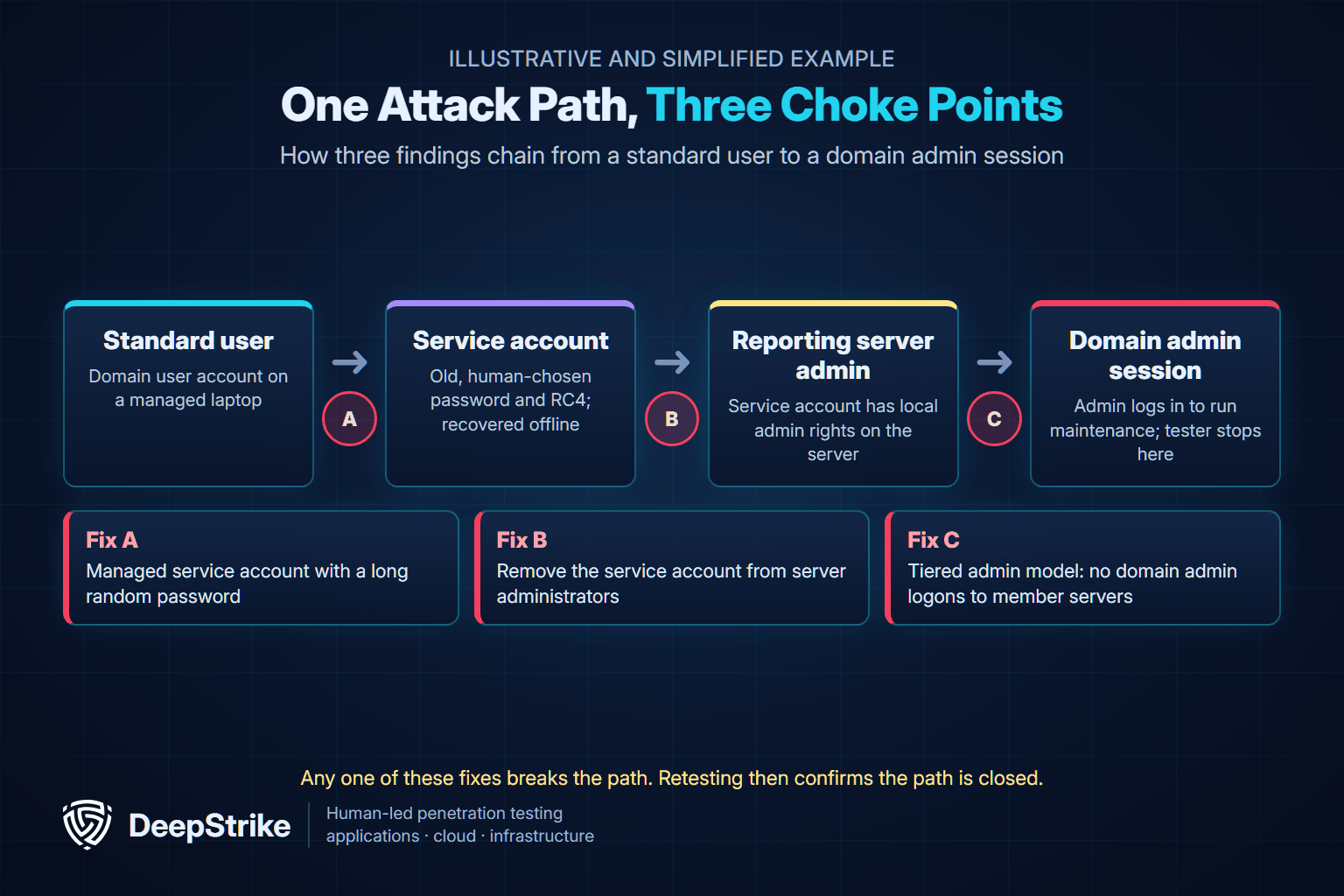
The report would show three findings, but the useful conclusion is the path. Any one of these fixes breaks it: a managed service account with a long random password, removing the service account from server administrators, or stopping domain admins from logging in to member servers through a tiered administration model. Retesting then confirms the path is closed.
Segmentation testing checks whether the boundaries in your network diagrams exist in practice. Firewall rules, VLANs and access control lists drift over time, and a single broad rule can connect a user subnet to a management network.
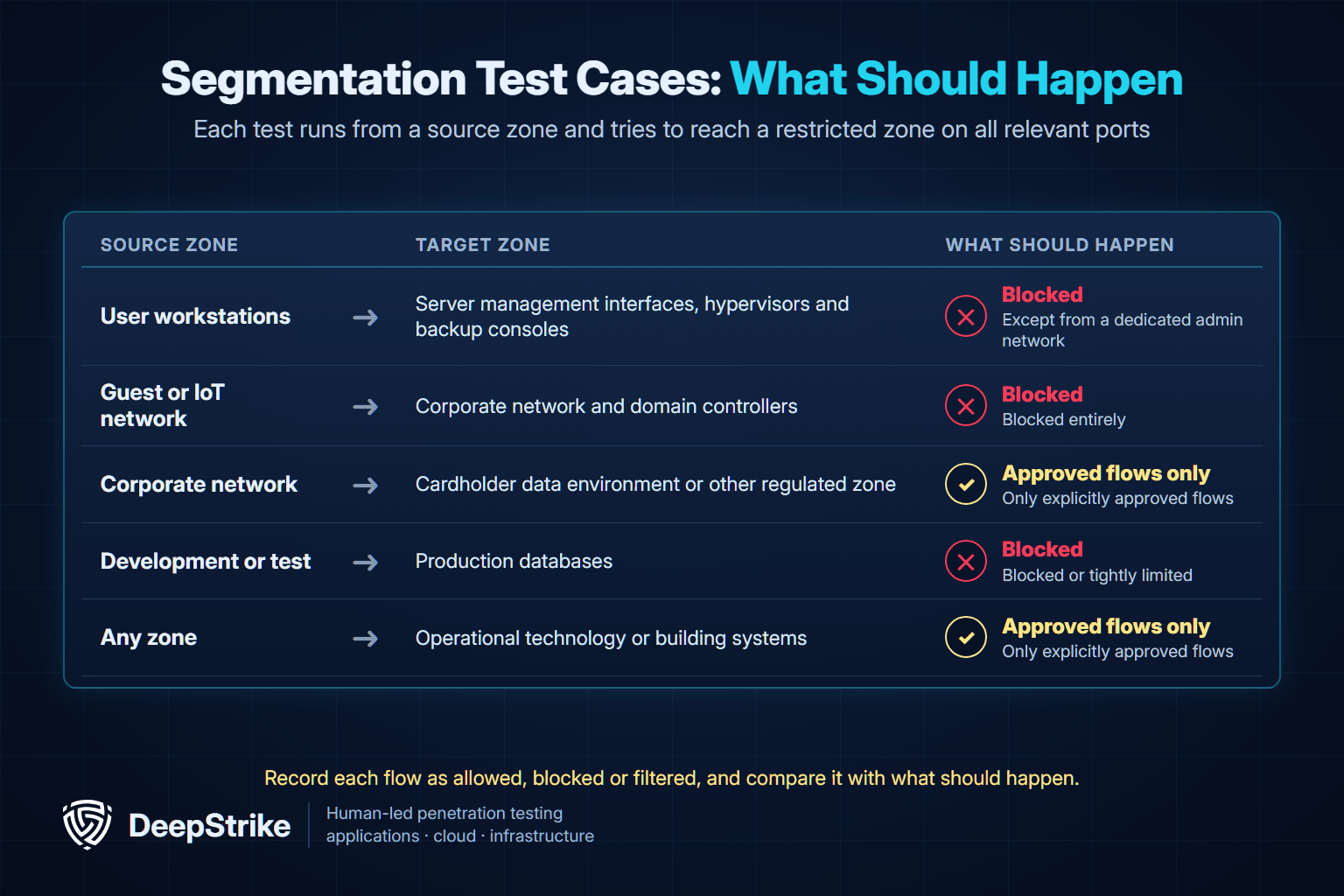
A segmentation test typically runs from each in-scope source zone and attempts to reach each restricted zone on all relevant ports, recording what is allowed, blocked or filtered. Useful test cases include:
| Source zone | Target zone | What should happen |
|---|---|---|
| User workstations | Server management interfaces, hypervisors and backup consoles | Blocked, except from a dedicated admin network |
| Guest or IoT network | Corporate network and domain controllers | Blocked entirely |
| Corporate network | Cardholder data environment or other regulated zone | Only explicitly approved flows |
| Development or test | Production databases | Blocked or tightly limited |
| Any zone | Operational technology or building systems | Only explicitly approved flows |
Segmentation also has a compliance dimension. PCI DSS v4.0.1 Requirement 11.4 calls for internal penetration testing at least once every 12 months and after significant changes. Where segmentation is used to isolate the cardholder data environment, the segmentation controls must also be tested at least every 12 months, and every six months for service providers. The official standard is available from the PCI Security Standards Council document library, and our PCI DSS penetration testing guide explains how the requirements apply.
Credential problems are the fuel for most internal attack paths. The NSA and CISA advisory lists poor credential hygiene among its ten most common misconfigurations, and recommends avoiding reused local administrator passwords, using long service account passwords or managed service accounts, and not storing credentials in files. These are the credential findings internal testers report most often:
| Finding | Why it matters | Typical fix |
|---|---|---|
| Passwords in scripts, config files and shares | Any user who can read the share inherits the access | Remove secrets, rotate them, move to a vault or managed identity |
| Weak service account passwords | Exposed to offline cracking through Kerberoasting | Managed service accounts or long random passwords, AES encryption |
| Shared local administrator passwords | One recovered password unlocks many machines | Windows LAPS |
| Privileged accounts used for daily work | Admin credentials are exposed on ordinary workstations | Separate admin accounts and tiered administration |
| Stale and over-privileged accounts | Forgotten accounts with old passwords keep old rights | Regular access reviews and disabling unused accounts |
| Domain admins logging in to member servers | Their sessions become targets on less protected hosts | Restrict privileged logons to dedicated admin systems |
Use this checklist to plan an engagement and to check that a report covers what it should.
| Phase | Check | Evidence to expect |
|---|---|---|
| Before | Written authorization, starting position, objectives and stop conditions agreed | Signed rules of engagement |
| Before | In-scope subnets, domains, forests, trusts and cloud identity links listed | Scope appendix |
| Before | Excluded and fragile systems named, with testing windows | Exclusion list |
| Before | Credential handling, data handling and emergency contacts defined | Rules of engagement section |
| During | Host, service and directory enumeration from the starting position | Asset and service summary |
| During | Name-resolution, relay and default-credential exposure tested | Findings or confirmed negative results |
| During | Service accounts, delegation and privileged groups reviewed | Account and group analysis |
| During | AD CS templates and enrollment endpoints reviewed, if AD CS is present | Template findings or confirmation of secure settings |
| During | Shares and files checked for exposed credentials and sensitive data | Redacted examples |
| During | Attack paths to each objective mapped and validated safely | Path diagrams with choke points |
| During | Segmentation tested from each source zone to each restricted zone | Allowed and blocked flow matrix |
| During | Key actions time-stamped for detection review, if agreed | Activity log |
| After | Each finding has evidence, severity, business impact and a specific fix | Findings section |
| After | Test accounts, files and other artifacts removed | Cleanup confirmation |
| After | Fixes retested and results recorded | Retest report |
Clear answers make proposals comparable and keep the test focused on what matters to you:
Our penetration testing scope guide explains how to turn these answers into rules of engagement and a statement of work. For broader network context, including external and wireless options, see our network penetration testing guide.
An internal report can run to dozens of findings. Reading it well means looking past the severity counts.
Start with the objectives. Did testers reach each agreed objective, by which path and in how many steps? A report that reached domain admin in a few steps through ordinary misconfigurations tells you more than a count of medium-severity issues.
Find the choke points. Look for the findings that appear in more than one path. Fixing those first usually reduces more risk than working down the list by CVSS score. A medium finding that sits on every path can matter more than an isolated high.
Separate exposure from detection. If detection was in scope, compare the tester's activity log with your alerts. Note which actions went unseen; those are gaps in monitoring, not just in configuration.
Check the negative results. A good report also states what was tested and found secure, such as AD CS templates reviewed with no issues, or segments that blocked traffic as designed. That tells you what the test covered.
Agree the retest criteria. For each critical path, define what "fixed" means, such as the service account no longer being crackable or the route between two zones being blocked, and retest against that. Our penetration testing report guide covers the full structure of a strong report.
| Question | Internal vulnerability scan | Internal penetration test | Red team engagement |
|---|---|---|---|
| Main goal | Find known vulnerabilities and missing patches | Prove which weaknesses combine into real attack paths | Test detection and response against a realistic adversary |
| Approach | Automated, broad | Manual and tool-assisted, objective-driven | Covert, scenario-driven |
| Identity and AD analysis | Limited | Core focus | Used as needed to reach objectives |
| Typical cadence | Continuous or monthly | At least yearly and after major changes | Periodic, for mature security programs |
Scans and penetration tests complement each other. A red team engagement makes most sense once internal penetration tests have already removed the obvious paths.
Most organizations run an internal penetration test at least once a year and after significant changes, such as a merger, a new domain or forest, a major network redesign or a move to hybrid identity. PCI DSS sets a 12-month minimum for in-scope environments. More frequent testing makes sense when your network changes quickly or previous tests found critical paths. Our guide on how often to perform penetration testing covers cadence by risk and framework.
An assumed-breach test is a type of internal penetration test. It starts from a position where the attacker already has some access, usually a standard user account on a corporate device. Other internal tests start with only network access and no credentials.
Usually yes, because AD controls access to most internal systems. Confirm it in the scope. Ask whether the test covers AD CS, trusts between domains and forests, and links to cloud identity providers such as Microsoft Entra ID.
It can be when the rules of engagement are clear. Testers avoid denial-of-service techniques, agree on fragile systems and testing windows, and stop at proof of impact instead of making disruptive changes. Name any systems that must not be touched.
It depends on the number of sites, subnets, domains and objectives, and on whether detection testing requires a slower pace. A single-domain office needs far less time than a multi-forest estate with several sites. Ask each provider to state the testing days, report delivery date and retest window in the proposal.
Yes, if you want to know the impact of a breach. A clean external test reduces the chance of an attacker getting in from the internet, but phishing, stolen credentials and third-party access can still lead to an internal foothold.
An internal penetration test turns "what if someone gets in?" into a specific list of paths, choke points and fixes. The most valuable results come from a clear starting position, named objectives and a report that shows which few changes close the most paths.
If you are planning an internal or assumed-breach test, review our penetration testing services or contact DeepStrike to discuss scope, starting position and retesting.
Mohammed Khalil is a Cybersecurity Architect at DeepStrike, specializing in advanced penetration testing and offensive security operations. With certifications including CISSP, OSCP, and OSWE, he has led numerous red team engagements for Fortune 500 companies, focusing on cloud security, application vulnerabilities, and adversary emulation. His work involves dissecting complex attack chains and developing resilient defense strategies for clients in the finance, healthcare, and technology sectors.

Stay secure with DeepStrike penetration testing services. Reach out for a quote or customized technical proposal today
Contact Us
