November 6, 2026
Updated: November 6, 2026
Public vs private, IPv4 vs IPv6, static vs dynamic, what your address reveals, how to find it, and when it becomes a security risk.

Mohammed Khalil
What is an IP address? It is the number that tells the internet where to send data for your device or network, much like the address on an envelope. Your phone, laptop and router all use them, and the devices in a home usually share one public address. This guide explains public and private addresses, IPv4 and IPv6, and static and dynamic assignment. It also covers what your address does and doesn't reveal, how to find it, and when an exposed address becomes a security risk.
An IP (Internet Protocol) address is a numeric label given to a network connection so that data can be sent to it and received from it. It comes in two formats: IPv4, such as 192.0.2.53, and IPv6, such as 2001:db8:582:ae33::29.
The original Internet Protocol specification from 1981 puts the job simply: "A name indicates what we seek. An address indicates where it is." You type a name like deepstrike.io. Computers use the address.
You don't pick your public address. IANA, the body that coordinates global addressing, hands large pools to five regional internet registries. In the U.S., that registry is ARIN. Registries allocate addresses to internet service providers (ISPs), and your ISP assigns one to you.
Two common descriptions need correcting:
Data on the internet travels in small chunks called packets. Each packet carries a source address and a destination address. Here is what happens when you open a website from home:
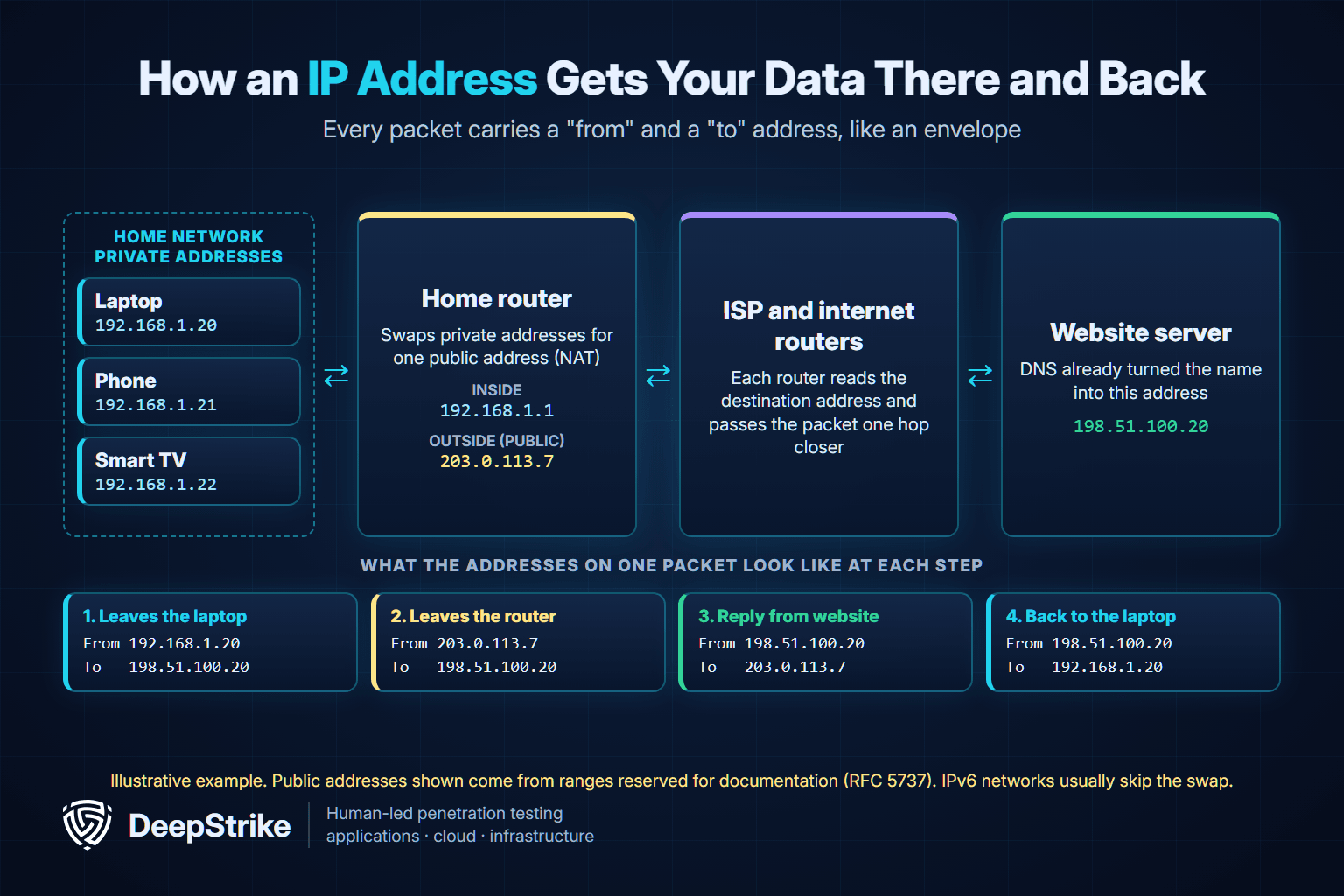
The address gets data to the right machine. A port number then gets it to the right service, such as a web server or a remote desktop tool. Ports matter more for security than the address does.
Every address fits several labels at once. Your laptop's might be private, IPv4 and dynamic all at the same time.
| Pair | The difference | Where you'll meet it |
|---|---|---|
| Public vs private | Reachable across the internet vs used only inside a local network | Router status page vs your device's Wi-Fi settings |
| IPv4 vs IPv6 | 32-bit address vs 128-bit address | Most devices today have one or both |
| Static vs dynamic | Stays the same vs leased and able to change | Servers and business lines vs most home connections |
| Dedicated vs shared | One customer or site vs many behind one address | Business plans vs mobile networks and shared web hosting |
A public IP address is the one the rest of the internet sees. Your ISP assigns it, and it usually sits on your router. A private IP address only works inside your local network. Your router hands these out, and anyone can use the three reserved private ranges without asking for permission.
So is your IP address just your Wi-Fi? Partly. On home Wi-Fi, every device shares the router's public address but has its own private one. Switch your phone to cellular data and it uses your carrier's network and a different address.
Use this table to decode a number you've found:
| If it starts with | Type | What it means |
|---|---|---|
| 10. | Private | Local network, not reachable directly from the internet |
| 172.16. through 172.31. | Private | Local network, common in offices |
| 192.168. | Private | Local network, common in homes |
| 100.64. through 100.127. | Shared | Your provider shares a public address among customers (carrier-grade NAT) |
| 127. | Loopback | Your device talking to itself; 127.0.0.1 is the usual example |
| 169.254. | Link-local | Your device assigned this itself, usually because no router gave it an address |
| Any other IPv4 number | Likely public | Reachable on the internet, subject to firewalls |
| ::1 | IPv6 loopback | Your device talking to itself |
| fe80: | IPv6 link-local | Normal; works only on the local link |
| fc or fd | IPv6 unique local | The IPv6 counterpart to private addressing |
| 2 or 3 | IPv6 global | Public IPv6 address |
These meanings come from IANA's IPv4 special-purpose registry, RFC 6598 on shared address space, RFC 3927 on 169.254 addresses, RFC 4193 on IPv6 local addresses and IANA's IPv6 address space table. Addresses like 192.0.2.53 in this article come from ranges reserved for documentation and don't belong to anyone.
IPv4 is the older format and IPv6 is its replacement. They aren't directly compatible, so many networks run both side by side.
| Feature | IPv4 | IPv6 |
|---|---|---|
| Address length | 32 bits | 128 bits |
| Possible addresses | About 4.3 billion | About 3.4 × 10^38 |
| Looks like | 192.0.2.53 | 2001:db8:582:ae33::29 |
| Deployment | January 1, 1983 | Began in 1999 |
| Address translation | NAT is very common | Designed so NAT isn't needed |
IPv4 simply ran short. IANA's free pool was depleted on February 3, 2011, and ARIN's followed on September 24, 2015. That shortage is why NAT and shared addresses are everywhere. The move to IPv6 is still underway: Google measured 46.86% of its users reaching it over IPv6 on November 4, 2026.
IPv6 changes two things worth knowing. Without NAT in the way (RFC 4864 explains why it isn't needed), a device can hold a globally routable address, so firewall rules do the protecting. And because an address built from a stable identifier could make a device easier to follow, devices can use temporary IPv6 addresses that change over time. Networks running both versions need security rules for both. The NSA warned in January 2023 that dual-stacked networks have an increased attack surface.
A dynamic IP address is leased automatically and can change. On local networks this is handled by DHCP, which gives out an address for a limited time so it can be reused later. A static IP address stays the same until someone changes it, which is why servers, VPN gateways and email systems normally use one.
Dynamic doesn't mean an address changes every time you connect. How long you keep one depends on your provider. It also isn't a security control. A changing address may slow casual tracking, but it doesn't fix anything that's exposed.
An IP address tells people less than most assume, but it isn't meaningless.
What it can show:
What it doesn't show:
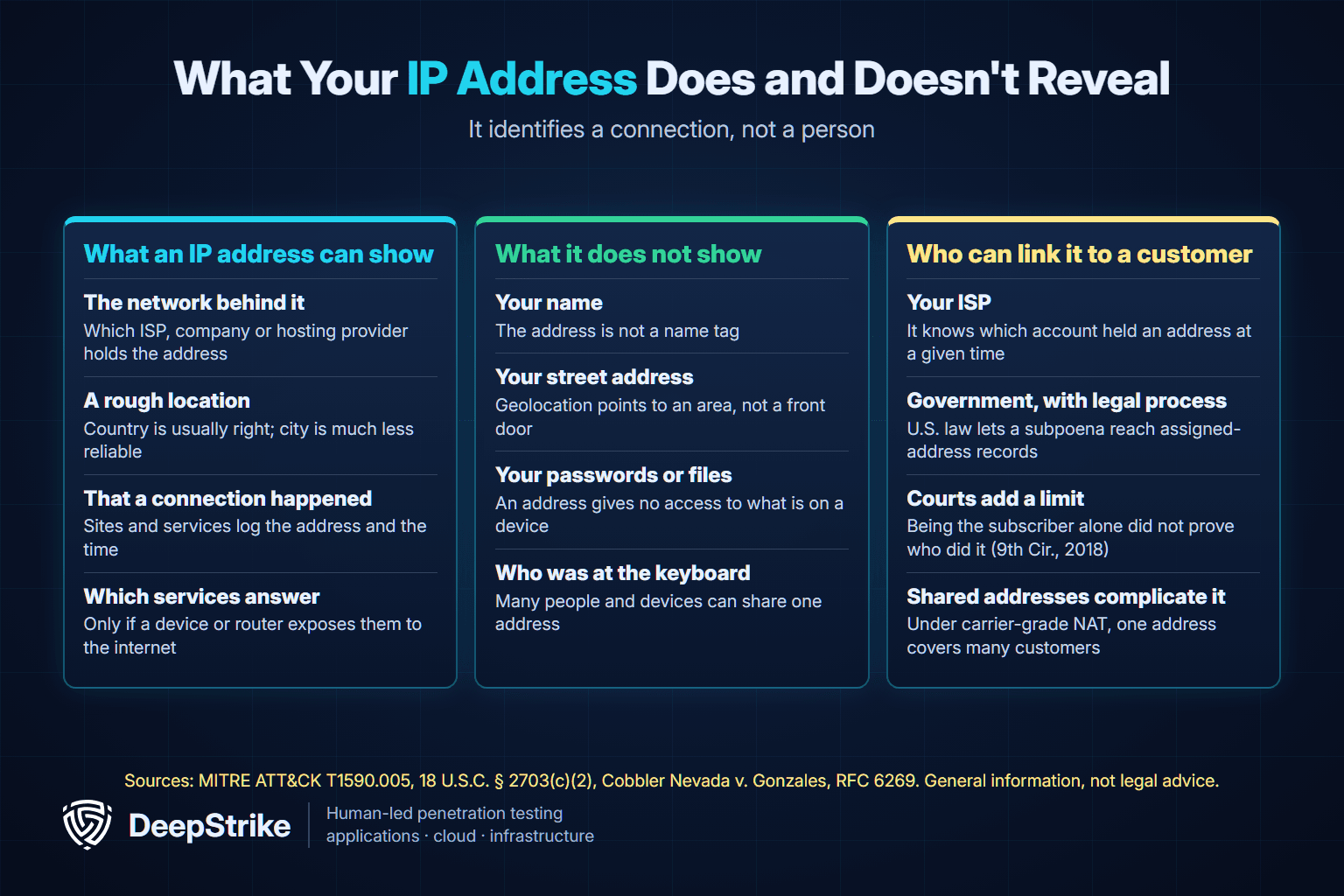
Your ISP is the link. In the U.S., 18 U.S.C. § 2703(c)(2) lets the government obtain subscriber records from a provider, including name, address and any temporarily assigned network address, with an administrative, grand jury or trial subpoena. A stranger can't simply demand those records. It takes legal process.
Even then, an address points to an account, not a person. In Cobbler Nevada v. Gonzales, decided August 27, 2018, the Ninth Circuit held that a bare allegation that someone was the registered subscriber of an IP address wasn't enough to state a copyright infringement claim. Shared addressing muddies this further. RFC 6269 explains that once providers share addresses, an IPv4 address alone no longer identifies a single subscriber.
Privacy law treats addresses seriously anyway. In the EU, GDPR Recital 30 lists internet protocol addresses among online identifiers, and the EU Court of Justice ruled on October 19, 2016 that a dynamic address can be personal data when a website operator has legal means to identify the visitor through the ISP. This is general information, not legal advice.
The FTC describes blackmail emails that claim the sender hacked your computer and recorded you, then demand Bitcoin. It calls the threats empty and says the password some messages quote likely came from a data breach. Knowing an IP address wouldn't give a sender that access either. The FTC's steps:
On its own, rarely. An address is like a street address: knowing it doesn't open the door. The risk comes from what answers at that address. Your public address is already visible to every site you visit, so hiding it matters less than making sure nothing weak is exposed there.
| Risk | What happens | What helps |
|---|---|---|
| Exposed services | Scanners find a login page, camera or remote desktop tool reachable at your address | Close what you don't need; change default passwords; update |
| Denial of service | Someone floods the address with traffic until the connection fails | Contact your ISP; for businesses, use a protection service |
| IP spoofing | A sender forges the source address on packets, often to disguise a flood | Provider filtering; never treat an address alone as proof of identity |
| Shared-address blocking | Another customer's abuse gets a shared address blocked | Contact the blocking service or your provider |
| Tracking | Sites connect visits using the address, with cookies and other data | Browser and app privacy settings; a VPN shifts what sites see |
Sources: CISA on denial-of-service attacks, which notes that slow networks can also have ordinary causes, MITRE ATT&CK Active Scanning, BCP 38 on forged addresses and RFC 6269 on shared-address blocking. For more on floods, see what a DDoS attack is.
Two well-documented cases show why exposure matters more than the address itself:
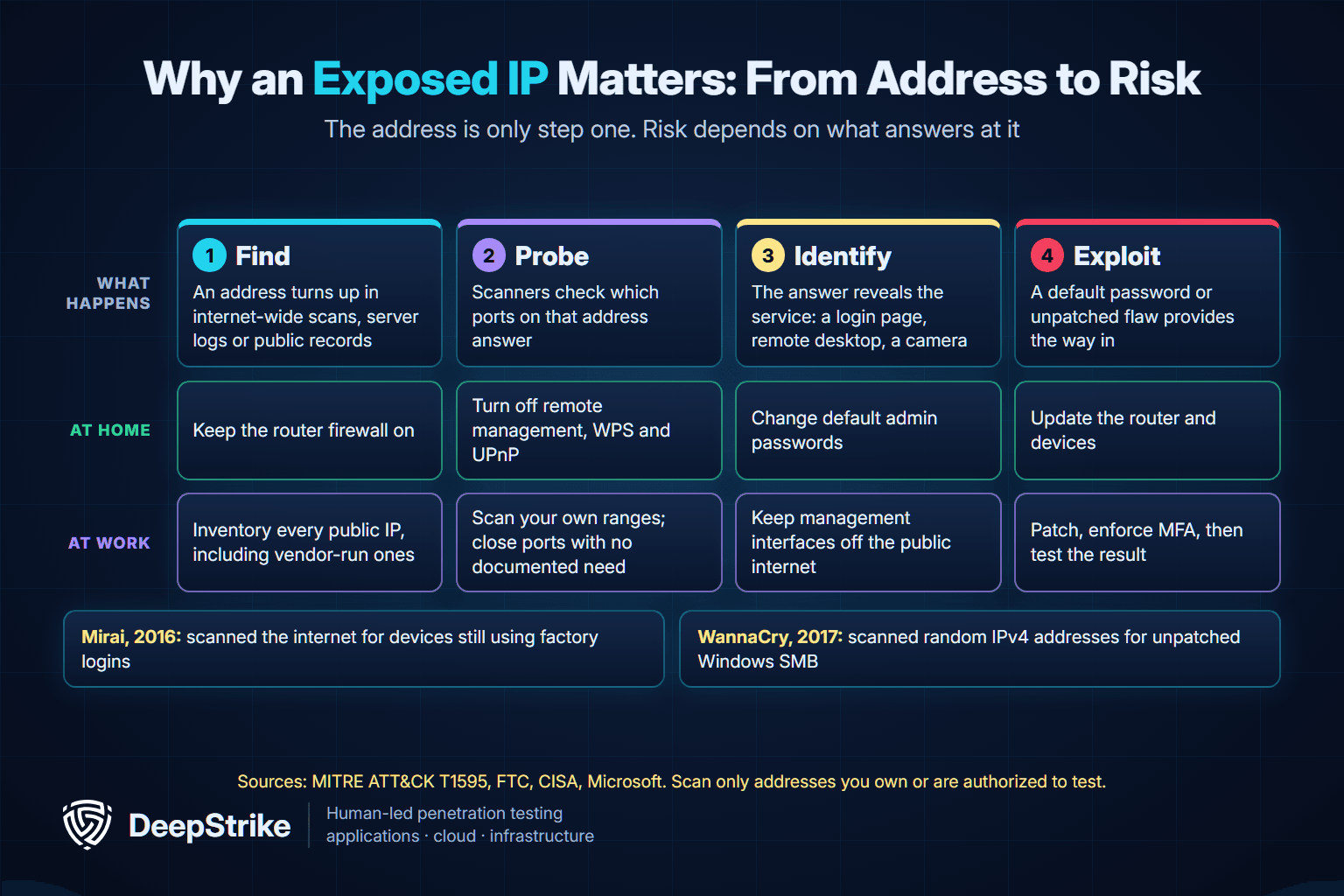
Most of the protection is on your router, not in hiding the number. These steps come from the FTC's guide to securing a home Wi-Fi network:
If your connection seems under attack, CISA advises contacting your ISP, which can tell you whether there's an outage or an attack.
Hiding your address. A VPN routes your traffic through its provider's servers, so sites see that server instead of you. The FTC's 2018 guidance warns that this generally won't make you entirely anonymous. It shifts your trust to the provider, not all apps encrypt everything, and free apps may rely on ads or data sharing, so research any app and its permissions first. Our comparison of proxies, VPNs and Tor covers the differences. Private browsing doesn't do this job: the FTC notes it doesn't block websites from seeing your activity.
Public Wi-Fi. The FTC says public Wi-Fi is usually safe because most websites now encrypt traffic, but check for https, and remember that a scam site can be encrypted too. Your wider public trail is a separate issue, covered in our guide to your digital footprint.
You have two addresses to check, and they answer different questions.
Search for "what is my IP" and use a well-known site, or log in to your router and look for its WAN or internet address. A VPN changes what a website shows, so turn it off if you want your real connection's address.
Here's a useful check. Compare the router's WAN address with what a website reports. If they match, your router holds the public address. If the router shows a private address or one from 100.64 through 100.127, your provider is likely sharing a public address among customers. That explains why some inbound services, such as hosting a game server, may not work from home.
For a business, public IP addresses are part of the attack surface. MITRE notes that gathering them is hard to stop with preventive controls, because it happens outside your network. So the practical goal is controlling what those addresses expose.
CISA's Internet Exposure Reduction Guidance, revised August 21, 2026, gives a clear sequence:
CISA's Binding Operational Directive 23-02, issued June 13, 2023, gives federal agencies 14 days to take internet-exposed management interfaces off the public internet or put them behind zero-trust access controls. It doesn't bind private companies, but it's a sensible benchmark. CISA's ransomware guide likewise says not to expose services such as remote desktop on the web.
Addresses are also weak identity evidence. If you run public services, RFC 6269 recommends logging the source port, because an address alone may not identify a user behind shared addressing.
Scanning shows what's open. Testing shows what it means. An authorized external penetration test or broader network penetration test should prove:
Only scan or test addresses you own or have written permission to assess.
Each device on a network has its own private address on that network. Devices on the same home network usually share one public IPv4 address. With IPv6, each device can have its own global address.
Not from the address alone. Geolocation usually points to a broad area and can be wrong, sometimes by a wide margin. Your ISP has your account details, but it generally releases them only through legal process.
The address alone gives no access to your files or accounts. An attacker would still need a weakness at that address, such as an exposed service with a default password or an unpatched flaw. A firewall, updates and changed passwords remove most of that risk. A flood of traffic is a different problem: it can disrupt your connection without breaking into anything.
It hides your address from the sites you visit, which see the VPN server instead. Your VPN provider can still see your real address, and sites can still track you through accounts and other data you share.
Your ISP controls your public address. Restarting your router may produce a new one, but that isn't guaranteed, and some providers only change it on request. Connecting to a different network, or a VPN, also changes the address sites see.
An IP address identifies a connection on a network and can change as you move. A MAC address identifies a network adapter on the local network, and it doesn't normally travel across the internet. Many phones now use a private Wi-Fi address instead of the hardware one.
An IP address is directions to a connection. At home, know your addresses, secure the router, and don't panic if someone quotes your IP. At work, know every public address you hold and what each one exposes.
If you want that exposure tested, DeepStrike's penetration testing services use manual testing, with reports and actionable fix recommendations. To talk through scope, contact DeepStrike.
Mohammed Khalil is a Cybersecurity Architect at DeepStrike, specializing in advanced penetration testing and offensive security operations. With certifications including CISSP, OSCP, and OSWE, he has led numerous red team engagements, focusing on cloud security, application vulnerabilities, and adversary emulation. His work involves dissecting complex attack chains and developing resilient defense strategies for clients in the finance, healthcare, and technology sectors.

Stay secure with DeepStrike penetration testing services. Reach out for a quote or customized technical proposal today
Contact Us
