November 6, 2026
Updated: November 6, 2026
What split tunneling changes, when it is worth it, and how to check that the right traffic stays protected.

Mohammed Khalil

VPN split tunneling is a setting that sends some of your traffic through an encrypted VPN tunnel while the rest goes straight to the internet over your normal connection. You choose by app, website or IP address. It can fix a printer that vanished, an app that refuses VPN connections or a laggy video call, but anything outside the tunnel loses the VPN's protection and shows your real IP address. At home, that is a reasonable trade for low-risk apps. On public Wi-Fi, or on a work device without IT approval, keep a full tunnel.
A VPN tunnel is an encrypted connection between your device and a VPN server. By default, most VPNs push everything through it. Windows treats force tunnel as the default when no routes are specified, and Android sends all traffic through the VPN unless the app sets up lists of included or excluded apps.
Split tunneling breaks that default on purpose. The NIST glossary describes it as routing organization-specific traffic through the VPN and other traffic through the user's default gateway. In home use, the idea is the same: some traffic takes the tunnel, and the rest behaves as though the VPN were off.
| Full tunnel | Split tunnel | |
|---|---|---|
| Traffic in the VPN | Everything | Only what your rules select |
| Address websites see | The VPN server's | The VPN server's for tunneled traffic; your real IP for direct traffic |
| What your Wi-Fi or ISP can see | That you are connected to a VPN | That, plus the destinations of direct traffic |
| Speed | All traffic detours through the VPN server | Direct traffic skips the detour |
| Printers and home devices | May become unreachable | Can stay reachable |
| Employer visibility on a work VPN | The company can inspect internet traffic | The company cannot inspect direct traffic |
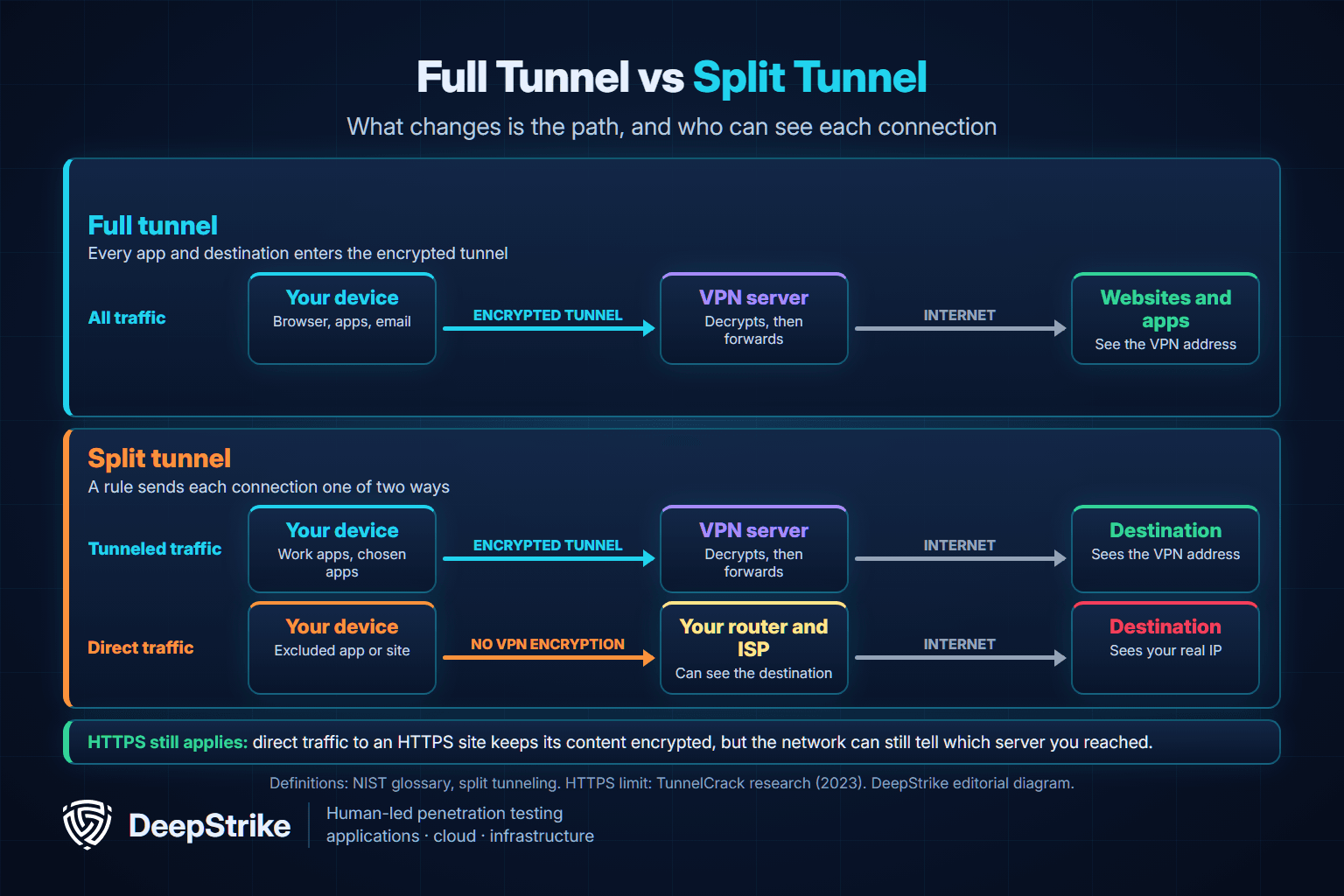
Split tunneling never adds protection. It removes protection from selected traffic in exchange for speed or compatibility, so the only real question is whether that traffic needs it.
Your device keeps a routing table, a list of rules that decide which network connection each piece of traffic leaves through. A full tunnel adds a default route, such as 0.0.0.0/0, that points at the VPN. Anything without a more specific rule goes into the tunnel.
A split tunnel changes those rules in one of three ways:
Routing and name lookups are separate. Cloudflare's documentation warns that its split tunnel rules only affect IP traffic, and that DNS requests follow their own settings. A site can sit outside the tunnel while its DNS lookup stays inside, or the reverse.
| Type | What the rule matches | Typical use | Main limit |
|---|---|---|---|
| By app | An installed app | Exclude a game or a video call app | Every connection from that app takes the same path |
| By website or URL | A site's domain name | Exclude one site that blocks VPNs | Some traffic has no URL, and domain rules depend on DNS |
| By IP address or route | A destination address range | Send only company networks through the VPN | Needs stable, published addresses |
| Dynamic | A hostname resolved while connected | Cloud services whose addresses change | Support varies by VPN client |
| Local network access | Addresses on your own network | Reach a printer or home storage | A known target for leak attacks |
Two details matter when choosing. Microsoft notes that Teams media traffic has no URL, so URL rules cannot route it. Cloudflare recommends IP rules over domain rules when possible, and says mobile clients apply rules only when the tunnel starts.
Every split tunnel uses one of two list types. With an exclude list, everything uses the VPN except what you name. With an include list, nothing uses the VPN except what you name. Android's allowed and disallowed lists work this way, and an app can use one or the other, not both.
The confusing part is the word "inverse." Many consumer VPN apps call their exclude list "split tunneling" and their include list "inverse split tunneling." Wikipedia's entry, which cites enterprise gateway documentation, defines inverse as the opposite: everything enters the tunnel except explicit exceptions. Both meanings are in active use, so the label tells you very little.
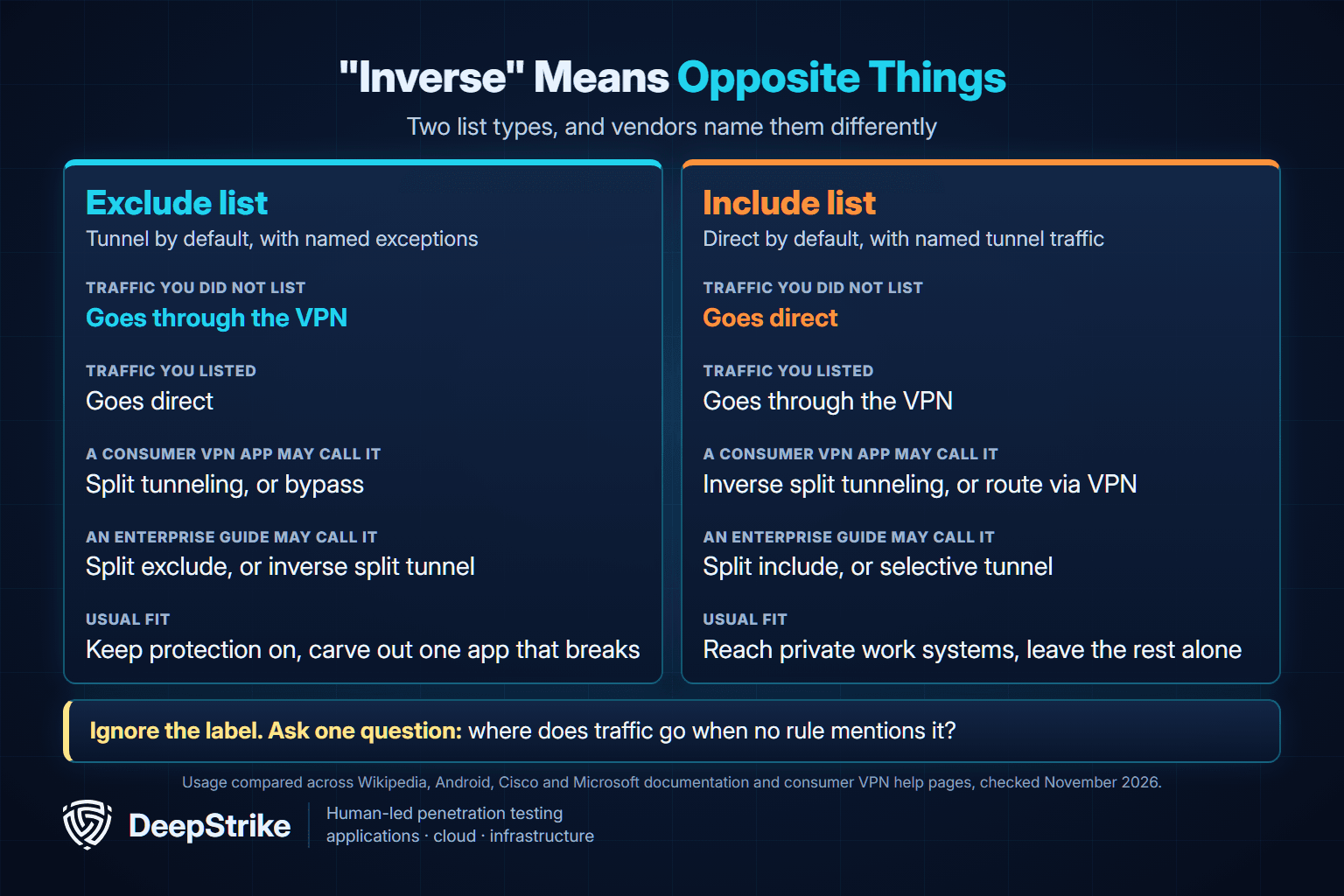
Ask one question instead: where does traffic go when no rule mentions it? If the answer is "through the VPN," a forgotten app stays protected. If the answer is "direct," a forgotten app is exposed, and you may not notice.
It can be, for the right traffic on the right network. Split tunneling is not a vulnerability. It is a decision to leave some traffic outside the VPN, and the risk depends on what that traffic is and who runs the network it crosses.
| What changes | What it means | What to do |
|---|---|---|
| Direct traffic loses VPN encryption | Protection now depends on the app or website using its own encryption | Exclude only apps and sites that use HTTPS |
| Your real IP address is visible | The destination can see your address and rough location | Do not exclude anything you use the VPN to keep private |
| The network can see destinations | HTTPS hides content, not which server you contacted | Avoid excluding sensitive services on networks you do not trust |
| DNS may leave the tunnel | Your ISP or resolver may see the names you look up | Check your VPN's DNS setting |
| Browsers may reveal your ISP address | WebRTC can discover both addresses on a split tunnel | Test your browser after enabling it |
| A kill switch may not cover excluded apps | They may stay online when the VPN drops | Disconnect the VPN once and watch what happens |
The HTTPS point deserves context. The FTC said in February 2023 that public Wi-Fi is usually safe because most websites now use encryption. The NSA's guidance is stricter: it strongly advises a VPN on public Wi-Fi, HTTPS browsing and avoiding bank or medical accounts there. Both are right about different threats, and a fake site can still have a padlock. Researchers behind the TunnelCrack work add the limit that matters here: HTTPS does not hide who you are talking to.
The browser point comes from the IETF. RFC 8828 says WebRTC can discover both the VPN address and your ISP address on a split-tunnel VPN. Our proxy, VPN and Tor comparison covers DNS and WebRTC leaks in more depth.
Turning split tunneling off does not guarantee that everything stays in the tunnel. Two pieces of research show why, and both abuse the routing table described above.
Both are forms of man-in-the-middle attack. They need an attacker on your local network, or at your ISP in the case of ServerIP. The TunnelCrack researchers advise updating your VPN app, disabling local network access if the app offers that option, and relying on HTTPS. The FCC adds that your phone's data plan may be more secure than Wi-Fi when you send sensitive information.
This table is our editorial guide, based on the sources above.
| Your situation | Recommendation | Why |
|---|---|---|
| A printer or home storage stopped working on your home network | Use it, or turn on the VPN's local network option | Low risk on a network you control |
| A game or video call lags at home | Exclude that one app | The app's traffic is usually low sensitivity |
| A site or app refuses your VPN connection | Exclude only that app, and check that it uses HTTPS | Better than turning the whole VPN off |
| You are on airport, hotel or cafe Wi-Fi | Keep a full tunnel, or switch to mobile data for the blocked app | You do not control the network |
| You use the VPN to hide your activity from your ISP or a network owner | Keep a full tunnel | Direct traffic reveals exactly what you want to hide |
| You are on a work laptop or work VPN | Follow company policy and do not change it yourself | The setting may be a contract or security requirement |
If you use split tunneling, prefer an exclude list and keep it short. That way, new apps stay protected by default.
Menu names vary, so these steps are general. Look for "split tunneling," "bypass," "app exclusions" or "route via VPN."
| Platform | Where the control lives | Good to know |
|---|---|---|
| Windows | The VPN app, or the SplitTunneling setting on a built-in VPN profile | Built-in profiles force all traffic through the tunnel by default |
| macOS | The VPN app, or the "Send all traffic over VPN" option on built-in profiles | Clearing that option may also require adding routes by hand |
| iPhone and iPad | The VPN app | Per-app VPN is a managed-device feature, so consumer options vary by app |
| Android | The VPN app | Block connections without VPN can cut off apps when lists are in use |
| Company VPN | The administrator's policy | Users normally cannot and should not change it |
The platform details come from Microsoft's Set-VpnConnection reference, Cisco Meraki's client VPN guide, Apple's VPN deployment overview and Android's VPN guide.
To check the result, compare your public IP address in a tunneled browser and in an excluded app or browser. They should differ. On a computer, you can also read your routing table. These commands only display information and change nothing:
# Windows
route print

# macOS
netstat -rn -f inet

# Linux
ip route show
With a full tunnel, the default route points at the VPN interface. With an include-list split tunnel, the default route stays on your normal connection and only named networks point at the VPN. App-based rules may not appear here, so rely on the IP comparison for those.
Only if you have a specific problem to solve, such as a blocked app or an unreachable printer. If nothing is broken, leave it off, because a full tunnel covers apps you forget about.
It is not bad in itself, but it leaves traffic outside the VPN. Companies dislike it because they cannot inspect that traffic, and because a compromised laptop can talk to the internet and the company network at the same time.
It can make excluded apps faster, because their traffic skips the trip through the VPN server and its encryption. The gain depends on your VPN server and connection.
Only if the app refuses to work over your VPN. If you must, do it on a network you trust or use mobile data. The NSA advises against accessing bank accounts on public Wi-Fi.
No. A kill switch blocks traffic when the VPN drops. Split tunneling decides which traffic uses the VPN while it is up. Excluded apps may keep working during a drop because they were never in the tunnel, and behavior varies by app.
Not through the VPN gateway. NIST notes that split tunneling stops the organization from examining much of that traffic. Software on a company-managed laptop may still record activity, so check your employer's policy.
Per-app VPN is one way to split traffic: the rule matches an app rather than an address. Apple and many enterprise platforms use the term for managed apps, while split tunneling is the broader term.
For a company, the question is not speed alone. A split tunnel changes which security controls see remote traffic, and that needs an owner and a test.
| Source | Position | Scope |
|---|---|---|
| NIST SP 800-53 Rev. 5, SC-7(7) | Prevent split tunneling unless securely provisioned with defined safeguards | Moderate and high federal baselines |
| NIST SP 800-46 Rev. 2 | Consider disabling it on untrusted networks such as hotspots | Telework guidance |
| NIST SP 800-171 Rev. 2, 3.13.7 | Prevent it, with no stated exception | Controlled unclassified information |
| CMMC Level 2, SC.L2-3.13.7 | Same requirement | US defense contractors |
| NIST SP 800-171 Rev. 3 (2024) | Requirement withdrawn; addressed by remote access and configuration requirements | Newer revision, not the CMMC baseline |
| Australian Cyber Security Centre (2021) | Devices should disable it | General guidance |
| CISA TIC 3.0 telework guidance (2020) | May be considered, if decision points cannot be easily bypassed | US federal agencies |
| Microsoft (page updated June 2026) | Recommends it for a narrow set of Microsoft 365 endpoints | Microsoft 365 customers |
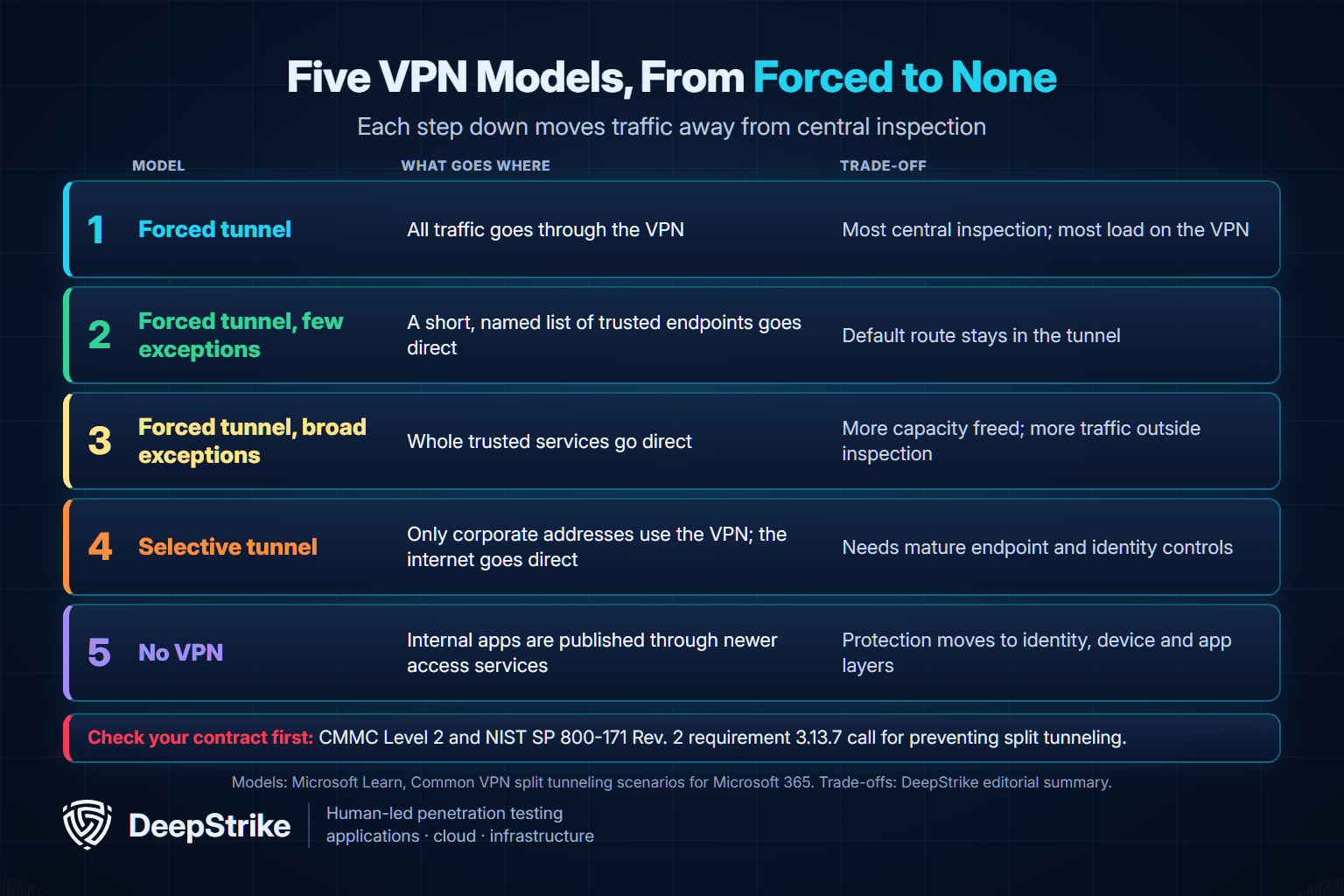
The Rev. 3 detail catches people out. CMMC's rule at 32 CFR 170.14 says Level 2 requirements are identical to Rev. 2, so Rev. 3's withdrawal does not relax the rule for those contractors. Confirm your contract language with your assessor. For the other positions, see SP 800-53, SP 800-46, the Australian guidance and CISA's telework guidance.
Microsoft's case is narrow on purpose. It targets endpoints that it says carry around 70-80% of Microsoft 365 traffic, in about 20 IP subnets, with encryption and security controls in the service. It describes five models, and recommends the second. Keep in mind that Microsoft sells the service it is advising on.
Also remember that the VPN gateway is itself a target. CISA and the NSA warn that exploited remote access VPN servers can lead to credential theft and remote code execution.
A policy document proves little until someone tests it. On systems you own or are authorized to test:
A network penetration test can include VPNs in scope. If you want an outside view of your remote access setup, see our penetration testing services or contact our team to discuss scope.
Mohammed Khalil is a Cybersecurity Architect at DeepStrike, specializing in advanced penetration testing and offensive security operations. With certifications including CISSP, OSCP, and OSWE, he has led numerous red team engagements, focusing on cloud security, application vulnerabilities, and adversary emulation. His work involves dissecting complex attack chains and developing resilient defense strategies for clients in the finance, healthcare, and technology sectors.
NIST CSRC Glossary: split tunneling (SP 800-113 and SP 800-53 Rev. 5)
NIST SP 800-53 Rev. 5: Security and Privacy Controls (SC-7(7) Split Tunneling for Remote Devices)
NIST SP 800-46 Rev. 2: Guide to Enterprise Telework, Remote Access, and BYOD Security
NIST SP 800-171 Rev. 3: Protecting Controlled Unclassified Information (03.13.07 withdrawn)
eCFR: 32 CFR Part 170, Cybersecurity Maturity Model Certification Program
TunnelCrack: Widespread design flaws in VPN clients (August 8, 2023)
IETF RFC 8828: WebRTC IP Address Handling Requirements
CISA: TIC 3.0 Interim Telework Guidance (April 8, 2020)
CISA: CISA and NSA Release Guidance on Selecting and Hardening VPNs (September 28, 2021)
NSA: Securing Wireless Devices in Public Settings (2021)
FTC: Are Public Wi-Fi Networks Safe? (February 2023)
FCC: Wireless Connections and Bluetooth Security Tips
Australian Cyber Security Centre: Using Virtual Private Networks (October 2021)
Microsoft Learn: VPN routing decisions
Microsoft Learn: Overview: VPN split tunneling for Microsoft 365
Microsoft Learn: Common VPN split tunneling scenarios for Microsoft 365
Microsoft Learn: Securing Teams media traffic for VPN split tunneling
Microsoft Learn: Set-VpnConnection
Apple: VPN overview for Apple device deployment
AWS: Split-tunnel on AWS Client VPN endpoints
Cloudflare One docs: Split Tunnels

Stay secure with DeepStrike penetration testing services. Reach out for a quote or customized technical proposal today
Contact Us
