November 5, 2026
Updated: November 5, 2026
How MITM attacks work, evil twin Wi-Fi, ARP, HTTPS stripping, rogue certificates and AiTM phishing, with real examples, detection signals and layered prevention.

Mohammed Khalil
A man-in-the-middle (MITM) attack is when an attacker secretly places themselves between two parties, such as a user and a website, so they can read, change or reuse what passes between them. HTTPS made classic eavesdropping much harder, but MITM attacks have not gone away. They moved to rogue Wi-Fi, local network spoofing, stripped or misused encryption and, most of all, phishing proxies that steal session cookies after the user passes MFA. This guide explains how MITM attacks work, the main types, real examples, the warning signs and the controls that prevent them.
A man-in-the-middle attack is an attack in which an adversary intercepts the communication between two systems and relays it, so that each side believes it is talking directly to the other. From that position the attacker can eavesdrop, alter messages, inject content or capture credentials and session tokens.
The attack goes by several names. MITRE ATT&CK catalogs it as T1557 Adversary-in-the-Middle, under the Credential Access and Collection tactics. OWASP's community page calls it the Manipulator-in-the-Middle attack, and protocol designers often say "on-path attacker." "AiTM" is now used most for phishing proxies that sit between a user and a real sign-in page. They all describe the same idea: the attacker controls a point that traffic has to pass through.
MITM attacks come in two broad forms:
ATT&CK lists four sub-techniques under T1557, which map to several of the types below: T1557.001 Name Resolution Poisoning and SMB Relay, T1557.002 ARP Cache Poisoning, T1557.003 DHCP Spoofing and T1557.004 Evil Twin. Our MITRE ATT&CK framework guide explains how techniques and sub-techniques fit together.
Almost every MITM attack follows three stages, whatever the technology.
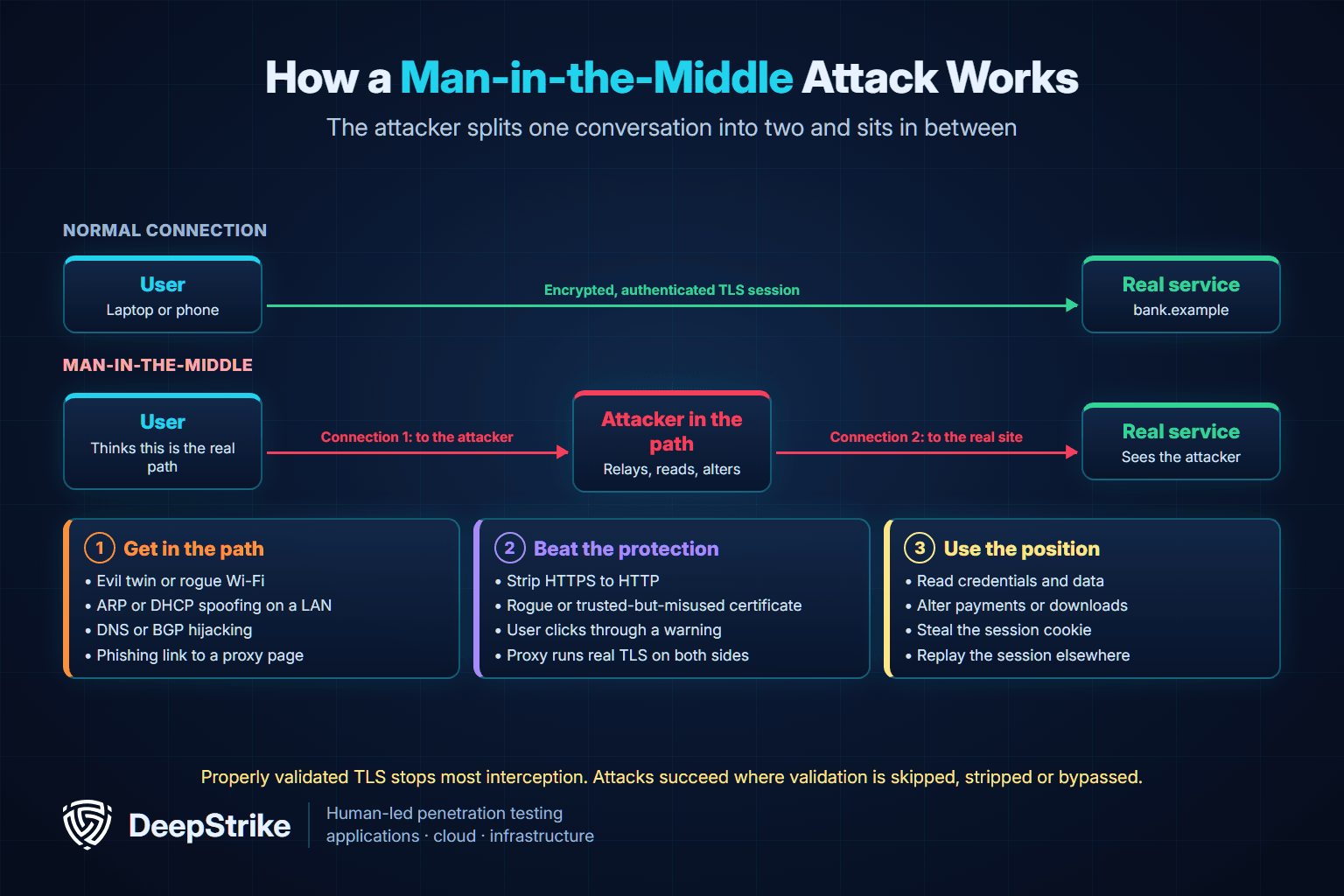
The key insight is in stage 2. Properly validated TLS stops a network attacker from reading or changing traffic. That is why most modern MITM attacks aim at the places where validation is skipped, stripped or made irrelevant, rather than at the encryption itself.
| Situation | Can the attacker read or change traffic? | Why |
|---|---|---|
| Plain HTTP on a shared network | Yes | Nothing is encrypted or authenticated |
| HTTPS with a valid certificate the browser checks | No | TLS encrypts the data and authenticates the server |
| HTTPS where the user clicks through a certificate warning | Yes | The user accepted the attacker's certificate |
| First HTTP request to a site without HSTS | Yes, for that connection | The attacker can stop the upgrade to HTTPS |
| Device that trusts a rogue or misused root certificate | Yes | The attacker's certificate passes validation |
| App that does not validate certificates at all | Yes | Any certificate is accepted |
| Phishing proxy the user reaches by clicking a link | Yes, for that session | The user connects to the attacker's site on purpose, so TLS protects the wrong connection |
The last row explains why AiTM phishing has become the dominant form. The victim's browser has a perfectly valid TLS connection, just to the attacker's domain instead of the real one.
An evil twin is a fake wireless access point that copies the name (SSID) of a legitimate network. MITRE's T1557.004 Evil Twin page, added in September 2024, describes how attackers broadcast a trusted SSID, offer a stronger signal or block the real access point, and even answer devices that send probe requests for networks they have joined before. Once connected, users may land on a fake captive portal that asks for credentials. ATT&CK records that APT28 used a Wi-Fi Pineapple device for evil twin attacks to capture credentials. Our guide to testing for evil twin attacks compares Wi-Fi security modes and shows how an authorized test checks them.
Evil twins are a real-world crime, not only a lab demo. In June 2024 the Australian Federal Police charged a man who allegedly ran fake free Wi-Fi networks at Perth, Melbourne and Adelaide airports and on domestic flights. According to the AFP, people who connected were sent to a page asking them to sign in with an email or social media account, and those details were saved to his devices. The investigation started after an airline's staff reported a suspicious network during a flight.
Wi-Fi protocols themselves have also had MITM-enabling flaws. In 2017 researcher Mathy Vanhoef of KU Leuven disclosed KRACK, a set of key reinstallation attacks against WPA2. NVD's record for CVE-2017-13077 says an attacker within radio range could "replay, decrypt, or spoof frames." The fix was patching both clients and access points; changing the Wi-Fi password did not help. Our wireless penetration testing guide covers how Wi-Fi environments are assessed.
On an Ethernet or Wi-Fi segment, devices use ARP to map IP addresses to hardware (MAC) addresses. ARP has no authentication, so an attacker on the same segment can announce that their MAC address belongs to the default gateway. Traffic meant for the router then flows through the attacker. This is ATT&CK T1557.002. We cover the mechanics, detection and fixes in depth in what is ARP spoofing.
DHCP spoofing (T1557.003) reaches the same position differently: a rogue DHCP server answers first and hands out the attacker's address as the gateway or DNS server. Attackers sometimes exhaust the real server's address pool first, a technique explained in our DHCP starvation guide. Switch features such as DHCP snooping and dynamic ARP inspection block both on managed networks.
If an attacker can change how a name resolves, they can send victims to their own server without touching the local network. DNS spoofing, also called DNS cache poisoning, makes a resolver or client accept a forged answer. At internet scale, attackers can also announce someone else's IP prefixes so that traffic is routed through them, as explained in our BGP hijacking guide. In both cases, TLS certificate validation is what stops the redirected victim from completing a trusted connection, which is why attackers pair these techniques with stage 2 tricks.
Inside Windows networks, the attacker does not always need to change routing. When a hostname cannot be resolved through DNS, Windows can fall back to broadcast protocols such as LLMNR and NBT-NS. An attacker on the segment answers those broadcasts, claims to be the requested host and receives an authentication attempt, which they can relay to another server. This is ATT&CK T1557.001, Name Resolution Poisoning and SMB Relay.
The defenses are configuration, not new products. ATT&CK's mitigations include disabling unneeded features (M1042), which here means turning off LLMNR and NBT-NS. Microsoft's SMB signing overview explains that signing protects deployments from relay and spoofing attacks, that domain controllers require signing by default, and that Kerberos is preferred over NTLM. Relay is a common route for lateral movement once an attacker is inside.
Many users still type a bare domain or follow an http:// link, and the site then redirects to HTTPS. An attacker in the path can intercept that first plain-HTTP request and keep the victim on HTTP while talking HTTPS to the real site. The victim sees no certificate warning, only a missing padlock that few people notice. Moxie Marlinspike presented this technique and his sslstrip tool at Black Hat DC in 2009, according to Wikipedia's HSTS article.
The standard answer is HTTP Strict Transport Security. RFC 6797, published in November 2012, lets a site tell browsers to use only HTTPS for a set period. The RFC is honest about its limit, which it calls the bootstrap MITM problem: a browser that has never seen the site's HSTS header can still be stripped on the first visit. The HSTS preload list closes that gap. It is built into Chrome, and Firefox, Safari and Edge use lists based on it, so preloaded domains are HTTPS-only from the very first request.
If an attacker can present a certificate the victim's device trusts, TLS no longer protects the connection. That can happen in three ways: a certificate authority is compromised or misissues, the device trusts an extra root certificate it should not, or the attacker controls a TLS-inspecting proxy the device already trusts.
The DigiNotar breach is the best-known case. According to Wikipedia's summary of the incident, a fraudulent wildcard certificate for *.google.com was issued on July 10, 2011, at least 531 certificates were misissued in total, and the Fox-IT investigation identified 300,000 Iranian Gmail accounts as the main victims. Browsers removed DigiNotar's roots around August 29, 2011, and its parent company announced on September 20, 2011 that DigiNotar had been declared bankrupt.
Software can create the same weakness. NVD's record for CVE-2015-2077 describes an SDK that installed a root certificate with the same private key on every customer's machine, which "makes it easier for man-in-the-middle attackers to spoof SSL servers." It was originally reported for Superfish adware preinstalled on certain Lenovo laptops in 2015.
Many MITM attacks are really after the session, not the password. Once a user signs in, the server issues a session cookie or token, and whoever presents it is treated as that user. RFC 6797 cites Firesheep, a 2010 browser extension that let anyone on open Wi-Fi capture session cookies sent over plain HTTP. Full-site HTTPS largely ended that, but cookie theft simply moved: ATT&CK tracks it as T1539 Steal Web Session Cookie, and malware in the browser itself (man-in-the-browser, T1185 Browser Session Hijacking) can act inside an already encrypted session. AiTM phishing, below, is the most common modern route to a stolen session.
Adversary-in-the-middle phishing is the form of MITM most organizations face today. The attacker does not need to be on the victim's network. They send a link to a look-alike sign-in domain that runs a reverse proxy. Every page and every answer is forwarded to the real identity provider in real time, so the user sees the genuine login flow, enters a password, approves MFA and is signed in. The proxy keeps the session cookie the real service returns. Because the lure is a message, AiTM sits where MITM meets social engineering.
Microsoft Threat Intelligence documented this at scale in its July 12, 2022 report on AiTM phishing. The campaign had attempted to target more than 10,000 organizations since September 2021. Microsoft explained that the phishing site holds two TLS sessions, one with the victim and one with the real site, and stressed that this "is not a vulnerability in MFA": the attacker steals the cookie after authentication, regardless of the sign-in method. The attackers then used mailboxes for business email compromise, searching for invoice threads, creating inbox rules to hide replies and inserting themselves into payment conversations. The report names open-source AiTM kits including Evilginx2, Modlishka and Muraena.
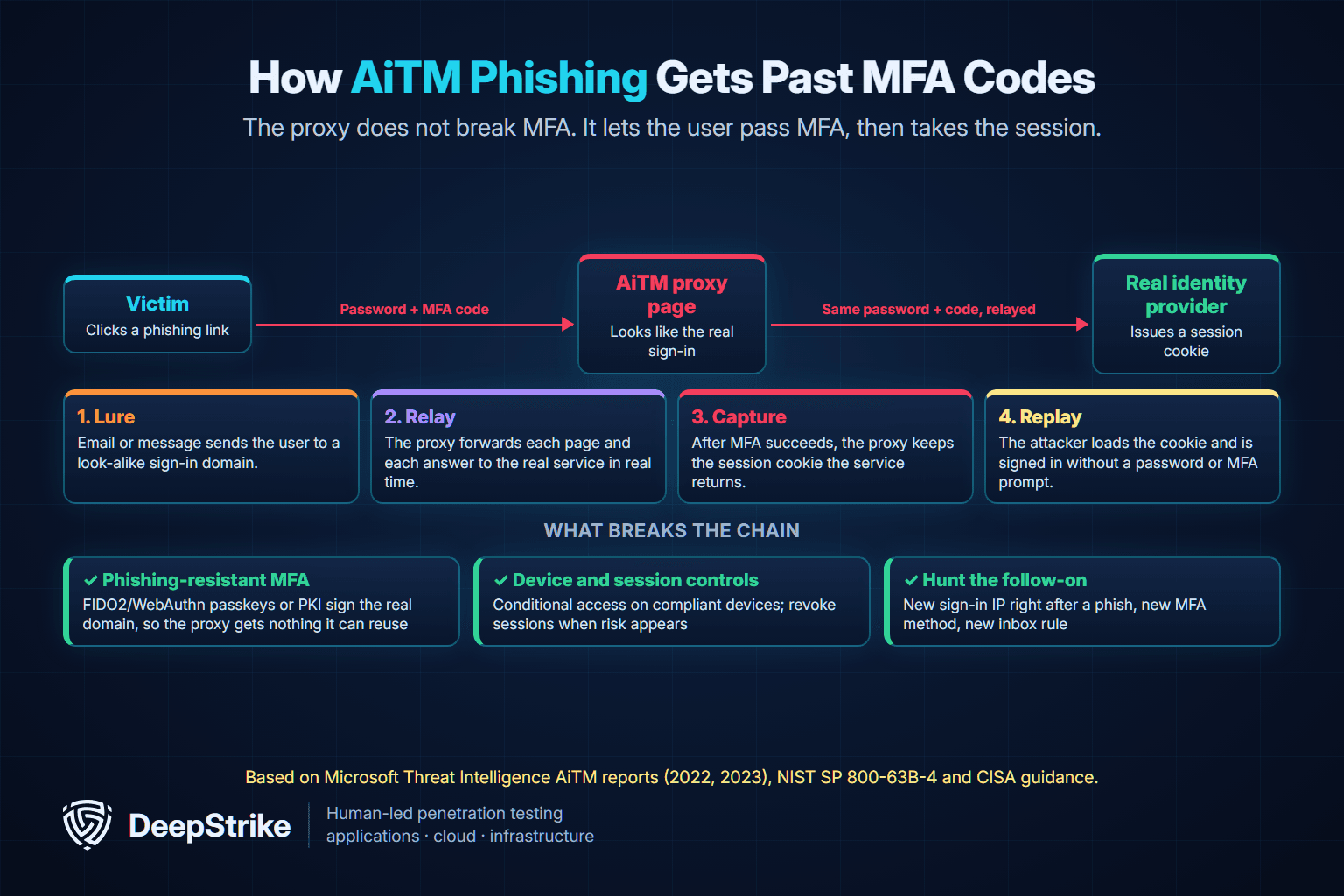
In a June 8, 2023 follow-up, Microsoft described a campaign using a kit from a group it tracks as Storm-1167. The phish came from a compromised trusted vendor. After replaying the stolen cookie, the attackers added a new phone-based MFA method to the account without being asked to re-authenticate, then sent more than 16,000 second-stage phishing emails to the victim's contacts. Microsoft's point for defenders is that a password reset is not enough: session cookies must be revoked and attacker MFA changes rolled back.
The difference comes down to whether the authenticator checks where it is being used. NIST's SP 800-63B-4, published in July 2025, defines phishing resistance as the protocol's ability to prevent authentication secrets being disclosed to an impostor verifier without relying on the user's vigilance. It recognizes two methods: channel binding and verifier name binding, where the authenticator's output is cryptographically bound to the real site's identity, as WebAuthn does. It states that authenticators requiring manual entry of an output, such as one-time passwords and out-of-band codes, are not phishing-resistant, because the code is not bound to the session.
| MFA method | What happens against an AiTM proxy | Source |
|---|---|---|
| SMS or voice code | User types the code into the proxy; it is relayed | NIST SP 800-63B-4; CISA fact sheet |
| Authenticator app one-time code | Same as SMS; the code works for whoever submits it first | NIST SP 800-63B-4; CISA fact sheet |
| Push approval, with or without number matching | User approves a real sign-in started by the proxy | CISA fact sheet (vulnerable to phishing) |
| FIDO2/WebAuthn security key or passkey | Signature is bound to the real domain, so the proxy's domain gets nothing reusable | NIST SP 800-63B-4; CISA fact sheet |
| PKI smart card or certificate-based authentication | Bound to the TLS channel or certificate; not relayable | NIST SP 800-63B-4; CISA fact sheet |
CISA's phishing-resistant MFA fact sheet (October 2022) reaches the same conclusion, calling FIDO/WebAuthn and PKI-based MFA "the gold standard." Push-based MFA has a separate weakness, repeated prompts until a user accepts, covered in our guide to MFA fatigue attacks.
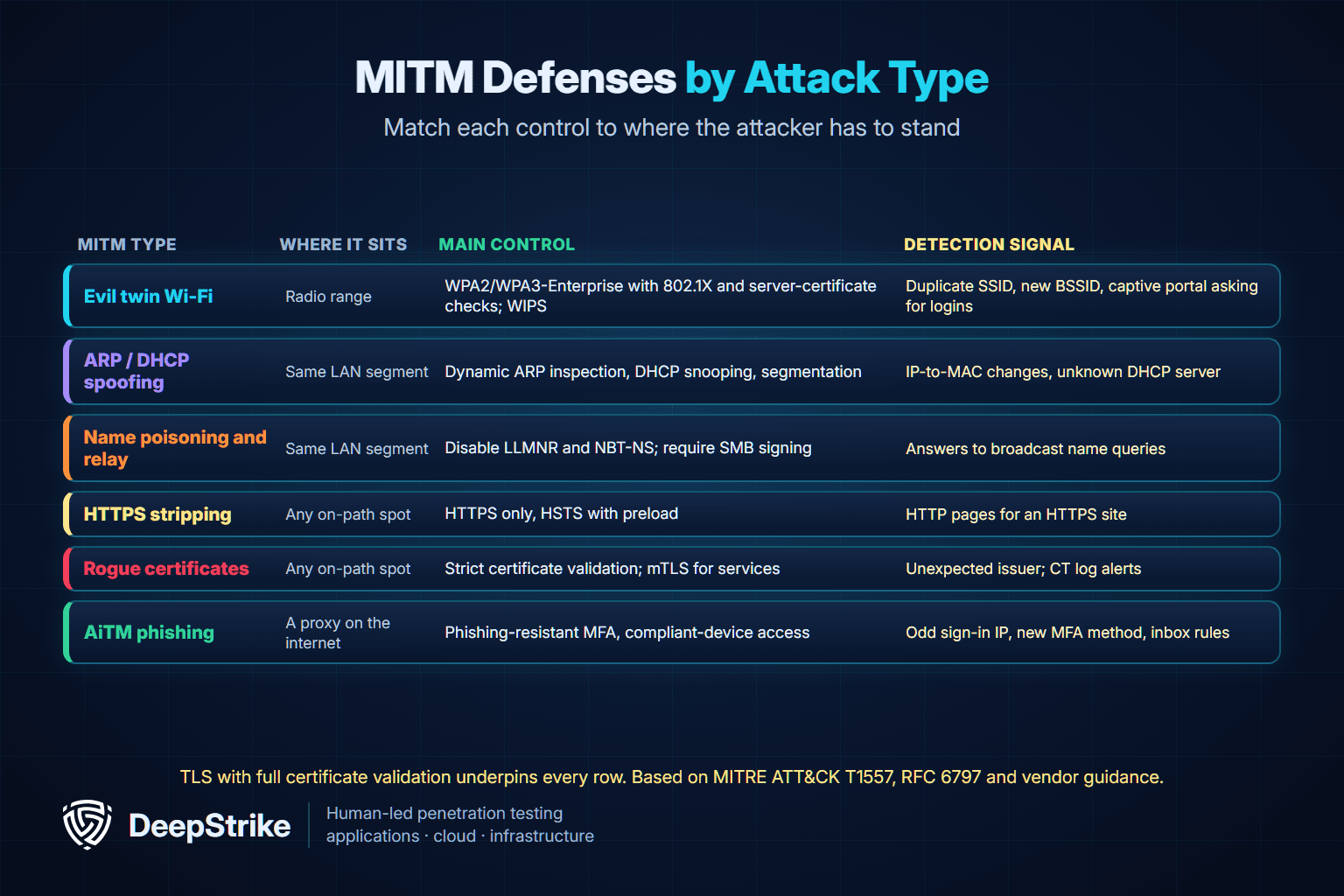
| Type | Where the attacker sits | What the attack needs | Main control |
|---|---|---|---|
| Evil twin Wi-Fi | Within radio range | Users or devices that join an untrusted network | WPA2/WPA3-Enterprise with 802.1X and server certificate checks; wireless intrusion prevention |
| ARP spoofing | Same LAN segment | Unauthenticated ARP | Dynamic ARP inspection; segmentation |
| DHCP spoofing | Same LAN segment | Clients that accept any DHCP offer | DHCP snooping |
| DNS spoofing or BGP hijacking | Resolver or internet routing | A forged answer or route | TLS validation; DNSSEC and route origin validation at the provider level |
| Name resolution poisoning and relay | Same Windows segment | LLMNR or NBT-NS enabled; unsigned SMB or NTLM | Disable LLMNR and NBT-NS; require SMB signing |
| HTTPS stripping | Anywhere in the path | A first request over HTTP | HSTS with preload |
| Rogue certificate or TLS interception | Anywhere in the path | A certificate the device trusts | Strict validation; certificate monitoring; mTLS for services |
| Session hijacking | Path, browser or endpoint | A readable session token | HTTPS-only Secure cookies; short sessions; device-bound access |
| AiTM phishing | A proxy on the internet | A user who clicks a link | Phishing-resistant MFA; compliant-device conditional access |
| Year | Case | Type | What happened | Source |
|---|---|---|---|---|
| 2011 | DigiNotar | Rogue certificate | Fraudulent *.google.com certificate; Fox-IT identified 300,000 Iranian Gmail accounts as main victims | Wikipedia summary of the Fox-IT report |
| 2015 | Superfish / Komodia | TLS interception software | Shared root CA private key across installations let attackers spoof HTTPS sites | NVD CVE-2015-2077 |
| 2017 | KRACK | Wi-Fi protocol flaw | WPA2 key reinstallation allowed replay, decryption or spoofing of frames | NVD CVE-2017-13077; KRACK site |
| 2021–2022 | Microsoft AiTM campaign | AiTM phishing | Attempted to target more than 10,000 organizations; session cookies stolen; BEC followed | Microsoft Threat Intelligence, July 2022 |
| 2023 | Storm-1167 kit campaign | AiTM phishing | Trusted-vendor phish; MFA method added; more than 16,000 second-stage emails | Microsoft Threat Intelligence, June 2023 |
| 2024 | Australian airports and flights | Evil twin Wi-Fi | Alleged fake free Wi-Fi captured email and social media logins | Australian Federal Police, June 2024 |
The pattern over 13 years is clear. Early cases attacked the trust system of TLS itself. Today the easier path is to leave TLS alone and get the user to connect to the wrong place, whether that is a fake access point or a proxy page.
MITM attacks are designed to be invisible, so detection depends on watching for side effects. MITRE's detection strategy for T1557 (DET0296) points to DNS and ARP poisoning, unauthorized changes to name resolution or certificate trust settings, TLS downgrades and unexpected routing changes, correlated with unusual network or authentication activity.
| Who watches | Signal | What it may indicate |
|---|---|---|
| Users | A certificate warning on a site that normally works | Interception or a rogue certificate; do not click through |
| Users | A familiar site loading over HTTP or without the padlock | HTTPS stripping |
| Users | Public Wi-Fi asking for an email or social media login | Evil twin captive portal (the AFP's specific warning) |
| Network team | An IP address that suddenly maps to a new MAC address, especially the gateway | ARP spoofing |
| Network team | DHCP offers from a server that is not authorized | DHCP spoofing |
| Network team | Responses to LLMNR or NBT-NS broadcasts from unexpected hosts | Name resolution poisoning |
| Wireless team | The corporate SSID broadcast from an unknown BSSID or with different security settings | Evil twin |
| Identity team | A sign-in from a new IP, country or hosting provider shortly after a user clicked a link | AiTM session replay |
| Identity team | A new MFA method registered, or new inbox rules that move or hide mail | Post-AiTM persistence and BEC (Microsoft 2022 and 2023) |
| Web and PKI team | Certificates for your domains in certificate transparency logs that you did not request | Misissuance or a rogue certificate |
For identity, Microsoft's 2022 guidance is to hunt for suspicious sign-in characteristics and unusual mailbox activity such as inbox rule creation. Detection on its own is not enough for AiTM. Once a session cookie is stolen, the response is to revoke sessions, remove attacker-added MFA methods and inbox rules, and then reset credentials.
No single control stops every MITM variant, because the attacker can stand in different places. The reliable approach is to make every hop authenticated: the network the device joins, the server the device talks to and, for sign-ins, the site the authenticator is used on.
Use TLS for every connection, internal ones included, and never ship code that disables certificate validation "temporarily." RFC 8446 defines TLS 1.3, and NIST's SP 800-52 Rev. 2 gives configuration guidance for US federal systems that is a useful baseline elsewhere. Monitor certificate transparency logs for certificates issued for your domains, and audit which root certificates your managed devices trust.
Redirect HTTP to HTTPS, then send the HSTS header on every HTTPS response so browsers refuse plain HTTP afterward. The preload site recommends ramping max-age up in stages. To join the preload list, it requires a valid certificate, HTTPS on all subdomains, and a header like this one (illustrative):
Strict-Transport-Security: max-age=31536000; includeSubDomains; preloadPreloading is hard to undo, so check every subdomain, including internal ones, before submitting. Mark session cookies Secure so they are never sent over HTTP.
Standard TLS proves the server's identity to the client. Mutual TLS (mTLS) also makes the client present a certificate, so an attacker who intercepts a service-to-service connection cannot impersonate either side. For OAuth-protected APIs, RFC 8705 (February 2020) defines mTLS client authentication and certificate-bound access tokens, which make a stolen token useless without the matching private key. Service meshes commonly provide mTLS for internal traffic.
Use WPA2- or WPA3-Enterprise with IEEE 802.1X authentication for corporate wireless, and configure clients to validate the authentication server's certificate and name. Without that check, a device can hand its credentials to an evil twin running its own authentication server. Add wireless intrusion prevention, which MITRE lists as a mitigation for evil twins, and keep access points and clients patched against protocol flaws like KRACK. Guest networks should be isolated from internal systems.
On managed switches, enable DHCP snooping and dynamic ARP inspection, which stop most ARP and DHCP spoofing. Segment networks so that one compromised laptop cannot reach everything (ATT&CK M1030). Use 802.1X on wired ports as well where it is practical, so unknown devices cannot plug in and start answering ARP.
Disable LLMNR and NBT-NS where they are not needed. Require SMB signing on servers and clients, prefer Kerberos over NTLM, and plan to reduce NTLM use. These settings remove the conditions that make T1557.001 work.
Move privileged users first, then everyone, to FIDO2/WebAuthn security keys or passkeys, or to PKI-based authentication. NIST SP 800-63B-4 requires verifiers at AAL2 to offer at least one phishing-resistant option and requires phishing resistance at AAL3. Microsoft's AiTM guidance adds conditional access that requires compliant or managed devices, continuous access evaluation that revokes access when risk changes, and requiring re-authentication before anyone can register a new MFA method. Keep session lifetimes proportionate to risk so a stolen cookie expires sooner.
A VPN protects traffic between a device and the VPN gateway, which helps on untrusted Wi-Fi, but it does nothing against an AiTM phishing proxy the user visits on purpose. User training (ATT&CK M1017) still matters for specific behaviors: never click through certificate warnings, distrust open networks that ask for logins, and report unexpected sign-in prompts.
| Control | What good looks like | How to verify |
|---|---|---|
| TLS everywhere | All external and internal services use TLS with validated certificates | Inventory services; review code and configs for disabled validation |
| HSTS | Header on every HTTPS response; includeSubDomains; preload where feasible | Inspect response headers; check preload status |
| Session cookies | Secure, HttpOnly, sensible lifetime | Inspect Set-Cookie responses |
| Certificate monitoring | Alerts on unexpected certificates for your domains | Review certificate transparency monitoring |
| mTLS | Required between internal services and for high-value APIs | Attempt a connection without a client certificate in a test environment |
| Corporate Wi-Fi | WPA2/WPA3-Enterprise with 802.1X; clients validate the server certificate | Review client profiles; test with a lab access point |
| Wireless monitoring | Rogue and duplicate-SSID detection | Review WIPS alerts and coverage |
| Switch protections | DHCP snooping and dynamic ARP inspection enabled | Review switch configuration per VLAN |
| Windows name resolution and SMB | LLMNR and NBT-NS off; SMB signing required | Review Group Policy and SMB configuration |
| MFA | FIDO2/WebAuthn or PKI for admins and high-risk users | Review authentication method policies |
| Session and MFA changes | Compliant-device access; re-authentication to add MFA methods | Review conditional access policies |
| Incident response | Playbook revokes sessions and removes attacker MFA methods and inbox rules | Tabletop the AiTM scenario |
Testing for MITM exposure means checking whether an attacker could get in the path and whether anything would stop them once there. It touches real networks and real users, so professional engagements start with written authorization, an agreed scope, test accounts and clear rules about whose traffic may be observed. No real user traffic is captured beyond what the scope allows. The method below is a checklist, not a set of commands.
Testers list the places an attacker could reach: guest and corporate Wi-Fi, office LAN ports, VPN and remote-access gateways, internal name resolution, and every sign-in page users see. This decides which of the types above are in scope.
On wireless, testers check whether corporate clients validate the 802.1X server certificate, whether a lab access point broadcasting the corporate SSID is detected by wireless monitoring, and whether guest networks are isolated. Our wireless penetration testing guide explains the scope in more detail.
From an agreed internal foothold, testers check whether switch protections stop ARP and DHCP spoofing, whether LLMNR and NBT-NS are still answered, and whether SMB signing is required. These checks are a standard part of internal penetration testing and wider network penetration testing.
Testers confirm that HSTS is present on every public host, that HTTP never serves sensitive pages, that cookies carry the Secure attribute, and that mobile and desktop apps reject invalid certificates. Internal APIs are checked for plain-text traffic and for mTLS where it is required.
With the client's approval, a phishing simulation can measure how many users would reach a look-alike sign-in page, but the more useful question is what happens next. Testers review which MFA methods each group can use, whether conditional access would block a session replayed from an unmanaged device, and whether the security team would see the sign-in and new MFA registration. This belongs in a social engineering penetration test or red team engagement.
A useful finding names where the attacker could stand, which control was missing, what the realistic impact is (for example, captured domain credentials or a replayed Microsoft 365 session), and the specific fix. After remediation, the same checks are repeated to confirm the gap is closed.
It is when someone secretly sits between you and the site or service you are using. They pass your messages along so everything seems normal, while reading or changing what goes through, such as your password or the session cookie that keeps you logged in.
Yes, but they work differently. Properly validated HTTPS stops attackers from reading traffic on the network. Attacks now target the gaps: users clicking through certificate warnings, first visits to sites without HSTS, devices that trust rogue certificates, and phishing proxies that users reach by clicking a link.
Common signs are certificate warnings on familiar sites, sites loading over HTTP, public Wi-Fi asking for an email or social login, unexpected sign-in alerts from a new location, and new MFA methods or mailbox rules you did not create. Network teams also watch for gateway MAC changes and unauthorized DHCP servers.
It takes two things: a way into the path, such as an open Wi-Fi network, an unprotected LAN or a phishing link, and a weakness that removes the protection, such as missing HSTS, disabled certificate checks, a trusted rogue certificate or MFA that can be relayed.
Only phishing-resistant MFA can. SMS codes, app codes and push approvals can be relayed by an AiTM proxy, which then steals the session cookie. FIDO2/WebAuthn passkeys and security keys or PKI smart cards are bound to the real site, so the proxy gets nothing it can reuse.
A VPN helps on untrusted networks such as public Wi-Fi, because it encrypts traffic to the VPN gateway. It does not stop AiTM phishing, rogue certificates trusted by the device, or attacks beyond the VPN gateway.
They describe the same position. MITRE ATT&CK uses "adversary-in-the-middle" for all such techniques. In practice "AiTM" usually refers to phishing kits that proxy a real sign-in page to steal session cookies, while "MITM" also covers network attacks like ARP spoofing and evil twins.
MITM risk lives in specific gaps: a client that does not validate the 802.1X certificate, a switch without ARP inspection, a subdomain without HSTS, or an admin group still using app codes. Each of these can be checked and fixed before an attacker finds it.
DeepStrike's penetration testing services include infrastructure penetration testing, red team engagements and social engineering assessments that simulate real-world attacks such as phishing. Reports include step-by-step reproduction instructions, root cause analysis and specific remediation recommendations. To scope a test, contact DeepStrike.
Mohammed Khalil is a Cybersecurity Architect at DeepStrike, specializing in advanced penetration testing and offensive security operations. With certifications including CISSP, OSCP, and OSWE, he has led numerous red team engagements, focusing on cloud security, application vulnerabilities, and adversary emulation. His work involves dissecting complex attack chains and developing resilient defense strategies for clients in the finance, healthcare, and technology sectors.

Stay secure with DeepStrike penetration testing services. Reach out for a quote or customized technical proposal today
Contact Us
