November 6, 2025
Updated: November 5, 2026
Discover how wireless penetration testing secures Wi-Fi, Bluetooth, and IoT networks through real-world attack simulations, tools, and best practices.

Mohammed Khalil
Wireless penetration testing is an authorized security assessment of an organization's radio networks: mainly Wi-Fi, but also Bluetooth, Zigbee and other IoT radios. Testers use the same techniques a nearby attacker would, under written rules of engagement, to find weak encryption, exposed WPS, rogue or evil twin access points, poor guest isolation and insecure devices before someone else does. The result is evidence of what an attacker within radio range could reach, plus prioritized fixes and a retest to confirm they hold.
Wireless penetration testing is a specialized security audit of radio-based networks (Wi‑Fi, Bluetooth, Zigbee, RFID) using hacker-style techniques. Think of it as a safe, authorized war-driving mission: testers attack your wireless infrastructure with real-world exploits to see how an adversary could break in. This includes evaluating Wi‑Fi access points, SSIDs, encryption, WPS settings, Bluetooth device pairing, GATT services, and IoT radios for weaknesses. Wireless pentests go beyond a wired network scan by focusing on radio signals and protocols, and uncover issues a standard scan might miss. For example, BreachCraft notes wireless tests probe access points, network cards and connected devices exactly as attackers would, looking for any misconfiguration or exposed service. Like all pentests, a wireless test must be done with explicit written permission and clear rules of engagement.
Unlike passive vulnerability scans, a wireless pentest often triggers devices to reveal hidden information. Testers might detect even hidden non broadcast SSIDs, SSID probing, and legacy WEP networks. As NIST emphasizes, conducting wireless scans with passive analyzers helps organizations determine corrective actions to mitigate risks posed by wireless enabled technologies. In short, wireless pentesting reveals gaps, weak keys, open guest networks, rogue APs, etc. before real attackers exploit them.
DeepStrike's Red Teaming Services take a cracked Wi-Fi key and keep going, showing exactly what an attacker reaches once they are on your network.
Wireless security is critical today. In 2026, enterprises often run large numbers of IoT and wireless endpoints. Globally, connected IoT devices now exceed 21 billion (IoT Analytics, 2025), meaning an enormous invisible attack surface. An attacker can target your Wi-Fi or Bluetooth from outside your building. Any weak WPA2 passphrase, open Bluetooth profile, or unpatched IoT gadget can serve as an entry point.
Moreover, many compliance frameworks mandate wireless controls and testing. For example, PCI DSS 4.0.1 requires quarterly scans for unauthorized wireless access points (Requirement 11.2.1) and penetration testing of in-scope networks at least annually (Requirement 11.4), which includes wireless networks connected to the cardholder data environment, and segmentation controls that keep guest Wi-Fi out of it. HIPAA also demands strong wireless safeguards for patient data. A thorough wireless pentest not only uncovers security holes, it helps demonstrate compliance with PCI, HIPAA, SOC 2, and more. In short, as data breaches and IoT threats rise, wireless pentesting is no longer optional; it is a business necessity to protect data and reputation.
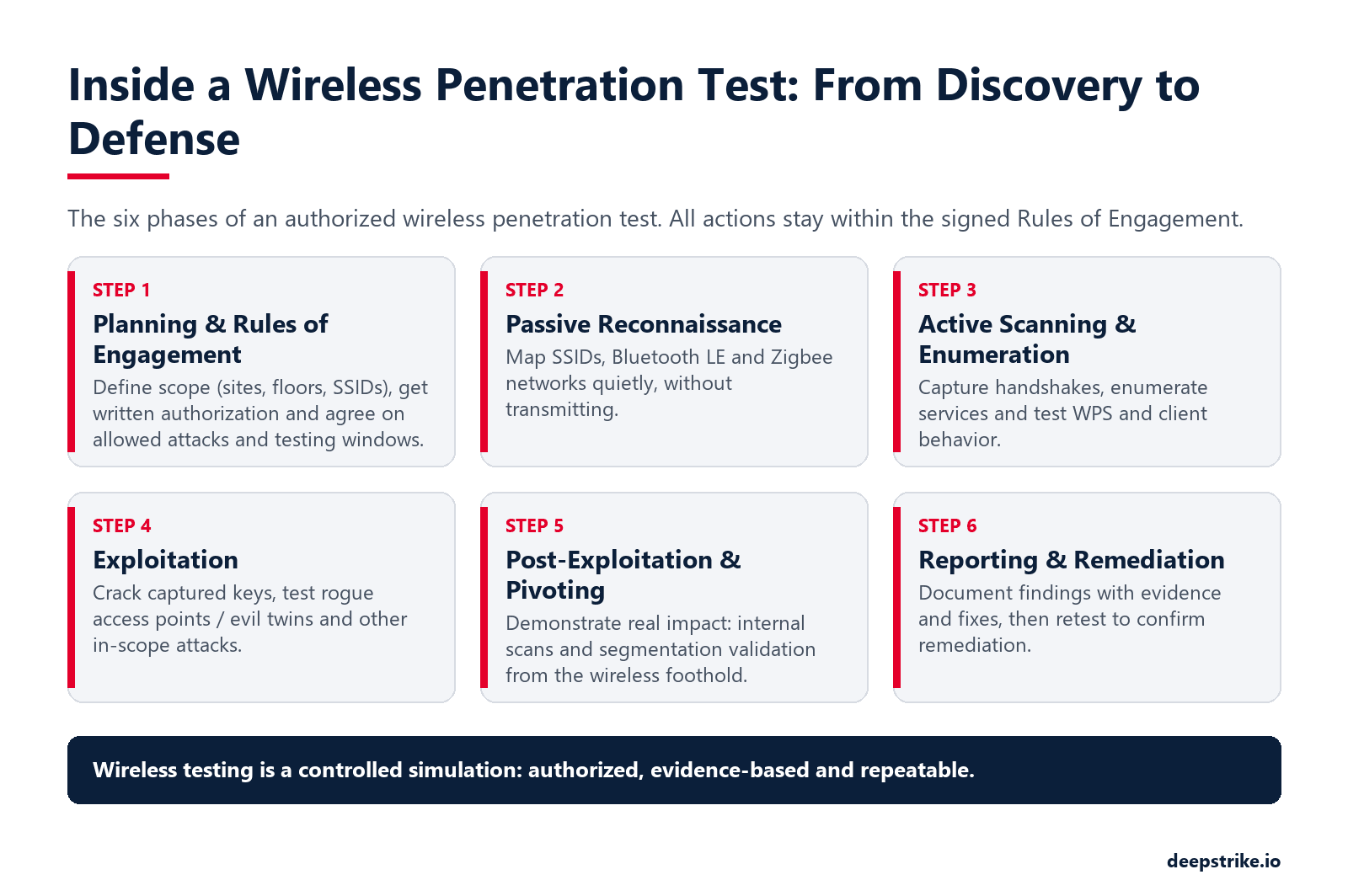
Wireless penetration testing follows familiar pentest phases, adapted for radio. Here’s the typical methodology:
| Aspect | Passive Scanning (Stealth) | Active Scanning (Probing) |
|---|---|---|
| What it does: | Listens to Wi-Fi/Bluetooth/LoRa networks without sending packets. | Actively sends probes (e.g., deauth, probe requests, GATT requests). |
| Tools: | Kismet, Wireshark (monitor mode), BlueHydra, RTL-SDR (sniffing mode). | airodump-ng (channel hop or targeted), wash (WPS), bettercap (deauth, BLE recon). |
| Pros: | Undetectable by target APs/IDS. Good for finding hidden SSIDs and listening to beacons and adverts. | Faster data gathering forces devices to respond, triggers handshakes. Reveals more details quickly. |
| Cons: | May miss information (e.g., no handshake capture if no client activity). Slower, requires patience. | Devices/APs may notice it (e.g., deauth). Potentially noisy in logs. May violate stealth requirements. |
| Use Case: | Initial mapping of environment and unknown devices. When stealth is needed or for compliance with passive-only rules. | When you need handshake captures, WPS info, or to prompt devices (e.g., detach clients to sniff). Ideal for targeted exploitation steps. |
Use both methods together: start passive to map everything quietly, then selectively go active with permission to gather what passive can’t, like WPA handshakes or service enumeration.
Wireless networks and devices have well known weak spots:
Attack examples like the Evil Twin fake Wi Fi hotspot show how dangerous wireless can be. Kaspersky explains an Evil Twin is a fake AP duplicating a legitimate SSID; any traffic from connected users then flows through the attacker’s machine. For example, a victim at a café could connect to the attacker’s AP and enter banking logins into a fake captive portal. These illustrate why wireless pentesting must include social engineering scenarios like captive portal spoofing within scope to test user awareness.
By validating these attacks in a controlled test, you ensure controls are in place. For instance, use WPA3 Enterprise with 802.1X or strong WPA2 passphrases, disable WPS, isolate guest WLANs, and enforce BLE/IoT device enrollment processes. Wireless pentesting reveals where such improvements are needed.
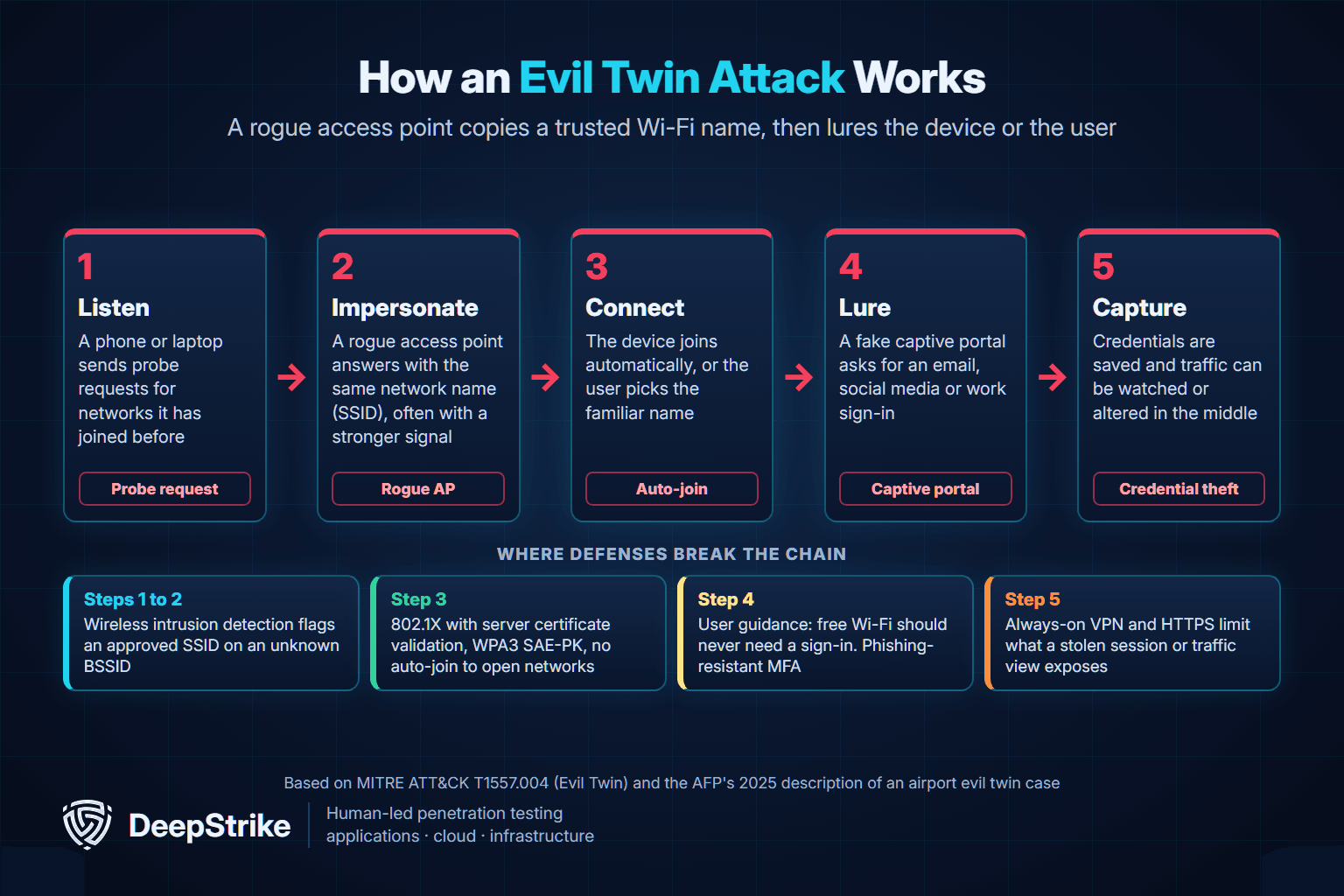
An evil twin attack is a wireless attack in which a rogue access point copies the name (SSID) of a legitimate Wi-Fi network so that devices or people connect to it instead of the real one. Once connected, the attacker sits between the victim and the internet and can show a fake sign-in page, collect credentials, or watch and alter unencrypted traffic. MITRE ATT&CK tracks it as T1557.004 Evil Twin, a sub-technique of adversary-in-the-middle, and our man-in-the-middle attack guide shows how it compares with ARP spoofing, SSL stripping and AiTM phishing. In a wireless pentest it is usually the most realistic test of whether your devices can tell your network from a copy.
Wi-Fi clients choose networks largely by name. A phone or laptop remembers the SSIDs it has joined and, depending on the operating system, may send probe requests asking whether those networks are nearby. MITRE's technique entry describes three ways attackers exploit this: broadcasting the same SSID as a legitimate network, offering a stronger signal or blocking the real access point so clients move to the rogue one, and answering probe requests for networks a device has saved. NIST's SP 800-153 guidelines for securing WLANs (February 2012) describe the enterprise version of the problem: an access point configured to look like part of the organization's WLAN can open a backdoor into the wired network that bypasses perimeter controls, and lets the attacker view and manipulate the traffic of any client that connects to it by mistake.
Many evil twins do not need to break any encryption. The rogue network is open, and the first page a victim sees is a captive portal styled like a hotel, airline or corporate guest login. It asks for an email address and password, a social media sign-in, or the Wi-Fi passphrase itself, and saves whatever is typed. HTTPS does not help here, because the victim hands the secret to the attacker's page directly. The defense is partly technical, since phishing-resistant MFA makes a captured password far less useful, and partly behavioral: the Australian Federal Police advise that joining a free Wi-Fi network should never require personal details.
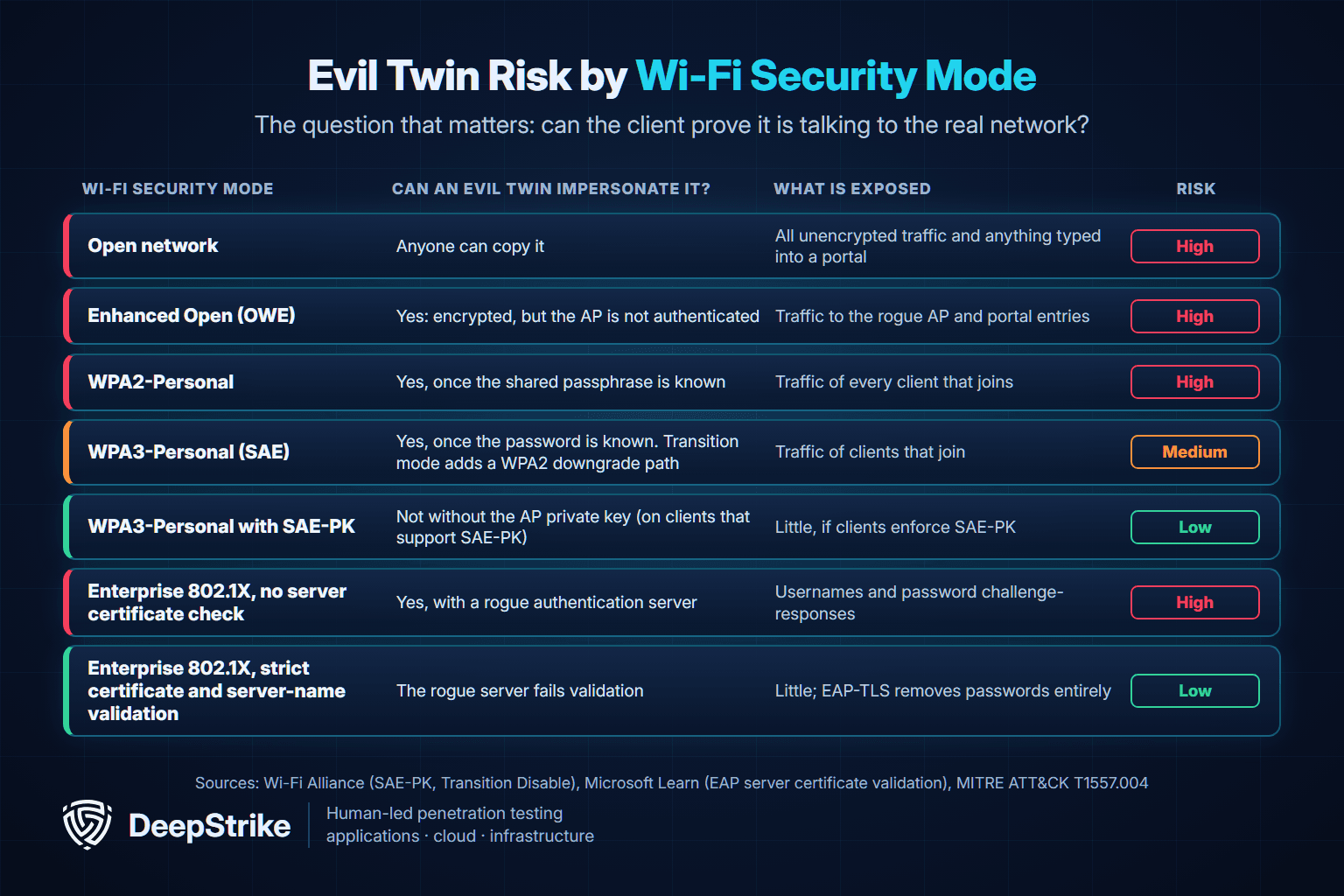
How exposed a network is depends on one question: can the client prove it is talking to the real network? Open and Enhanced Open (OWE) networks give it no way to do that. RFC 8110, which defines OWE, states that opportunistic encryption provides no authentication and is open to an attacker who impersonates an access point. Personal networks authenticate with a shared password, so anyone who knows it can stand up a twin that clients accept. The Wi-Fi Alliance notes that this applies to WPA3-Personal too, which is why its December 2020 update added SAE Public Key (SAE-PK), which ties the password to a key only the real access point holds, and Transition Disable, which stops clients from being downgraded to WPA2 once they have connected with WPA3. Enterprise 802.1X networks are only as strong as the client's check of the authentication server.
| Wi-Fi security mode | Can an evil twin impersonate it? | What is at risk | Main control |
|---|---|---|---|
| Open network | Yes, trivially | Unencrypted traffic and anything typed into a portal | Keep staff off it; use an always-on VPN on untrusted Wi-Fi |
| Enhanced Open (OWE) | Yes; traffic is encrypted, but the access point is not authenticated | Traffic sent to the rogue access point and portal entries | Treat as untrusted; VPN for staff |
| WPA2-Personal | Yes, once the shared passphrase is known | Traffic of every client that joins | Limit and rotate the passphrase; move staff to 802.1X |
| WPA3-Personal (SAE) | Yes, once the password is known; transition mode also allows a WPA2 downgrade | Traffic of clients that join | Disable transition mode when clients allow; enable Transition Disable |
| WPA3-Personal with SAE-PK | Not without the access point's private key, on clients that support SAE-PK | Little, if clients enforce SAE-PK | Confirm client support before relying on it |
| WPA2/WPA3-Enterprise without server certificate validation | Yes, with a rogue authentication (RADIUS) server | Usernames and password challenge-responses, for example with PEAP-MSCHAPv2 | Enforce certificate and server-name validation by policy |
| WPA2/WPA3-Enterprise with strict validation | No; the rogue server fails the certificate and name check | Little; EAP-TLS also removes reusable passwords | Keep validation locked; prefer EAP-TLS |
Microsoft's EAP-TLS and PEAP certificate requirements spell out what strict validation means on Windows: the client accepts the authentication server only if its certificate chains to a trusted root CA, carries the Server Authentication purpose, and matches the server name configured for the connection. The weak point is the prompt. If a user may accept a certificate with an unexpected name, that certificate is added to the trusted store, so deploy wireless profiles through Group Policy or MDM and remove that choice. Even a well-protected corporate SSID does not stop an attacker from broadcasting an open network with a similar name and a portal, which is why detection and user guidance still matter.
In June 2024 the Australian Federal Police charged a 42-year-old Western Australian man over fake free Wi-Fi networks at Perth, Melbourne and Adelaide airports and on domestic flights. The investigation began in April 2024 after an airline reported that its staff had spotted a suspicious network during a domestic flight. According to the AFP's November 2025 sentencing release, the portable wireless device he carried, sometimes called a WiFi Pineapple, listened for device probe requests and created networks with matching names, so phones joined automatically. A login page then asked for email or social media credentials, which were saved to his devices; no real internet access was provided. He pleaded guilty to 15 charges, including unauthorized access to restricted data and attempted destruction of evidence, and on November 28, 2025 the Perth District Court sentenced him to seven years and four months in prison.
The lesson for organizations goes beyond travelers. The same pattern works against staff in a lobby, a parking lot or a branch office, and this case surfaced because people noticed an odd network and reported it. A wireless pentest should test both halves: whether managed devices can be lured, and whether anyone, human or sensor, notices.
Detection works best when you know exactly what your legitimate wireless estate looks like. Useful signals include:
An evil twin test is an active attack against people and devices, so it needs tighter rules than a passive survey. A typical authorized engagement runs in six stages, and none of them involves networks or devices outside the agreed scope:
When the portal lure tests people rather than devices, it overlaps with social engineering penetration testing, so agree consent, messaging and data handling with HR and legal first. Evil twin scenarios also fit inside a broader network penetration testing engagement, and DeepStrike's penetration testing services can scope wireless and evil twin testing for your sites.
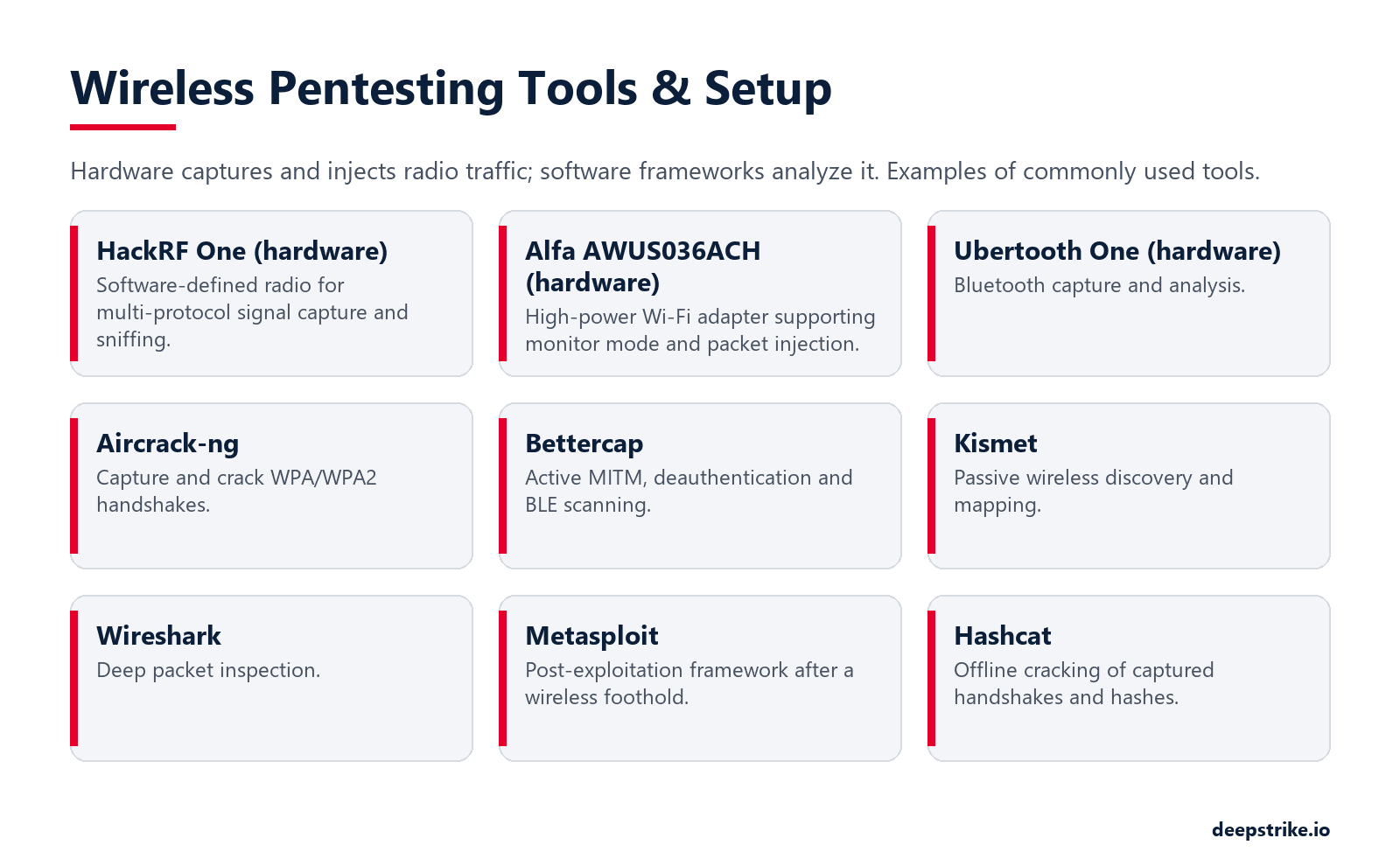
A successful wireless pentest relies on the right hardware and software:
NIST even recommends using a mobile device with analyzer software that supports both passive and active scanning. In practice, testers may script tasks with Python/Scapy or use automated tools like Wifite or Airgeddon for broad sweeps. The combination of these tools enables a thorough wireless assessment in any environment.
Pricing for wireless pentesting varies by scope and engagement model. Typically, wireless testing is part of a broader pentest or a specialized add on. Cost depends mainly on the number of sites, access points, SSIDs and devices in scope, the depth of testing (for example rogue access point hunting or WPA-Enterprise attacks), and tester experience. A purely wireless-focused test with a narrow scope sits at the lower end, while bundling it with internal and external network tests is common and raises the total. For how engagements are scoped and quoted, see our penetration testing pricing page.
Some organizations prefer a continuous or on demand model Penetration Testing as a Service PTaaS over one off tests. PTaaS platforms let you spin up a wireless test whenever needed even after each major update and view results in real time, rather than waiting months for a static report. This fits modern DevOps workflows and can be more cost effective long term. DeepStrike's continuous penetration testing re-tests applications and APIs as new releases ship; wireless testing is scoped as a separate engagement.
As a market estimate (not DeepStrike pricing), small businesses might pay just a few thousand dollars for a wireless assessment, whereas large regulated firms should expect mid five to six figure contracts when combined with full network pentesting. Always ensure the scope is clear e.g., exactly which SSIDs, physical sites, and IoT classes are included. See DeepStrike’s Wireless Penetration Testing Services for specific offerings.
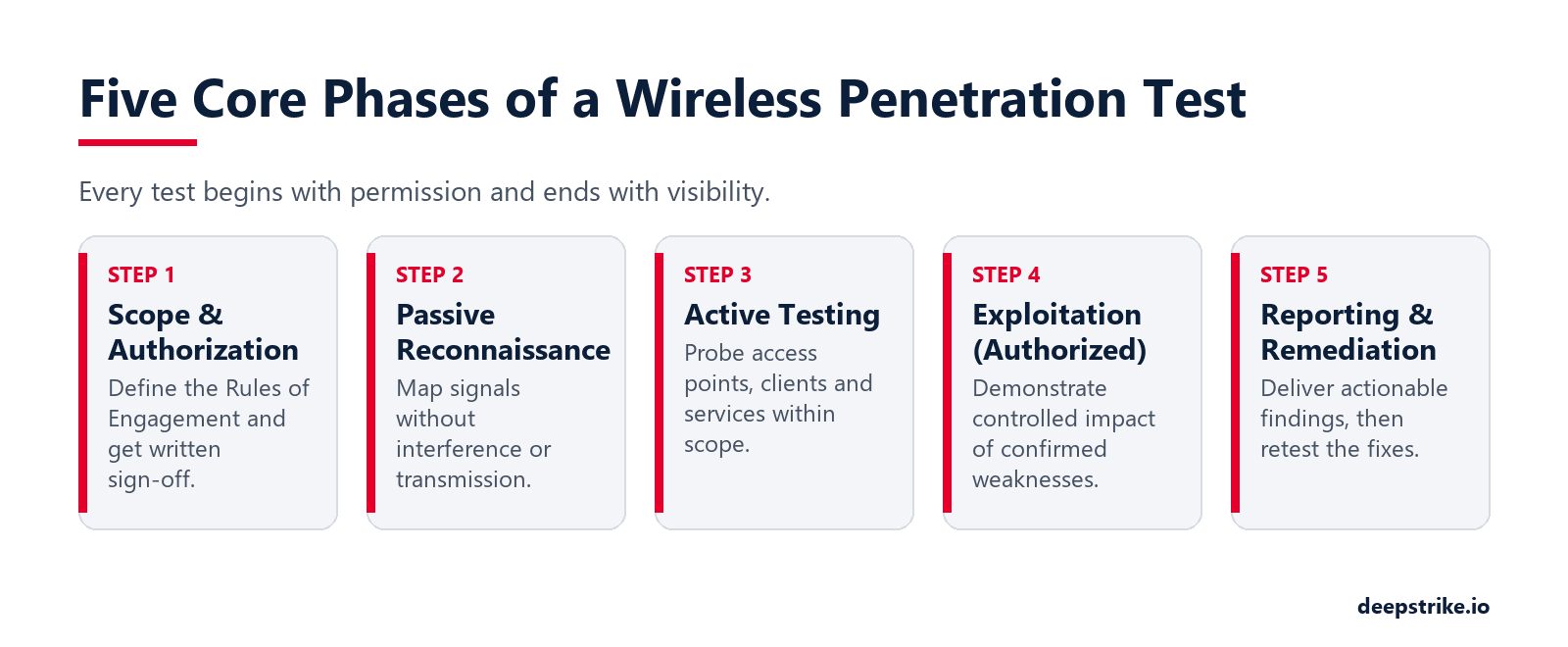
Use these five steps as a quick checklist. They condense the six phases described in Wireless Pentest Phases and Steps above, with post-exploitation folded into the exploitation and reporting steps.
A wireless pentest is often part of a larger compliance or risk strategy. For example, PCI DSS calls for penetration testing of the cardholder data environment, which includes wireless networks connected to it. HIPAA’s Security Rule similarly requires safeguards on wireless PHI transmissions. Meeting PCI DSS usually means performing wireless tests at least annually or after major changes. Security teams often incorporate wireless pentests into vendor risk assessments, cyber insurance criteria, and audits.
Beyond compliance, wireless testing validates that your segmentation and encryption policies are effective. For instance, you may believe your guest Wi-Fi is isolated, but a pentest might reveal a VLAN misconfiguration. Or you might discover that a connected IoT device uses a common password. Catching these issues is priceless: the cost of a data breach now averaging a record $4.99M per IBM's 2026 report, is far higher than the pentesting budget. In short, wireless pentesting proves that your organization's cybersecurity defenses actually work under attack. It closes the validation gap that audits and scanners alone cannot fill.
Wireless penetration testing uncovers the blind spots in your radio networks before attackers find them. In this guide we outlined the multi step methodology from passive discovery to active exploitation and reporting that ensures you cover Wi Fi, Bluetooth, IoT and other wireless assets in scope. By following industry best practices NIST/OWASP frameworks and using proven tools Aircrack ng, Kismet, Bettercap, etc., you can simulate real threats like Evil Twin APs or WPS PIN attacks in a safe, authorized manner.
Ready to strengthen your defenses? The threats of 2026 demand more than awareness; they require readiness. If you want to validate your wireless security posture, identify hidden Wi-Fi risks, or meet compliance mandates, DeepStrike is here to help.
Our team of certified testers provides clear, actionable guidance on fixing wireless vulnerabilities. Explore our Wireless penetration testing services to see how we can uncover weaknesses before attackers do.
Mohammed Khalil is a Cybersecurity Architect at DeepStrike, specializing in advanced penetration testing and offensive security operations. With certifications including CISSP, OSCP, and OSWE, he has led numerous red team engagements, focusing on cloud security, application vulnerabilities, and adversary emulation. His work involves dissecting complex attack chains and developing resilient defense strategies for clients in the finance, healthcare, and technology sectors.
Wireless penetration testing is a security assessment focused on radio-based networks (Wi-Fi, Bluetooth, Zigbee, etc.). Testers use hacker tools to probe these wireless systems for vulnerabilities, just as an attacker would. Unlike a wired network scan, it includes discovering SSIDs, capturing authentication handshakes, testing WPS and Bluetooth pairing, and even setting up fake access points. The goal is to find and fix wireless-specific flaws (weak encryption, rogue APs, insecure IoT radios) before real attackers exploit them.
The process follows the six phases described in the methodology section above: planning and rules of engagement, passive reconnaissance, active scanning and enumeration, exploitation, post-exploitation and pivoting, and reporting. Each phase is performed under an agreed scope and written authorization, using the specialized tools covered below.
A typical toolkit includes: a USB Wi Fi adapter capable of monitor mode e.g. Alfa AWUS, Aircrack ng suite airodump, aireplay, aircrack, Wash/Reaver for WPS attacks, hcxdumptool for PMKID capture, Kismet for mapping networks, Bettercap for Evil Twin and BLE attacks, BlueHydra or gatttool for Bluetooth scanning, and Wireshark for analysis. An SDR HackRF, RTL SDR is useful for non Wi Fi radios. Also carry a packet injection capable Linux laptop Kali or Parrot OS with these tools. The exact tools may vary, but they all aim to sniff, crack, or spoof wireless signals.
An evil twin attack is when an attacker sets up a rogue Wi-Fi access point that copies the name (SSID) of a legitimate network, often with a stronger signal, so devices or people connect to it. The attacker can then show a fake sign-in page to collect credentials, or watch and alter unencrypted traffic. MITRE ATT&CK tracks it as T1557.004. In a wireless pentest, an authorized test checks whether managed devices can tell the real network from the copy, for example through 802.1X server certificate validation, and whether monitoring detects the twin. The Evil Twin Attack section above explains the full test model.
Not on its own. WPA3-Personal still relies on a shared password, and the Wi-Fi Alliance notes that anyone who knows it can launch an evil twin. SAE-PK, added to WPA3 in December 2020, closes that gap on clients that support it, and Transition Disable blocks downgrades to WPA2. For staff networks, WPA3-Enterprise with strict server certificate validation is the stronger fix.
Compare what is on the air with what you own. A wireless intrusion detection system that knows your access points' BSSIDs can alert when your SSID appears from unknown hardware, with a different security setting, or with an unusually strong signal. Add regular rogue access point sweeps, watch for deauthentication floods, and treat user reports of unexpected sign-in pages or certificate warnings as possible evil twin activity.
Wireless networks should be tested at least annually, but ideally whenever there is a significant change such as new APs, firmware updates, or configuration changes. PCI DSS 4.0.1 requires quarterly checks for unauthorized wireless access points (Req. 11.2.1) and penetration testing at least every 12 months (Req. 11.4). HIPAA's Security Rule requires risk analysis and transmission safeguards but does not currently name penetration testing; a proposed 2025 update would add annual testing if finalized. In practice, critical environments might run quarterly or rolling tests. Automated scanners can run more frequently, but a full wireless pentest should be done regularly to catch new vulnerabilities as common tools or new devices appear. Treat wireless pentests as an ongoing process, not a one-off.
Costs vary based on scope. Generally, pentest engagements range from a few thousand dollars for small tests to tens of thousands for large environments. A dedicated wireless assessment covering all APs, IoT radios, etc. might cost at the low end of that range if limited in scope. Many firms include wireless as part of a network pentest or PTaaS subscription. Key factors are number of sites, APs, and tester expertise. Market estimates (not DeepStrike prices) suggest small orgs often pay thousands, while large enterprises pay tens or even hundreds of thousands. Ultimately, it’s an investment: a single breach could cost millions more, so pentest costs are often budgeted as risk reduction.

Stay secure with DeepStrike penetration testing services. Reach out for a quote or customized technical proposal today
Contact Us
