November 2, 2026
Updated: November 3, 2026
Scope, test and retest desktop applications, from local storage and DLL loading to traffic and backend APIs.

Mohammed Khalil

Thick client penetration testing is an authorized security assessment of a desktop application that runs part of its logic on the user's machine. It covers the installed files, local data, process memory and libraries, the traffic between client and server, and the backend services the client trusts. The aim is to show which weaknesses a real attacker could use, from secrets stored on disk to a server that accepts whatever the client sends. A useful test also explains the business impact of each finding, gives developers fixes they can apply, and retests those fixes before the report is closed.
A thick client, also called a fat or rich client, is software installed on an endpoint that does meaningful processing locally instead of only rendering pages from a server. It usually stores some data on the device, enforces part of the business logic in the client and talks to one or more backend services.
Common examples include:
The architecture matters because it decides where the attack surface sits.
| Architecture | How it works | Where testers focus |
|---|---|---|
| Standalone | The app works mainly offline with local files or an embedded database. | Local storage, file permissions, update mechanism, binary protections |
| Two-tier | The client connects directly to a database or server, often with embedded connection details. | Stored credentials, direct database access, SQL issues, server-side permissions |
| Three-tier | The client talks to an application server or API, which talks to the database. | Traffic, API authorization, session handling, client-side logic the server relies on |
| Hybrid and web-based desktop (for example Electron) | A desktop shell renders web content and exposes some operating-system features. | Renderer configuration, inter-process communication, navigation, plus all of the above |
A web application test assumes the attacker controls the browser and the HTTP traffic. A thick client test adds everything that lives on the endpoint: binaries, configuration files, the registry, local services, memory and the way the operating system loads code. A mobile test covers similar ground, but on platforms with stronger sandboxing and app-store controls than a typical Windows or macOS desktop.
| Question | Web application test | Mobile app test | Thick client test |
|---|---|---|---|
| Main attack surface | Browser, HTTP traffic, server | App package, device storage, APIs | Installed binaries, OS integration, memory, any protocol, backend |
| Traffic | HTTP/HTTPS through a proxy | Mostly HTTPS, sometimes pinned | HTTP, raw TCP/UDP, database protocols, named pipes, custom formats |
| Code access | Server code rarely available | App package can be decompiled | Binaries can be decompiled or debugged on the tester's machine |
| Local privilege issues | Not applicable | Limited by the mobile sandbox | DLL loading, writable install folders, services, update tasks |
| Typical standards | OWASP WSTG, ASVS | OWASP MASVS, MASTG | OWASP Desktop App Security Top 10 (incubator), NIST SP 800-115, CWE |
If your desktop app is a shell around a web front end, you need both views. For the backend half, see our API penetration testing guide. For the mobile counterpart, see mobile application penetration testing.
The most useful way to plan a thick client test is to follow the places where trust changes hands. A finding almost always sits on one of these four boundaries.
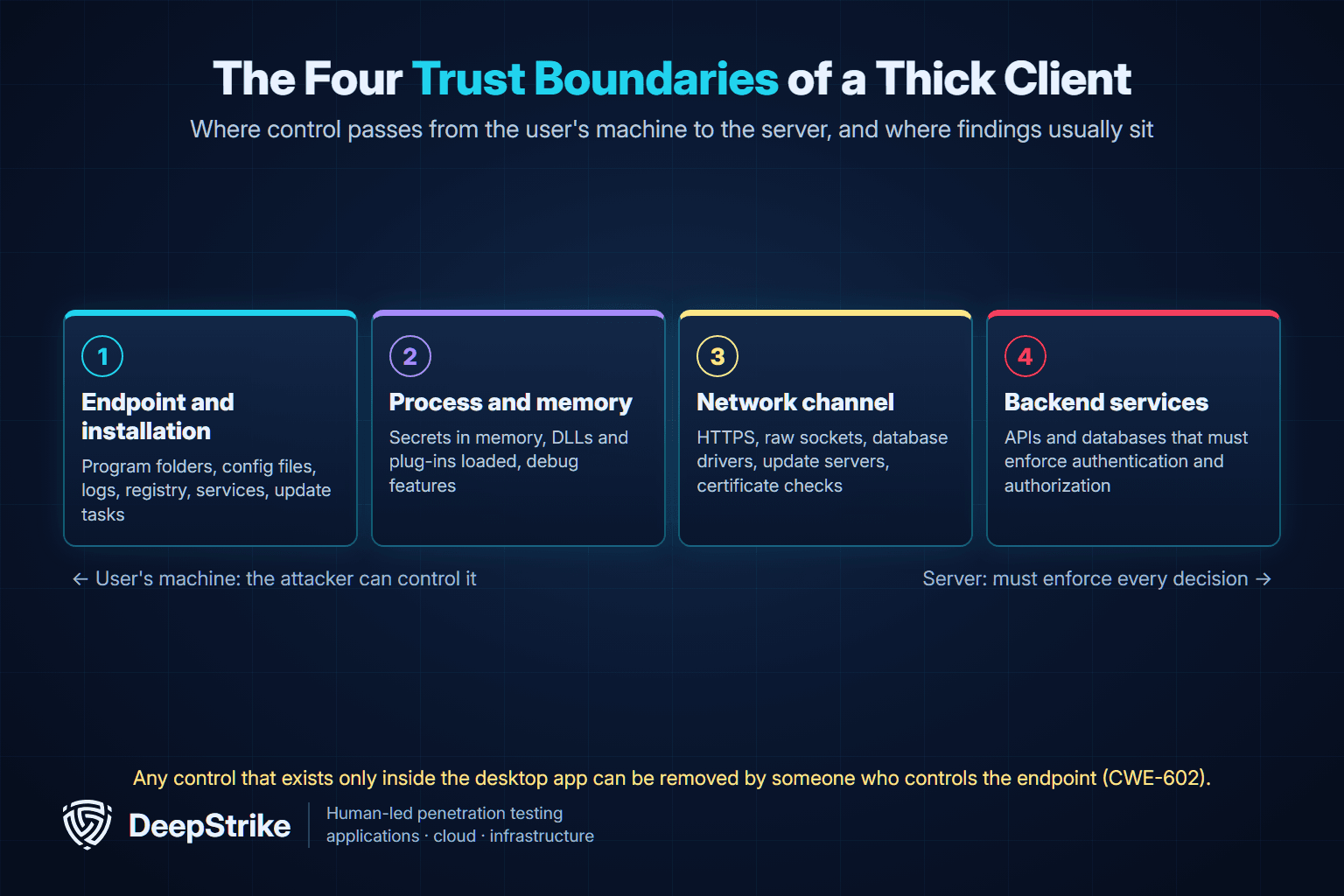
The fourth boundary produces many of the highest-impact findings. MITRE's weakness catalog lists this pattern as CWE-602: Client-Side Enforcement of Server-Side Security: a server that relies on the client to apply a protection meant to protect the server. Any control that exists only inside the desktop app can be removed by someone who controls the endpoint.
Use this checklist to agree scope with a provider and to read a report critically.
| Area | What testers check | Typical evidence in the report |
|---|---|---|
| Installation and updates | Install folder permissions, update channel integrity, signature checks on downloaded packages, leftover installer files | Writable paths, unsigned or unverified update steps |
| Local data and secrets | Configuration files, local databases, logs, caches and the registry for passwords, API keys, tokens and personal data | Secrets recovered from disk, weak or missing encryption at rest |
| Library loading | Whether the app loads DLLs or plug-ins from paths a standard user can write to | Load attempts from writable or current directories |
| Binary and code review | Decompilation or disassembly to find hard-coded secrets, hidden features, debug switches and client-side checks | Code locations of embedded credentials or bypassable checks |
| Authentication and sessions | Login flow, token storage and lifetime, offline modes, "remember me" and logout behavior | Tokens reusable after logout, weak session handling |
| Authorization | Whether the server enforces roles and object ownership, or only the user interface does | Requests that succeed for the wrong role or another user's data |
| Traffic and transport | Encryption in transit, certificate validation, replay and tampering of requests | Cleartext credentials, accepted invalid certificates, changed requests that succeed |
| Input handling | Injection into SQL, commands, file paths and parsers on both the client and server | Validated injection points and their impact |
| Local interfaces | Named pipes, local ports, COM objects, custom URL handlers and IPC between processes | Local endpoints reachable by other users or apps |
| Privilege boundaries | Services or helpers that run with higher privileges than the user | Paths from a standard user to elevated actions |
| Logging and monitoring | Whether security-relevant events reach the server and logs avoid storing secrets | Missing audit events, sensitive data in logs |
The OWASP Desktop App Security Top 10 (2021) is a community list that maps the most common desktop risks. It is still an incubator project rather than a flagship standard, so treat it as a checklist, not a compliance requirement. Its ten categories are:
| ID | OWASP category | What it looks like in a desktop app |
|---|---|---|
| DA1 | Injections | SQL built from client input, command or path injection in local helpers |
| DA2 | Broken Authentication and Session Management | Tokens that never expire, offline login that skips the server |
| DA3 | Sensitive Data Exposure | Personal or financial data cached in clear text, secrets in logs |
| DA4 | Improper Cryptography Usage | Hard-coded encryption keys, home-made algorithms, weak modes |
| DA5 | Improper Authorization | Admin features hidden in the UI but available to any user through the API |
| DA6 | Security Misconfiguration | Debug builds shipped, writable install folders, verbose errors |
| DA7 | Insecure Communication | Cleartext protocols, disabled certificate validation |
| DA8 | Poor Code Quality | Memory-safety bugs in native code, unsafe deserialization |
| DA9 | Using Components with Known Vulnerabilities | Outdated runtimes, bundled libraries with public CVEs |
| DA10 | Insufficient Logging and Monitoring | No server-side record of sensitive actions |
Three issues show up often enough to describe in more detail.
Hard-coded credentials. Developers sometimes embed database passwords, service-account keys or API tokens in the binary or a configuration file so the client can connect. Anyone with the installer can usually recover them. MITRE tracks this as CWE-798: Use of Hard-coded Credentials. The fix is to remove shared secrets from the client and give each user or device its own revocable credential, with the server enforcing what that credential can do.
Insecure library loading. Microsoft explains that when an application loads a DLL without a fully qualified path, Windows searches a defined list of directories, and an attacker who controls one of those directories can plant a malicious copy. Microsoft calls this a DLL preloading or binary planting attack and notes it can lead to local privilege elevation when the application runs with administrator rights (Microsoft Learn: Dynamic-Link Library Security). MITRE ATT&CK tracks the attacker behavior as T1574.001, Hijack Execution Flow: DLL, and the underlying weakness is CWE-427: Uncontrolled Search Path Element.
Weak local protection of secrets. Storing tokens in plain files or the registry exposes them to anyone who can read that location. On Windows, the Data Protection API (DPAPI) lets an application encrypt data with keys tied to the current user or the machine, which avoids generating and storing its own key (Microsoft Learn: How to use data protection). With the current-user scope, DPAPI protects data at rest against other users of the machine; with the machine scope, any account on that computer can decrypt it. Neither scope protects against malware already running as the same user, so testers check which scope the app uses and what an attacker on the same account could reach.
The technology stack changes which checks matter most.
| Stack | What changes for the tester | Checks to prioritize |
|---|---|---|
| .NET (WinForms, WPF) | Assemblies decompile back to readable code. | Embedded secrets, client-only authorization, unsafe deserialization, configuration file protection |
| Java (Swing, JavaFX) | Bytecode also decompiles cleanly. | Embedded secrets, outdated bundled runtimes, unsafe deserialization, keystore handling |
| Native C/C++ | Source is not recoverable; analysis uses disassembly and debugging. | Memory-safety issues, DLL loading, exploit mitigations, privileged helper services |
| Electron | A desktop shell runs web content with access to operating-system APIs. | Node.js integration, context isolation, sandboxing, IPC sender validation, navigation and shell.openExternal |
| macOS apps | Code signing and runtime protections affect what can be injected or loaded. | Signing and runtime hardening settings, Keychain use, privileged helper tools, update integrity |
For Electron, the project's own security checklist is the best baseline. It recommends enabling context isolation and process sandboxing, never enabling Node.js integration for remote content, defining a restrictive Content Security Policy, validating the sender of every IPC message and keeping Electron current. Context isolation has been on by default since Electron 12, Node.js integration off by default since Electron 5 and renderer sandboxing on by default since Electron 20, so many real-world findings come from apps that turned those protections off or still run old versions. Our Electron application penetration testing guide walks through these checks in depth.
Most providers follow a general testing framework such as NIST SP 800-115 and adapt it to the desktop stack. A typical engagement runs in eight stages.
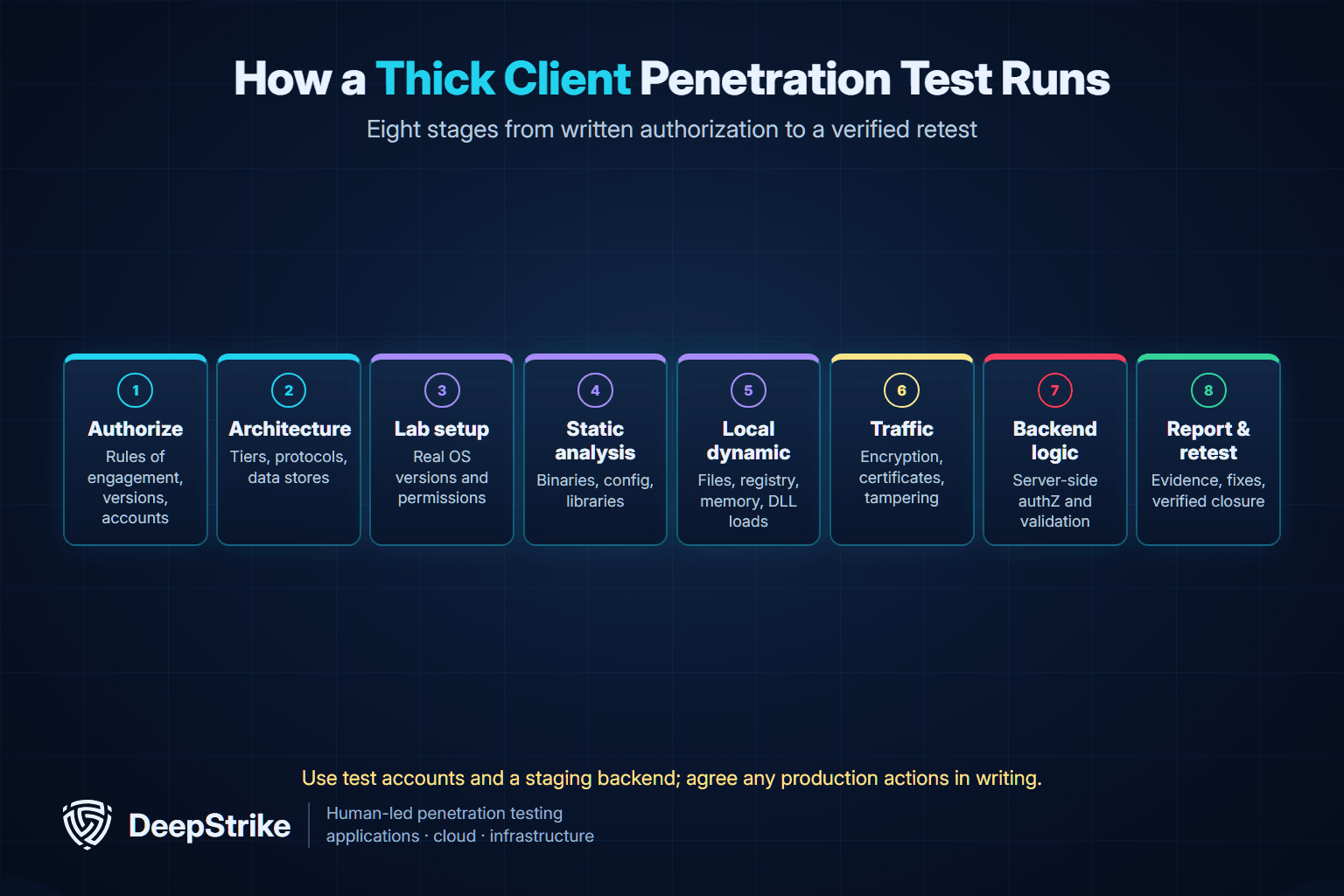
Production safety matters more for desktop apps than many teams expect. A client may write to shared databases or trigger real transactions. Agree in writing which actions are allowed against live backends and use test accounts with synthetic data wherever possible.
Tools support the work; they do not replace it. Most of the value comes from understanding how the client and server trust each other.
| Category | Purpose | Examples |
|---|---|---|
| Process and file monitoring | Watch file, registry and library activity | Sysinternals Process Monitor, Process Explorer |
| Decompilers and disassemblers | Read .NET, Java or native code | dnSpyEx (maintained fork of dnSpy) or ILSpy, JD-GUI, Ghidra |
| Debuggers and instrumentation | Inspect memory and change behavior at runtime in a lab | x64dbg, WinDbg, Frida |
| Traffic interception | Inspect and modify HTTP and other protocols | Burp Suite, Wireshark, mitmproxy |
| Dependency analysis | Find bundled components with known CVEs | Software composition analysis tools |
Microsoft itself suggests using Process Monitor to spot suspicious DLL load attempts, such as a load from the current directory. Automated scanners help with dependency and configuration checks, but they cannot judge whether a hidden admin button is enforced on the server. For more on that trade-off, see manual vs automated penetration testing.
The following example is illustrative and simplified; it does not describe a specific client.
A finance team uses a .NET desktop client that talks to a REST API. The client hides the "approve payment" button unless the signed-in user has the approver role. During static analysis, the tester sees that the role check happens only in the client. In the lab, using two test accounts, the tester captures the approval request made by an approver and replays it with a standard user's session. The server accepts it.
Nothing in this finding required breaking encryption or exploiting memory. It required looking at the client the way an attacker who owns the endpoint would.
Good scoping keeps cost predictable and results useful. Before you request proposals, collect answers to these questions:
Our penetration testing scope guide explains how to turn these answers into rules of engagement and a statement of work. If you are deciding how much internal knowledge to share, see black box vs white box testing.
A thick client report should let a developer reproduce each issue and a manager decide what to fix first. Look for:
For a full breakdown of report sections, see our penetration testing report guide.
A thick client is installed software that does real processing on the user's machine, stores some data locally and talks to backend services. It contrasts with a thin client, such as a browser-based app, where almost all logic runs on the server.
Common issues include hard-coded credentials, sensitive data stored without adequate protection, insecure library loading, weak or disabled transport security, outdated bundled components and authorization checks that exist only in the client. The OWASP Desktop App Security Top 10 (2021) groups these into ten categories.
A web test focuses on the browser, HTTP traffic and the server. A thick client test adds the endpoint itself: installed files, the registry, memory, local services, library loading and non-HTTP protocols. It also checks whether the backend trusts decisions made inside the client.
No, but it helps. Testers can decompile many .NET and Java clients and analyze native binaries without source. Sharing source or symbols in a white-box test usually finds more issues in the same time, especially in complex business logic.
Sometimes, with strict limits. Desktop clients often write to shared databases or trigger real transactions, so most testing should use a staging backend and test accounts. Any production testing needs written approval, defined windows and stop conditions.
Yes, in practice. Electron apps install on the desktop and can reach operating-system features, so they carry both web risks and desktop risks. They need checks on renderer settings, inter-process communication and navigation in addition to standard thick client tests.
Desktop applications move part of your security model onto machines you do not control, so the backend has to enforce every decision that matters. A focused thick client penetration test shows where that assumption breaks and gives your developers specific fixes to verify.
If you are planning a desktop application assessment, contact DeepStrike to discuss scope, access and retesting, or review our penetration testing services.
Mohammed Khalil is a Cybersecurity Architect at DeepStrike, specializing in advanced penetration testing and offensive security operations. With certifications including CISSP, OSCP, and OSWE, he has led numerous red team engagements for Fortune 500 companies, focusing on cloud security, application vulnerabilities, and adversary emulation. His work involves dissecting complex attack chains and developing resilient defense strategies for clients in the finance, healthcare, and technology sectors.

Stay secure with DeepStrike penetration testing services. Reach out for a quote or customized technical proposal today
Contact Us
