June 2, 2026
Updated: September 15, 2026
A practical guide to mobile app pentesting for Android, iOS, APIs, authentication, local storage, OWASP MASVS, reporting, cost, and compliance.

Mohammed Khalil
Mobile application penetration testing is a controlled security assessment of an Android or iOS application, its backend APIs, authentication flows, local storage, network communication, platform integrations, and third-party components. The goal is to identify exploitable weaknesses before attackers do. A proper assessment combines static analysis, dynamic testing, API testing, reverse engineering, runtime manipulation, and manual business-logic validation - not just automated scanning.
This guide is written for CISOs, AppSec leaders, engineering managers, SaaS founders, mobile product owners, compliance teams, and organizations that need to validate the security of Android and iOS applications before launch, audit, or major release.
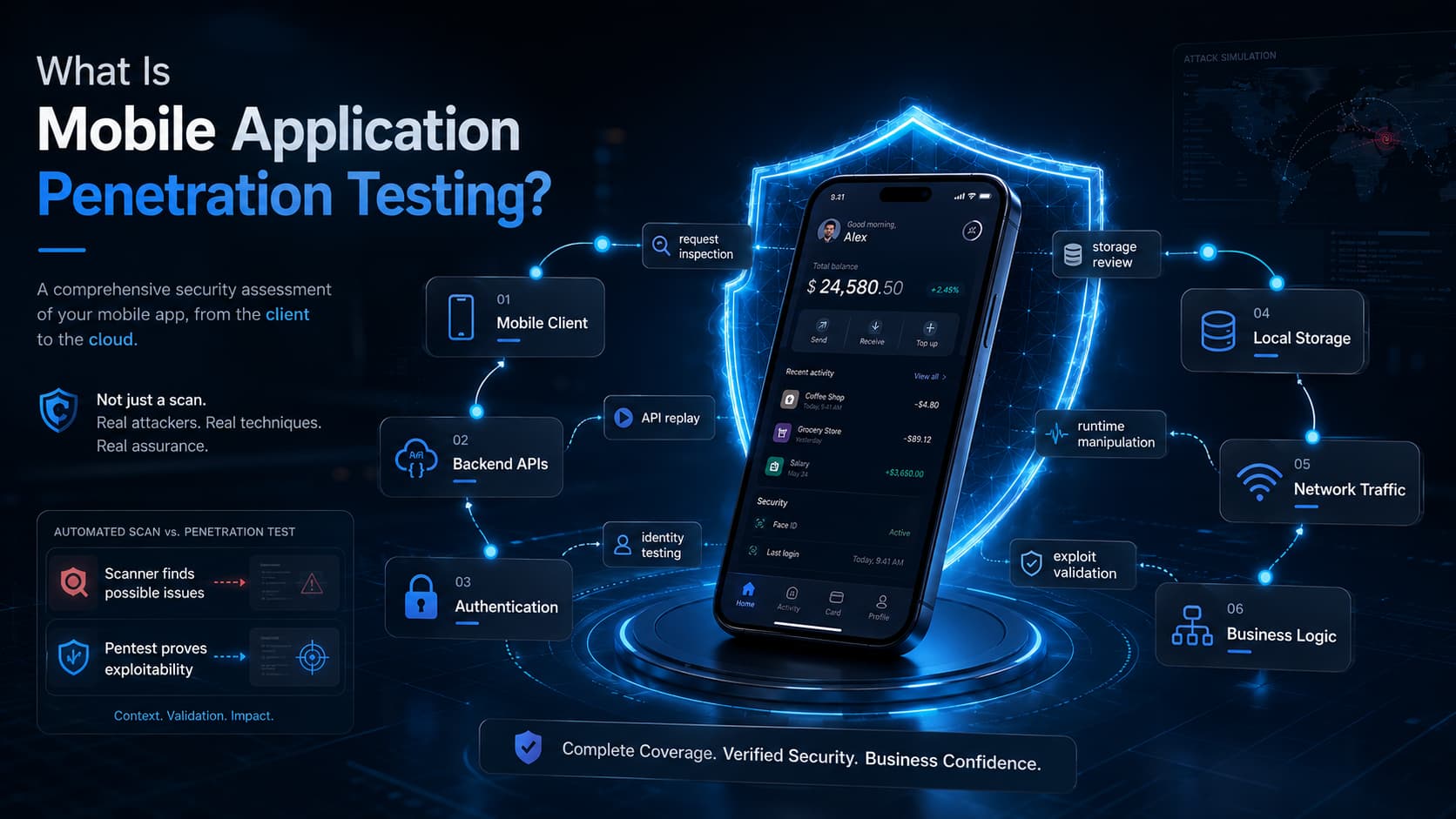
Mobile application penetration testing is a manual-first security assessment of a mobile app and the systems that support it. In a typical mobile app penetration testing engagement, testers examine the Android or iOS client, the APIs it calls, the authentication model, local storage, network communication, platform features, and high-risk workflows that could be abused by an attacker.
Unlike a basic mobile scan, a penetration test attempts to prove exploitability. A scanner may identify a missing configuration or vulnerable library. A mobile pentester asks a more important question: can this weakness be used to steal data, bypass authentication, escalate privileges, manipulate transactions, or compromise backend systems?
Mobile testing also differs from a standard web assessment. A mobile app is distributed to user-controlled devices, which means attackers can reverse engineer the binary, inspect local files, hook runtime functions, bypass client-side checks, and replay API calls outside the app interface. For that reason, a mobile assessment must cover both the app client and the server-side logic behind it.
| Assessment Type | What It Covers | What It Misses | Best Use Case |
|---|---|---|---|
| Automated mobile scan | Static and dynamic checks for common misconfigurations, libraries, permissions, and obvious storage issues. | Business logic, exploit chaining, custom authorization flaws, and many runtime bypasses. | Early checks in CI/CD or quick hygiene reviews. |
| Manual mobile app pentest | Client binary, APIs, authentication, storage, network traffic, platform interaction, and exploit validation. | Only what is excluded from scope or inaccessible during testing. | Launch readiness, compliance evidence, and high-risk app validation. |
| Mobile API security test | Backend endpoints used by the app, authorization, input validation, rate limits, and data exposure. | Client-side storage, platform features, reverse engineering, and local runtime behavior. | Apps with large API surfaces or sensitive server-side workflows. |
| Secure code review | Source-level flaws, insecure patterns, hardcoded secrets, and implementation defects. | Runtime behavior, deployment configuration, and production-like API abuse. | High-risk apps, regulated environments, and source-assisted testing. |
| Continuous validation | Recurring checks across releases, retesting, and regression validation. | Some deep manual attack paths unless included in the service model. | Fast-moving teams that ship mobile updates frequently. |
Mobile apps often handle credentials, personal data, payment information, health records, location data, private messages, corporate data, or privileged workflows. Current mobile security statistics show that most tested apps fail at least one MASVS control and that a majority can leak personal data. They also depend on a stack that is easy to underestimate: mobile client code, identity providers, backend APIs, cloud storage, push notification services, third-party SDKs, and device-level security controls.
A mobile app can look secure in the user interface while remaining vulnerable at the API layer. For example, a banking, marketplace, or healthcare app may hide administrative functions from normal users. If the backend API does not enforce authorization independently, an attacker can modify intercepted API requests and access another user’s records, change account data, or trigger restricted actions.
A complete assessment should be broader than a review of the mobile binary. Strong mobile application penetration testing services validate the mobile client, its APIs, authentication flows, sensitive data handling, and platform-specific attack surface.
| Test Area | What Testers Look For | Example Risk | Business Impact |
|---|---|---|---|
| Android APK/AAB review | Manifest settings, exported components, permissions, debug flags, resources, and decompiled code. | Exported activity or hardcoded API key. | Unauthorized access, data leakage, or app logic abuse. |
| iOS IPA review | Info.plist, entitlements, ATS settings, URL schemes, frameworks, and binary strings.Info.plist, entitlements, ATS settings, URL schemes, frameworks, and binary strings. | Insecure URL scheme or ATS exception. | Interception, unintended app linking, or data exposure. |
| Authentication and sessions | Login, MFA, password reset, token expiry, logout, refresh tokens, and device binding. | Long-lived tokens or weak session invalidation. | Account takeover and persistent unauthorized access. |
| Authorization and roles | Server-side permission enforcement across users, roles, tenants, and objects. | Broken object-level authorization. | Cross-account data access or privilege escalation. |
| Local storage | SharedPreferences, SQLite, caches, logs, backups, NSUserDefaults, and Keychain/Keystore usage. | Plaintext tokens or PII stored locally. | Sensitive data disclosure from lost, rooted, or jailbroken devices. |
| Network communication | TLS configuration, certificate validation, pinning behavior, proxy resistance, and insecure fallbacks. | Missing or bypassable certificate pinning. | Man-in-the-middle interception and request manipulation. |
| Mobile APIs | Endpoints used by the app, input validation, data exposure, rate limits, and authorization. | API returns another user’s data when IDs are modified. | Bulk data theft or unauthorized transaction manipulation. |
| Platform interaction | Deep links, universal links, intents, content providers, WebViews, push notifications, and biometrics. | Unprotected deep links trigger sensitive workflows. | Phishing, unauthorized action, or data exposure. |
| Runtime and reverse engineering | Frida/Objection hooks, root/jailbreak bypass, anti-debugging, obfuscation, and tamper resistance. | Client-side security checks are patched out. | Attackers bypass controls and automate abuse. |
| Third-party SDKs | SDK permissions, data collection, vulnerable libraries, exposed tokens, and privacy risk. | Analytics SDK sends excessive personal data. | Privacy exposure, supply-chain risk, and regulatory concerns. |
Android and iOS share many mobile security risks, but the testing workflow differs because each platform has a different application model, storage model, permission model, signing process, and runtime environment.
Android testing commonly starts with APK or AAB inspection. Testers decompile the app, inspect AndroidManifest.xml, review permissions, analyze exported activities, services, broadcast receivers, and content providers, and search resources and code for hardcoded secrets or backend endpoints. They also inspect local storage such as SharedPreferences, SQLite databases, cache directories, logs, and external storage usage.
Dynamic Android testing often uses rooted devices or emulators. Testers attempt to intercept traffic, bypass certificate pinning, hook sensitive functions with tools such as Frida, bypass root detection, and validate whether authentication and business logic are enforced by the backend rather than the app client.
iOS testing usually begins with IPA inspection, Info.plist review, entitlement analysis, App Transport Security settings, URL schemes, universal links, embedded frameworks, and binary strings. Testers verify whether sensitive data is stored in the Keychain correctly and whether insecure storage such as NSUserDefaults, local files, caches, or logs expose tokens or personal data.
Dynamic iOS testing often requires a jailbroken test device or a special testing build. Testers use runtime instrumentation to bypass jailbreak detection, analyze network communication, manipulate app logic, and determine whether anti-tamper, anti-debugging, and certificate pinning protections are meaningful or cosmetic.
| Category | Android Focus | iOS Focus | Shared Risks |
|---|---|---|---|
| Binary and config | APK/AAB, DEX, AndroidManifest.xml, Network Security Config. | IPA, Info.plist, entitlements, Mach-O binary, ATS. | Hardcoded secrets, weak configuration, exposed endpoints. |
| Local storage | SharedPreferences, SQLite, cache, external storage, Android Keystore. | Keychain, NSUserDefaults, app sandbox, local databases. | Plaintext tokens, PII leakage, insecure keys. |
| Platform interaction | Intents, content providers, broadcast receivers, exported components. | URL schemes, universal links, app extensions, entitlements. | Deep link abuse, unintended data flow, IPC exposure. |
| Runtime testing | Rooted device, emulator, Frida, Xposed, Objection. | Jailbroken device, Frida, LLDB, app sandbox inspection. | Pinning bypass, auth bypass, tamper resistance failures. |
| API and business logic | Mobile API traffic captured and replayed outside the app. | Mobile API traffic captured and replayed outside the app. | BOLA, privilege escalation, excessive data exposure. |
OWASP is central to professional mobile testing, but the resources should not be treated as interchangeable. The OWASP MASVS defines the mobile security requirements an app should satisfy. It is useful for control coverage and for mapping findings to recognized security areas.
The OWASP MASTG provides the testing methodology and detailed test guidance. In practice, MASTG helps testers decide how to verify controls around storage, cryptography, authentication, network communication, platform interaction, code quality, and resilience.
The OWASP Mobile Top 10 is best used as a risk taxonomy. It summarizes common categories such as improper credential usage, supply chain issues, insecure authentication or authorization, insecure communication, and insecure data storage. However, a serious assessment should not stop at the Top 10. MASVS provides broader verification coverage.
| MASVS Area | What It Means in Practice | Example Test | Example Finding |
|---|---|---|---|
| Architecture and design | Security is considered across trust boundaries, data flows, and mobile threat scenarios. | Review architecture and identify client-side trust assumptions. | Authorization assumed in the app UI but not enforced by the API. |
| Data storage and privacy | Sensitive data is stored only when necessary and protected appropriately. | Inspect local files, caches, screenshots, backups, and logs. | Access token stored in plaintext local database. |
| Cryptography | Cryptographic algorithms, key storage, randomness, and key lifecycle are appropriate. | Review encryption implementation and key handling. | Static IV or encryption key hardcoded in the binary. |
| Authentication and sessions | Login, session lifetime, MFA, token refresh, and logout are secure. | Manipulate tokens and test session invalidation. | Refresh token remains valid after logout. |
| Network communication | Traffic is protected against interception and downgrade risks. | Attempt MITM interception and pinning bypass. | The app accepts user-installed CA certificates in production. |
| Platform interaction | Mobile OS features are used securely. | Test deep links, intents, URL schemes, WebViews, and app extensions. | An unauthenticated deep link opens a sensitive screen. |
| Code quality and build | Production builds avoid insecure debug behavior and known vulnerable components. | Check debug flags, logs, libraries, and build artifacts. | Debuggable Android build shipped to production. |
| Resilience | The app resists trivial reverse engineering, tampering, and runtime manipulation. | Patch app logic or hook functions with Frida. | Root detection is bypassed by changing one function return value. |
Mobile vulnerabilities often combine client-side weaknesses with API and backend weaknesses, and they are exploited alongside the wider mobile security threats targeting the device itself — malware, smishing, spyware, and rogue networks. The following issues appear frequently in real mobile assessments:
The most damaging findings are often not isolated bugs. They are attack chains. For example, an attacker may reverse engineer the app, extract an API endpoint, bypass certificate pinning, capture a valid request, modify an object ID, and retrieve another user’s data because authorization is missing on the server side.
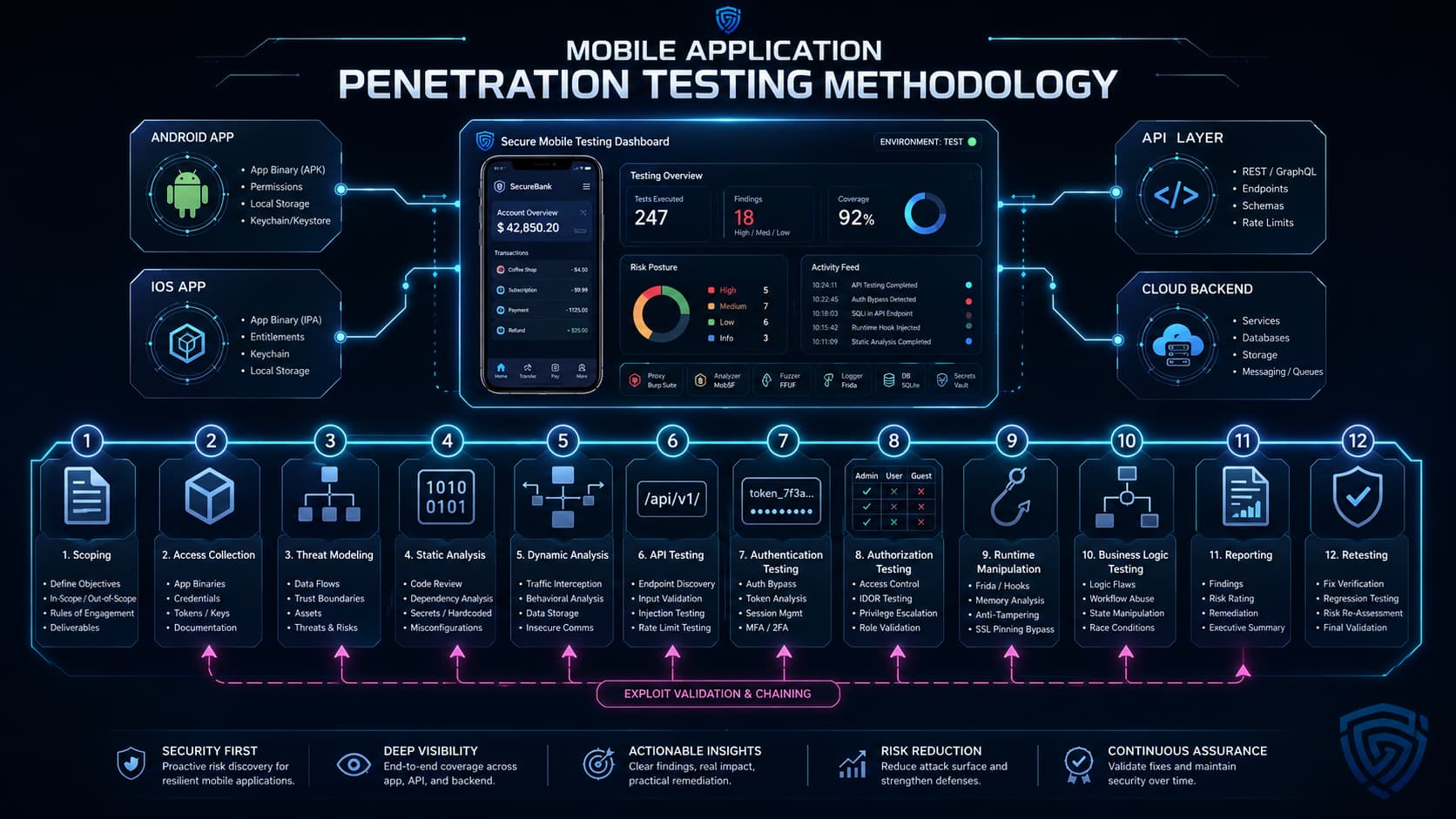
A mature methodology combines structured testing with attacker creativity. Deep mobile testing also overlaps with broader penetration testing services when the app depends on APIs, cloud services, web portals, identity platforms, and third-party integrations.
Preparation improves coverage and reduces wasted testing time. Treat mobile assessment preparation as part of your wider mobile application security testing process rather than a last-minute file handoff.
Black-box testing gives testers minimal knowledge. It can simulate an external attacker, but it often misses deeper mobile issues because testers may lack accounts, API documentation, role coverage, or source-level context.
Grey-box testing gives testers partial knowledge, usually including test accounts, app builds, API documentation, and architecture context. For most business-critical applications, grey-box testing should be the minimum baseline because it balances realism with coverage.
White-box testing includes source code, build context, and deeper architecture access. It is useful for high-risk fintech, healthcare, enterprise, or compliance-driven mobile applications. Source-assisted testing can identify insecure implementation patterns faster, but it should still include dynamic validation because runtime behavior and deployment conditions matter.
Tools support the assessment, but they do not replace manual judgment. The most important mobile vulnerabilities often require context, role testing, exploit chaining, and business-logic analysis.
Duration depends on scope. A single-platform app with limited screens and one user role is very different from a fintech app with Android, iOS, admin workflows, payments, identity integrations, and a large API surface.
| App Type | Typical Duration | Why It Takes That Long |
|---|---|---|
| Small single-platform app | About 5-7 business days | Limited features, few workflows, small API surface, and simple authentication. |
| Standard business app | About 1-2 weeks | Multiple screens, several user roles, backend APIs, and normal security controls. |
| Complex mobile app | About 2-4 weeks | Payments, multiple roles, third-party integrations, sensitive data, or complex business logic. |
| Enterprise or regulated app | 4+ weeks | Android and iOS coverage, source-assisted testing, compliance mapping, multiple environments, and retesting. |
The biggest drivers are number of platforms, number of roles, API complexity, authentication model, sensitive data types, source-code access, staging readiness, and whether retesting is included.
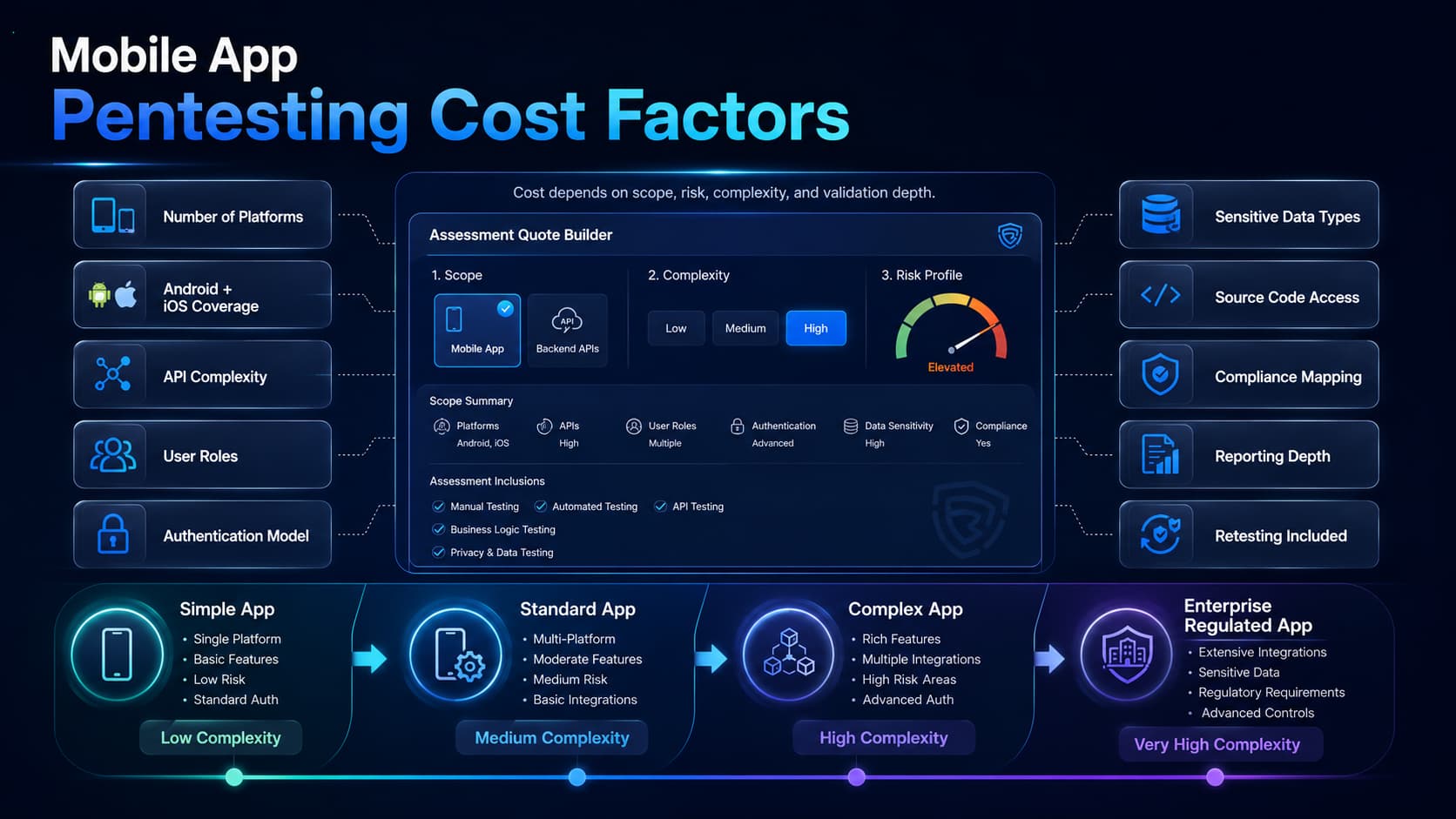
Mobile application penetration testing pricing is usually quote-based because scope varies widely. A realistic quote should reflect the number of platforms, app complexity, user roles, API endpoints, source-code access, compliance needs, reporting depth, and retesting requirements.
A lower-cost assessment may only cover automated scanning and a limited manual review. A stronger assessment should explicitly include mobile client testing, backend API testing, authentication and authorization testing, local storage review, network interception testing, runtime manipulation, exploit validation, and a retest path.
When comparing vendors, ask how many testing days are included, whether both Android and iOS are covered, whether API testing is included or separate, whether source code review is part of scope, whether retesting is included, and whether the report maps findings to OWASP MASVS, compliance controls, or your internal risk framework.
A strong mobile app pentest report should be useful to executives, security teams, and developers. It should not read like an automated scanner export.
The best reports help the engineering team fix issues quickly and help leadership understand what matters first. A finding should explain not only what is wrong, but how it can be exploited and what risk it creates for users and the business.
Mobile pentesting can support compliance evidence, but it does not make an organization compliant by itself. It helps demonstrate that mobile systems have been assessed, risks have been identified, and remediation has been prioritized. NIST SP 800-163 Rev. 1 is also a useful context for mobile application vetting programs.
For apps distributed through Google Play or assessed through ecosystem security programs, the App Defense Alliance / MASA context may also be relevant. Treat those requirements as part of a wider security program, not as a substitute for manual penetration testing.
Choosing a provider should be a procurement decision, not just a price comparison. The provider needs mobile-specific offensive security skill, API testing ability, clear reporting, and a retesting process.
Mobile app testing often overlaps with other services. If the same product includes a web dashboard or admin portal, a dedicated web application pentest may be needed because the web interface has its own attack surface.
If the mobile app is supported by customer portals, internal dashboards, or complex browser-based workflows, web application penetration testing services can validate those components separately from the mobile client.
If the app relies on cloud storage, serverless functions, managed databases, identity platforms, or exposed backend infrastructure, cloud penetration testing services may be required to validate the server-side environment that the mobile client depends on.
For teams that release mobile features frequently, continuous penetration testing can help validate changes over time instead of relying only on annual assessments.
If the organization wants to simulate a broader attacker campaign involving social engineering, identity compromise, device compromise, or lateral movement, red teaming as a service may be more appropriate than a standalone mobile pentest.
If the mobile app provisions, pairs with, or controls connected hardware, the device side carries its own exposure — the IoT hacking statistics show default credentials and unpatched firmware remain the dominant entry points, and the companion app is often where the keys are stored. If the mobile app includes AI assistants, LLM workflows, AI-generated decisions, or chatbot features, LLM and AI penetration testing services should be considered for risks such as prompt injection, data leakage, tool abuse, and model-side authorization failures.
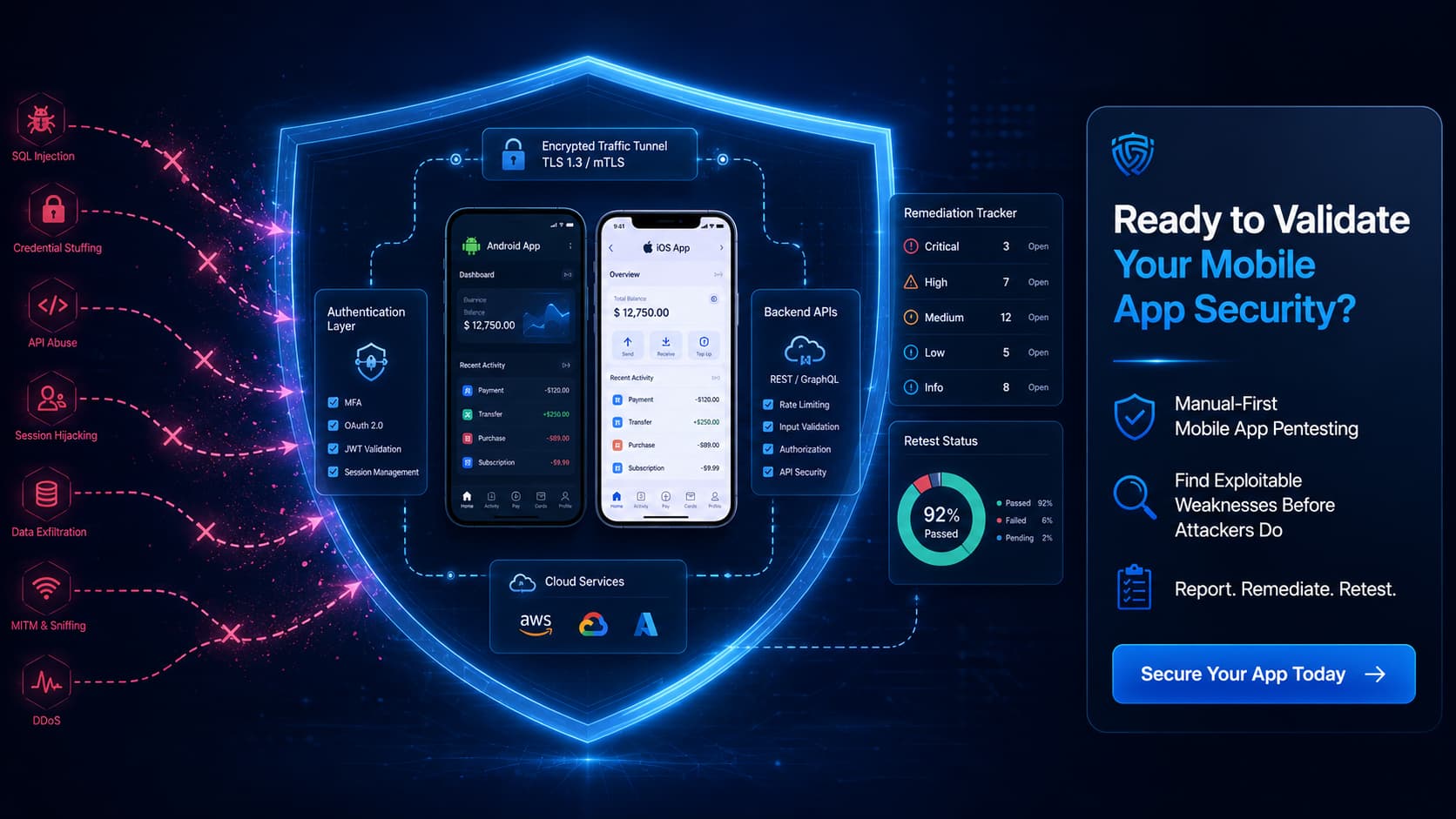
Mobile application penetration testing is not just a scan of an Android or iOS app. It is a structured security assessment of the mobile client, backend APIs, authentication, authorization, local storage, network traffic, platform integrations, third-party SDKs, and business logic.
The strongest assessments combine OWASP-aligned methodology with manual exploitation, runtime testing, API validation, clear reporting, and retesting. For organizations shipping mobile apps that handle payments, health data, personal information, enterprise workflows, or regulated data, mobile pentesting provides practical evidence that the app has been tested against realistic attack paths.
DeepStrike helps organizations validate Android and iOS application security through manual-first penetration testing, clear remediation guidance, and retesting support. The goal is simple: find exploitable weaknesses before attackers, auditors, or customers do. If you are still selecting a provider, our comparison of mobile application penetration testing vendors breaks down how the main options differ.
Mobile application penetration testing is a controlled security assessment of an Android or iOS app, the APIs it calls, authentication flows, local storage, network communication, platform integrations, and business logic. Testers simulate attacker behavior to identify exploitable weaknesses before real attackers can abuse them.
Mobile app security testing is a broad term that can include scanning, code review, policy checks, and configuration review. Mobile app pentesting is narrower and more attack-focused: testers attempt to exploit weaknesses and prove real-world impact.
Yes, it should. Mobile apps depend heavily on backend APIs. Testing only the app client can miss broken authorization, excessive data exposure, injection, rate-limit bypass, and server-side logic flaws.
A small app may take about 5-7 business days, a standard business app may take 1-2 weeks, and a complex or regulated app may take 2-4+ weeks. The timeline depends on platforms, user roles, API complexity, source access, and retesting scope.
Only partially. Automated tools can identify obvious issues such as insecure configuration, vulnerable libraries, and some storage problems. Manual testing is still required for authorization bypass, business logic flaws, runtime manipulation, exploit chaining, and context-specific vulnerabilities.
Android testing commonly includes APK/AAB review, manifest analysis, exported components, intents, content providers, storage, Keystore usage, and root bypass testing. iOS testing commonly includes IPA review, Info.plist, entitlements, Keychain usage, ATS, URL schemes, universal links, and jailbreak bypass testing. Both require API and business-logic testing.
OWASP MASVS is not a legal requirement for every app, but it is one of the strongest standards for structuring mobile security verification. Mature mobile pentests often map findings to MASVS and use MASTG as methodology guidance.
Business-critical apps should be tested before launch, after major releases, after authentication or payment changes, before audits, and at least annually. Fast-moving teams may need more frequent or continuous validation.
Provide the latest app builds, test accounts for each role, API documentation where available, staging access, safe test data, integration details, architecture diagrams, and a technical point of contact for blockers and urgent findings.
Mohammed Khalil, CISSP, OSCP, OSWE, is a Cybersecurity Architect specializing in penetration testing and offensive security. He has more than 10 years of experience helping organizations validate security controls across web, mobile, cloud, API, and compliance-driven environments, including SOC 2, PCI DSS, HIPAA, and ISO 27001.

Stay secure with DeepStrike penetration testing services. Reach out for a quote or customized technical proposal today
Contact Us
