November 4, 2026
Updated: November 5, 2026
The build, ship and run risk model, NIST SP 800-190, CIS Docker Benchmark basics, runtime hardening, real runc CVEs, detection and a checklist.

Mohammed Khalil
Container security is the set of practices, controls and tools that protect containerized applications across their lifecycle: the images you build, the registries that ship them, the runtime and orchestrator that run them, and the host kernel every container shares.
Because containers isolate processes with Linux namespaces and cgroups rather than a hypervisor, one runtime or kernel flaw can expose every workload on a host. Good container security combines minimal, scanned and signed images, least-privilege runtime settings, patched hosts, runtime detection and regular testing.
A container packages an application with its libraries and configuration so it runs the same way on a laptop, in CI and in production. That portability is the reason Docker and Kubernetes took over application delivery, and it is also the reason container security has its own discipline. A container image is built once, copied many times and run on hosts the developer never sees. A weakness baked into the image travels with it everywhere.
The most important technical fact is that containers share the host's kernel. Docker's own security documentation explains that namespaces mean processes in one container "cannot see, and even less affect, processes running in another container," and cgroups limit resources to fend off some denial-of-service attacks. Those are real boundaries, but they are kernel features. If an attacker finds a bug in the kernel or in the low-level runtime (runc on most Linux systems), the boundary can fail for every container on that host at once.
That is why container security covers three phases, not one:
| Property | Virtual machine | Container |
|---|---|---|
| Isolation boundary | Hypervisor; each VM has its own kernel | Kernel namespaces, cgroups, capabilities and security modules on one shared kernel |
| Typical lifetime | Weeks to years; patched in place | Minutes to weeks; replaced, not patched |
| Where vulnerabilities live | Guest OS and installed software | Image layers, the runtime (runc, containerd) and the host kernel |
| Effect of a kernel bug | Usually limited to one VM | Potentially every container on the host |
| Patching model | Update the running system | Rebuild the image and redeploy |
| Security tooling | Host agents and network devices | Pipeline gates, admission control and container-aware runtime sensors |
The practical consequence: a container is only as isolated as its runtime configuration, and container security work happens mostly in the pipeline and the platform, not on individual servers.
NIST's SP 800-190, Application Container Security Guide, groups container risk into five areas: images, registries, orchestrators, containers (the runtime) and the host OS. Adding secrets and the software supply chain as their own row gives a model most teams can map their controls to.
| Risk area | What goes wrong | Typical example | First control | SP 800-190 section |
|---|---|---|---|---|
| Images | Known CVEs in base layers, configuration defects, embedded malware, untrusted public images | An image built on an old base runs as root with a shell and package manager | Minimal trusted base, non-root USER, scan before promotion | 3.1 and 4.1 |
| Secrets and supply chain | Credentials baked into layers; unpinned tags and dependencies change underneath you | A cloud key passed as a build argument stays in image history | Build-time secret mounts, pinned digests, SBOM and signing | 3.1.4 and 4.1.4 |
| Registries | Plain-HTTP pulls, stale images, weak push permissions | Any CI job can overwrite the production tag | Authenticated, audited, least-privilege push; immutable versions | 3.2 and 4.2 |
| Orchestrator | Unbounded admin access, weak network separation, mixing sensitive and public workloads on one node | A broad cluster role lets a developer token create privileged pods | RBAC least privilege, Pod Security Admission, network policies, node pools by sensitivity | 3.3 and 4.3 |
| Runtime | Runtime CVEs, privileged containers, extra capabilities, writable root filesystems, unbounded egress | A container started with the Docker socket mounted can start other containers on the host | Drop capabilities, keep seccomp and AppArmor or SELinux, read-only root, patch runc | 3.4 and 4.4 |
| Host | Large attack surface, shared kernel, unpatched components, direct logins, sensitive host mounts | A general-purpose server also runs a database outside containers | Container-optimized OS, patch kernel and runtime, no sensitive host paths | 3.5 and 4.5 |
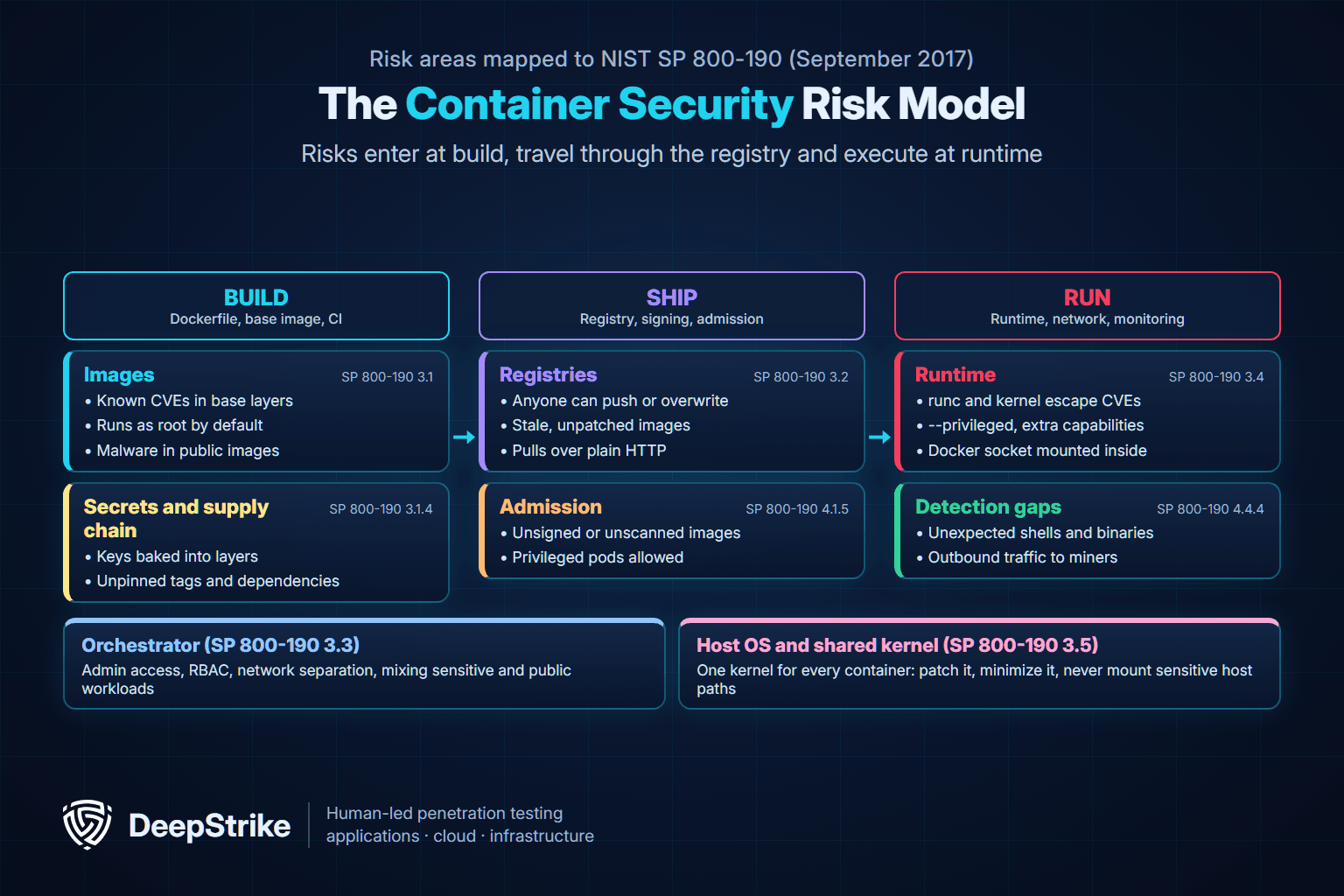
Two observations from that model shape the rest of this guide. First, most risks are created at build time but only become dangerous at runtime, so controls must exist at both ends. Second, the runtime and host rows are shared by every workload, so a weakness there has the widest blast radius.
NIST published SP 800-190 in September 2017 (authors Murugiah Souppaya, John Morello and Karen Scarfone). The CSRC page still lists it as the final version with no revision or withdrawal as of November 5, 2026. Some examples have aged (it mentions Docker Swarm and Windows Nano Server), but the countermeasures in Section 4 remain a sound baseline. This summary is based on a full read of Sections 3 and 4 of the SP 800-190 PDF.
| SP 800-190 area | Key countermeasures (paraphrased) | What it means in practice in 2026 |
|---|---|---|
| 4.1 Images | Container-aware vulnerability management across build, registry and runtime; policy "quality gates" that block images above a CVSS threshold; validate image configuration (run as non-privileged users); trusted, minimal base layers; no SSH or remote shells in containers; scan for malware; keep secrets out of images; only run images from trusted, signed sets | Scan in CI and in the registry, fail builds on agreed severity, sign images and verify signatures at admission |
| 4.2 Registries | Encrypted connections only; prune stale images; deploy immutable, specific versions rather than trusting "latest"; authenticate all access, restrict and audit writes | Pin by version or digest, scope push rights per repository, log pulls of sensitive images |
| 4.3 Orchestrators | Least-privilege admin access; MFA and single sign-on for cluster admins; separate network traffic by sensitivity; isolate workloads of different sensitivity on different hosts; secure node identity and mutually authenticated, encrypted cluster traffic | RBAC reviews, separate node pools or clusters for sensitive workloads, network policies |
| 4.4 Containers (runtime) | Monitor and patch the runtime; control egress; automate compliance with runtime configuration standards such as the CIS Docker Benchmark; use SELinux or AppArmor; run with at least the runtime's default seccomp profile; use container-aware runtime defense; read-only root filesystems; separate environments and log every container creation to an identity | The runtime hardening baseline in the "Run" section below, plus a runtime detection sensor |
| 4.5 Host OS | Prefer container-specific OSs; otherwise harden per SP 800-123; do not mix containerized and non-containerized workloads; keep kernel and runtime updated; operate hosts immutably; audit host logins; never mount sensitive host directories | Use a container-optimized node image, patch on a schedule, alert on direct node logins |
| 4.6 Hardware | Hardware root of trust, measured and secure boot, extended to the runtime where possible | Use cloud instance types with secure or measured boot where the platform offers it |
SP 800-190 is explicit about why automation matters: it says organizations can "scan" for compliance at a point in time, "but such approaches do not scale," and recommends tools that continuously assess and enforce settings. That is the job of admission policies, CI gates and benchmarks.
Image security is where most container vulnerabilities originate, and it is also the cheapest place to fix them. Four habits cover most of the risk.
Every package in the base image is attack surface you inherit. Use a small official or distroless base, rebuild often so security patches land, and pin the base by digest in production builds so the image you tested is the image you ship. SP 800-190 recommends trusted sources, frequent base updates and minimal bases, and warns against trusting the "latest" tag as a guarantee of freshness.
Images run as root unless the Dockerfile says otherwise. Docker's documentation concludes that containers are "quite secure" by default, especially when processes run as non-privileged users inside the container. CIS Docker Benchmark check 4.1 (as implemented in Docker Bench) asks for a dedicated user. An illustrative multi-stage Dockerfile:
# syntax=docker/dockerfile:1
# Illustrative example: pin real digests in your own builds
FROM python:3.13-slim AS build
WORKDIR /app
COPY requirements.txt .
RUN --mount=type=secret,id=pip_conf,target=/etc/pip.conf \
    pip install --no-cache-dir --prefix=/install -r requirements.txt
COPY src/ ./src/

FROM python:3.13-slim
RUN useradd --uid 10001 --no-create-home --shell /usr/sbin/nologin appuser
COPY --from=build /install /usr/local
COPY --from=build /app/src /app
USER 10001
WORKDIR /app
CMD ["python", "main.py"]Docker's build documentation states that build arguments and environment variables are "inappropriate for passing secrets to your build" because they persist in the final image. Use BuildKit secret mounts, as in the RUN --mount=type=secret line above, and pass the secret at build time:
docker build --secret id=pip_conf,src=$HOME/.config/pip/pip.conf -t api:1.4.2 .Add a .dockerignore so .env files, .git and local credentials never reach the build context, and provide runtime secrets through your orchestrator or a secrets manager rather than baking them in. SP 800-190 says secrets "should be stored outside of images and provided dynamically at runtime."
Scan every image in CI and again in the registry, generate a software bill of materials (SBOM) for each image, and sign images so the cluster can verify where they came from. These topics have their own depth, including how to read scanner CVE output honestly and how to test signing and admission, in the container image testing section of our Kubernetes penetration testing guide. For pipeline placement, see our penetration testing for DevOps guide, and for where each check belongs across the lifecycle, our secure SDLC guide. Malicious or hijacked dependencies are a supply chain problem first; our overview of software supply chain attacks covers that wider picture.
A registry is the hand-off point between build and run, so it needs the same rigor as source control. SP 800-190 asks for encrypted registry connections, authenticated access to sensitive images, write access limited to the repositories each team owns, audited writes, and pruning of stale images. Deploy specific, immutable versions instead of mutable tags.
The second half of shipping is admission: the cluster deciding what it will run. In Kubernetes, Pod Security Admission enforces the Pod Security Standards per namespace, and policy engines can additionally require signed images from approved registries. The registry and admission tests a penetration tester runs (who can push, pull and delete, tag immutability, pull-through caches and provenance) are covered in the container registry security section of the Kubernetes penetration testing guide, so this guide does not repeat them.
Container runtime security is the set of controls that limit what a running container can do and that detect it when it misbehaves. Docker and Kubernetes ship several protections on by default, but the defaults are a floor, and some common flags remove them entirely.
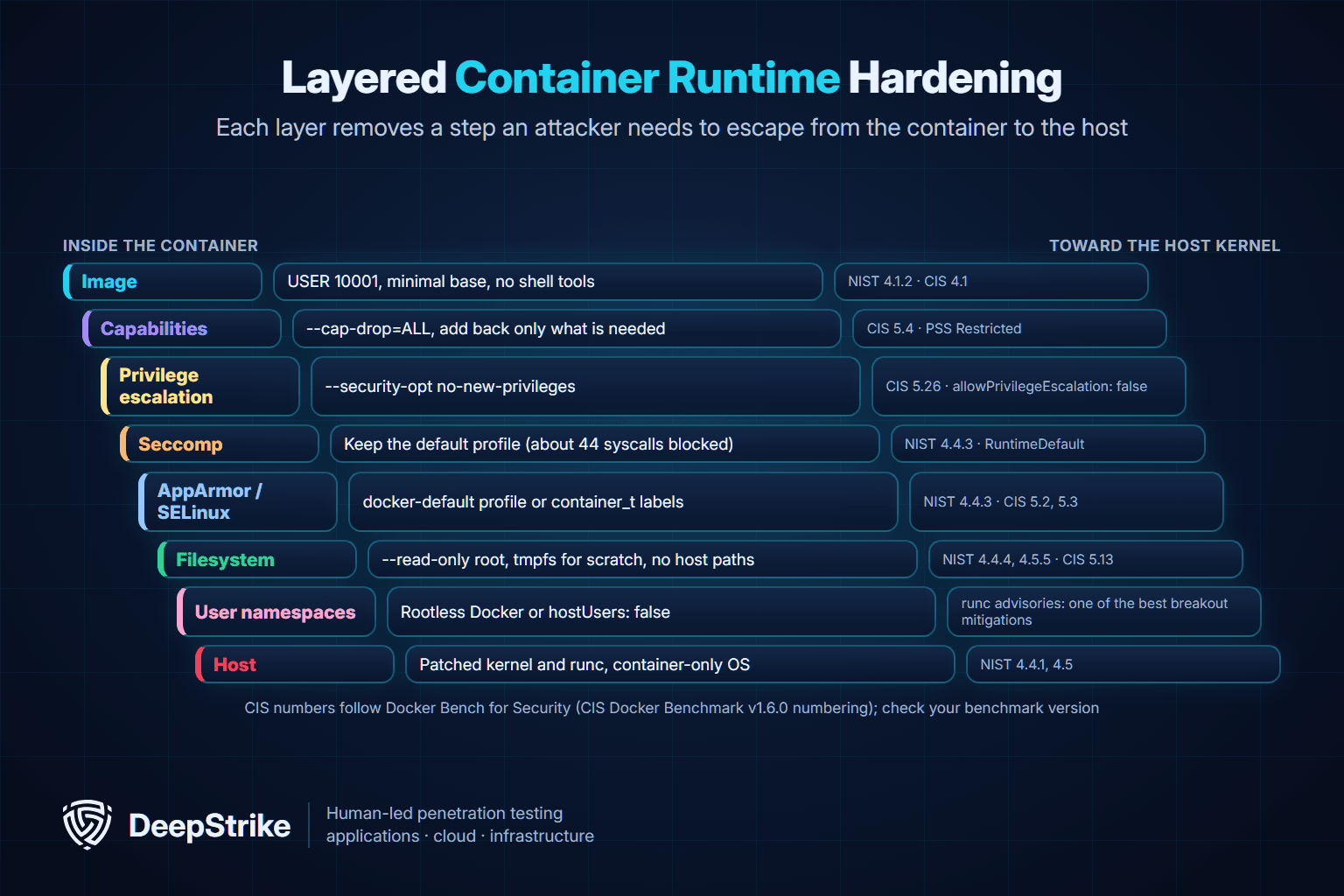
Linux capabilities split root's power into pieces. Docker's security documentation describes its default as "an allowlist instead of a denylist approach": containers get a reduced set. You can go further. Start with --cap-drop=ALL, add back only what the application proves it needs (for example NET_BIND_SERVICE to bind a port below 1024), and set --security-opt no-new-privileges so setuid binaries cannot raise privileges. Never use --privileged for application workloads; Kubernetes' Baseline profile disallows privileged containers because they "disable most security mechanisms."
Seccomp filters system calls. Docker's default seccomp profile is an allowlist that, per Docker's documentation, "disables around 44 system calls out of 300+" while keeping wide application compatibility. It is on unless someone runs a container with --security-opt seccomp=unconfined. In Kubernetes, the Restricted profile requires the seccomp type to be RuntimeDefault or Localhost; both an unconfined profile and the absence of a profile are prohibited. SP 800-190 says containers should run with at least the runtime's default seccomp profile.
Mandatory access control adds a second, kernel-enforced policy. On AppArmor hosts, Docker automatically loads a profile named docker-default and applies it to containers unless you override it. On SELinux hosts, container processes run with a confined type such as container_t. These layers matter in practice: the original CVE-2019-5736 disclosure noted that Fedora's "docker" package and Podman were protected because they run container processes as container_t, and the November 2025 runc advisory explains that the default AppArmor profile in Docker and Podman blocks writes to most of /proc and /sys.
A read-only root filesystem stops an attacker from dropping tools or modifying binaries in place. SP 800-190 recommends it because writes are then isolated to specific directories that are easier to monitor. Use --read-only with a small tmpfs for scratch space in Docker, or readOnlyRootFilesystem: true with an emptyDir volume in Kubernetes.
Rootless mode, in Docker's words, "lets you run the Docker daemon and containers as a non-root user" to mitigate vulnerabilities in the daemon and the container runtime. In Kubernetes, setting hostUsers: false puts a pod in its own user namespace; the Kubernetes documentation lists the feature as stable since v1.36 and explains that without it, a root container that breaks out has root on the node, and with it, it does not. The runc maintainers' November 2025 advisory says they "strongly" recommend user-namespaced containers as one of the best hardening mechanisms against breakouts. Check that your kernel and container runtime versions support the feature before enforcing it.
Docker's documentation is direct: "only trusted users should be allowed to control your Docker daemon," and the docker group "grants root-level privileges to the user." A container with /var/run/docker.sock mounted can start a privileged container and reach the host, which MITRE ATT&CK lists as an escape method under T1611. Keep the daemon on its default non-networked Unix socket, and if remote access is required, use SSH or TLS with client authentication, never an open TCP port.
An illustrative docker run for a stateless API service:
docker run -d --name api \
  --user 10001:10001 \
  --read-only --tmpfs /tmp:rw,noexec,nosuid,size=64m \
  --cap-drop=ALL \
  --security-opt no-new-privileges \
  --pids-limit 200 --memory 512m --cpus 1 \
  registry.example.com/team/api:1.4.2
The same intent as a Kubernetes pod that passes the Restricted Pod Security Standard:
apiVersion: v1
kind: Pod
metadata:
  name: api
spec:
  hostUsers: false
  securityContext:
    runAsNonRoot: true
    runAsUser: 10001
    seccompProfile:
      type: RuntimeDefault
  containers:
  - name: api
    image: registry.example.com/team/api:1.4.2
    securityContext:
      allowPrivilegeEscalation: false
      readOnlyRootFilesystem: true
      capabilities:
        drop: ["ALL"]
    resources:
      limits:
        memory: 512Mi
        cpu: "1"
    volumeMounts:
    - name: tmp
      mountPath: /tmp
  volumes:
  - name: tmp
emptyDir: {}| Setting | What it prevents | CIS check (Docker Bench numbering) | Kubernetes equivalent |
|---|---|---|---|
| Non-root user | Root inside the container mapping to powerful file and kernel access | 4.1 | runAsNonRoot: true, runAsUser not 0 |
| Drop all capabilities | Kernel operations the app never needs | 5.4 | capabilities.drop: ALL |
| No privileged mode | Disabling nearly every isolation control | 5.5 | privileged: false (Baseline) |
| No sensitive host mounts | Reading or changing host configuration | 5.6 | No hostPath volumes (Baseline) |
| No host namespaces | Seeing host processes, network or IPC | 5.10, 5.16, 5.17 | hostNetwork, hostPID, hostIPC false |
| Read-only root filesystem | Dropping tools and tampering with binaries | 5.13 | readOnlyRootFilesystem: true |
| Default seccomp kept | Rarely needed, risky system calls | 5.22 | seccompProfile RuntimeDefault (Restricted) |
| No new privileges | Escalation through setuid binaries | 5.26 | allowPrivilegeEscalation: false |
| PIDs and memory limits | Fork bombs and resource exhaustion | 5.11, 5.29 | resources.limits |
| Docker socket not mounted | Controlling the host's container engine | 5.32 | No hostPath to the runtime socket |
| User namespaces | Root in the container being root on the host | 5.31 (host user namespace not shared) | hostUsers: false |
The check numbers follow Docker Bench for Security, which implements CIS Docker Benchmark v1.6.0; confirm the numbering against the benchmark version you adopt.
The host is the one component every container depends on. SP 800-190 recommends container-specific operating systems where possible, because they disable unneeded services and often use read-only system partitions. It also says not to mix containerized and non-containerized workloads on the same host, to keep the kernel and runtime components updated, to operate hosts immutably, and to audit every direct host login. In managed Kubernetes, that usually means the provider's container-optimized node image, automatic node upgrades and alerts on SSH or console access to nodes.
The orchestrator adds a control plane with its own risks: who can create pods, who can read secrets and which workloads share a node. Apply least-privilege RBAC, enforce Pod Security Admission with the restricted level on application namespaces, add default-deny network policies, and keep sensitive workloads on dedicated node pools or clusters, as SP 800-190 recommends. An illustrative namespace label that enforces the Restricted profile:
apiVersion: v1
kind: Namespace
metadata:
  name: payments
  labels:
    pod-security.kubernetes.io/enforce: restricted
    pod-security.kubernetes.io/warn: restricted
API server exposure, etcd, kubelet endpoints and RBAC escalation paths are attack surfaces in their own right; the Kubernetes penetration testing guide walks through how testers assess each one. Where clusters run in a cloud account, identity is often the real path to the cluster, as our AWS penetration testing guide explains, and continuous posture checks from CSPM tools help catch drift between tests.
The CIS Docker Benchmark is a consensus-built set of secure configuration recommendations for Docker. As of November 5, 2026, CIS lists version 1.9.0 as the current release; CIS's August 2025 benchmark update announced v1.8.0 with support for Docker Server v28. The full PDF is available from CIS after registration.
The benchmark's structure is easiest to see through Docker Bench for Security, Docker's open-source script that checks a host against it. Its README says it is based on CIS Docker Benchmark v1.6.0, and its main checks are grouped into:
Section 5 is where most real-world failures show up: AppArmor or SELinux not applied, capabilities not restricted, privileged containers, sensitive host directories mounted, writable root filesystems, seccomp disabled, no-new-privileges missing and the Docker socket mounted inside containers. SP 800-190 names the CIS Docker Benchmark as implementation guidance for runtime configuration and stresses that it only works when compliance is automated and continuously enforced, not checked once a year. Treat benchmark results as a prioritized backlog: some checks are "Manual" and need human judgment, and a few (such as Swarm settings) will not apply to Kubernetes nodes.
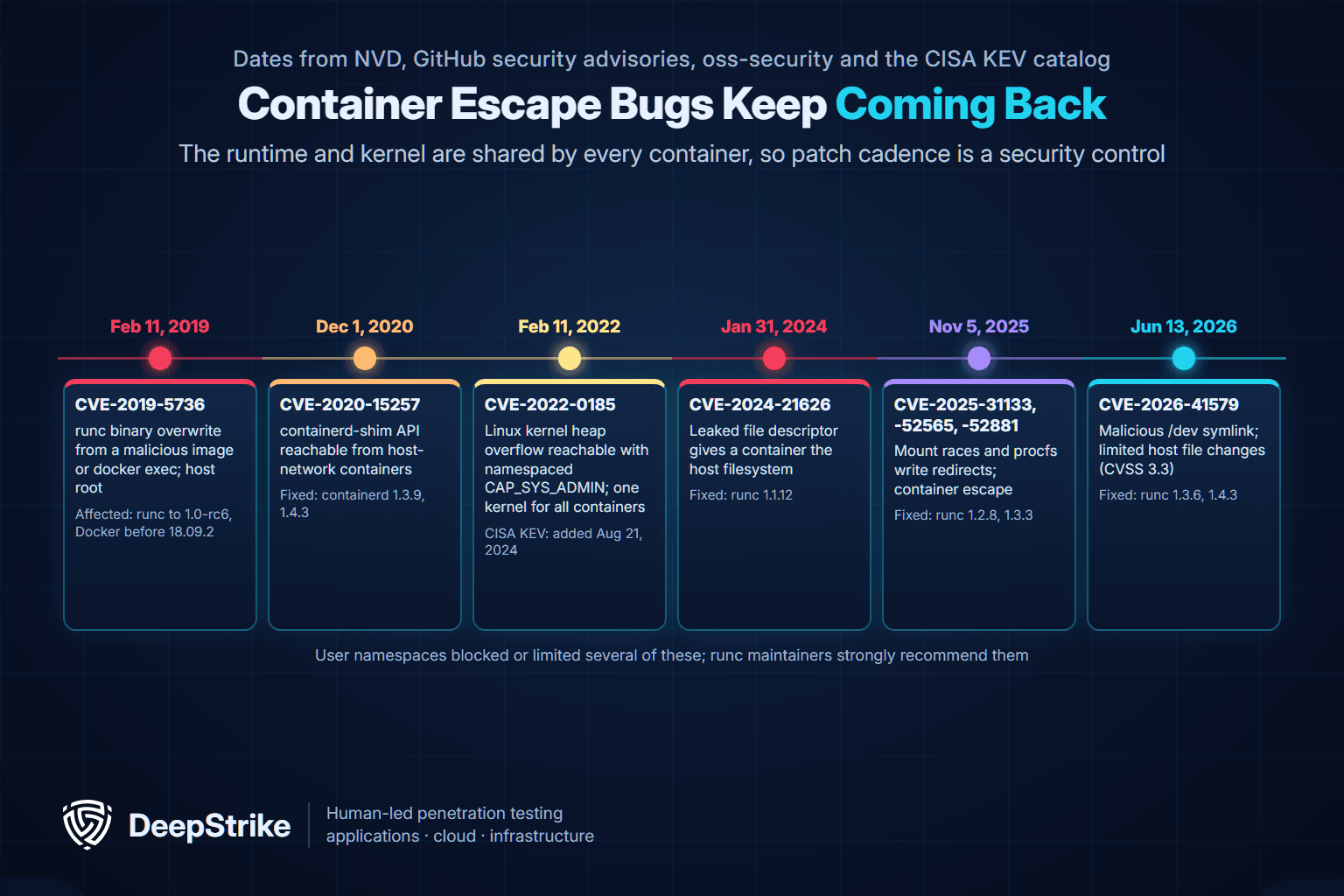
The cases below are all documented in primary sources. They show that the runtime and kernel layers are not theoretical risks, and that the hardening layers above change outcomes.
| Date (source) | Case | What happened | Fixed or listed | What mattered most |
|---|---|---|---|---|
| February 11, 2019 (oss-security; NVD) | CVE-2019-5736, runc | A process running as root in a container could overwrite the host runc binary and gain root on the host, either from an attacker-controlled image or through docker exec into a container the attacker could write to; NVD CVSS 3.1 score 8.6 | Affected runc through 1.0-rc6 and Docker before 18.09.2 | The disclosure said correct use of user namespaces blocks it; SELinux confinement as container_t protected some packages |
| December 1, 2020 (NVD) | CVE-2020-15257, containerd | The containerd-shim API socket was reachable from containers sharing the host network namespace, letting a root process in such a container run new processes with elevated privileges | Fixed in containerd 1.3.9 and 1.4.3 | Avoid host networking; restart containers started with old shims |
| February 11, 2022 (NVD); KEV August 21, 2024 | CVE-2022-0185, Linux kernel | Heap overflow in filesystem context handling, reachable by an unprivileged user when unprivileged user namespaces are enabled, or with namespaced CAP_SYS_ADMIN | Added to CISA's Known Exploited Vulnerabilities catalog on August 21, 2024 | One shared kernel: patch nodes, keep seccomp on, drop capabilities |
| January 31, 2024 (NVD; runc advisory) | CVE-2024-21626, runc | Internally leaked file descriptors let a container process get a working directory on the host filesystem; variants could overwrite host binaries for a complete escape; NVD CVSS 3.1 score 8.6 | Fixed in runc 1.1.12 | Run only trusted images; patch runc on every node |
| November 5, 2025 (runc advisories; NVD) | CVE-2025-31133, CVE-2025-52565, CVE-2025-52881, runc | Mount race conditions and procfs write redirects could enable container escape, host information disclosure or denial of service | Fixed in runc 1.2.8, 1.3.3 and 1.4.0-rc.3 | runc recommends user namespaces; default AppArmor profiles limit some variants, but CVE-2025-52881 can bypass LSM labels |
| June 13, 2026 (runc advisory; NVD July 1, 2026) | CVE-2026-41579, runc | A malicious image with /dev as a symlink could make runc delete or create a limited set of files on the host; CVSS 3.1 score 3.3 | Fixed in runc 1.3.6, 1.4.3 and 1.5.0 | Not exploitable under Docker, whose read-only init layer masks the symlink; other higher-level runtimes were exposed |
| Since at least October 2019 (MITRE ATT&CK) | TeamTNT and Kinsing campaigns | TeamTNT targeted cloud and containerized environments to deploy cryptocurrency miners and scanned for the Docker API; Kinsing malware ran in an Ubuntu container deployed through an open Docker daemon API | Tracked as ATT&CK group G0139 and software S0599 | Never expose the Docker API; detect unexpected containers and outbound mining traffic |
Primary records: CVE-2019-5736 disclosure on oss-security and NVD entry; NVD CVE-2020-15257; NVD CVE-2022-0185 and the CISA KEV catalog; runc advisory GHSA-xr7r-f8xq-vfvv and NVD CVE-2024-21626; runc advisory GHSA-9493-h29p-rfm2 with NVD entries for CVE-2025-31133, CVE-2025-52565 and CVE-2025-52881; runc advisory GHSA-xjvp-4fhw-gc47 and NVD CVE-2026-41579; MITRE ATT&CK pages for TeamTNT (G0139) and Kinsing (S0599).
hostUsers: false are worth the compatibility work.--privileged, host namespaces, extra capabilities, seccomp=unconfined and mounted sockets. Two of the 2025 runc flaws were TOCTOU races, in which a path was swapped for a symlink between runc checking it and mounting it.Prevention will not catch everything, so you need runtime visibility. SP 800-190 lists the anomalies container-aware tools should detect: unexpected process execution and system calls, changes to protected files and binaries, writes to unexpected locations, new network listeners, traffic to unexpected destinations, and malware storage or execution. The MITRE ATT&CK Containers matrix gives those signals a shared vocabulary; our MITRE ATT&CK framework guide explains how to use it for detection coverage.
| Signal | ATT&CK technique | Where to look |
|---|---|---|
| Interactive shell or exec into a running container outside a change window | T1609 Container Administration Command | Kubernetes audit log (exec subresource), Docker daemon events, runtime sensor |
| New container from an unknown image, or with privileged, host-namespace or hostPath settings | T1610 Deploy Container | Admission controller decisions, Kubernetes audit log, Docker events |
| Container process touching host paths, the runtime socket or kernel modules | T1611 Escape to Host | Runtime syscall monitoring, AppArmor or SELinux denials, host audit logs |
| Image built directly on a production host through the Docker API | T1612 Build Image on Host | Docker API access logs; alert on any build on runtime nodes |
| Workload listing containers, pods or nodes, or querying the kubelet API | T1613 Container and Resource Discovery | Kubernetes audit log for service-account list calls, network flow logs |
| Outbound connections to mining pools or unknown hosts from a workload | Impact pattern seen in TeamTNT and Kinsing activity | Egress firewall and DNS logs, network policies in audit mode |
Technique pages: T1609, T1610, T1611, T1612 and T1613.
For runtime detection, Falco is a widely used open-source option: a CNCF project that was accepted in October 2018 and reached graduated status on February 29, 2024. Whatever sensor you choose, wire its alerts into the same response process as your other detections, and remember that container IP addresses change constantly, so alerts need pod, namespace, image and node context to be actionable. When an attacker does get a foothold, the next step is usually to move toward credentials and other workloads; our guide to lateral movement covers how that looks and how to detect it.
Run these checks only on hosts and clusters you own or are authorized to assess. They are configuration reviews, not exploits.
1. Benchmark a Docker host. Docker Bench for Security runs the CIS-based checks and prints PASS, WARN and INFO results:
git clone https://github.com/docker/docker-bench-security.git
cd docker-bench-security
sudo sh docker-bench-security.sh
2. Inspect running containers for risky flags. This reads configuration only (it requires jq):
for c in $(docker ps -q); do
  docker inspect "$c" | jq -r '.[] | [.Name, ("user=" + .Config.User),
    ("privileged=" + (.HostConfig.Privileged|tostring)),
    ("readonly=" + (.HostConfig.ReadonlyRootfs|tostring)),
    ("capadd=" + (.HostConfig.CapAdd|tostring)),
    ("secopt=" + (.HostConfig.SecurityOpt|tostring))] | join(" ")'
done
An empty user= means the container runs as the image default, usually root. Look for privileged=true, unexpected capadd values and seccomp=unconfined in secopt.
3. Find containers with the Docker socket mounted:
docker ps -q | xargs docker inspect | jq -r '.[] | select(any(.Mounts[]?; .Source == "/var/run/docker.sock")) | .Name'4. Dry-run the Restricted profile in Kubernetes. Label a namespace with pod-security.kubernetes.io/warn: restricted and pod-security.kubernetes.io/audit: restricted first; the API server then reports which workloads would fail before you switch to enforce.
5. Test like an attacker would. Configuration checks tell you what is set, not what an attacker can chain. A penetration test of a container platform starts from a realistic foothold (a compromised pod, a leaked CI token, a developer account) and tries to reach secrets, other namespaces, the node and the cloud account. That is how misconfigurations that each look minor turn into a path to production data.
Build
Ship
Run
Host and orchestrator
Detect and test
Container security is the practice of protecting containerized applications and the platform they run on across build, ship and run. It covers image contents and secrets, registries and admission, runtime privileges, the orchestrator and the shared host kernel, plus detection and testing.
NIST SP 800-190 groups them into image, registry, orchestrator, container runtime and host OS risks. In practice the most common problems are vulnerable or untrusted images, secrets baked into layers, over-privileged containers, exposed management APIs, unpatched runc or kernels, and weak RBAC.
Container runtime security limits what a running container can do and detects misbehavior. It includes non-root users, dropped capabilities, no-new-privileges, seccomp, AppArmor or SELinux, read-only filesystems, user namespaces, resource limits and runtime monitoring for unexpected processes, file changes and network activity.
Docker's defaults are reasonable: namespaces, cgroups, a reduced capability set, a default seccomp profile and, on AppArmor hosts, the docker-default profile. But images run as root unless told otherwise, the root filesystem is writable, and flags such as --privileged or a mounted Docker socket remove most protections. Hardening is still required.
NIST SP 800-190, the Application Container Security Guide, was published in September 2017. It describes risks in images, registries, orchestrators, containers and host operating systems, and recommends countermeasures for each, including quality gates, trusted signed images, least-privilege orchestration, runtime hardening and container-specific host OSs.
It is a consensus set of secure configuration recommendations for Docker hosts, daemons, images and containers published by the Center for Internet Security. CIS lists version 1.9.0 as current. Docker Bench for Security is a free script that checks a host against an earlier version of the benchmark.
Rootless mode and user namespaces do not prevent every bug, but they sharply reduce the damage: a process that breaks out is not root on the host. The runc maintainers strongly recommend user-namespaced containers, and several runc advisories list them as the main mitigation.
Container security covers the image, the runtime and the host for any container. Kubernetes security adds the control plane: the API server, etcd, kubelets, RBAC, admission, network policies and secrets. A secure container can still be exposed by a weak cluster, so both layers need testing.
Start with configuration checks: Docker Bench for Security, a review of runtime flags and a Pod Security Admission dry run. Then run an authorized penetration test that starts from a realistic foothold and tries to escalate to the node, other namespaces, secrets and the cloud account.
Container security is mostly configuration discipline: small trusted images, no secrets in layers, least-privilege runtime settings, patched runtimes and kernels, and detection that understands containers. The hard part is knowing whether all of those layers actually hold together in your environment, because the paths attackers use run between them.
DeepStrike's cloud penetration testing services include container and Kubernetes security assessment: testing of containerized applications, Docker configurations, Kubernetes clusters and service mesh security, together with infrastructure-as-code and CI/CD pipelines. Engagements deliver a detailed report, fix recommendations, a technical presentation for your engineers and re-testing to confirm the fixes. For the cluster-specific methodology, read our Kubernetes penetration testing guide, or contact DeepStrike to scope a test.
Mohammed Khalil is a Cybersecurity Architect at DeepStrike, specializing in advanced penetration testing and offensive security operations. With certifications including CISSP, OSCP, and OSWE, he has led numerous red team engagements, focusing on cloud security, application vulnerabilities, and adversary emulation. His work involves dissecting complex attack chains and developing resilient defense strategies for clients in the finance, healthcare, and technology sectors.

Stay secure with DeepStrike penetration testing services. Reach out for a quote or customized technical proposal today
Contact Us
