November 6, 2026
Updated: November 11, 2026
Geek Squad is real, and criminals are impersonating it. How the fake renewal email works, how to check a charge, and what to do next.

Mohammed Khalil
A Geek Squad scam email is a fake renewal notice or invoice that says you will be charged hundreds of dollars, then pushes you to call a phone number or click a link. Geek Squad is a real Best Buy service, and criminals are impersonating it. Do not call the number. Check your bank or card statement, and contact Best Buy using details you already trust. If you called, clicked or paid, contact your bank or card issuer, change any exposed passwords, and report it at ReportFraud.ftc.gov.
DeepStrike is a penetration testing company and is not affiliated with Geek Squad or Best Buy. This guide is built from FTC, FBI, CISA and Best Buy guidance. Best Buy's own advice is on its Protect Yourself page, and it takes scam reports at abuse@BestBuy.com. If you have already called or paid, go straight to the section "What to Do If You Called, Clicked or Paid" below.
Very likely, if you did not expect it. The FTC warned about this exact message in an October 2022 consumer alert: a text or email says you were or will be charged hundreds of dollars to renew a Geek Squad membership, and you must call a number within 24 hours to dispute it. The FTC's tech support scam guidance, dated September 2025, still names Geek Squad among the brands used in fake renewal messages.
There is one complication. Geek Squad itself is legitimate, and real renewals exist. Best Buy publishes a list of genuine Geek Squad statement charges, so "I got a renewal message" does not settle the question by itself. What settles it is checking your own accounts, without using anything from the email.
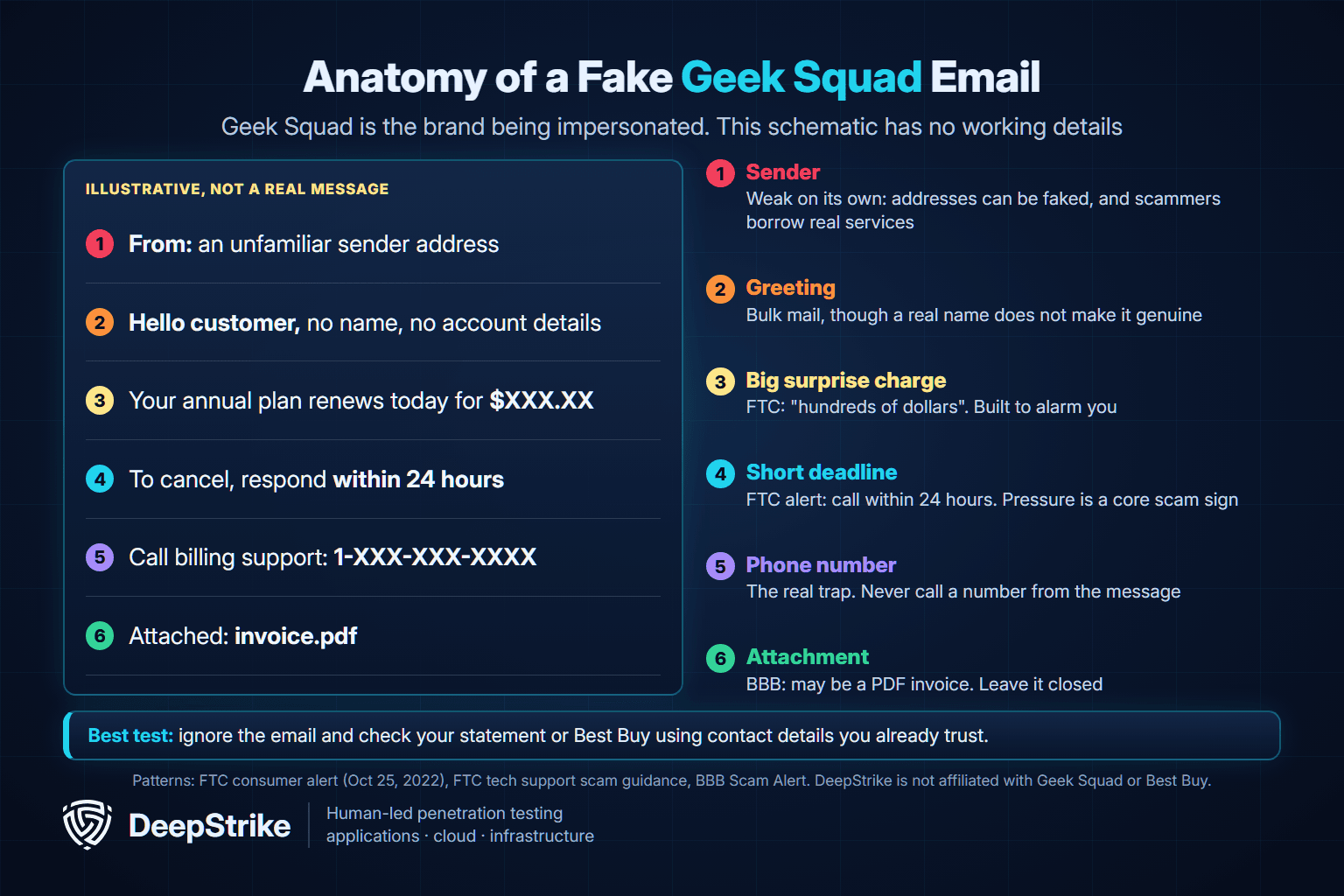
Most versions follow the same script: a surprise charge, a short deadline and a phone number to fix it. The FTC's four signs of a scam describe the pattern well: scammers pretend to be a company you know, claim there is a problem, pressure you to act now, and insist on a specific way to pay. The schematic below is illustrative, and it shows the same pattern.
| Warning sign | What it looks like | How much it proves |
|---|---|---|
| A phone number is the fix | "Call to cancel or dispute" | Strong. Treat any number in the message as the scammer's |
| A short deadline | Respond within a day or the charge goes through | Strong. Pressure is a core scam sign |
| A charge you do not recognize | Hundreds of dollars for a plan you do not remember | Strong, once your statement shows no such charge |
| Requests to verify personal details | Card, bank or Social Security details to "cancel" | Strong. Best Buy says it does not ask for this by email |
| An attached invoice | A PDF bill you did not ask for | Moderate. Real companies send invoices too, so verify first |
| A generic greeting | "Dear customer" | Weak. Scammers can have your name |
| Odd spelling or formatting | Strange wording, mismatched branding | Weak. A clean email can still be fake |
| The sender address | Free email or an unrelated company | Useful only when it looks wrong. A normal address proves nothing |
The sender address deserves a caution, because many guides treat it as the main test. Best Buy's US scam page does not publish a list of sending addresses. In a May 2026 report, Fox News described a fake $489 Geek Squad invoice that came from a real payment company's address, because the sender had abused an account on that platform. The company, Razorpay, told Fox News the account was in test mode and has been disabled. A believable sender, in other words, is not proof.
The lack of a link is not proof either. Many of these emails carry only a phone number, while others use a link or an attached PDF invoice, according to the Better Business Bureau. That is why the FTC's advice is simple: contact the company using a number you know is real, and do not use the number in the message.
You can do this in a few minutes without touching the email.
This scam is a form of callback phishing, where an email gets you to phone the attacker instead of clicking something. MITRE ATT&CK tracks the behavior under Spearphishing Voice (T1566.004), which covers phishing messages that tell victims to call a number. It is a type of social engineering, though unlike spear phishing it is usually sent in bulk rather than tailored to you.
The call usually follows the same path, based on the FTC, the FBI and a joint CISA advisory from January 2023. The person who answers offers to cancel the charge or issue a refund, asks for remote access to your computer, shows you a fake over-refund on your bank screen, then asks you to "return" the difference, sometimes in gift cards. The McAfee version runs the same script, and our McAfee scam email guide walks through each step of that fake refund call.
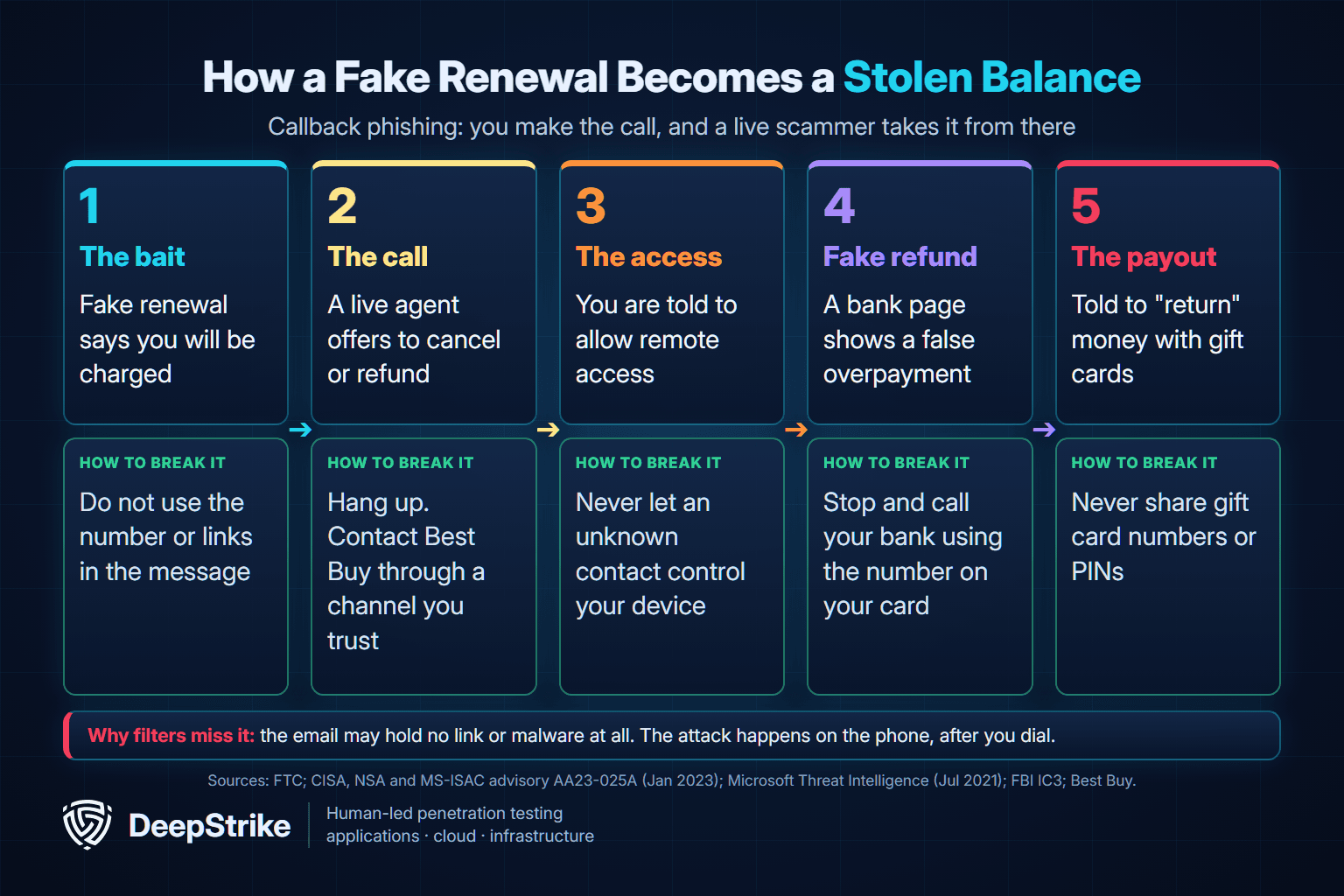
Three things make this work. The fear of a large charge pushes you to act quickly. The fact that you never bought the plan makes calling feel like the safe, sensible thing to do. And because you dialed the number yourself, the person who answers feels like customer support rather than a stranger who called you.
It also gets past some of the usual defenses. Microsoft's analysis of BazaCall, a 2021 campaign using the same fake subscription idea to spread malware, noted that its emails had no malicious link or attachment, which made them harder to detect. We are not saying the same criminals run both. The point is that the technique is well documented, and an email with nothing suspicious to click can still be dangerous.
The scale is real, although no public figure isolates Geek Squad. The FBI's 2025 Internet Crime Report logged 47,794 tech and customer support complaints with about $2.13 billion in reported losses across all brands in 2025. For wider numbers on phone-based attacks, see our vishing statistics.
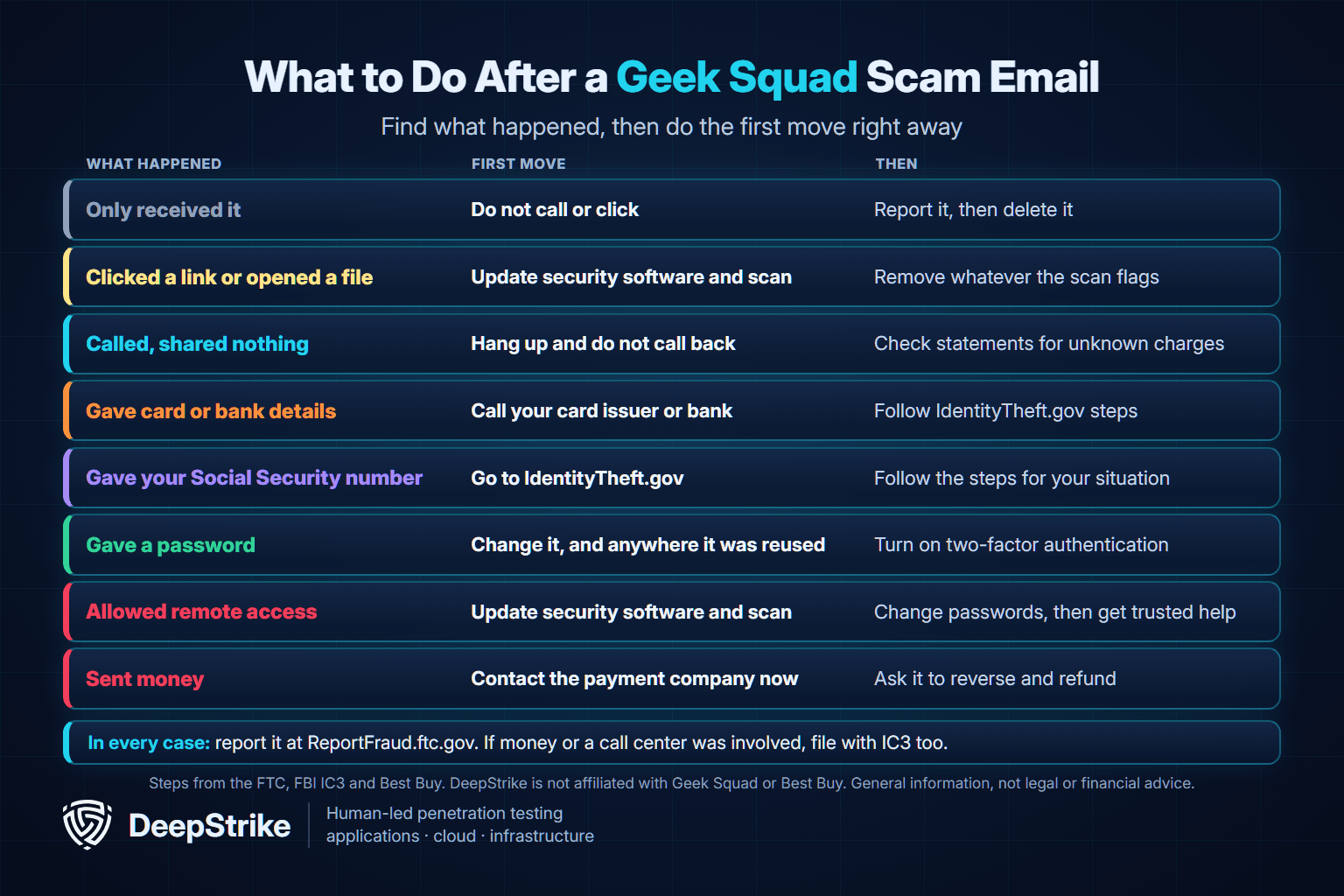
Being caught by this is not a sign of carelessness. The email is designed to rush you. Find the situation below that matches what happened, and start with it. If more than one applies, work through each one.
| What happened | First move | Then |
|---|---|---|
| You only received it | Do not call or click | Report it and delete it |
| You clicked a link or opened an attachment | Update your security software and run a scan | Remove anything it flags |
| You called but shared nothing | Hang up and do not call back | Check your statements for unknown charges |
| You gave card or bank details | Contact your card issuer or bank | Follow the steps at IdentityTheft.gov |
| You gave your Social Security number | Go to IdentityTheft.gov | Follow the steps for your situation |
| You gave a username and password | Change it, and change it anywhere you reused it | Turn on two-factor authentication |
| You allowed remote access | Update your security software, scan and remove what it flags | Change passwords and get trusted help |
| You sent money | Contact the bank or payment company right away | Ask them to reverse it and refund you |
Everything below comes from the FTC's guide on what to do if you were scammed, its phishing guidance and Best Buy's Protect Yourself page.
The FTC says links and attachments can install harmful software. Update your computer's security software, run a scan and remove anything it flags. For background on what that software can do, see our guide to the types of malware. If you typed anything into a page you reached through the link, follow the steps below for that type of information.
If you are still on the call, hang up. If you shared nothing and allowed no access, check your statements for charges you do not recognize, then report the scam. Best Buy says it generally does not make unsolicited calls to customers, so treat any follow-up call claiming to be Best Buy or Geek Squad with suspicion.
Contact your card issuer or bank using the number on the back of your card, your online account or the app, and report what happened. For a Social Security number, the FTC splits the next step in two. If it has been used, report it at IdentityTheft.gov and follow the recovery plan. If it has not been used, or you are not sure, follow the steps at IdentityTheft.gov/databreach. Our identity theft statistics show how that kind of misuse plays out.
If you gave a username and password, create a new strong password for that account, change it anywhere else you used it, and turn on two-factor authentication.
The FTC gives three steps: update your security software (or install some, using recommendations from independent review sites, friends or family), run a scan and delete anything it flags, then change your passwords and turn on two-factor authentication. Our McAfee scam email guide sets out a fuller cleanup order, including ending the session and resetting the device if problems continue.
If you need help removing malware, the FTC suggests the device manufacturer, a company you trust or a knowledgeable friend or relative. Best Buy's page also suggests a trusted computer repair specialist. Do not use anyone the scammer recommended.
Tell whoever helps you exactly what you installed. CISA notes that criminals in these campaigns use legitimate remote monitoring and management software, sometimes in portable versions that are not installed in the normal way, so a security scan may not treat it as a threat.
Move quickly. The FTC says to report it right away, and gives these contacts by payment method:
| How you paid | Who to contact right away | What to ask or know |
|---|---|---|
| Credit card | Card issuer, using the number on the back of the card | Ask for a refund. Federal law protects you from unauthorized use |
| Debit card | Your bank or credit union | Ask for a refund. Federal law protects you from unauthorized use |
| Bank transfer or Zelle | Your bank or credit union | Ask them to reverse the payment and refund you |
| Payment app | The app company | Ask for a reversal and a refund |
| Wire transfer | The wire company | Say a scammer tricked you and ask for a refund |
| Gift card | The card issuer, using the number on the back of the card | Say a scammer got the number and PIN. Keep the card and receipt |
| Cryptocurrency | The exchange or crypto ATM operator | Report fraud and ask for a reversal. Protections are weaker, so recovery can be hard |
| Cash by US mail | U.S. Postal Inspection Service, 1-877-876-2455 | For a fee, it may intercept an undelivered domestic package |
If you sent cash by FedEx or UPS, contact the carrier as soon as possible. And remember Best Buy's rule on its own cards: they cannot be used to pay bills, and you should never share a gift card number or PIN over the phone with someone you do not know.
Reporting takes a few minutes and helps others, even if you lost nothing. The FTC says its reports help it build cases and spot trends.
For an IC3 complaint, the FBI asks for as much detail as possible: websites, phone numbers and emails used, account names and receiving banks or wallets, a description of the interaction, and any link involved. Keep the original emails and your call logs.
The FBI says call centers overwhelmingly target older adults. In 2025, people aged 60 and over filed more than 21,000 tech and customer support complaints to IC3, reporting about $1.04 billion in losses, which is almost half of the category's total, according to the elder fraud section of the FBI's 2025 Internet Crime Report.
A few rules from the FBI and FTC are short enough to share over the phone: do not call numbers shown in an email, pop-up or text, do not download software because a stranger asked you to, and do not let an unknown contact control your device. Be careful with support numbers found through a web search too, because sponsored results may be paid placements. If a relative is mid-scam, the most useful thing you can do is help them make the calls in the table above.
Fake renewal emails also reach work inboxes, where the same call can end with an attacker running a remote tool on a company laptop. An authorized social engineering penetration test can show whether staff report a call-this-number email and whether an endpoint would really block an unapproved remote tool. DeepStrike's penetration testing services include simulated phishing, calling and baiting; testing shows where the gaps are but does not guarantee that an attack will fail, and you can contact our team to scope one.
Real customers can receive genuine messages about plans they bought, and Best Buy lists real renewal charges. However, Best Buy says most legitimate companies, including Best Buy, will never ask you to verify personal information through email. Its US page does not list official sending addresses, so verify through BestBuy.com or 1-888-237-8289 rather than judging by the sender.
Yes. The FTC warned about it in 2022, its September 2025 guidance still names Geek Squad, and Fox News reported a new variant in May 2026. Wording and amounts change, but the script stays the same.
No. Geek Squad is Best Buy's real tech support service. Scammers use its name because people recognize it.
Reading a message is not one of the actions the FTC warns about. Its warnings focus on links, attachments and calling the number. If you did none of those, report the email and delete it. If you clicked or opened an attachment, update your security software and run a scan.
The call itself does not give them access to your device or bank account. The FTC warns that the harm comes next, when they ask for remote access, bank details or gift cards. If you shared nothing, hang up and check your statements for unknown charges anyway.
Probably because it was sent in bulk. Fox News describes these emails going to large lists, some scraped online and some from past data breaches. Our guide to your digital footprint explains how addresses get exposed. Getting the email does not, by itself, mean you have an account or that Best Buy was breached.
Forward it to abuse@BestBuy.com, then report it at ReportFraud.ftc.gov and forward it to reportphishing@apwg.org.
Treat the phone number as the trap. Check your own statement, reach Best Buy through details you already trust, and report the message. If you have already called, clicked or paid, it is not too late to act: start with your bank or card issuer, follow the FTC steps above, and file a report.
Mohammed Khalil is a Cybersecurity Architect at DeepStrike, specializing in advanced penetration testing and offensive security operations. With certifications including CISSP, OSCP, and OSWE, he has led numerous red team engagements, focusing on cloud security, application vulnerabilities, and adversary emulation. His work involves dissecting complex attack chains and developing resilient defense strategies for clients in the finance, healthcare, and technology sectors.
FTC: How to recognize a fake Geek Squad renewal scam (October 25, 2022)
FTC: How To Spot, Avoid, and Report Tech Support Scams (September 2025)
FTC: What To Do if You Were Scammed (June 2026)
FTC: How To Recognize and Avoid Phishing Scams (September 2022)
FTC: How To Avoid a Scam (July 2023)
FTC: IdentityTheft.gov data breach steps
FBI IC3: Tech/Customer Support and Government Impersonation
FBI IC3: 2025 Internet Crime Report
MITRE ATT&CK: Phishing: Spearphishing Voice, T1566.004

Stay secure with DeepStrike penetration testing services. Reach out for a quote or customized technical proposal today
Contact Us
