November 6, 2026
Updated: November 11, 2026
How to check a suspicious McAfee message, what to do if you clicked, paid or allowed remote access, and where to report it.

Mohammed Khalil
A McAfee scam email is a fake message that uses McAfee's name to scare you into calling a number, clicking a link or paying for a renewal you never ordered. Most arrive as a bogus invoice or an "expired protection" notice. Don't call, click or reply. Check your card statement and, if you have an account, sign in by typing mcafee.com yourself. No charge means you can report it and delete it. If you already paid, shared details or allowed remote access, go straight to the recovery steps below.
No. McAfee is a real security company, and it is the one being impersonated here. DeepStrike is not affiliated with McAfee. McAfee has its own scam awareness page and a support article on how to spot and report fake McAfee emails. This guide brings those together with steps from the FBI and the Federal Trade Commission, which names McAfee in its warning. We did not visit live scam sites or call scam numbers, and we do not reproduce any here.
A McAfee email cannot prove itself, because anything in the message can be copied. Your own records can.
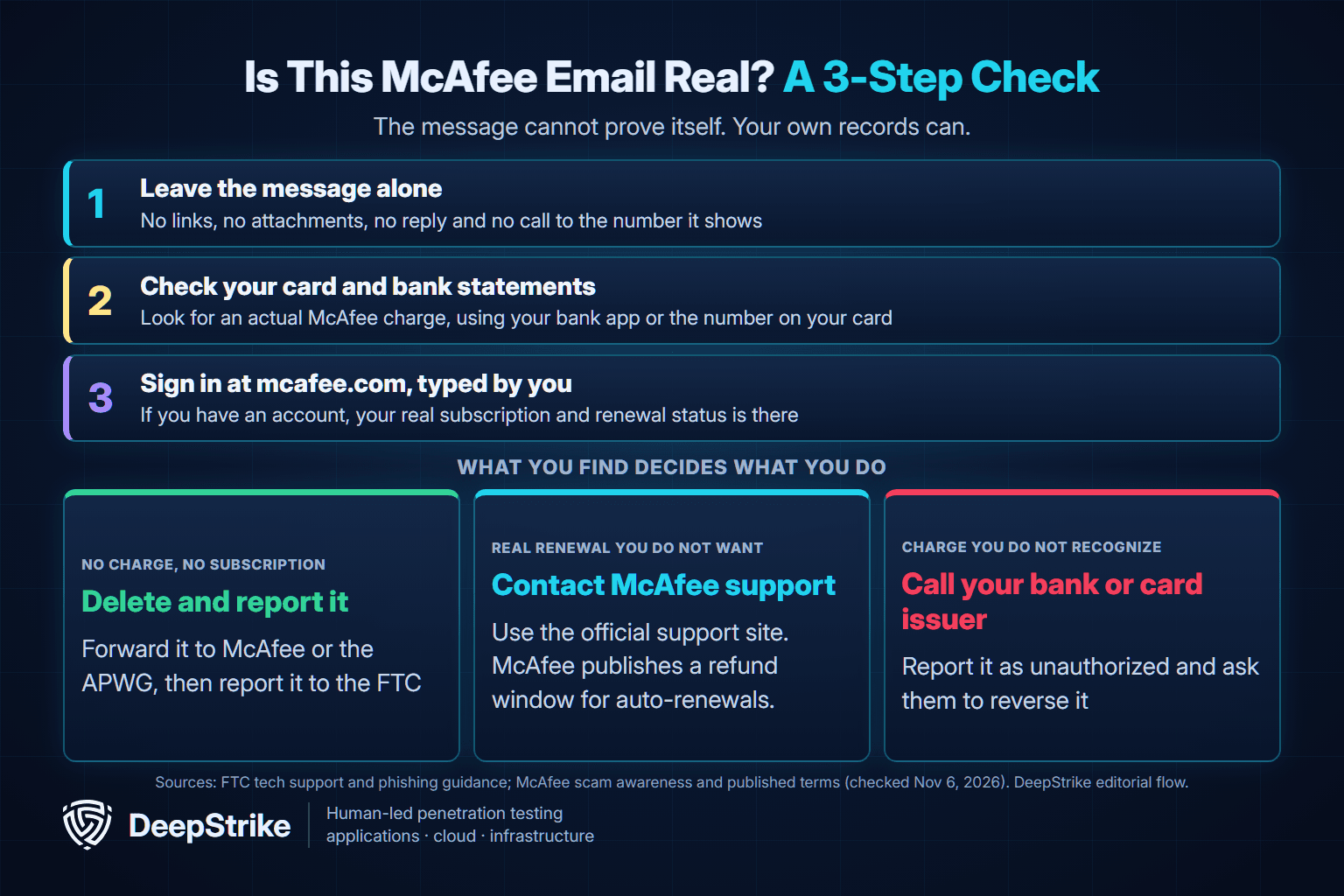
If you've never had a McAfee account, the FTC's test is simpler still: no account with the company means it's likely a scam, so report it and delete it.
If you need help, go to McAfee's official support site from your address bar. Be careful with search results. The FBI's IC3 warned in 2018 that criminals pay to place fake tech support companies high in search results, and the FTC says scammers still buy search ads. McAfee also warns about fraudulent customer service websites. We don't print a McAfee phone number here for the same reason: a number copied from a web page is the habit this scam depends on.
Red flags aren't equal, and a polished fake can pass the weak ones.
| Sign | Real McAfee | Scam | How much it proves |
|---|---|---|---|
| You must call a phone number | McAfee says it never requires this | Central to the invoice version | Strong: treat as a scam |
| Asks you to confirm personal details | McAfee says it never does this | Common | Strong: treat as a scam |
| Virus warning inside a browser tab | Alerts come from the installed program | Common | Strong: treat as a scam |
| Sender address | Appears on McAfee's published list | Usually unrelated to McAfee | Useful, not final |
| Bad spelling and grammar | Not expected | Common, not universal | Weak: its absence proves nothing |
| Contains a real McAfee link | Yes | Sometimes, for credibility | Weak: other links may be malicious |
| The price | Varies by plan and term | Documented from about $80 to hundreds | Weak: price can't decide it |
The table draws on McAfee's scam awareness page, which publishes the sender list, and its guidance on fake pop-ups. That list includes a few addresses outside mcafee.com, so an unfamiliar domain isn't automatic proof of fraud. A match isn't the last word either, because the IC3 has seen scammers use email domains that seem authentic. McAfee also told The Guardian that criminals are getting more sophisticated with AI, so clean writing counts for little.
Criminals use the McAfee name in three main ways, and each one pushes you toward a different mistake. The FTC's tech support scam guidance specifically lists renewal notices citing Geek Squad, McAfee or Norton, with a deadline to call within 24 hours.
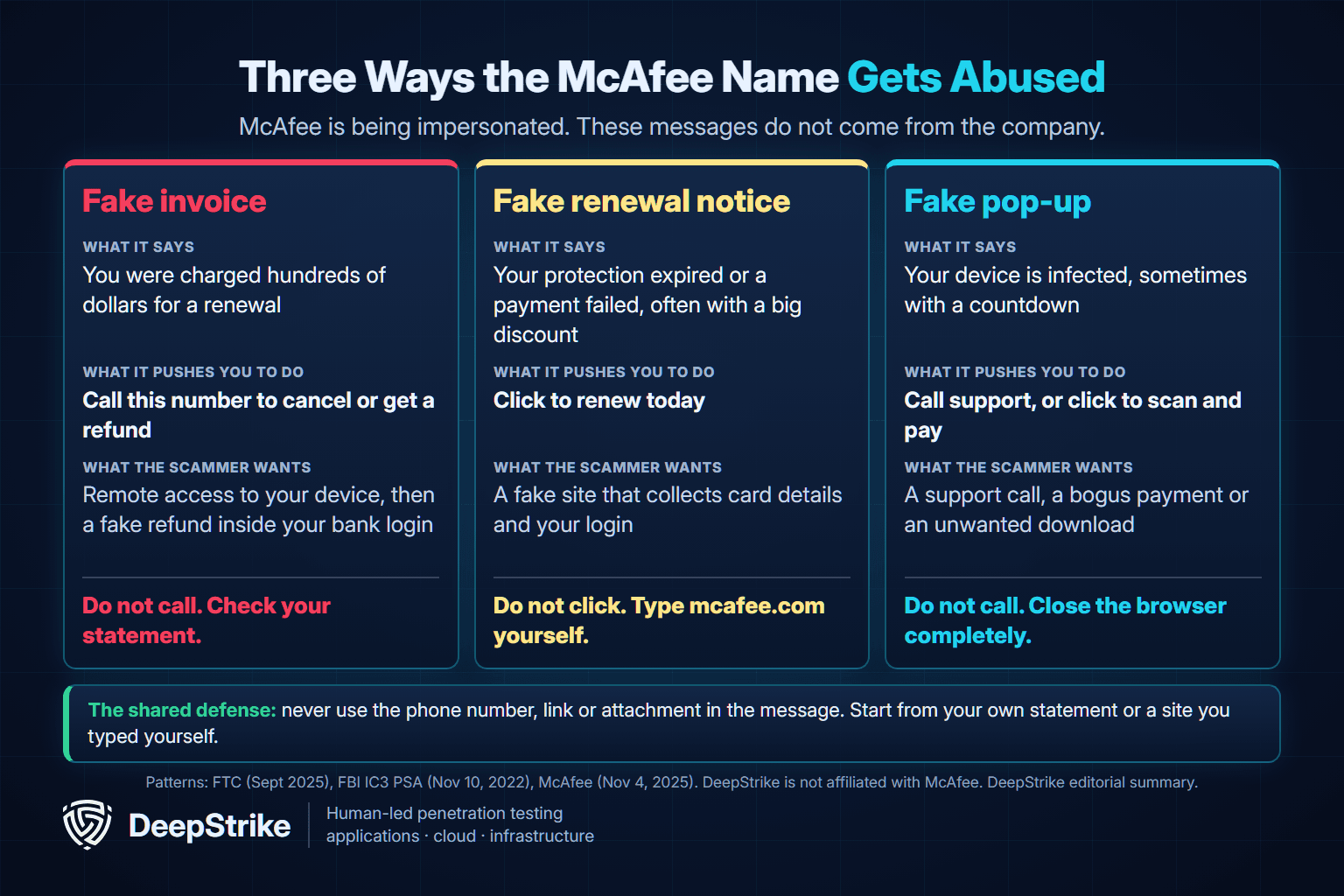
This version says you've already been charged, or are about to be. The IC3 described the template in 2022: a subject line hinting at a renewal within about 24 hours, a price commonly between $300 and $500, and a number to call to cancel and get a refund. The bill is bait. The call is the attack.
This version says your protection has expired or a payment failed, and it pushes a link. Many offer a steep discount for acting today. The link often goes to a fake site built to collect your card details, your login or both.
These appear in your browser, not your inbox. They claim your device is infected, often with McAfee's logo and a countdown timer, and tell you to call a number or pay. McAfee says genuine notifications come from the installed program, not your browser. Apple's advice on browser warnings like these is simple: don't believe them.
These named reports show why no single detail, such as the amount or wording, can identify the scam.
| Date reported | Reported by | What the message did |
|---|---|---|
| November 2022 | FBI IC3 | Renewal due within 24 hours, $300 to $500, call to cancel |
| May 2024 | Action Fraud (UK) | Said the computer "could be at risk"; links led to phishing sites |
| September 2024 | Which? (UK) | Attached invoice for £799.99 with a number to call |
| May 2026 | The Guardian | Offered an 89% renewal discount if paid the same day |
| October 2026 | PCrisk (anti-malware vendor) | Claimed failed payments, $79.99 due, with a Norton subject line and McAfee branding |
Which? says McAfee confirmed the emails it reviewed weren't genuine. The anti-malware vendor PCrisk says its sample led to a fake cloud storage page. UK press coverage in May 2024 quoted the UK's Action Fraud as saying it had received 4,531 reports of fake McAfee emails since April 1, 2024. We found no public US count specific to McAfee.
The invoice version can do the most damage, because it turns your wish to stop a charge into a reason to let someone onto your computer. The sequence below comes from the IC3's 2022 warning and a January 2023 advisory from CISA, NSA and MS-ISAC.
There was no refund. In the case CISA described, the attackers edited the bank account summary shown on the screen, then asked the victim to return the "excess." The IC3 notes that in some cases the money is simply moved between your own accounts to make it look like a deposit.
This is expensive, especially for older adults. In the FBI's 2025 Internet Crime Report, people aged 60 and over reported about $1.04 billion in tech and customer support losses for 2025. That covers every brand and counts only reported complaints, so it isn't a McAfee number. Our vishing statistics track the all-ages trend.
The right response depends on what you did. If more than one situation applies, handle them all, and deal with money first. Being tricked is common, and acting quickly matters more than how it happened.
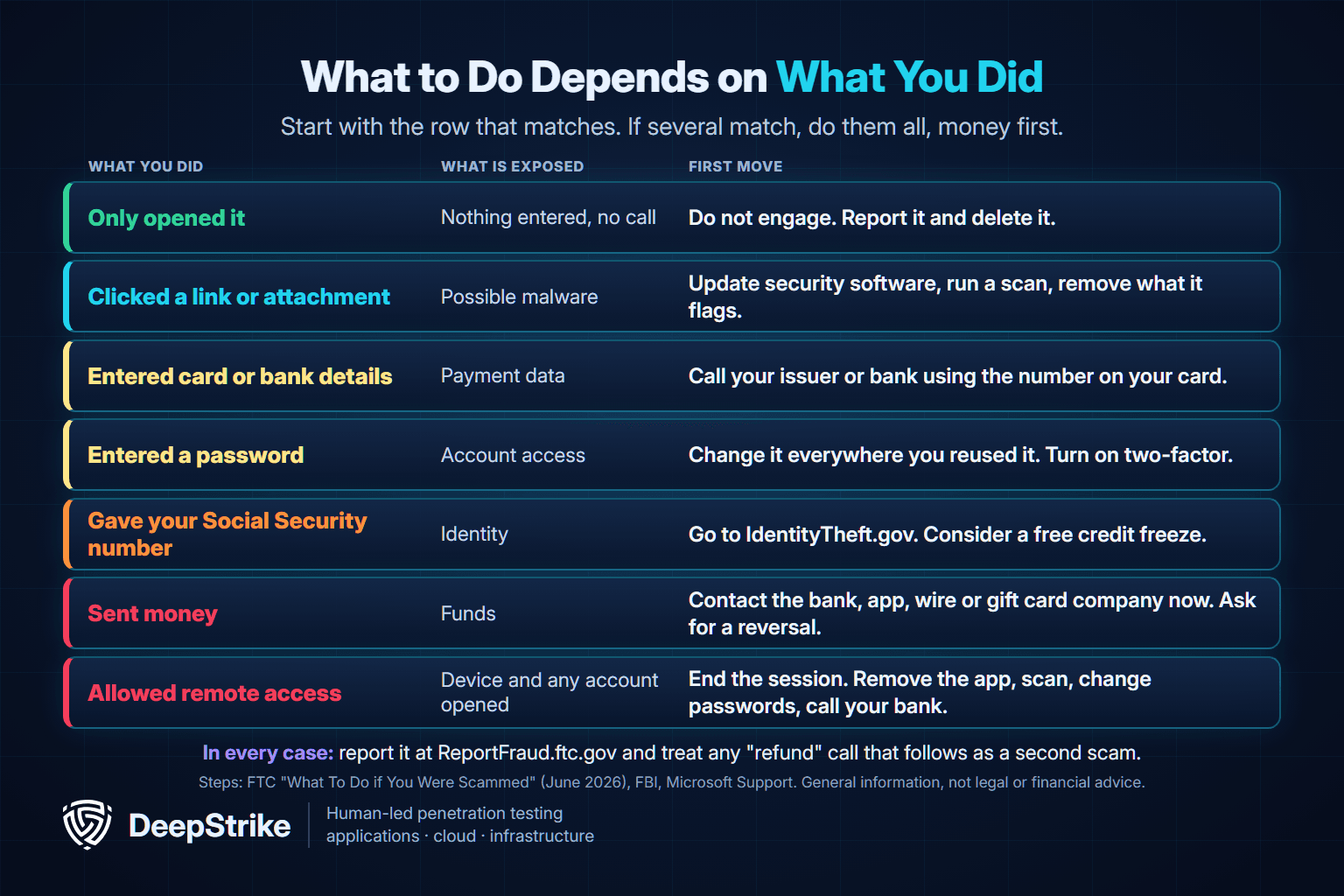
The FTC says to update your security software, run a scan and remove anything it flags. If you installed something the message offered, remove it too. Our guide to types of malware explains what these programs can do.
Act right away and ask for your money back. Contact whoever handled the payment: your card issuer, bank, payment app, wire company, gift card issuer or crypto exchange. The FTC's guidance by payment type says what to ask each one, and our Geek Squad scam email guide sets it out in a method-by-method table. The FTC notes that federal law protects you from unauthorized credit and debit card use, and that cryptocurrency has fewer protections, so recovery there can be hard. Recovery isn't guaranteed. Report every payment at ReportFraud.ftc.gov too.
Treat the computer as compromised, and work through these in order.
Hang up and don't call back. The IC3 warns that these companies share customer details, so expect more calls. Check your statements, and report the number to the FTC.
The FBI says to expect to be contacted again, and the California Attorney General warns about follow-up calls offering a "refund." The IC3 has also seen criminals offer to recover money lost to these scams. Treat anyone calling back to return or recover your money as a second scam. Keep dealing only with your bank, the card company and the agencies below.
Reporting takes minutes, and the FTC says reports help it build cases and warn others.
For emails: mark them as phishing or spam so your provider can filter similar messages, and block the sender. McAfee's support article covers blocking in Gmail, Outlook, Yahoo and Apple Mail. Don't reply or use any unsubscribe link in the message, because McAfee told The Guardian those links can lead to fake websites.
For pop-ups: don't click anything on the alert, and close the tab or window. Apple gives the same advice for Macs and iPhones. If the page won't close, McAfee suggests quitting the browser, using Task Manager on Windows if needed. The IC3 says that if your screen stays locked, you should shut the device down, and victims who did so usually found the pop-up gone after restarting.
If they keep coming back: you may have allowed a site to send notifications. Google's Chrome help shows where to block them, under Privacy and security, then Site Settings, then Notifications. McAfee also suggests removing browser extensions you don't recognize, resetting the browser and running a full scan with your security software.
The same playbook reaches employees. In the CISA, NSA and MS-ISAC advisory, help desk themed phishing reached federal staff, and Microsoft reported in May 2024 that the group it tracks as Storm-1811 posed as IT support on calls, persuaded users to open Quick Assist and eventually deployed Black Basta ransomware. MITRE ATT&CK tracks these steps as Spearphishing Voice (T1566.004) and Remote Access Tools (T1219). The rule to teach staff is the one Microsoft states for Quick Assist: never allow a remote connection unless you started the support request yourself.
Staff fall for social engineering under time pressure, and our spear phishing guide covers the targeted version. A social engineering assessment can show whether an employee would call the number and whether an unapproved tool would actually run. DeepStrike's penetration testing services include simulated phishing and calling attacks. If you want to test this pattern against your own team, talk to us.
Ignore the email itself and check your own records. Look at your card or bank statement, then sign in by typing mcafee.com into your browser. McAfee says it won't require you to call a number in an email or text, and won't ask you to confirm personal details. Its scam page also lists the addresses it sends from, which is useful but doesn't settle the question alone.
It may be a real auto-renewal, or a charge from someone misusing your card. McAfee's published terms, checked in November 2026, describe automatic renewal, charging seven days before renewal for the offer shown, and a full refund on request within 60 days of an auto-renewal. Sign in to your account to check. If you have no account and the charge is on your statement, report it to your card company as unauthorized and ask for it to be reversed.
If the message comes from the installed McAfee app on your device, check it in your account, because real trials and subscriptions do end. If it appears in a browser tab or an email with a link or a discount, treat it as fake. Check your status by opening the installed program or signing in at mcafee.com.
The risks the FTC describes come from links and attachments, which can install malware, and from calling the number. If you only opened the email and did nothing else, report it and delete it. If you clicked or downloaded something, update your security software and run a scan.
Possibly. Your chances depend on how you paid and how fast you report it. The FTC notes that federal law protects you from unauthorized credit and debit card use, while crypto has fewer protections. Contact the payment company straight away, and be wary of anyone who offers to recover the money for you.
Scam emails go out in bulk, so you don't need to be a customer to receive one. The FTC's advice: if you have no account with the company, it's likely a scam, so report it and delete it. It's still worth checking your statements for a charge.
If a McAfee message is sitting in your inbox right now, don't use anything in it, and check your statement. No charge means report it and delete it. If you responded, start with your bank and the FTC's recovery steps. This article is general information, not legal or financial advice, and your bank or a qualified adviser can speak to your own situation.
Mohammed Khalil is a Cybersecurity Architect at DeepStrike, specializing in advanced penetration testing and offensive security operations. With certifications including CISSP, OSCP, and OSWE, he has led numerous red team engagements, focusing on cloud security, application vulnerabilities, and adversary emulation. His work involves dissecting complex attack chains and developing resilient defense strategies for clients in the finance, healthcare, and technology sectors.

Stay secure with DeepStrike penetration testing services. Reach out for a quote or customized technical proposal today
Contact Us
