August 3, 2026
Updated: November 1, 2026
A dark web browser hides your location, not your mistakes. What Tor protects, what it misses, and how to reach .onion sites safely in 2026.
Abdalla Mohamed
A dark web browser routes your traffic through an anonymity network, almost always Tor, so you can reach the .onion sites normal browsers cannot open. The usual choice is the Tor Browser, a hardened build of Firefox ESR that relays every request through three hops to hide your location. What most guides skip is the limit: it hides where you are, but it does not make you anonymous if you log in, resize the window, or run a compromised device. This 2026 guide covers how it works, what it protects, and how to browse the dark web safely.
Updated: November 2026. Reflects Tor Browser 16.0 (released October 29, 2026, the first stable release based on Firefox ESR 153), Tails 7.16, v3 onion services, and the ongoing Arti (Rust) rewrite.
A dark web browser is software that connects to a darknet, a network that sits on top of the regular internet but is not reachable with Chrome or Safari. The most common darknet is Tor, whose sites use .onion addresses, so in practice "dark web browser" almost always means the Tor Browser or an app that routes through Tor. It is worth separating two terms people mix up: the deep web is simply everything not indexed by search engines (your email inbox, banking portals, paywalled pages), while the dark web is the small, deliberately hidden slice you need a tool like Tor to reach. Our guide on the deep web versus the dark web covers that distinction in full.
The Tor Browser itself is free and open source, maintained by the non-profit Tor Project, and runs on Windows, macOS, Linux, and Android. It is not a shady product; journalists, researchers, and privacy-conscious users rely on it every day, and Tor Metrics estimated roughly 3 million or more people a day connecting directly to the Tor network through September and October 2026. The reason it exists as a separate browser rather than a setting is that anonymity needs the whole browser hardened, not just the connection rerouted.
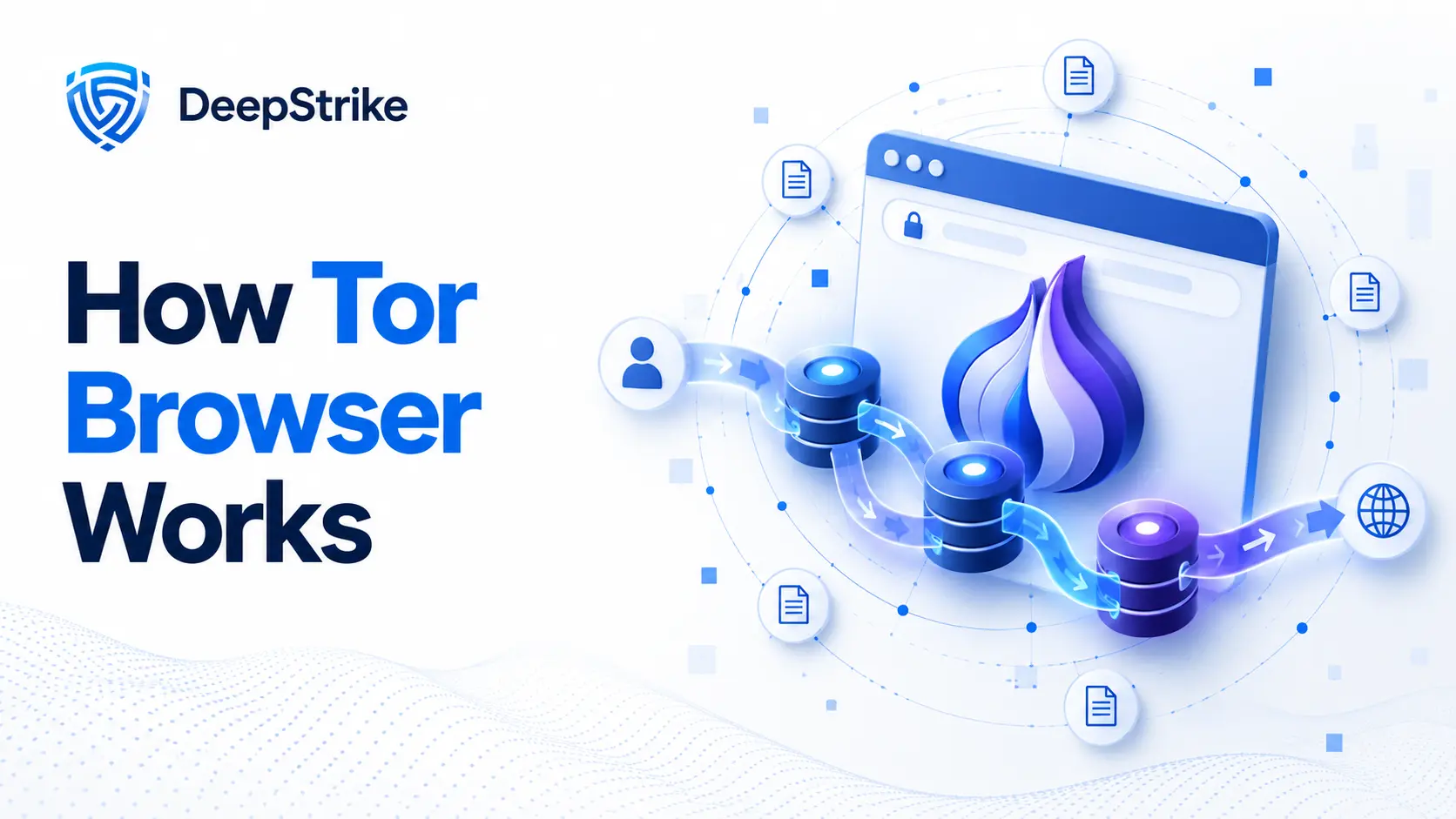
Tor stands for "The Onion Router," and the name describes the mechanism. When you request a page, the Tor Browser wraps it in layers of encryption and sends it through three volunteer-run relays before it reaches its destination. Each relay peels back one layer and knows only the step immediately before and after it, so no single relay ever sees both who you are and what you are visiting. That three-hop design is what provides anonymity against an observer watching any one point on the path.
There is an important exception. When you visit a .onion service, your traffic never leaves the Tor network, so there is no exit node at all. The connection is end-to-end encrypted between you and the hidden service through a rendezvous point, which is why onion sites remove the exit-node risk that clearnet browsing carries. Under the hood, the current onion services are version 3, which use 56-character addresses built on an ed25519 public key; the older, weaker version 2 addresses were deprecated in 2021 and stopped working in Tor Browser with version 11.0 in November 2021, which shipped Tor 0.4.6.8. The Tor Project is also rewriting its core software from C into Rust in a project called Arti, which was declared ready for production use as a client with Arti 1.0 in 2022. As of Arti 2.6.0 (September 2026), work toward running it as a relay and directory authority is still in progress, and Tor Browser and Tails still ship the C tor client.
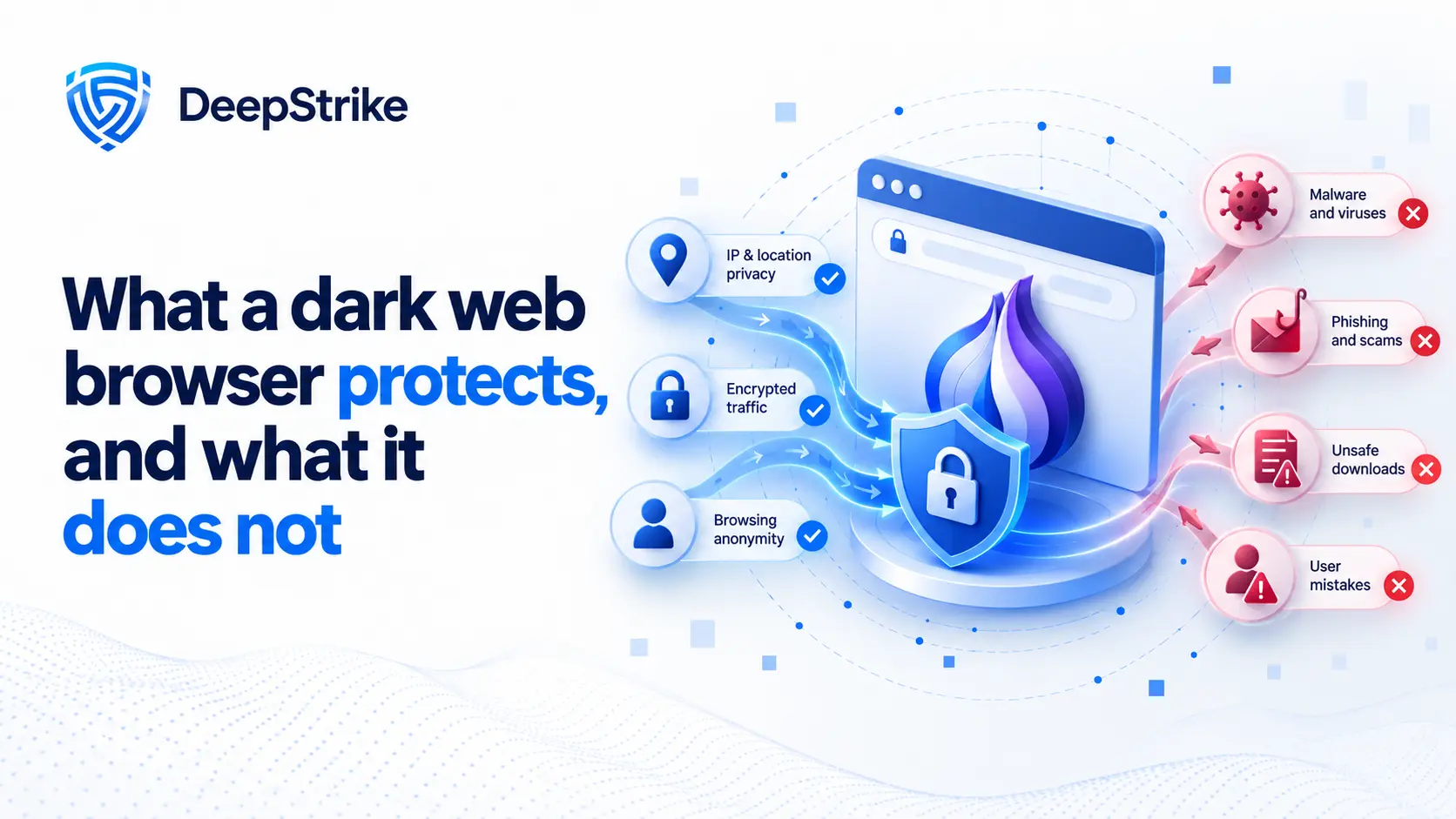
This is the section every other guide gets wrong, and it is the difference between using Tor safely and getting a false sense of security. The Tor Browser protects your network anonymity: it hides your IP address and location from the sites you visit and prevents your internet provider or local network from seeing the specific destinations and content you access through Tor, although they may still be able to tell that you are using Tor. It does not, and cannot, protect you from yourself. Anonymity is a property of your whole behavior, not a switch the browser flips.
| A dark web browser protects | It does NOT protect against |
|---|---|
| Your IP address and physical location | Logging into an account that identifies you |
| Traffic content from your ISP or Wi-Fi | Malware on a compromised device (endpoint) |
| Which sites you visit, from local observers | Reusing a real name, email, or username |
| Onion traffic (stays inside the Tor network) | A global adversary running a correlation attack on entry and exit timing |
The practical takeaway is that the browser handles the network, and you handle everything else. The classic ways people de-anonymize themselves have nothing to do with Tor's cryptography:
For a deeper treatment of these limits, see our analysis of how anonymous the dark web really is. The honest summary: Tor hides your traffic, but it does not make careless behavior anonymous.
Tor Browser is the default, but it is not the only way to reach the dark web, and the alternatives differ sharply in how much protection they actually provide. The table below compares the realistic options. The recurring theme is that routing traffic through Tor is only half the job; the browser also has to resist fingerprinting, and that is where the substitutes fall short. Brave's own help page says its Tor windows do not implement most of Tor Browser's privacy protections and recommends Tor Browser when your safety depends on anonymity.
| Browser or tool | What it is | Honest caveat |
|---|---|---|
| Tor Browser | The standard dark web browser, free and open source | Strongest anonymity uniformity; deliberately slow |
| Brave "Private Window with Tor" | A Chromium browser that routes one window through Tor (desktop only) | Brave's own docs say it does not implement most of Tor Browser's privacy protections; not a substitute |
| Onion Browser (iOS) | Tor Project-recommended app for iPhone and iPad | Built on Apple's WebKit engine, so the Tor Project says it cannot match desktop Tor Browser's privacy protections |
| Tor Browser for Android / Orbot | Official Android browser; Orbot routes device apps over Tor | Orbot is a proxy/VPN app, not a hardened browser on its own |
| I2P | A separate anonymity network, not a browser | Different design and threat model; not used to reach .onion sites |
One name that causes confusion belongs off this list: the Mullvad Browser, built by the Tor Project with Mullvad, carries Tor Browser's anti-fingerprinting protections but does not connect to the Tor network. It is made for use with a VPN, so it is not a dark web browser at all. If your goal is reaching .onion sites, the Tor Browser remains the best dark web browser for almost everyone, with Tails or Whonix for higher-risk needs covered below.
Getting onto the dark web is straightforward; doing it safely takes a few deliberate habits. The single most important rule is to download the browser only from the official Tor Project site, because fake Tor builds laced with malware are a real and recurring threat. The steps below are the safe baseline.
The browser is free, so any site charging you to "access the dark web" is a scam. Speed will be noticeably slower than normal browsing; that is the cost of routing through three relays and is not a sign something is wrong.
Fake Tor Browser builds are one of the most common ways people get compromised before they ever reach a dark web site. Attackers publish trojanized copies on lookalike domains, in unofficial app stores, and through search ads, then use them to steal cryptocurrency or install malware. A few checks keep you safe. First, confirm the address bar reads exactly torproject.org, not a hyphenated or misspelled variant. Second, avoid any download that arrives through an ad, a forum link, or a third-party mirror, because the official project does not distribute that way. Third, in higher-risk situations, verify the download's cryptographic signature using the Tor Project's instructions. Finally, be suspicious of any version that asks for payment or unusual permissions; the real browser does neither.
Ordinary search engines cannot see .onion sites, so finding anything on the dark web means using a Tor search engine or a curated directory like the Hidden Wiki. This is where the "tor search engine" and "tor links" searches lead, and the safety advice matters as much as the tools. Some indexes filter out illegal and malicious pages; others index everything, so the engine you choose changes what you are exposed to.
For a fuller, safety-first rundown, see our guide to the best dark web search engines. Treat any directory of onion links as untrusted: many links are dead, cloned, or outright scams, and clicking blindly is how people land on content and marketplaces they never intended to see. Much of what circulates is also overstated, as our piece on dark web myths explains.
For most readers the Tor Browser on a clean computer is enough. When the stakes are higher, or when the risk of leaving traces on a device is unacceptable, two operating systems take anonymity further by forcing everything through Tor at the system level rather than trusting a single application.
| Option | How it works | Best for |
|---|---|---|
| Tails | An amnesic live USB operating system that forgets everything at shutdown unless you use encrypted persistence | Trace-free sessions on an untrusted or shared machine |
| Whonix | A two-part virtual-machine setup where a gateway runs Tor and a separate workstation can only reach the internet through it | Persistent, compartmentalized work on a trusted computer |
| Onion Browser (iOS) | A Tor-routing app for iPhone and iPad, recommended by the Tor Project | Reaching onion sites on Apple devices, with weaker protection than desktop |
| Tor Browser for Android / Orbot | The official Android browser, or Orbot to route other apps over Tor | Mobile browsing on Android and routing specific apps |
The difference between Tails and Whonix comes down to memory and mobility. Tails leaves no trace and travels on a USB stick, which suits journalists and anyone using a machine they do not control. Whonix stays put but isolates your work so that even a compromised application cannot easily discover your real IP, because the workstation physically has no other route to the internet. Neither replaces good judgment; they raise the floor, not the ceiling.
Tor Browser's most useful safety control is the security level setting, reached through the shield icon on desktop. It has three levels, and choosing the right one is a trade-off between usability and exposure. JavaScript is one reason this matters: active web content expands the browser attack surface, and JavaScript has historically played a role in browser exploit chains used against Tor users.
Beyond the slider, the safe defaults are simple: keep NoScript, which ships built in, do not add extensions, and do not torrent over Tor, because torrent clients often leak your real IP address outside the browser. Tor Browser routes its own DNS requests through the network to prevent DNS leaks, something you can check through a DNS leak test, but a separate misconfigured application on your system can still expose you, which is part of why system-level setups like Whonix exist.
In the United States and most democratic countries, downloading and using a dark web browser is completely legal. Tor is a privacy and anti-censorship tool used by ordinary people, businesses, journalists, and even law enforcement. What is illegal is illegal regardless of the browser: buying drugs, trafficking stolen data, or accessing abusive content is a crime whether you use Tor or not. The tool is neutral; your actions are not.
Safety is a separate question from legality. The real risks on the dark web are scams, malware-laden downloads, and stumbling onto disturbing content, not the mere act of connecting. A few countries actively block or restrict Tor, and users there rely on bridge relays to connect; if you travel, be aware that local law varies. For organizations, the dark web matters mostly as a place where breached data ends up for sale, which is why many run dark web monitoring to catch leaked credentials early.
Alongside monitoring for leaked credentials, organizations should reduce browser-related exposure on company devices. For supported workplace browsers such as Chrome, Edge, and Firefox, centralized browser management helps IT teams enforce web access policies and restrict unapproved extensions. These controls complement dark web monitoring; they do not provide anonymity or replace Tor Browser's security protections.
Credentials, session cookies and network access sold on dark web markets are a common first step in real intrusions. The useful question for a security team is not whether employees can open Tor, but whether exposed accounts or internet-facing systems could actually be used to get in. DeepStrike's red team engagements test that attack path end to end, from leaked credentials to the systems they unlock.
A dark web browser is software that routes your traffic through an anonymity network, usually Tor, so you can reach hidden .onion sites that normal browsers cannot open. The most common one is the Tor Browser, a hardened version of Firefox that hides your IP address and location by sending traffic through three relays.
Yes. The Tor Browser is completely free and open source, maintained by the non-profit Tor Project, and available for Windows, macOS, Linux, and Android. Any website that charges you to "access the dark web" or sells a paid Tor browser is a scam. Always download it from the official torproject.org site.
Not by itself. Tor hides your IP address and traffic, but you break that anonymity if you log into personal accounts, reuse a real name or email, resize the window, or run a device infected with malware. Anonymity depends on your behavior as much as on the browser.
For almost everyone, the Tor Browser is the best choice because it combines Tor routing with strong anti-fingerprinting protections. Brave's Tor window is more convenient but weaker, and mobile options are more limited. For high-risk use, Tails or Whonix add system-level protection on top of Tor.
Download Tor Browser only from torproject.org, connect using a bridge if Tor is blocked, and leave the default settings alone. Set the security slider to Safer or Safest, never log into personal accounts, do not install add-ons, and do not download and open files carelessly. Treat every onion link as untrusted.
In ordinary use, Tor is designed so that no single relay sees both who you are and where you are going. A sufficiently capable adversary able to observe traffic at multiple points may still attempt timing or traffic-correlation attacks, and any mistake that directly reveals your identity, such as logging in or using a compromised device, can defeat the privacy benefit. Tor reduces risk; it does not eliminate it.
Usually not. The Tor Project does not recommend using a VPN with Tor unless you are an advanced user who can configure both correctly, because a poorly chosen or misconfigured one can reduce your anonymity. Running Tor over a VPN can hide the fact that you use Tor from your ISP, which is the main legitimate reason to combine them, but it is situational rather than essential.
Yes. There is no Tor Browser for iOS, but the Tor Project recommends Onion Browser for iPhone and iPad. Because Apple requires iOS browsers to use WebKit, it cannot match the privacy protections of the desktop Tor Browser, so treat it as a lighter option. On Android, the official Tor Browser gives you the full hardened browser, and the Orbot app can route other apps over Tor.
A dark web browser like Tor is a legitimate, free privacy tool that does exactly one thing well: it hides your location and traffic by routing them through the Tor network. What it cannot do is protect you from your own mistakes, a compromised device, or the scams and malware that fill the dark web. Use the official Tor Browser, keep the defaults, raise the security slider, and never assume the browser alone makes you anonymous. If your concern is organizational rather than personal, the dark web is where stolen data surfaces, and DeepStrike's security testing helps find the exposures that put it there in the first place.
Abdalla Mohamed is a security researcher at DeepStrike who works on dark web monitoring, threat intelligence, and OSINT investigations. His research covers onion service infrastructure, credential exposure, and how breached data moves between leak sites and private forums. He regularly tests anonymity tooling in isolated environments and writes about the gap between what privacy tools claim and what they actually deliver for organizations assessing their own exposure.

Stay secure with DeepStrike penetration testing services. Reach out for a quote or customized technical proposal today
Contact Us
