November 6, 2026
Updated: November 6, 2026
What Secure Boot does, how to check it, how to turn it on safely, and what the 2026 certificate change means for your PC.

Mohammed Khalil
Secure Boot is a security feature in UEFI firmware, the software that runs before your operating system, that lets a PC start only with boot software carrying a trusted digital signature. It exists to stop bootkits, malware that loads before Windows and can hide from security tools. For almost everyone, the right setting is on. Turn it off only for a specific need, such as an older operating system, then turn it back on. To check your PC, press Windows + R, type msinfo32 and read Secure Boot State.
Think of Secure Boot as a guest list for the first seconds of startup. Before each piece of boot software runs, the firmware checks its digital signature against a list of trusted signers and a list of banned items. Anything that fails the check does not run.
Microsoft describes it as a UEFI firmware feature that helps ensure only trusted software runs during the boot sequence. It is an industry standard rather than a Windows-only feature. NSA guidance from December 2025 traces it to the UEFI specification in the mid-2000s, and Windows first supported it in Windows 8.
The problem it solves is timing. Antivirus and other security tools start after the operating system does. A bootkit replaces the bootloader, the small program that starts the operating system, so it loads first and can hide itself. Bootkits are one of the rarer types of malware, but they are hard to detect and hard to remove once installed.
Secure Boot does one narrow job. It does not encrypt your files, scan downloads or block phishing. If you want the short glossary version of this and similar terms, see our cybersecurity terminology guide.
Secure Boot builds a chain of trust, where each stage is checked before it gets control:
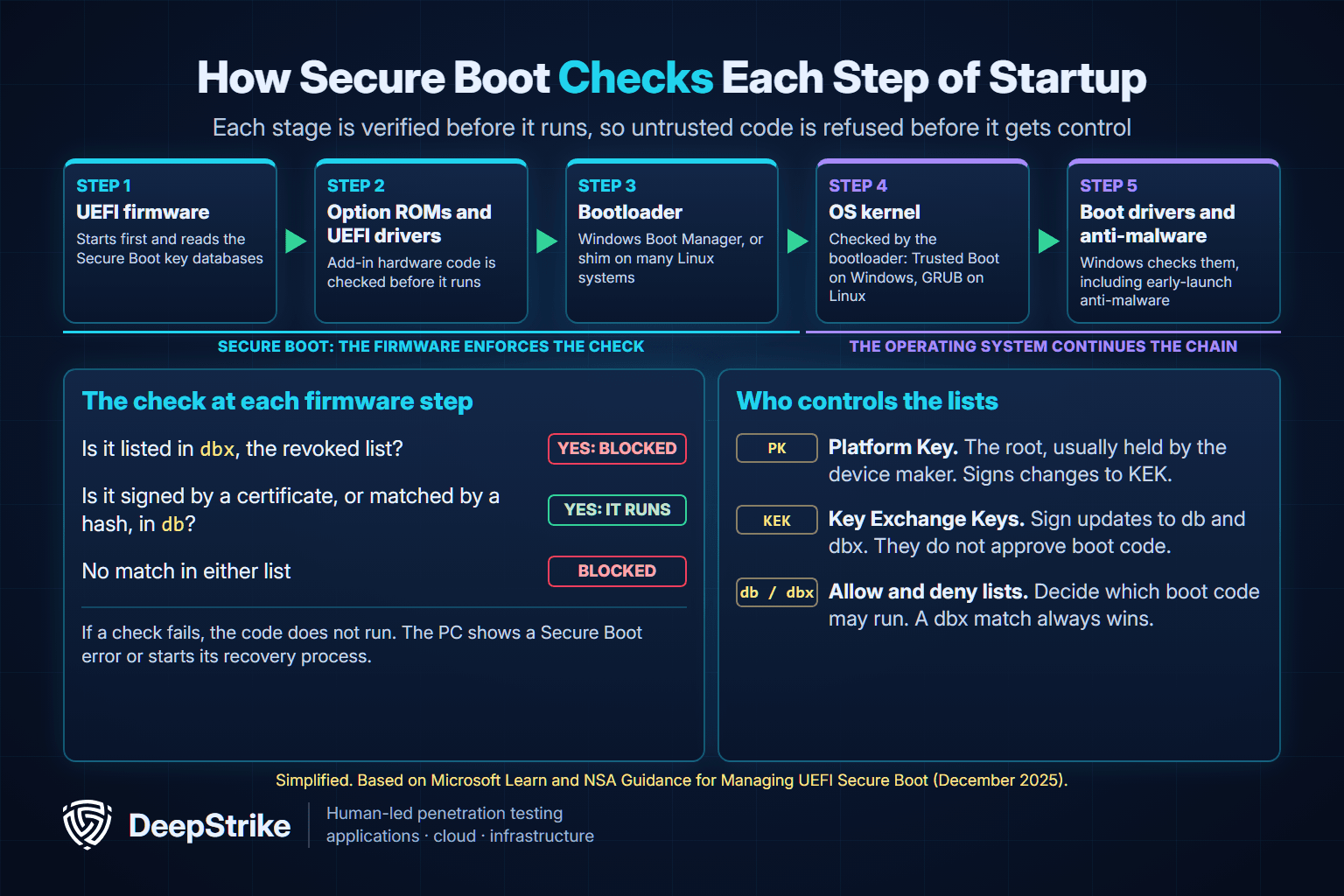
The check relies on four stored items. The NSA guidance and Microsoft's documentation define them this way:
| Item | Plain meaning | What it does |
|---|---|---|
| Platform Key (PK) | The owner key | Authorizes changes to the KEK list; typically held by the device maker |
| Key Exchange Key (KEK) | The list managers | Sign updates to db and dbx; do not decide what boots |
| Signature database (db) | The allow list | Certificates and hashes of trusted boot software |
| Revoked database (dbx) | The ban list | Revoked or untrusted software; a dbx match overrides db |
The ban list matters most in practice. When a signed bootloader turns out to be flawed, its signature is still valid, so the only way to stop it is to add it to dbx.
These features are often confused because they appear together. They are separate, and NSA warns not to assume that a TPM or BitLocker means Secure Boot is on.
| Feature | Job | When it acts |
|---|---|---|
| Secure Boot | Blocks untrusted boot software | Before the operating system loads |
| Trusted Boot | Checks the Windows kernel and boot components | As Windows starts |
| Measured Boot | Records what loaded so it can be reviewed | Throughout startup |
| TPM 2.0 | Stores keys and boot measurements in hardware | Throughout startup and in use |
| BitLocker | Encrypts the drive | Whenever data is at rest |
No. Major distributions support it. On Ubuntu, for example, a Microsoft-signed shim loads the distribution's signed boot components, and the kernel then requires its modules to be signed. Self-built kernel modules must be signed by you, which is usually a better fix than turning Secure Boot off.
Keep Secure Boot on. Microsoft recommends it and says that disabling it puts a device at risk of bootkit malware. Without it, a PC runs whatever bootloader is on the drive, with no way to tell a trusted one from a rootkit.
| Your situation | Recommended setting | Why |
|---|---|---|
| Everyday Windows 10 or 11 PC | On | Protects startup and usually has no visible effect |
| PC gaming with kernel anti-cheat | On | Some games will not run without it |
| Windows and a major Linux distribution | On | Signed shim is supported on major distributions |
| Self-built Linux kernel or custom modules | On, with your own signing key | Keeps the check and allows your code |
| Older Windows version or incompatible hardware | Off only if nothing else works | Check for updates from the manufacturer first |
| Temporary troubleshooting | Off briefly, then on again | Microsoft recommends re-enabling after the issue is fixed |
Microsoft's instructions for disabling Secure Boot ask you to first consider whether it is necessary, because makers update their trusted hardware and driver lists. They also warn that after installing incompatible software or hardware, you may need to restore the PC to its factory state before Secure Boot will work again.
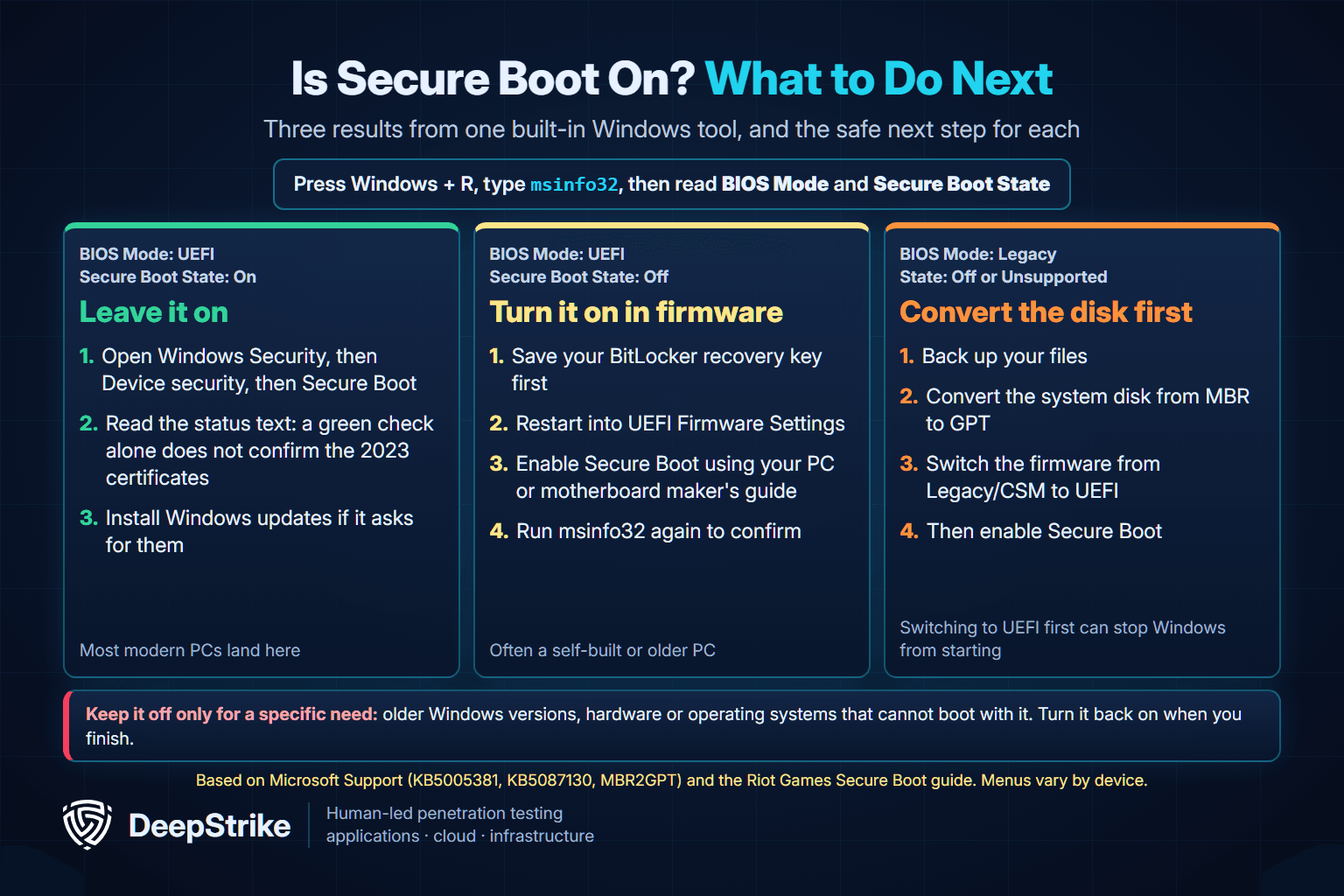
The quickest check on Windows uses a built-in tool, as described in Microsoft's guidance:
| BIOS Mode | Secure Boot State | What it means | Next step |
|---|---|---|---|
| UEFI | On | Protected | Leave it on and check the certificate status |
| UEFI | Off | Supported but turned off | Turn it on in firmware |
| Legacy | Off or Unsupported | The PC boots in the old mode | Convert the disk before changing firmware |
Those meanings follow the Riot Games Secure Boot guide, which is the clearest public write-up of the three results.
These commands only read the current state and change nothing. In an administrator PowerShell window, Microsoft's cmdlet returns True when Secure Boot is on, False when it is off, and an error on non-UEFI systems:
Confirm-SecureBootUEFIOn Linux, NSA's guidance uses this check:
sudo mokutil --sb-stateNSA adds that Secure Boot is not enforcing when setup, audit or permissive mode is reported.
Firmware menus differ by device, so use Microsoft's list of manufacturer guides, which covers ASUS, Dell, Gigabyte and AORUS, HP, Lenovo, MSI and others. Microsoft warns to change only the Secure Boot setting your manufacturer describes. The general path works on Windows 11 and, with a slightly different Settings menu, on Windows 10:
If the PC will not start afterward, Microsoft says to go back into the firmware, disable Secure Boot and try again, then contact the manufacturer if the problem continues.
If your BIOS Mode says Legacy: do not switch the firmware to UEFI first, because Windows may not start. Secure Boot needs the system disk in GPT format. Microsoft's MBR2GPT tool converts a system disk without deleting data, and it validates the disk before changing anything. After conversion, the firmware must be set to boot in UEFI mode. Back up your files before you begin, since this is the riskiest step in the process.
This message usually means the setting is on but the firmware has no complete set of keys to enforce it. Microsoft's requirements call for SecureBoot=1 and SetupMode=0 with a provisioned database, so a PC left in setup mode is not enforcing. The related message that Secure Boot can be enabled only in user mode usually points to the same cause.
The usual fix is to restore the factory keys. Lenovo calls the option Restore Factory Keys, and other makers use similar names such as loading default keys. Microsoft also suggests resetting the BIOS to factory settings if Secure Boot still will not enable. A compatibility module (CSM) left on can also prevent it, per NSA's list of misconfigurations.
This error means the firmware refused a boot file it could not trust. ASUS explains that it can follow an operating system reinstall or a different OS, which leaves inconsistent loader keys. Microsoft also notes that in a few cases a certificate update can stop a device from starting.
Follow your manufacturer's steps, and turn Secure Boot back on once the PC starts. If you changed nothing and the error appeared on its own, contact your device maker. A blocked boot file is what Secure Boot is designed to catch, and Microsoft's advice for a device that may already be compromised is to contact your security provider.
Windows 11's minimum requirements list "UEFI, Secure Boot capable" firmware and TPM 2.0. Note the word capable. Microsoft's support article says the upgrade requirement is only that the PC can use Secure Boot, and suggests turning it on for better security.
Games are stricter. Some anti-cheat systems use Secure Boot to counter cheats that try to load during startup, and these publishers state their requirements directly:
| Game | Stated requirement | Publisher source |
|---|---|---|
| Battlefield 6 | Secure Boot required to play on PC | EA, August 4, 2025 |
| Call of Duty: Black Ops 7 | TPM 2.0 and Secure Boot required; missing them restricts modes such as Ranked Play | Activision, checked November 6, 2026 |
| Call of Duty: Modern Warfare 4 and Warzone | TPM 2.0 and Secure Boot required for online modes | Activision, checked November 6, 2026 |
| VALORANT | Secure Boot required for Vanguard; error VAN 9003 appears when it is off | Riot Games, May 11, 2026 |
The publishers' pages are EA's Battlefield 6 notice, Activision's Call of Duty support article and Riot's VAN 9003 article. These rules change, so check the page for your game, and use the publisher's and manufacturer's own steps.
If you saw a warning that Secure Boot "expired," this is why. Microsoft's original certificates from 2011 reached their expiration dates on June 24, June 27 and October 19, 2026, and 2023 replacements are being delivered to Windows devices.
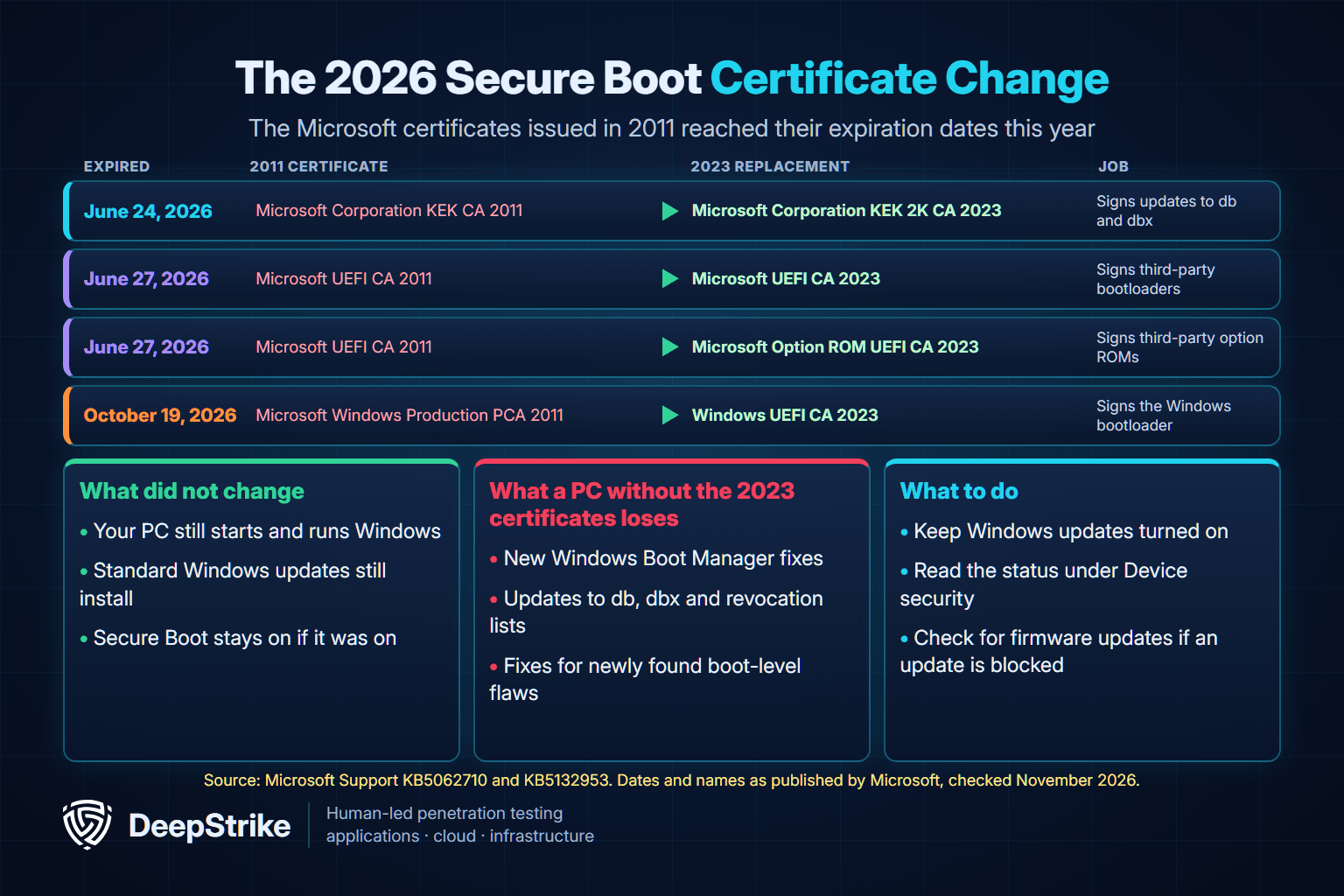
Your PC keeps starting, and standard Windows updates keep installing. The loss is quieter. A device without the 2023 certificates cannot receive new early-boot protections, including Windows Boot Manager updates, revocation list updates and fixes for newly found boot-level flaws. Microsoft says the last boot managers signed with the 2011 certificate are frozen, and future security patches are signed only under the 2023 certificate.
For most home users, no action is needed beyond keeping updates on. Confirm these three things:
To see your status, open Windows Security, then Device security, then Secure Boot. A green check alone does not confirm the update. Look for the text saying Secure Boot is on and all required certificate updates have been applied. If the message names a hardware or firmware limit, contact your device maker. Missing the dates is not fatal: Microsoft says certificates can still be applied after expiration.
Secure Boot is strong but not unbreakable. The weak point has rarely been the math. It has been trusted software with flaws, and keys handled badly.
The best-known case is BlackLotus. BleepingComputer reported in March 2023 that researchers at ESET had confirmed this bootkit, advertised on hacking forums for $5,000, could infect fully patched Windows 11 PCs. It abused CVE-2022-21894, known as Baton Drop, which Microsoft had patched in January 2022. NSA explains the catch: the old vulnerable boot loaders were not on the ban list, so they were still trusted.
Two facts keep this in proportion. Microsoft notes that BlackLotus is a persistence tool, not a way in, and it needs privileged or physical access first. Once installed, though, it can turn off BitLocker, memory protections and Microsoft Defender Antivirus.
Microsoft tracks the related fix as CVE-2023-24932, published May 9, 2023. Its KB5025885 guidance is aimed at organizations. The mitigations ship in updates since July 9, 2024, but are not on by default, and they cannot be reverted once applied while Secure Boot stays on. As of November 6, 2026, Microsoft's page still lists the date for mandatory enforcement as to be announced.
| Case | Type of failure | Fix |
|---|---|---|
| BlackLotus, CVE-2022-21894 (2022–2023) | Signed Windows boot loaders with a flaw, not yet revoked | Patches and revocations |
| PKfail, CVE-2024-8105 (2024) | Test Platform Keys left in production firmware | Firmware updates from the vendor |
| CVE-2024-7344 (January 2025) | Signed third-party recovery app ran unsigned code | App updates and dbx revocation |
| CVE-2025-3052 (June 2025) | Signed firmware utility misused an NVRAM variable | Vendor updates and 14 dbx entries |
Sources for these cases are CERT/CC notes on PKfail, CVE-2024-7344 and CVE-2025-3052. The pattern is the practical lesson: updates matter as much as the setting, because revocations only protect a PC that receives them.
Secure Boot leaves most everyday threats to other controls:
A single PC can rely on automatic updates. A fleet needs evidence. These steps come from NSA and Microsoft guidance:
Because bootkits need privileged access first, the useful question is how far an attacker gets before that point. An internal penetration test or network penetration test can show whether a foothold leads to privilege escalation and local admin on endpoints. An IT security audit can check whether Secure Boot settings and update status match your stated baseline across the fleet.
A test will not certify firmware or guarantee that a device cannot be compromised. If you want to validate the path to admin rights on your endpoints, DeepStrike's penetration testing services cover infrastructure and red team work with manual testing, or you can contact our team to discuss scope.
Your PC normally keeps working, but it loses its check on boot software, and Microsoft says that exposes it to bootkit malware. Games that require it may refuse to start, and BitLocker may ask for a recovery key. Turn it back on as soon as you can.
The setting itself is a firmware change, not a disk format, so it should not touch your files. The risks are a PC that will not start until you reverse the change, or a BitLocker recovery prompt. Back up your files and save your recovery key first, especially if the PC uses Legacy mode.
It can block unsigned or older operating systems, drivers and bootable tools, and custom kernels need their own signing keys. Revocations can also stop old recovery media from working. For most people these limits never come up.
No. Secure Boot blocks untrusted boot software, while a TPM is a security chip or firmware feature that stores keys and boot measurements. Windows 11 requires TPM 2.0 and Secure Boot-capable firmware, which is why they get mentioned together.
No. It only covers startup. You still need updates, endpoint protection and careful account security for threats that arrive once the operating system is running.
No. Microsoft says the expiration does not stop computers from turning on or Windows from starting. Keep Windows updates on so your PC can receive the 2023 certificates and future boot protections.
Secure Boot is a free, built-in check that blocks untrusted software at the moment it would be hardest to catch. Check it once with msinfo32, keep it on, leave updates running and read the certificate status under Device security. If you run a fleet, turn those checks into evidence and test the access paths that make boot-level attacks possible.
Mohammed Khalil is a Cybersecurity Architect at DeepStrike, specializing in advanced penetration testing and offensive security operations. With certifications including CISSP, OSCP, and OSWE, he has led numerous red team engagements, focusing on cloud security, application vulnerabilities, and adversary emulation. His work involves dissecting complex attack chains and developing resilient defense strategies for clients in the finance, healthcare, and technology sectors.

Stay secure with DeepStrike penetration testing services. Reach out for a quote or customized technical proposal today
Contact Us
