November 5, 2026
Updated: November 5, 2026
How search operators expose data, what the GHDB is, where the legal lines are, and how to find, fix and monitor what your own domain shows in Google.

Mohammed Khalil
Google dorking, also called Google hacking, is the use of advanced search operators such as site:, filetype: and intitle: to find information a search engine has indexed but that was never meant to be easy to find. The queries are called Google dorks. Attackers use them for reconnaissance, looking for exposed documents, login pages, directory listings and error messages. Defenders can run the same operators against their own domains to find that exposure, then fix it with authentication, deletion or noindex and a removal request in Google Search Console. robots.txt alone does not keep a URL out of results.
Google dorking is a search technique, not an exploit. It does not break into anything. It combines Google's search operators to narrow billions of indexed pages down to the few that reveal something sensitive: a spreadsheet left in a public folder, a staging site nobody remembered, an admin login page, or a server error that names the software version.
The practice was popularized by security researcher Johnny Long, who began cataloging such queries in 2000 and later documented them in the book "Google Hacking for Penetration Testers." The word "dork" originally referred to the careless site owner who exposed the data, and over time it came to mean the query itself.
Two points matter for security teams. First, everything a dork finds was already public. The search engine did not leak it; a web server served it to a crawler that asked. Second, the same technique is useful on both sides. Attackers use it to plan, and defenders use it to see their organization the way an outsider does.
| Term | What it means | How it relates to Google dorking |
|---|---|---|
| Google dorking | Using advanced search operators to find sensitive content in a search engine's index | The technique itself |
| OSINT | Intelligence produced from publicly or commercially available information | Google dorking is one OSINT collection technique among many |
| Attack surface management | Continuous discovery and monitoring of an organization's internet-facing assets | Uses search queries as one input, alongside DNS, certificates and scan data |
| Vulnerability scanning | Sending traffic to systems to detect known weaknesses | Active and direct; dorking only reads a third party's index and never touches the target |
For the wider discipline, see our explainer on what OSINT is and how security teams use it.
Every Google dork depends on three things happening first.
A dork is simply a precise query against that index. Operators restrict results to one domain, one file type, words in the title or URL, or a date range. Combine two or three and the result set shrinks from millions of pages to a handful.
This is why the defense is mostly about the first three steps. If a sensitive file is never publicly reachable, it never gets crawled. If it is crawled but carries a noindex rule, it never enters the index. Search operators can only surface what the index already holds.
MITRE ATT&CK tracks this activity as Search Open Websites/Domains: Search Engines (T1593.002), part of the Reconnaissance tactic (TA0043). ATT&CK describes adversaries using specialized search queries to find leaked sensitive data such as network details or credentials, and its procedure examples include the North Korea-linked group Kimsuky searching Google for vulnerabilities, tools and trends to target victims. For how ATT&CK organizes these behaviors, see our MITRE ATT&CK framework guide.
Google's own search help page documents a short list of operators. Others are widely used and still work, but Google does not formally document them, so their behavior can change. The table shows what each operator does and how a defender can use it on their own domain.
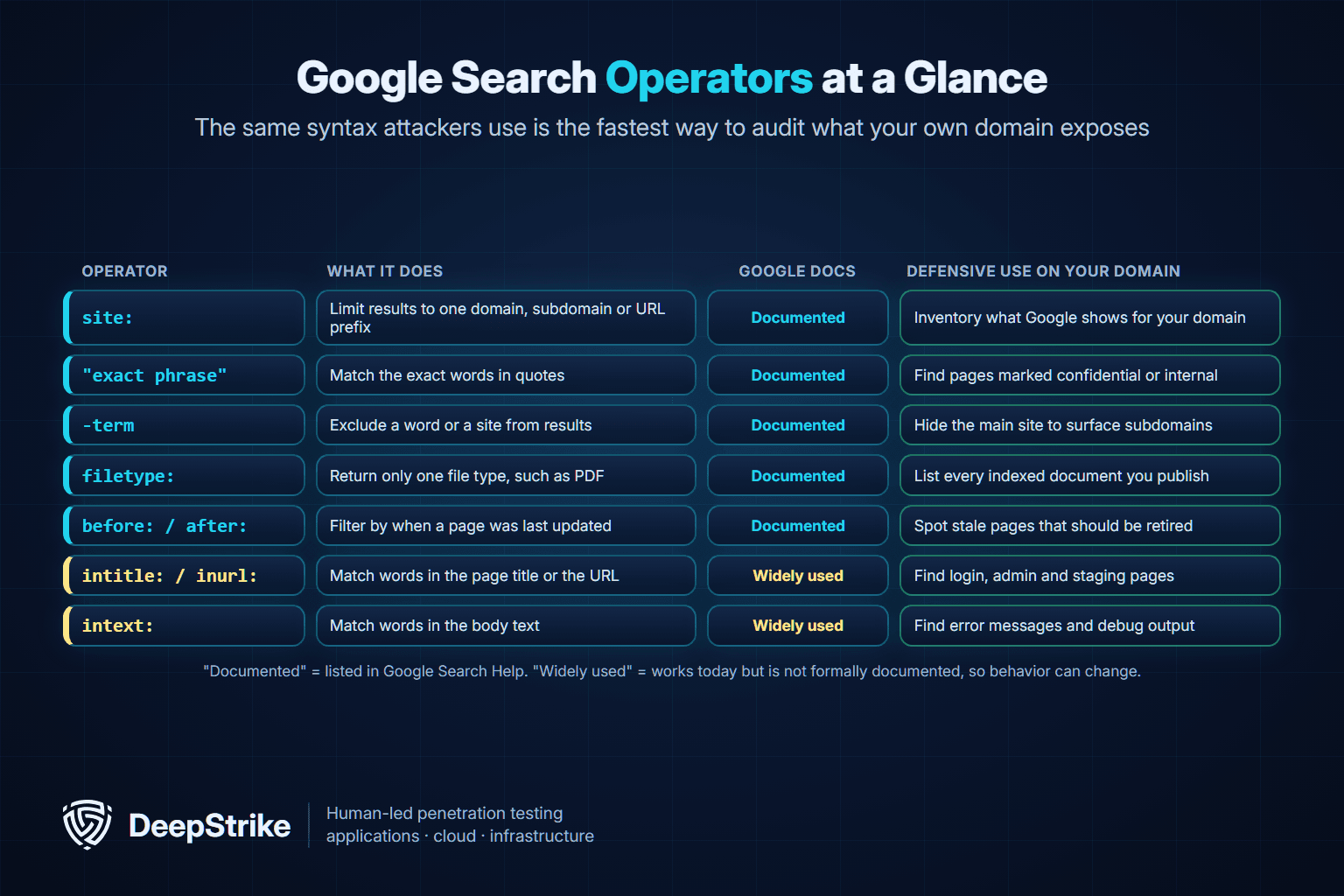
| Operator | What it does | Documented by Google | Defensive use on your own domain |
|---|---|---|---|
| site: | Limits results to a domain, subdomain or URL prefix | Yes | Inventory what Google shows for your domain |
| "exact phrase" | Matches the exact words inside the quotes | Yes | Find pages labeled confidential or internal use only |
| - (minus) | Excludes a word or a site from results | Yes | Hide the main site to surface forgotten subdomains |
| filetype: | Returns only one file type, such as PDF | Yes | List every indexed document you publish |
| before: and after: | Filter by the date a page was last updated | Yes | Find stale pages that should be retired |
| intitle: | Matches words in the page title | No, widely used | Find login, admin and directory listing pages |
| inurl: | Matches words in the URL | No, widely used | Find staging, test and backup paths |
| intext: | Matches words in the page body | No, widely used | Find error messages and debug output |
| OR | Matches either of two terms | No, widely used | Combine related checks in one query |
A few rules make operators behave predictably:
Other search engines, including Bing, support similar operators with their own syntax, and the same exposure can appear in more than one index.
Attackers rarely search for one company at a time. They search for a type of mistake and then see which organizations made it. That is why the categories matter more than any individual query. The table below describes the common categories at a conceptual level and the fix for each. The category names follow those used by the Google Hacking Database, described in the next section.
| Exposure category | What it looks like | Why it matters | Fix at the source |
|---|---|---|---|
| Files containing sensitive information | Spreadsheets, exports, reports or scans in a public folder | Personal data, financial data or internal plans exposed directly | Move behind authentication or delete; notify if personal data was exposed |
| Files containing usernames or passwords | Configuration files, backups or logs served by the web server | Direct path to account takeover | Remove, rotate every exposed credential, review access logs |
| Sensitive directories | Directory listing pages that show every file in a folder | One indexed listing reveals many files at once | Disable directory listing; restrict the folder |
| Pages containing login portals | Admin consoles, remote access and internal tool logins | Targets for password spraying and known exploits | Put behind VPN or SSO; restrict by IP; add MFA |
| Error messages | Stack traces, database errors, debug pages | Reveal software, versions, paths and queries | Turn off verbose errors in production |
| Web server detection and vulnerable servers | Default pages and version banners | Lets attackers match versions to known vulnerabilities | Patch, remove default content, hide version strings |
| Staging and test sites | Development copies indexed by mistake | Often weaker controls and real data | Require authentication on every non-production host |
The Pre-compromise mitigation (M1056) in ATT&CK makes the defender's position clear: reconnaissance through search engines happens outside your network, so it cannot be blocked with preventive controls. The practical defense is to reduce the amount and sensitivity of what is exposed. ATT&CK also notes that this activity has high false positive rates and often occurs outside the target's visibility, which is why detection efforts usually focus on later stages such as initial access.
The Google Hacking Database is a public, categorized index of search queries that reveal exposed information. It is hosted as part of the Exploit Database at exploit-db.com and maintained by OffSec. According to the GHDB's own description, Johnny Long started collecting the queries in 2000, the community contributed to it for nearly a decade, and he transferred the database to OffSec in November 2010. It now also includes queries for other search engines, such as Bing, and for code repositories.
Its categories are a useful checklist even if you never run a single entry from it. They include footholds, files containing usernames, sensitive directories, web server detection, vulnerable files and servers, error messages, files containing juicy info, files containing passwords, sensitive online shopping info, network or vulnerability data, pages containing login portals, various online devices, and advisories and vulnerabilities.
Two cautions apply. First, the GHDB is written to find exposures on anyone's site, so its entries are not scoped to your organization. Use the category names to plan your own site:-limited checks rather than running entries as published. Second, a result is evidence of exposure, not permission to access it. What you can do with a result is covered in the legal section below.
The two cases below come from regulator decisions, not press reports. In neither case did the exposure require hacking. A web server made files available, a search engine indexed them, and anyone with the right query could find them.
The U.S. Federal Trade Commission alleged that GMR Transcription Services, a medical and general transcription company, had inadequate data security practices that resulted in transcripts of customers' audio files being indexed by a major search engine and made publicly available to anyone who searched. Some of those files included consumers' medical histories and examination notes. On August 21, 2014, the FTC approved a final order that requires the company to run a comprehensive information security program, assessed initially and every two years by a certified third party, for 20 years. The order also covers personal information the company handed to its service providers.
On July 2, 2021, North London Collegiate School (Singapore) notified Singapore's Personal Data Protection Commission that a parent had been able to find a student report through internet search engines. The PDPC decision records that, from December 2019 to July 2021, admission documents uploaded through the school's website were stored in a web directory that search engines could index. The exposed documents included passports (1,742 individuals), identity cards (1,714), birth certificates (709) and immunization records (670).
The decision is useful because of what the school relied on. It had deployed a robots.txt file to ask search engines not to index the folder. The Commission found that this was not a security arrangement, because the robots exclusion protocol depends on crawlers choosing to comply and has no enforcement mechanism. It directed that organizations use proper folder permissions and access controls instead, and it imposed a financial penalty of SGD 10,000.
The lesson from both cases is the same: if a file should not be public, the web server must refuse to serve it. Search engine instructions are not access control.
Running a search query is generally legal. Search operators are a published feature, and reading what a search engine returns is not hacking. The legal risk starts with what you do next. This section is general information, not legal advice.
In the United States, the main line is unauthorized access. The Computer Fraud and Abuse Act (18 U.S.C. 1030) prohibits accessing a computer without authorization or exceeding authorized access, and the Supreme Court narrowed the meaning of "exceeds authorized access" in Van Buren v. United States on June 3, 2021. Finding a login page in search results is not a crime. Using a password you found in an indexed file to log in, downloading personal data in bulk or probing a system you do not own can cross the line, and data protection laws can apply to how you handle any personal data you collect.
For security work, a simple rule keeps teams safe: run dorks only against domains you own or have written authorization to test, and when a result exposes credentials or personal data, confirm the exposure without using it and report it to the owner.
A Google dork self-audit takes an hour or two and often finds something the asset inventory missed. Every query below uses example.com as a placeholder. Replace it only with domains your organization owns, and get sign-off from the people responsible for them before you start.
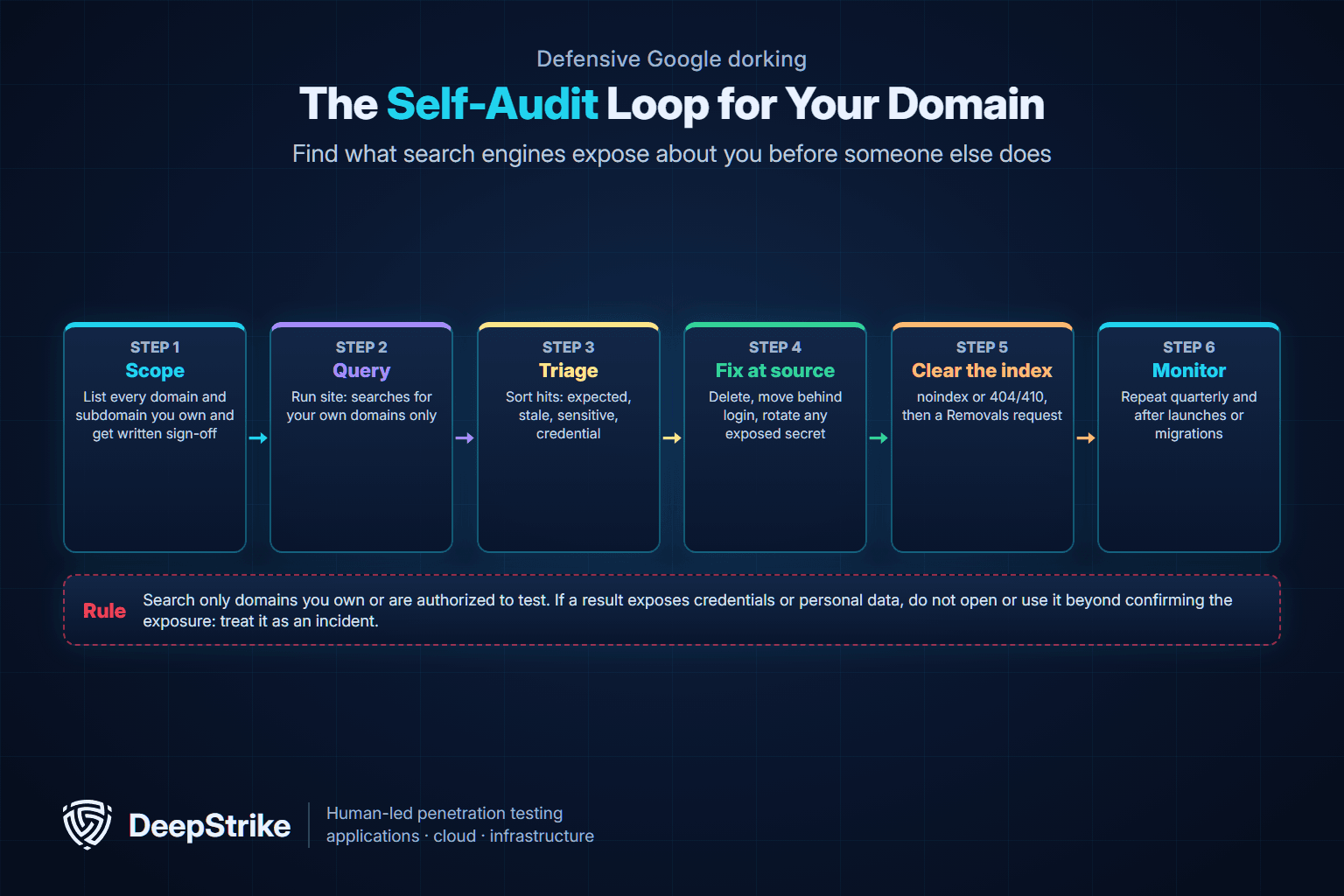
List every domain, subdomain and brand domain you own, including acquired companies and marketing microsites. Note who owns each one. If you work for a client, the scope belongs in the written rules of engagement.
Start broad, then exclude the main website so forgotten subdomains stand out.
site:example.com
site:example.com -site:www.example.com
site:example.com inurl:staging OR inurl:dev OR inurl:test
Compare every hostname in the results with your asset inventory. Anything unknown needs an owner or needs to go.
Documents are where most accidental exposure hides. List them by type and read the titles.
site:example.com filetype:pdf
site:example.com filetype:xlsx OR filetype:csv
site:example.com filetype:docx OR filetype:pptx
Look for anything that should be internal: exports, rosters, contracts, invoices, network diagrams and draft reports.
site:example.com "internal use only" OR "confidential"
site:example.com intitle:"index of"
site:example.com inurl:admin OR inurl:login
A directory listing page or an admin login in results is a finding even if nothing behind it is sensitive yet.
site:example.com intext:"stack trace" OR intext:"syntax error"
site:example.com before:2022
Verbose errors reveal your software stack. Old pages that nobody maintains are good candidates for retirement.
| Result type | Example | Severity | Next action |
|---|---|---|---|
| Credentials, keys or tokens | A backup or config file with a password | Critical | Treat as an incident: remove, rotate, review logs |
| Personal or regulated data | A spreadsheet of customers or staff | Critical | Remove, assess breach notification duties |
| Internal documents | Network diagram, internal policy draft | High | Remove or move behind authentication |
| Login portals and admin pages | Admin console on a public hostname | Medium to high | Restrict access, enforce MFA |
| Error and directory listing pages | Stack trace, open folder listing | Medium | Fix the server configuration |
| Stale or duplicate pages | Old product pages, test pages | Low | Retire or noindex |
Record each finding with the query, the URL, the date and the owner. Do not download or open sensitive files beyond what you need to confirm the exposure.
Fix the source first and the search result second. Removing a result from Google while the file is still on a public server only hides the symptom: other search engines, archives and anyone who already has the link can still reach it.
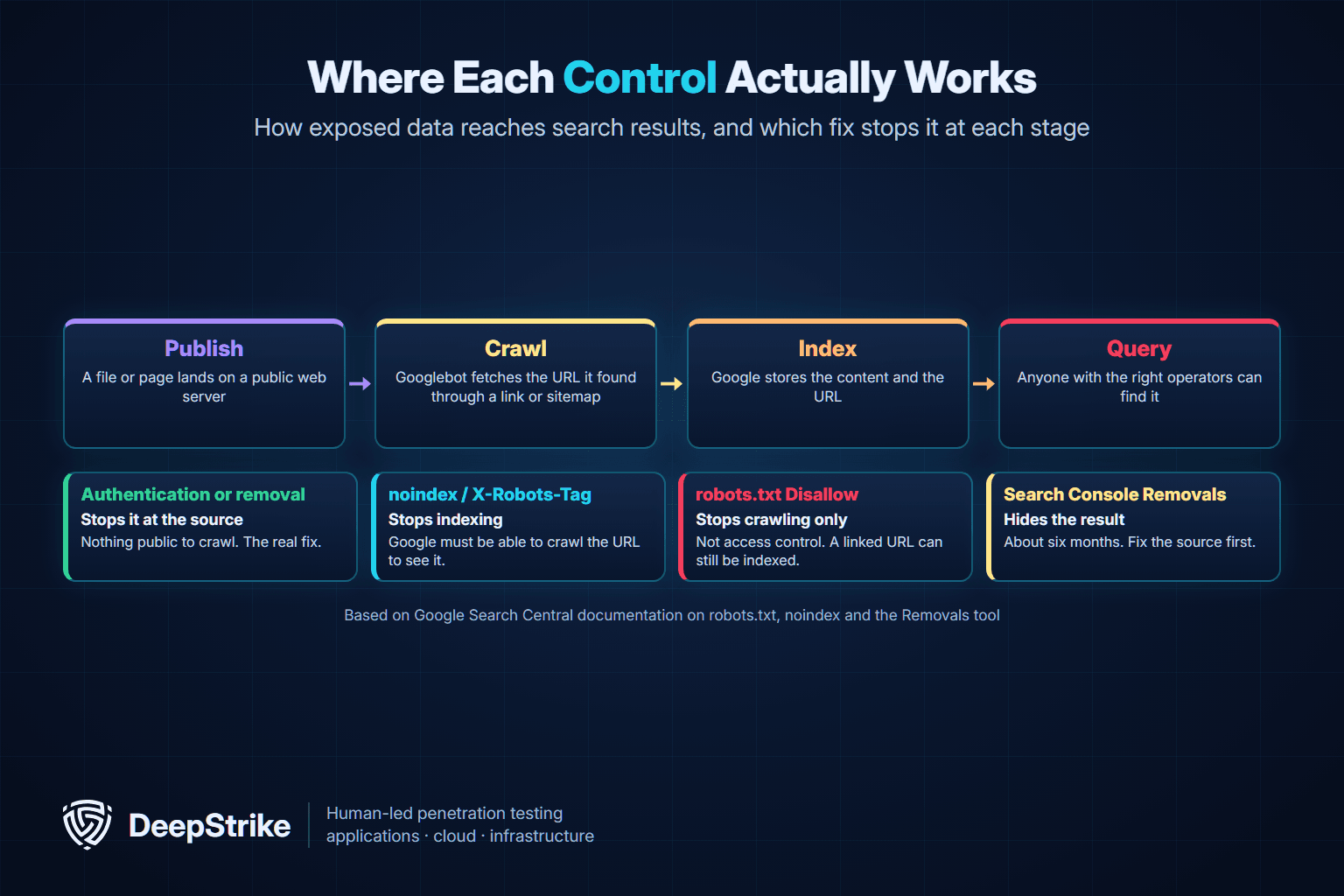
| Control | What it does | What it does not do |
|---|---|---|
| Authentication or access control | Stops anyone, including crawlers, from fetching the content | Nothing missing; this is the real fix for sensitive content |
| Delete the file (HTTP 404 or 410) | Removes the content; Google drops the URL after recrawling | Does not remove copies already downloaded or archived |
| noindex meta tag or X-Robots-Tag header | Tells Google not to show the page in results | Does not protect the content; Google must still be able to crawl the URL |
| robots.txt Disallow | Asks compliant crawlers not to crawl a path | Not access control; a linked URL can still be indexed, and the file lists the paths publicly |
| Search Console Removals tool | Hides a URL from Google results for about six months | Does not delete the content or affect other search engines |
For anything sensitive, the web server must refuse to serve it to the public. Move the file behind a login, restrict the folder, or delete it. If credentials were exposed, rotate them immediately and review access logs for use, because you cannot know who found the file before you did. If personal data was exposed, bring in your privacy or legal team to assess notification duties.
For pages that are fine to keep online but should not appear in search, such as thank-you pages or internal search results, use noindex. Google's noindex documentation describes two forms: a robots meta tag in the page head, or an X-Robots-Tag HTTP response header, which also works for PDFs and other non-HTML files. The page must not be blocked by robots.txt, because Google has to crawl it to see the rule.
robots.txt controls crawling, not access or indexing. Google's robots.txt introduction states that it is not a mechanism for keeping a web page out of Google, and that a disallowed URL can still be indexed if other pages link to it. The robots exclusion standard, RFC 9309, goes further: its rules are not a form of access authorization, and listing paths in robots.txt makes them public and discoverable. A robots.txt file that lists /backups/ or /admin/ tells every reader where to look.
Once the source is fixed, speed up the cleanup. The Removals tool in Google Search Console hides a URL from results for about six months. To make the removal permanent, the page must return 404 or 410, sit behind a password, or carry noindex before that period ends. The tool's "clear cached URL" option removes an outdated snippet until Google recrawls the page. If someone else's page is showing your outdated content, Google's separate outdated content tool does not require site ownership. Use the URL Inspection tool to confirm how Google currently sees a fixed URL.
Exposure comes back. A new microsite launches, a developer uploads a test export, or a migration turns on directory listing again. Monitoring turns the self-audit into a routine.
Search engine reconnaissance is a standard early step in an authorized external test. It shows the tester what an outsider can learn without sending a single packet to the target: forgotten hosts, exposed documents, technology versions and login pages that become candidate entry points. In an external penetration test, those findings are then validated within scope and reported with fixes.
Good testers keep this step defensive. They limit queries to in-scope domains, record what they found and where, do not use exposed credentials outside the agreed rules of engagement, and report exposures even when the test never uses them. Search exposure is also an early stage in the attacker's lifecycle, which our explainer on the cyber kill chain places in context.
Google dorking is using advanced search operators, such as site:, filetype: and intitle:, to find information that a search engine has indexed but that was not meant to be easy to find. The queries are called Google dorks. Attackers use them for reconnaissance; defenders use them to audit their own domains.
Running search queries is generally legal. What you do with the results can be illegal: logging in with credentials you found, downloading personal data or accessing systems without authorization can violate laws such as the U.S. Computer Fraud and Abuse Act. Limit dorking to domains you own or are authorized to test.
Google dorks are search queries that combine operators to find specific kinds of exposed content, such as documents of a certain type on one domain, login pages, directory listings or error messages. Defensive dorks use the site: operator to stay within your own domain.
The GHDB is a public, categorized collection of search queries that reveal exposed information. It is part of the Exploit Database and has been maintained by OffSec since Johnny Long transferred it in November 2010. Its categories make a useful checklist for auditing your own site.
No. robots.txt asks compliant crawlers not to crawl a path, but Google says it is not a mechanism for keeping a page out of results, and a linked URL can still be indexed. It also publishes the paths you list. Use authentication or deletion for sensitive content and noindex for pages that can stay public.
First secure the source: delete the file or move it behind authentication, and rotate any exposed credentials. Then use the Removals tool in Google Search Console to hide the URL for about six months while Google recrawls it. The removal becomes permanent once the URL returns 404 or 410, requires a login or carries noindex.
Google dorking costs an attacker nothing and leaves no trace on your systems, which is why it is one of the first things they try. Run the self-audit in this guide on your own domains, fix exposures at the source, clear them from the index and repeat the check every quarter.
To see the full picture of what an outsider can find and use, DeepStrike's penetration testing services start with a reconnaissance phase that gathers publicly accessible data using OSINT techniques, including domains and subdomains, then validate what matters and deliver reports with reproduction steps, remediation and root causes. For the continuous side of the work, start with our guides to what OSINT is and attack surface management.
Mohammed Khalil is a Cybersecurity Architect at DeepStrike, specializing in advanced penetration testing and offensive security operations. With certifications including CISSP, OSCP, and OSWE, he has led numerous red team engagements, focusing on cloud security, application vulnerabilities, and adversary emulation. His work involves dissecting complex attack chains and developing resilient defense strategies for clients in the finance, healthcare, and technology sectors.

Stay secure with DeepStrike penetration testing services. Reach out for a quote or customized technical proposal today
Contact Us
