April 16, 2026
Updated: September 10, 2026
What authorized security testing can assess in Shopify and Shopify Plus without crossing platform boundaries.

Mohammed Khalil
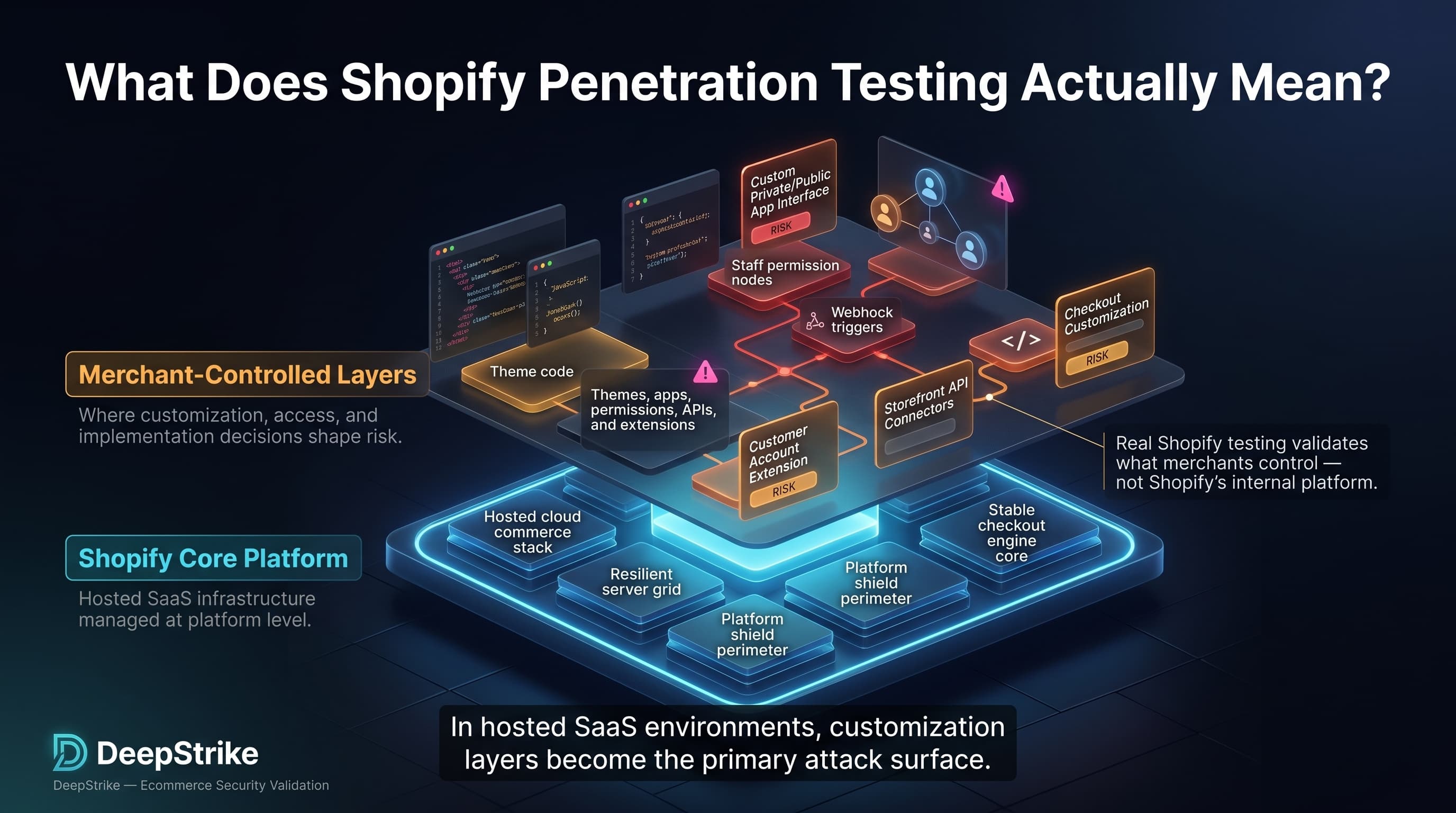
Shopify penetration testing is often misunderstood. Many teams use the term to mean “test my Shopify store,” but a real assessment is less about attacking Shopify’s platform and more about validating the merchant-controlled layers that sit on top of it: theme code, merchant JavaScript, custom apps, staff permissions, embedded admin workflows, webhooks, Storefront API use, and checkout or customer-account extensions where those customizations exist. That distinction matters because Shopify is a hosted SaaS platform, while themes, apps, roles, scopes, and extensions remain areas where merchant decisions still shape risk.
That model matters now because stores are increasingly app-heavy, theme-customized, API-driven, and operationally distributed across internal teams, agencies, and partners. Shopify’s own documentation shows themes containing JavaScript and CSS assets, apps request explicit data scopes, embedded apps rely on authentication patterns such as session tokens, and staff access is governed through roles and permissions. In practice, that means the attack surface most worth testing is the one created by business customizations, not the platform layers the merchant does not control. This article explains what is in scope, what is out of scope, what issues are commonly worth testing, and how to do it safely and meaningfully.
Shopify penetration testing refers to the authorized security assessment of the merchant-controlled components of a Shopify or Shopify Plus environment, including themes, custom code, third-party integrations, admin access paths, client-side logic, and related workflows, in order to identify exploitable weaknesses without testing platform components that the merchant does not own or control.
In practical terms, Shopify penetration testing is a store-level application security assessment shaped by SaaS boundaries. In a self-hosted ecommerce environment, testers typically examine the web server, operating system, application framework, network controls, and database posture alongside the storefront itself. In Shopify, those lower layers are part of the platform service. What stays testable is the code, configuration, identity model, and integrations the merchant or its developers introduce on top of that service.
This is why “Shopify security testing” often gets mis-scoped. Merchants may assume a pentest should include Shopify’s core checkout stack, internal backend services, or other platform internals. A normal merchant assessment does not work that way. It focuses on the storefront experience, theme output, custom JavaScript, app permissions, custom app behavior, role separation, token handling, redirect logic, customer account customizations, and other workflows the store owner can actually configure or approve.
A simple example makes the distinction clear. Trying to attack Shopify’s platform infrastructure is not the same as testing your store’s theme for unsafe output handling, checking a custom app’s granted scopes, or validating whether a low-privilege staff account can reach functions it should not have. The first is platform research under a separate program. The second is normal store-level pentest work.
| Example | Normal Scope? | Why |
|---|---|---|
| Testing Shopify core platform internals | No | The merchant does not own or control the platform backend |
| Testing your store’s theme, custom JavaScript, or forms | Yes | These are merchant-controlled storefront components |
| Testing a third-party integration or admin workflow in your authorized store context | Yes, if approved | The risk lives in the store’s approved apps, roles, and workflows |
Custom themes and private apps are where most store risk lives, and our web app penetration testing services cover exactly that.
Hosted commerce does not eliminate exploitable risk. It redistributes it. Shopify documents that apps can request access to store data, that certain apps may seek protected customer data through Shopify APIs, and that merchants control user roles, permissions, and app approvals. Those decisions directly affect customer trust, order integrity, operational continuity, and incident response even when the underlying platform remains secure.
The broader application security landscape reinforces why these layers deserve scrutiny. OWASP identifies broken access control as one of the most serious web application risks, and its API Security guidance highlights broken object-level authorization as a common way attackers abuse identifiers to retrieve records they should not see. For Shopify stores, those patterns map directly to custom admin tools, external integrations, customer workflows, and app-managed endpoints where authorization assumptions are often weaker than teams realize.
At a high level, Shopify owns the hosted platform and major security controls around its service delivery, while merchants still own what they add, approve, and operate inside that environment. Themes, staff roles, custom apps, permissions, collaborator access, embedded workflows, API scopes, and many integrations are all shaped by merchant or developer decisions. Third parties then add another trust boundary through app permissions, customer-data handling, JavaScript, and operational access.
| Area | Shopify Responsibility | Merchant / Store Responsibility | Third-Party / Custom Risk |
|---|---|---|---|
| hosting / infrastructure | Runs and secures the hosted commerce platform | Understand service boundaries and avoid assuming infra control | Integrations can still create attack paths above the platform layer |
| theme code | Provides the theme engine and delivery model | Choose, edit, and maintain theme templates, snippets, assets, and output handling | Custom theme work or app embeds can introduce XSS, leaks, or fragile logic |
| custom scripts | Provides supported mechanisms for theme assets and extensions | Govern merchant-added JavaScript, pixels, and custom widgets | External scripts can be compromised or expose sensitive data |
| staff accounts | Provides account, role, and authentication features | Assign least privilege, review access, and offboard users | Agencies and collaborators can extend exposure if poorly governed |
| apps | Provides app platform, scope model, and some review processes | Approve installs, review scopes, and validate business need | Over-privileged or insecure apps can expand the attack surface |
| API integrations | Provides APIs, auth patterns, and scope controls | Secure custom apps, secrets, tokens, and workflow authorization | Weak OAuth, token, or webhook handling can create exploitable gaps |
| customer-facing forms | Provides the platform context | Secure any custom forms, handlers, storage, and validation | External processors and app handlers can mishandle inputs or data |
| store configuration | Provides platform configuration options | Review redirects, domains, permissions, and app settings | Misconfiguration can enable abuse even without a code flaw |
| identity and permissions | Provides the roles and permissions framework | Design role separation and review cumulative permissions | Privilege creep can emerge across users, groups, and apps |
With authorization, a Shopify penetration test usually targets the pieces the merchant controls or has explicitly approved: theme templates and assets, merchant JavaScript, custom forms, storefront behavior, staff and collaborator access, custom apps, API integrations, webhook processing, and selected checkout or customer-account extensions where the merchant has introduced logic. Shopify’s documentation also shows that checkout customizations and customer-account extensions exist through defined extension models rather than unrestricted platform access, which helps narrow what is actually meaningful to test.
| Scope Area | Why It Matters | Example Weakness | Testing Consideration |
|---|---|---|---|
| themes and templates | They shape storefront output and user-controlled rendering | Stored or reflected XSS | Validate how user input and metafields are rendered |
| merchant-controlled JavaScript | It runs in every buyer session | Exposed config, DOM injection, unsafe logic | Review source, runtime behavior, and third-party dependencies |
| custom forms | They collect or route user data | Weak validation, data leakage, spam abuse | Test server-side validation and data handling paths |
| public storefront behavior | It reflects real attack paths | Open redirects, promo abuse, logic flaws | Use low-impact, non-destructive workflow testing |
| admin login and access controls | Account compromise changes store state | Missing MFA, weak separation of duties | Use authorized test accounts with distinct privilege levels |
| staff account roles | Roles determine business reach | Privilege creep or stale access | Verify horizontal and vertical authorization boundaries |
| third-party app behavior in store context | Apps add code and privileges | Over-scoped access or insecure endpoints | Test only within approved app/store boundaries |
| custom API integrations and webhooks | They move data and trigger actions | BOLA, token misuse, bad HMAC validation | Review authz, token handling, and webhook verification |
| redirects and promo logic | They affect trust and money flow | Phishing redirects or discount abuse | Test destination validation and business rules |
| checkout-adjacent logic if merchant-controlled | It can affect conversion and order flow | Unsafe extension behavior or weak backend checks | Restrict testing to merchant extensions, apps, and related services |
Typical Shopify store penetration testing does not automatically include Shopify core infrastructure, Shopify-managed backend internals, or platform components the merchant does not own or administer. It also does not include testing beyond the assets and workflows the merchant has authorized for the assessment. In a hosted SaaS model, scope follows ownership and control more than hostname alone.
That means destructive or disruptive activity, aggressive testing against restricted platform assets, or attempts to treat Shopify itself as if it were a self-hosted merchant stack are usually outside normal engagement boundaries. Platform security research follows separate disclosure rules and is not the same thing as a merchant-authorized penetration test against a live store and its approved custom components.
Unsafe theme customizations and XSS. Theme files contain Liquid, HTML, CSS, and JavaScript that control storefront output. When developers mix user-controlled content into those templates without appropriate output handling, they create the classic conditions for stored, reflected, or DOM-based XSS. OWASP notes that XSS occurs when untrusted input is rendered back into a trusted page without proper validation or encoding. In a Shopify context, the business consequence is storefront integrity loss, account/session abuse, or malicious script execution in buyer browsers.
Weak input validation in custom forms and workflows. Security reviews routinely find custom contact forms, landing pages, B2B request forms, and post-purchase workflows that trust client input too much. OWASP’s secure code review guidance calls for server-side validation, input analysis, and business-logic review because functional correctness does not guarantee security. In a store context, weak validation can lead to spam operations, unauthorized state changes, poisoned downstream data, or second-order abuse in CRM and support systems.
Sensitive data exposure in client-side code. Shopify themes store JavaScript assets in the theme, and storefront access tokens may be passed to JavaScript or mobile clients for Storefront API use. That does not automatically make a build insecure, but it does mean anything shipped to the browser should be treated as exposed. The business consequence is usually not “platform breach”; it is disclosure of implementation details, unnecessary data exposure, or attacker guidance that simplifies abuse of custom endpoints, customer flows, or business logic.
Open redirects, insecure app integrations, and over-privileged access. OWASP describes open redirects as a phishing and exploit-chain enabler when applications trust redirect targets supplied by untrusted input. Shopify documents that apps request explicit scopes, can request optional scopes after installation, and may access sensitive store areas or protected customer data depending on app model and approval. The business consequence is credential harvesting, unauthorized data reach, or excessive operational blast radius from a single compromised app or misconfigured integration.
Weak admin hygiene, stale staff access, and broken custom logic. Shopify supports roles, cumulative permissions, collaborator accounts, and optional enforcement of two-step authentication during user invitation. If offboarding lags, permissions accumulate, or MFA enforcement is inconsistent, attackers do not need a platform exploit; they need one weak account or trusted seat. In practice, the consequence can be unauthorized order management, settings changes, app installation, content manipulation, or discount and workflow abuse.
Webhook and embedded-app implementation flaws. Shopify’s webhook validation guidance explicitly warns that HMAC verification requires the raw request body before body-parsing middleware, and Shopify’s session-token guidance states that session tokens authenticate embedded requests but do not replace authorization. These are common places where custom app teams build something that “works” but fails security review. The business consequence is forged events, broken trust boundaries, or authenticated users reaching actions their role should not control.
Themes are not just presentation. Shopify’s theme architecture places Liquid, HTML, reusable snippets, and JavaScript assets directly in the store’s rendering path, which means custom theme work can turn into a security boundary problem if untrusted values are inserted into output carelessly. Shopify also provides theme app extensions and app blocks specifically so merchants can add app content without directly editing theme code, which can reduce change risk, but custom themes and rushed edits still reintroduce classic injection and logic flaws. Operationally, this matters because storefront changes are frequent, revenue-facing, and often pushed by agencies or growth teams under time pressure.
Client-side JavaScript is one of the most under-reviewed parts of a Shopify store because it is treated as “frontend” rather than “security-relevant.” Shopify supports bundling JavaScript directly with sections, blocks, and snippets, and storefront clients may also operate with tokenless or token-based Storefront API access. That makes browser-facing code a prime place to look for exposed implementation details, weak DOM handling, unsafe third-party tags, and business logic that should never rely on secrecy in the browser. OWASP’s third-party JavaScript guidance is especially relevant here because compromised external script sources can silently alter trusted storefront behavior at scale.
Third-party apps matter because they are both code and privilege. Shopify shows merchants the data and store areas an app wants to access before installation, allows review of permissions later, and supports both required and optional scopes, including scopes that can be requested after installation. Shopify also warns that apps installed through third-party links are not necessarily unsafe but have not gone through the App Store verification and approval process used for listed apps. For public apps using protected customer data, Shopify can require data-access requests and reviews, but that is still not a substitute for a store-specific security assessment of how the app actually behaves in your environment. Operationally, app governance is where many stores either preserve or lose control of their attack surface.
Admin and staff access is where technical exposure meets operational reality. Shopify allows roles, cumulative permissions, collaborator access for partners, and configurable two-step authentication requirements during invitation flows. It also notes that staff set up their own two-step authentication individually, which means organizations cannot rely on assumptions; they need active access governance and verification. On Shopify Plus and other organization-capable deployments, role categories, app permissions, groups, and cross-store administration introduce more flexibility and more opportunity for privilege creep. In practice, weak access design can produce exploit paths even when storefront code is clean.
OWASP treats web security testing and secure code review as distinct but complementary disciplines. That matters in Shopify because stores often combine visible storefront risk, hidden integration logic, third-party dependencies, and fast-moving code changes. A scanner alone will not meaningfully validate those trust boundaries, while a code review alone may not prove exploitability in real store workflows.
| Attribute | Penetration Testing | Vulnerability Scanning | Security Review |
|---|---|---|---|
| Primary Goal | Validate real exploitability in authorized workflows | Detect known patterns and obvious weaknesses at scale | Assess architecture, code, permissions, and trust boundaries |
| Depth of Validation | High manual depth | Low to medium automated depth | Medium to high analytical depth |
| Exploitability Focus | Direct and scenario-driven | Limited unless manually verified | Moderate, often design-focused |
| Typical Output | Evidence-backed findings with remediation priorities | Alert list, signatures, and hygiene findings | Code, architecture, and control recommendations |
| Business Value | Prioritizes what attackers can actually abuse | Alert list, signatures, and hygiene findings | Finds insecure design and governance gaps |
| Main Limitation | Scope-bound and point-in-time | Misses logic flaws and may create noise | May not prove that a flaw is practically exploitable |
Shopify stores usually need all three, but for different reasons. Scanning supports hygiene and repeatability. Security review helps with themes, custom apps, dependency decisions, and new integrations. Penetration testing validates whether those choices create a real attack path through the storefront, the admin, or the integration layer.
A proper Shopify penetration test starts by mapping the real store boundary, not just the primary domain. That means identifying the live storefront, theme repositories or deployment paths, custom forms, embedded apps, API consumers, webhook endpoints, admin workflows, collaborator access, and any checkout or customer-account extensions in use. For Shopify Plus environments, it also means identifying organization-level roles, user groups, and multi-store dependencies before any testing begins.
Next comes boundary confirmation. Testers should confirm which apps, services, domains, and environments are owned or authorized; establish test accounts with distinct privilege levels; and decide where staging is safer than production. This matters because embedded apps use session tokens, those tokens are short-lived, and session tokens are authentication mechanisms rather than authorization controls. A sound methodology therefore tests both identity and authorization assumptions, not just whether a request can be authenticated.
The core assessment then combines storefront testing, theme and JavaScript review, app and integration analysis, and manual access-control validation. Theme work should examine output handling and external scripts. App review should look at granted scopes, current permissions, customer-data usage, token handling, and webhook verification. Role testing should compare what low-, mid-, and high-privilege users can actually do. This is where business logic testing matters more than raw scan volume.
Finally, the output should be evidence-backed and merchant-readable: clear scope, reproducible steps, business impact, platform-boundary context, remediation guidance, and retesting after fixes. OWASP’s code-review and testing guidance both emphasize understanding boundaries, modified trust paths, integrations, and incremental validation after change. That is the right posture for Shopify stores where risk shifts every time an app, pixel, theme section, or role assignment changes.
A store launches a custom wholesale inquiry form embedded in the theme. The form looks harmless, but the backend accepts markup, fails to validate fields server-side, and later re-renders those values in an internal dashboard or autoresponder. That turns a simple lead form into a stored XSS or workflow-poisoning path. The issue is not “Shopify is vulnerable.” The issue is that merchant-owned logic mishandles untrusted input.
A third-party app is installed for merchandising, then later requests optional scopes for additional features. No one re-reviews the scope expansion because the store assumes the initial install was the important security checkpoint. A pentest finds the app now has broader visibility into products, discounts, or customer-adjacent data than the business actually intended. The weakness is governance drift, not only code.
A staff account used by an agency keeps broad permissions long after the original project ended. Because Shopify permissions are role-based and can be cumulative, the account can still reach operational functions that no longer match its purpose. A pentest validates that the stale account can alter content, install apps, or access workflows beyond its intended remit. The risk is operational privilege creep.
A custom app receives Shopify webhooks, but the Node.js middleware parses the body before HMAC verification. Developers work around resulting failures by weakening validation on that endpoint. The outcome is a webhook handler that trusts requests it should reject. In business terms, that can mean fake state changes, untrusted order-related triggers, or inventory and fulfillment confusion.
The main benefit of Shopify penetration testing is precision. It finds exploitable weaknesses in the actual merchant-controlled layers attackers are most likely to target: theme output, admin access, app governance, integration trust boundaries, and business workflows. It also tests what scanners routinely miss, especially authorization failures, unsafe operational assumptions, and logic abuse across real user journeys. For decision-makers, that makes remediation more actionable because findings reflect actual store behavior rather than generic platform anxiety.
Its limitations are just as important. A Shopify penetration test does not test all of Shopify, does not expose backend internals the merchant cannot control, and does not replace secure development, app governance, or role hygiene. It is also point-in-time. Stores that add apps, change roles, deploy new theme code, or extend checkout after the test can quickly invalidate old assumptions. In other words, a clean pentest is a security data point, not a permanent guarantee.
Understand scope boundaries first. Start with ownership, not assumptions. List domains, apps, extensions, webhook endpoints, admin paths, and service owners before any testing begins. This is the foundation of a safe Shopify store penetration testing program.
Review theme and custom code regularly. Theme assets and Liquid output should be treated as security-relevant code, especially after redesigns, seasonal launches, or agency handoffs. Output handling and DOM behavior need review, not just visual QA.
Inventory installed apps and granted scopes. Review both initial install permissions and currently granted scopes. Shopify explicitly supports dynamic optional scopes, so app exposure can change after day one.
Enforce MFA and remove stale access. Use available two-step authentication controls, require it where appropriate, and review old staff, collaborator, and partner access. Attackers often prefer weak trusted accounts over complicated exploitation.
Test custom forms, redirects, and workflow logic. These are common places where stores introduce phishing paths, injection conditions, spam abuse, or discount and promo flaws. They look like marketing features until they become security incidents.
Review client-side scripts for exposed data and supply-chain risk. Assume anything delivered to the browser is visible to attackers. Limit unnecessary data exposure, avoid putting secrets in client code, and review third-party JavaScript dependencies with the same skepticism used for backend packages.
Use staging where it meaningfully reduces business risk. Staging is useful for validating aggressive scenarios or destructive-looking paths, but it should mirror real scopes, apps, and roles closely enough to remain security-relevant. Otherwise it becomes a false comfort.
Secure embedded app and webhook implementation details. Verify session-token handling, authorization logic, secret storage, and raw-body HMAC verification. These are recurring sources of “it works in production, but it is still insecure” findings.
Retest after meaningful change. New theme sections, new apps, new groups, revised roles, and new checkout customizations all change the store’s real attack surface. Retesting should follow significant architectural or operational change, not just an annual calendar , the same applies when you prepare a Shopify store for sale, since buyers will scrutinize access hygiene and app governance as part of due diligence.
Shopify Plus does not create a separate law of security, but it does increase complexity. Shopify documents that Plus stores can use checkout UI extensions on key checkout steps, can create additional organization-level role structures and user groups, and often operate across broader organizations. That means Shopify Plus penetration testing usually involves more integrations, more staff and operational roles, and more workflow depth than a smaller single-store deployment.
The practical impact is exposure density. More stores, more automation, more custom checkout logic, more embedded apps, and more delegated access produce more opportunities for authorization mistakes, stale privileges, token misuse, and integration drift. The important point is not that Plus has a mythical separate security mandate. It is that Shopify Plus security assessment work tends to be wider because enterprise operations introduce more moving parts and a higher business impact if one of them fails.
It is the authorized security assessment of the parts of a Shopify store the merchant controls, such as themes, custom apps, integrations, client-side code, and access controls. It is not a blanket test of Shopify’s entire platform.
Yes, if the testing is authorized and focused on merchant-controlled assets and workflows. Scope should be defined by ownership and permission, not by assuming every platform component is testable.
Common scope includes themes, merchant JavaScript, staff access, custom apps, webhook handlers, API integrations, customer-account extensions, and checkout-adjacent extensions the merchant controls. Shopify core infrastructure is usually not part of a normal merchant pentest.
Usually yes in depth and breadth, not because Plus is a different security universe, but because Plus commonly adds checkout extensions, organization roles, groups, automation, and more operational complexity.
You can test app behavior within an authorized merchant engagement when that app is part of the approved store scope, but that does not automatically make every vendor-controlled asset fair game. App permissions, scopes, and customer-data handling should be reviewed carefully.
Common findings include unsafe theme output, XSS, weak custom form validation, open redirects, over-privileged apps, stale staff access, broken authorization logic, and insecure webhook or token handling.
No. Scanning looks for known issues and patterns, while penetration testing validates whether a weakness is actually exploitable in the store’s real workflows. A security review adds design and code analysis on top of both.
At minimum, after significant change: major theme updates, new apps, revised roles, new integrations, or checkout customization changes. Fast-moving stores should treat testing as recurring validation rather than a one-time event.
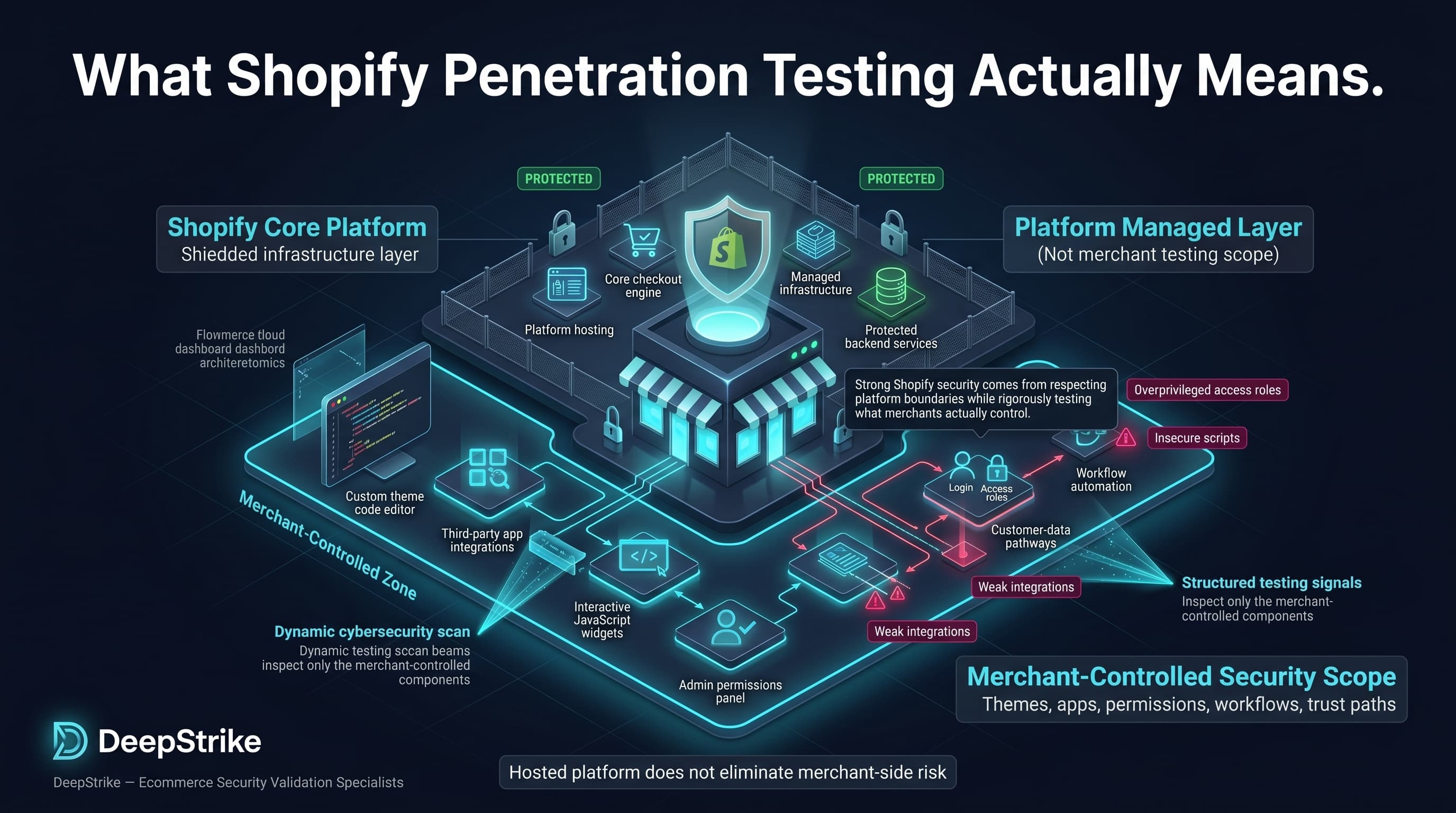
Shopify penetration testing is not a generic attempt to “hack Shopify.” It is the disciplined validation of the store components, code paths, permissions, integrations, and workflows the merchant actually controls. Strong Shopify security comes from respecting platform boundaries while rigorously testing themes, custom apps, JavaScript, access control, customer-data handling, and operational trust paths that attackers can still exploit even in a hosted platform model.
Mohammed Khalil is a Cybersecurity Architect at DeepStrike, specializing in advanced penetration testing and offensive security operations. With certifications including CISSP, OSCP, and OSWE, he has led numerous red team engagements for Fortune 500 companies, focusing on cloud security, application vulnerabilities, and adversary emulation. His work involves dissecting complex attack chains and developing resilient defense strategies for clients in the finance, healthcare, and technology sectors.

Stay secure with DeepStrike penetration testing services. Reach out for a quote or customized technical proposal today
Contact Us
